An access review is a regular, recorded check in which a responsible person looks at who has access to a system or data and confirms that each person still needs it, or asks for it to be removed.
Access reviews are also called access certification or recertification, because the reviewer "certifies" that the access is still right. This guide is for newcomers, students, career changers and managers who are not security specialists. It explains what an access review is, why it matters, how a review runs step by step, a worked example, common myths and simple first steps for a small team.
By the end of this guide you will be able to:
- Explain what an access review is and why organisations run them.
- Understand how access builds up over time.
- Describe the steps of a simple review, from scoping to removing access.
- Identify ways to make reviews meaningful rather than a box-ticking exercise.
Key takeaways
- Access piles up. People change jobs, join projects and get one-off favours, and old access is often never taken away.
- A review is a check with a decision. Someone who understands the work says keep or remove for each person's access, and the decision is recorded.
- The removal is the point. A review that finds unneeded access but never removes it changes nothing.
- The right reviewer matters. Managers, system owners or data owners usually know better than IT whether access is still needed.
- Start small and focused. Reviewing admin rights and sensitive data first gives the most value for the effort.
What it is, in plain English
Every account in an organisation has some access: the systems, folders, apps and actions it is allowed to use. Each separate permission, such as "can approve payments" or "member of the HR folder group", is often called an entitlement.
Access is usually easy to give and easy to forget. Someone moves from sales to marketing and keeps their sales access. A contractor finishes a project but their account stays open. A colleague is added to a group "just for this week". Over months, people end up with far more access than their job needs. This is called access creep or privilege creep.
An access review is the regular tidy-up. A responsible person, the reviewer, is shown a list of who has which access and asked, for each line, "does this person still need this?" They approve the access that is needed and mark the rest for removal. The decisions are kept as evidence for auditors.
Microsoft, for example, describes access reviews in its Entra ID product as a way to review group memberships, application access and role assignments regularly so that only the right people keep access, and it points out that excessive access rights can lead to compromises and audit findings.[1]
A helpful comparison is clearing out a shared fridge at work. Every so often, someone looks at each item and asks whose it is and whether it is still wanted. Anything unclaimed goes. Where the analogy breaks down: in a fridge, old food is obvious, but unneeded access looks exactly like needed access, so the reviewer has to know the work well enough to judge.
Why it matters to you
- If you run a small business: a short check every few months of who can reach your bank, email admin and customer data can catch old accounts before someone misuses them.
- If you are new to a security job: access reviews are one of the most common controls that auditors ask to see, and you may be asked to help run or evidence one.
- If you are a manager: you are often the reviewer. Your decisions matter, because you know what your team actually does.
Every unneeded permission is a door that an attacker could use if that account is stolen, or that the person could misuse. The more access an account holds, the bigger the possible damage. Removing access nobody needs is one of the simplest ways to shrink that risk, and it supports least privilege: giving each person only the access their job needs.
Access reviews also appear in security standards. NIST's SP 800-53 control catalogue asks organisations to review accounts for compliance with account management requirements at a frequency they define (control AC-2), and to review the privileges assigned to roles or users to confirm they are still needed, then reassign or remove them if necessary (control AC-6(7)).[2] These are standards for organisations to apply in their own way; how often you review is your decision.
How it works, step by step
Tools and terms vary, but most reviews follow the same pattern.
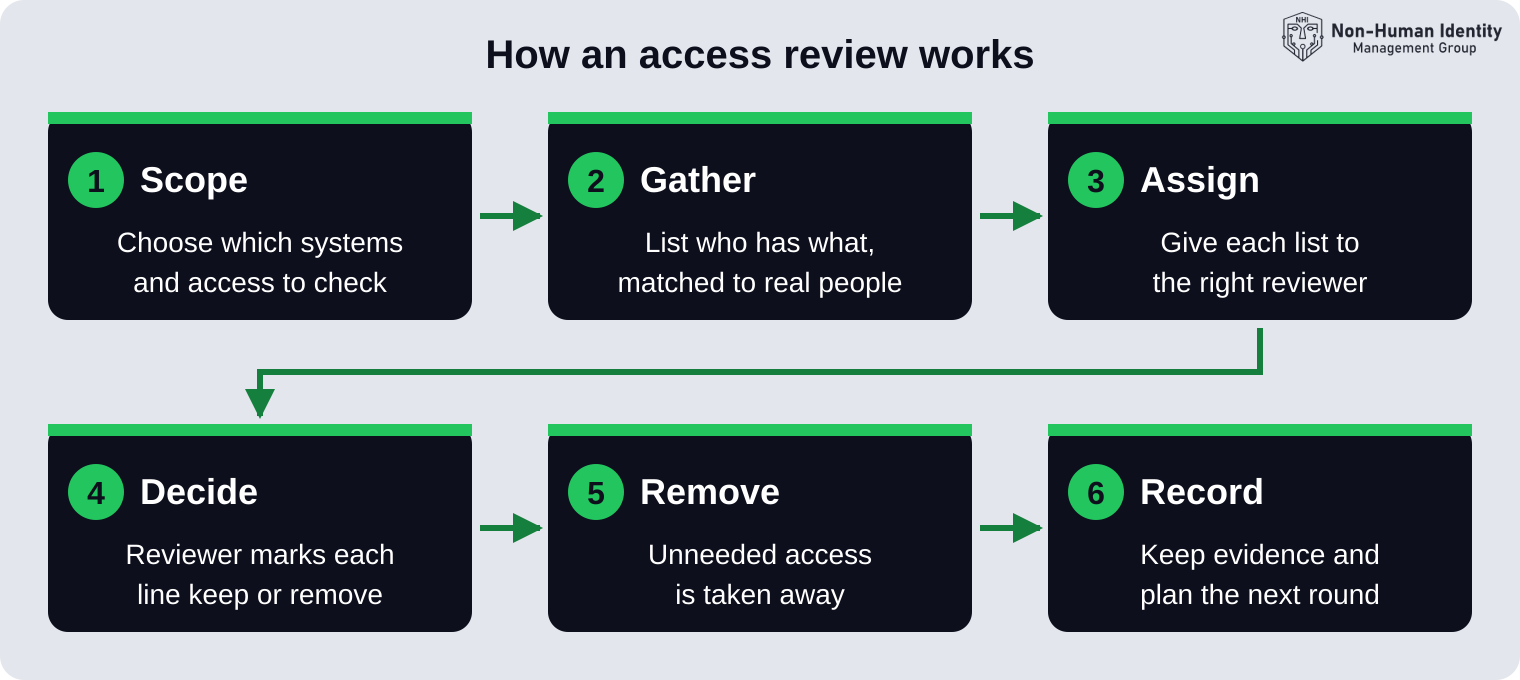
- Choose the scope. Decide what to review: for example, all admin accounts, everyone with access to the finance system, or guests from other companies.
- Gather the list. Export who has which access from each system, and match accounts to real people and their current jobs.
- Assign reviewers. Pick the people best placed to judge: line managers, system owners or data owners. Avoid asking people to approve their own access.
- Review and decide. Each reviewer marks each line "keep" or "remove", ideally with a short reason for anything unusual.
- Remove access. Access marked for removal is taken away, either automatically by the tool or by the system's administrator.
- Record and follow up. Keep the decisions and proof of removal, chase reviewers who did not respond, and note anything to fix before the next round.
Some tools automate parts of this. Microsoft Entra ID, for example, lets organisations set recurring reviews at frequencies such as weekly, monthly, quarterly or annually, and lets reviewers be specified people, group owners, the users themselves or managers, depending on what is being reviewed.[1] Microsoft notes that the feature needs particular licences.[1] Other identity governance products offer similar features under names such as "certification campaigns". A spreadsheet and a calendar reminder can work for a small team.
Useful distinctions
- Access review and certification usually mean the same thing. Some products call a planned set of reviews a certification campaign; that is a vendor's word for a batch of reviews, not a different control.
- A review is not the same as removing leavers. Removing access when someone leaves should happen on the day, through your leaver process. A review is the safety net that catches what that process missed.
- Self-review has limits. Asking people to confirm their own access can help with low-risk access, but for powerful access a second person should decide.
- Machines need reviews too. Service accounts, API keys and app integrations also hold access. They need a named owner who can answer "is this still needed?"
A worked example
Harbour Physio is a fictional chain of physiotherapy clinics with 70 staff. Its patient booking system holds health information. Dev, the operations manager, has never reviewed who can use it.
Dev runs a first review:
- Scope: the booking system's admin accounts and anyone who can export patient lists.
- Gather: Dev exports the user list and matches it against the staff list from payroll.
- Reviewers: each clinic lead reviews their own clinic's staff; Dev and the owner, Maria, review the admin accounts together.
The review finds three accounts belonging to people who left last year, a receptionist who still has export rights from a one-off project, and two admin accounts where nobody is sure who uses them. The leavers' accounts are disabled the same day. The receptionist's export right is removed. For the two unknown admin accounts, Dev disables them and waits a week to see whether anyone asks; when a supplier does, Dev creates a new named account for that supplier with only the access it needs, approved by Maria and recorded.
The review does not make the system safe on its own. Dev also asks the payroll team to tell IT on the day someone leaves, so fewer leaver accounts reach the next review, and sets a reminder to repeat the check in three months.
Myths and misunderstandings
| What people think | What is true |
|---|---|
| Access reviews are just for auditors. | They are often required for audits, but their real value is removing access an attacker or insider could misuse. |
| If the reviewer clicked "approve all", the review is done. | Approving everything without looking is known as rubber-stamping. It produces paperwork but rarely finds unneeded access. |
| IT should decide who keeps access. | IT can run the process, but managers and data owners usually know whether someone still needs access for their work. |
| Once a year is enough for everything. | Frequency should follow risk. We suggest checking admin and sensitive access more often than everyday low-risk access. |
| Marking access "remove" means it is gone. | Only if someone or something actually removes it. Always check that removals happened. |
Key terms
- Access review
- A formal, recorded process for confirming whether access is still needed and justified.
- Access certification
- The periodic review of whether an identity still needs its current entitlements; another name for an access review.
- Certification campaign
- A planned batch of access reviews with assigned reviewers, reminders, decisions and removals.
- Entitlement
- A permission that defines what an identity can do once signed in, such as a role or group membership.
- Access creep
- The gradual build-up of permissions left over after role changes, projects or temporary exceptions end.
- Least privilege
- Giving each person or system only the access needed for their job, and no more.
- Rubber-stamping
- A review habit where reviewers approve most access with little real checking.
- Orphaned account
- An account that is still active but has no clear owner or business purpose.
- Segregation of duties
- A control principle that stops one person holding combinations of access that could allow fraud or undetected errors.
Common questions
What is the difference between an access review and an access certification?
In practice, very little. Both describe a responsible person confirming that access is still needed. "Certification" is the word many governance products and auditors use.
How often should we run access reviews?
There is no single rule. Standards such as NIST SP 800-53 leave the frequency to the organisation.[2] A sensible start is to review admin and sensitive access more often than everyday access, and to repeat on a fixed schedule.
Who should be the reviewer?
Someone who understands the work and is not the person being reviewed: usually the line manager, the system owner or the data owner.
What if a reviewer is not sure?
They should ask the person or their manager, not approve by default. If access is removed by mistake, it can be restored through the normal request process, with approval and a record.
Do we need a special tool?
Not to start. A spreadsheet, a clear owner for each system and a calendar reminder can work for a small team. Tools help when you have many systems or many people.
Should service accounts and API keys be reviewed?
Yes. They also hold access, and they often have no obvious owner. Each one should have a named person who can confirm it is still needed.
First steps
Three things you can do this week:
- Pick one important system. Choose the system with your most sensitive data or your admin console, and export the list of who has access.
- Match accounts to people. Compare the list against your current staff and contractor list, and flag anyone who has left or changed role.
- Ask one owner to decide. Send the flagged lines to the right manager or owner, remove what they mark as not needed, and keep a copy of the decisions.
Checklist
- We know which systems hold our most sensitive data and admin rights.
- Each of those systems has a named owner.
- We review admin access and sensitive data access on a set schedule.
- Reviewers are managers or owners, not the people being reviewed.
- Reviewers can see enough detail (job, team, what the access does) to make a real decision.
- Access marked for removal is actually removed, and we check that it was.
- Decisions and removals are recorded and kept for audit.
- Service accounts, API keys and guest accounts are included, each with an owner.
Check your understanding
1. What is access creep?
Answer: the gradual build-up of access that is no longer needed, usually left over after people change roles or finish projects.
2. Why should a manager or data owner, rather than IT alone, make review decisions?
Answer: they usually know what the person's job involves and whether the access is still needed.
3. What is rubber-stamping, and why is it a problem?
Answer: approving access without really checking it. It creates paperwork but leaves unneeded access in place.
4. Is a review finished once the reviewer clicks "remove"?
Answer: no. The access must actually be taken away, and the removal should be checked and recorded.
Suggested learning pathway
- Role-Based Access Control for Beginners: a related beginner guide to read next.
- Microsoft Entra ID for Beginners: a related beginner guide to read next.
- Active Directory for Beginners: a related beginner guide to read next.
- For the basics of accounts and permissions, start with Identity and Access Management for Beginners.
- For the principle reviews support, read Least Privilege for Beginners.
- For a ready-made list of what to check, use the Access Review Checklist.
- For the full practitioner design, including campaigns and evidence, see the Access Reviews Guide.
- To compare periodic reviews with always-on checks, read Access Reviews vs Continuous Access Monitoring.
- For machine accounts, see How to Run an Access Review for Service Accounts.
Standards and references
- What are access reviews? Microsoft Entra ID Governance documentation, Microsoft Learn, Microsoft, last updated 12 March 2026. https://learn.microsoft.com/en-us/entra/id-governance/access-reviews-overview, accessed 27 Nov 2026.
- SP 800-53 Rev. 5, Security and Privacy Controls for Information Systems and Organizations (controls AC-2 Account Management and AC-6(7) Review of User Privileges). National Institute of Standards and Technology (NIST). https://csrc.nist.gov/pubs/sp/800/53/r5/upd1/final.
Related NHI Mgmt Group resources: Third Party Access Review Guide · Joiner-Mover-Leaver Guide · Privileged Access Management for Beginners