An agent-to-agent protocol is an agreed set of rules that lets one AI agent find another AI agent, ask it to do a job and get the result back, even when the two were built by different companies.
The best-known example is A2A (Agent2Agent), an open protocol now run as a project of the Agentic AI Foundation under the Linux Foundation.[9] This guide explains it in plain English. You do not need any technical background: every new term is explained the first time it appears.
By the end of this guide you will be able to:
- Explain what an agent-to-agent protocol is and why agents need one.
- Understand how A2A differs from MCP.
- Describe the steps of an A2A request, from finding an Agent Card to getting results back.
- Identify the identity and permission questions to ask about any agent that talks to other agents.
Key takeaways
- It is a shared language for agents. An agent-to-agent protocol lets agents from different companies work together without custom wiring for every pair.
- A2A is the main open standard. Its specification reached version 1.0 in March 2026, and version 1.0.1 was released on 26 May 2026.[6]
- Agents introduce themselves with an Agent Card. This small public file says what the agent can do, where to reach it and what proof of identity it expects.
- The protocol carries the conversation, not the trust. A2A leaves identity checks and permissions to standard web security, so the people running the agents must set them up.[3]
- Every agent needs its own identity and limits. Treat each agent like a new member of staff: a name, only the permissions it needs, and a record of what it did.
What it is, in plain English
An AI agent is software that uses an AI model to work towards a goal with some independence. It can plan steps, use tools and make decisions. A customer service bot that can issue refunds is one example.
A protocol is a set of rules both sides follow so they understand each other. Web pages load because your browser and the website both follow HTTP, the protocol of the web.
So an agent-to-agent protocol is the set of rules agents follow when they talk to each other. Think of a standard order form used between businesses. A restaurant does not learn a new process for every supplier: everyone uses the same form, with the same boxes, and knows what happens after it is sent.
Where the analogy breaks down: a paper form is read by a person who can spot something odd. Agents often exchange messages with no human reading them, so the checks have to be built in.
The A2A project says its aim is to let agents "built on diverse frameworks by different companies running on separate servers" work together. It also keeps each agent opaque, meaning a black box: the other side sees what it can do, not its memory, logic or tools.[10][2]
You will often see A2A next to MCP (Model Context Protocol). The A2A documentation calls MCP vertical, because it connects one agent to tools and data, and A2A horizontal, because it connects agents to other agents.[5]
| Protocol | What it connects | Everyday comparison |
|---|---|---|
| A2A (Agent2Agent) | An agent to another agent | One business sending a work order to a partner business |
| MCP (Model Context Protocol) | An agent to tools and data | A worker using the tools in their own toolbox |
| HTTP and HTTPS | Any program to any web server; both protocols above run on top of it | The roads the delivery vans drive on |
Why it matters to you
When agents talk to agents, decisions and data pass between machines at speed. That raises three questions: who is this agent, what is it allowed to do, and can we trace what happened? Agents that log in to other systems are a type of non-human identity: an identity used by software rather than a person. The A2A guidance is clear that its messages do not carry identity themselves; identity is set up underneath, using standard web methods such as OAuth 2.0 and OpenID Connect.[3]
- For a small business: if a supplier's AI assistant talks to other agents for you, ask how each agent proves who it is and what it can do with your data.
- If you are new to a security job: agent traffic is a new kind of machine-to-machine access. The same basics apply: identity, least privilege, logging.
- For a manager: every agent that acts for your organisation needs an owner and limits, just like a member of staff or a contractor.
How it works, step by step
A2A names three roles. The user is the person or service with a goal. The A2A client is the agent or app that acts for the user and starts the conversation. The A2A server, or remote agent, receives the request and does the work.
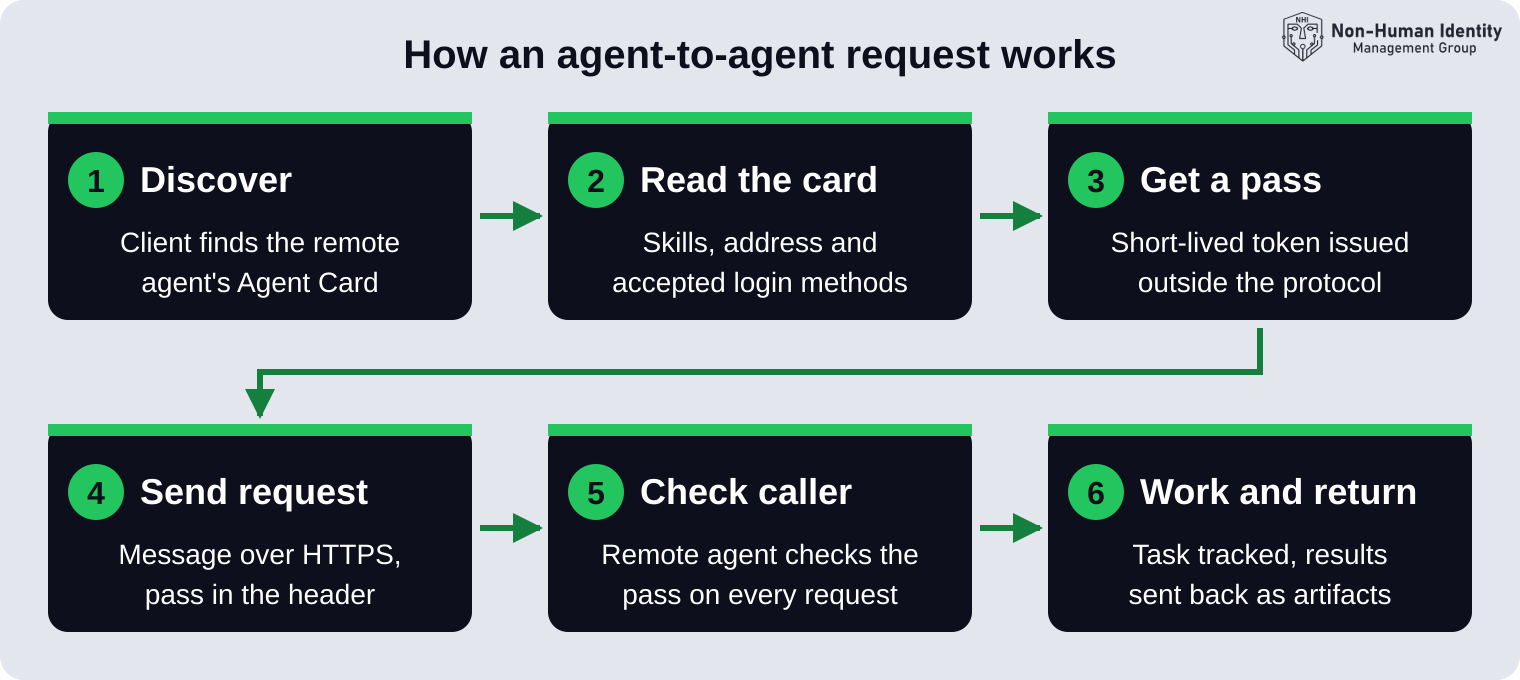
- Discovery. The client finds the remote agent's Agent Card, a small JSON document (JSON is a common text format for data) that the documentation compares to a digital business card. A standard place for it is
https://{agent-server-domain}/.well-known/agent-card.json. Cards can also come from a registry, a central catalogue an organisation runs, or be set up by hand.[2][4][8] - Reading the card. The card lists the agent's skills, its web address and the login methods it accepts, such as an API key, OAuth 2.0, OpenID Connect or mutual TLS (where both sides prove identity with certificates).[1]
- Getting a pass. The client gets the right credential outside A2A itself, for example a short-lived access token: a digital pass that proves who you are and what you may do, for a limited time.[3]
- Sending the request. The client sends a message over HTTPS, the encrypted version of HTTP, with the pass in a standard HTTP header. The guidance says production traffic must use HTTPS and recommends TLS 1.2 or higher.[3]
- Checking the caller. The remote agent must check every request. A missing or bad pass should get the web error 401 Unauthorized. A known caller asking for something it may not do should get 403 Forbidden.[3]
- Doing the work. For longer jobs the remote agent creates a task, a piece of work with its own ID and status. Statuses include submitted, working, input required, auth required, completed, failed, canceled and rejected.[1]
- Returning results. Finished outputs come back as artifacts, such as a document or structured data. The client can ask again (polling), keep a live stream open, or get a call back to a webhook, a web address it gave for updates.[2]
Two safety features are worth knowing. If a remote agent needs extra permission partway through, it can pause the task in the auth required state until the client supplies it.[3] And Agent Cards can be digitally signed using JSON Web Signature (RFC 7515), so a client can check a card has not been changed. Signing is optional, so we suggest asking whether your agents use it.[1][7]
| A2A building block | Plain-English meaning | Security question to ask |
|---|---|---|
| Agent Card | The agent's public business card | Is the card genuine, and who can publish or change it? |
| Message | One turn of the conversation | Does it contain more personal data than the job needs? |
| Task | A tracked piece of work with a status | Can only the right client see and cancel it? |
| Artifact | The finished output | Is the output checked before another system acts on it? |
| Webhook | A call back to the client when something changes | Is the callback address checked, so updates cannot go somewhere unexpected? |
A worked example
Meadowbank Garden Supplies is a fictional online shop with twelve staff. Its website has a customer service agent. A customer asks: "Where is my order, and can I change the delivery date?" The courier, a separate company, runs its own delivery agent.
- Meadowbank's agent reads the courier's Agent Card. It lists a "reschedule delivery" skill and accepts OAuth 2.0 tokens.
- Meadowbank's agent gets a short-lived token from the courier. The token's scope (the list of things it allows) covers tracking and rescheduling Meadowbank parcels only.
- The agent sends the parcel reference and the new date. It does not send payment details, because the courier does not need them.
- The courier's agent checks the token, confirms the parcel is Meadowbank's, creates a task and replies "working".
- A minute later the task completes with an artifact: the new delivery slot. The customer is told.
- Both companies log the exchange, so a disputed change can be traced to the agent, time and token.
Had Meadowbank given its agent one permanent, all-powerful courier key instead, a leak would let anyone redirect every parcel. The protocol is the same either way; the identity and permission choices make the difference.
Myths and misunderstandings
| What people think | What is true |
|---|---|
| A2A makes agents secure. | A2A gives a common structure and expects standard web security underneath. Its guidance says deciding who may do what is up to each agent's owners.[3] |
| A2A and MCP are rivals. | The A2A project calls them complementary: MCP gives one agent tools, A2A lets agents work together.[5] |
| If an agent has an Agent Card, it can be trusted. | A card is a description, not proof. Trust comes from checking the website's certificate, using a registry you control, or checking a signature. |
| Agents can share one login. | A shared login means you cannot tell agents apart in logs or cancel one without breaking the rest. Give each agent its own identity. |
| The remote agent will only do what its card says. | The remote agent is a black box. A2A guidance says agents must check permission before sensitive actions, so set limits on your side too.[3] |
Key terms
- A2A (Agent2Agent)
- An open protocol that lets AI agents find each other, exchange messages and work on tasks together.
- AI agent
- Software that uses an AI model to work towards a goal, planning steps and using tools.
- Agent Card
- A JSON document describing an agent's skills, web address and accepted login methods.
- Artifact
- A finished output from a task, such as a document or structured data.
- Authentication
- Proving who you are, for example with a token or certificate.
- Deciding what a caller who has proved its identity is allowed to do.
- MCP (Model Context Protocol)
- An open protocol that connects an AI application to tools and data.
- OAuth 2.0
- A widely used standard for handing out limited, often short-lived access tokens instead of sharing passwords.
- Webhook
- A web address one system calls to tell another that something happened.
Common questions
What is the A2A protocol used for?
It lets one AI agent hand a job to another agent, often run by a different team or company, and get the result back. A2A's own examples include a customer service agent passing a question to a billing agent.[2]
Who runs A2A?
A2A is an open-source project. In August 2026 the project announced it had joined the Agentic AI Foundation, part of the Linux Foundation, alongside MCP.[9]
What is the difference between A2A and MCP?
MCP connects an agent to tools and data. A2A connects an agent to other agents. Many systems use both. See MCP vs A2A.
Does A2A encrypt messages?
A2A runs over the web, and its guidance says production traffic must use HTTPS, which encrypts data in transit.[3]
How does an agent prove who it is in A2A?
Using normal web methods listed on the Agent Card, such as OAuth 2.0 tokens, OpenID Connect, API keys or mutual TLS. The pass travels in an HTTP header, not inside the A2A message.[2][3]
First steps
- Find out if your agents talk to other agents. Ask the teams or suppliers behind any AI assistants whether they call other agents or outside AI services.
- List each agent and its owner. A simple spreadsheet with agent name, purpose, owner and which outside agents it talks to is enough to start.
- Ask how each agent proves its identity. Is it a permanent key or a short-lived token? Prefer short-lived tokens with narrow scopes, and check that requests are logged.
Checklist
- Every agent has a named human owner and appears on a list.
- Each agent has its own credential; no two agents share one.
- Credentials are short-lived tokens with the smallest scope that does the job.
- All agent traffic uses HTTPS, and clients check the remote agent's certificate.
- Agent Cards come from known sources: your own registry, checked websites, or signed cards.
- Messages carry only the data the other agent needs.
- Sensitive actions such as payments or refunds need an extra check, such as human approval.
- Requests and task results are logged with the calling agent's identity.
Check your understanding
1. What does an Agent Card tell another agent?
Answer: what the agent can do (its skills), where to reach it, and which login methods it accepts.
2. Does A2A decide which agent is allowed to do what?
Answer: no. A2A carries the conversation; the people running each agent must set up identity checks and permissions.
3. Why should each agent have its own credential?
Answer: so you can tell agents apart in logs, limit each one to its own job, and cancel one without breaking the others.
Suggested learning pathway
- AI Agent Identity for Beginners: a related beginner guide to read next.
- Start with AI Agents for Beginners if you are new to agents.
- Then read Multi-Agent Systems for Beginners to see why agents work in teams.
- See What Is MCP? The Model Context Protocol Explained (2026) for the tools side of the picture.
- See MCP vs A2A for how the two main agent protocols fit together.
- See the Agent-to-Agent Authentication Guide for how agents prove identity to each other.
- See the A2A Protocol Security Guide for Agent Card trust, login schemes and task limits in depth.
- See the Multi-Agent and A2A Security Guide for risks when many agents work together.
Standards and references
Status checked 27 November 2026: the latest A2A release is specification version 1.0.1 (26 May 2026). Specifications change, so check the current version before relying on a detail.
- Agent2Agent (A2A) Protocol Specification. A2A Project. https://a2a-protocol.org/latest/specification/, accessed 27 Nov 2026.
- Core Concepts and Components in A2A. A2A Project documentation. https://a2a-protocol.org/latest/topics/key-concepts/, accessed 27 Nov 2026.
- Enterprise Implementation of A2A. A2A Project documentation. https://a2a-protocol.org/latest/topics/enterprise-ready/, accessed 27 Nov 2026.
- Agent Discovery in A2A. A2A Project documentation. https://a2a-protocol.org/latest/topics/agent-discovery/, accessed 27 Nov 2026.
- A2A and MCP: Detailed Comparison. A2A Project documentation. https://a2a-protocol.org/latest/topics/a2a-and-mcp/, accessed 27 Nov 2026.
- A2A Changelog (1.0.0, 12 March 2026; 1.0.1, 26 May 2026). A2A Project, GitHub. https://github.com/a2aproject/A2A/blob/main/CHANGELOG.md, accessed 27 Nov 2026.
- RFC 7515: JSON Web Signature (JWS). Internet Engineering Task Force (IETF), May 2015. https://datatracker.ietf.org/doc/html/rfc7515.
- RFC 8615: Well-Known Uniform Resource Identifiers (URIs). Internet Engineering Task Force (IETF), May 2019. https://datatracker.ietf.org/doc/html/rfc8615.
- A2A joins the Agentic AI Foundation (blog post, 27 August 2026). A2A Project, GitHub. https://github.com/a2aproject/A2A/blob/main/docs/blog/posts/a2a-joins-aaif.md, accessed 27 Nov 2026.
- A2A project README. A2A Project, GitHub. https://github.com/a2aproject/A2A, accessed 27 Nov 2026.
Related NHI Mgmt Group resources: MCP vs A2A · A2A Protocol Security Guide · Agent-to-Agent Authentication Guide · Non-Human Identity (NHI) Guide