Content provenance is a signed record attached to a digital file, such as a photo, video or audio clip, that shows where it came from and how it has been changed, and C2PA is the open technical standard most widely used to create that record.
AI tools can now make realistic images, voices and videos in seconds, so it is harder to know what to trust. This guide explains content provenance in plain English for newcomers, students, career changers and managers who are not specialists. It covers what a provenance label is, how it is created and checked, a worked example, common myths and simple first steps for a small team.
By the end of this guide you will be able to:
- Explain what content provenance and Content Credentials are.
- Understand what a provenance label can and cannot tell you.
- Describe how a label is created, added to, shared and checked.
- Identify practical first steps for using provenance in your organisation.
Key takeaways
- Provenance shows history, not truth. A label can show who made a file, with which tools and what edits followed. It cannot tell you whether the picture shows something that really happened.
- The record is signed. A digital signature makes changes to the file or its record visible when someone checks it.
- Labels can be lost. Some apps and websites strip the hidden data from files, so a missing label does not mean a file is fake.
- Use it as one signal among several. Combine provenance with common sense, trusted sources and verification steps such as calling a person back.
- Small teams can start now. Keep original files, avoid tools that strip data from your published images, and learn to check a label.
What it is, in plain English
Every digital file can carry metadata: extra information stored inside the file, such as the date a photo was taken. Ordinary metadata is easy to change, so it is weak evidence.
Content provenance, in the sense used in this guide, adds a stronger record. When a camera, editing app or AI image tool supports it, it writes a small package of facts about the file (for example "created with this app" or "cropped and brightened") and seals that package with a digital signature, a kind of tamper-evident seal made with cryptography. The C2PA calls this package a manifest, and its preferred everyday name is a Content Credential.[1]
C2PA stands for the Coalition for Content Provenance and Authenticity. It brought together two earlier efforts, the Content Authenticity Initiative and Project Origin, and is a project of the Joint Development Foundation, a non-profit.[2] The Content Credentials website says the effort has grown into a collaboration of hundreds of companies, including Adobe, Google, Meta and Microsoft.[3]
A helpful comparison is the paperwork that comes with a valuable painting. A good record lists who painted it, when, and every owner and restorer since. You still have to judge whether the record comes from someone you trust. Where the analogy breaks down: a painting's papers sit in a drawer, while a Content Credential travels inside the file, and any change to a signed record is detectable by software rather than relying on an expert's eye.
Why it matters to you
- If you run a small business: fake images and voices are used in fraud, such as a fake picture of a damaged delivery or a message that seems to come from your boss. Provenance gives you one more way to check what you are sent.
- If you are new to a security job: provenance comes up in fraud prevention, brand protection and AI governance work, and colleagues may ask you how much weight a label deserves.
- If you are a manager: publishing your own images with Content Credentials can help customers and journalists confirm what genuinely came from your organisation.
Security agencies have taken notice. In January 2025 the US National Security Agency (NSA), together with cyber security agencies in Australia, Canada and the UK, published guidance recommending Content Credentials as part of protecting media integrity in the generative AI era.[4] The same guidance is clear about the limits. It says the record shows how content was made but does not establish whether it is true, and that missing credentials do not automatically make content untrustworthy, because there can be legitimate privacy or technical reasons.[4]
How it works, step by step
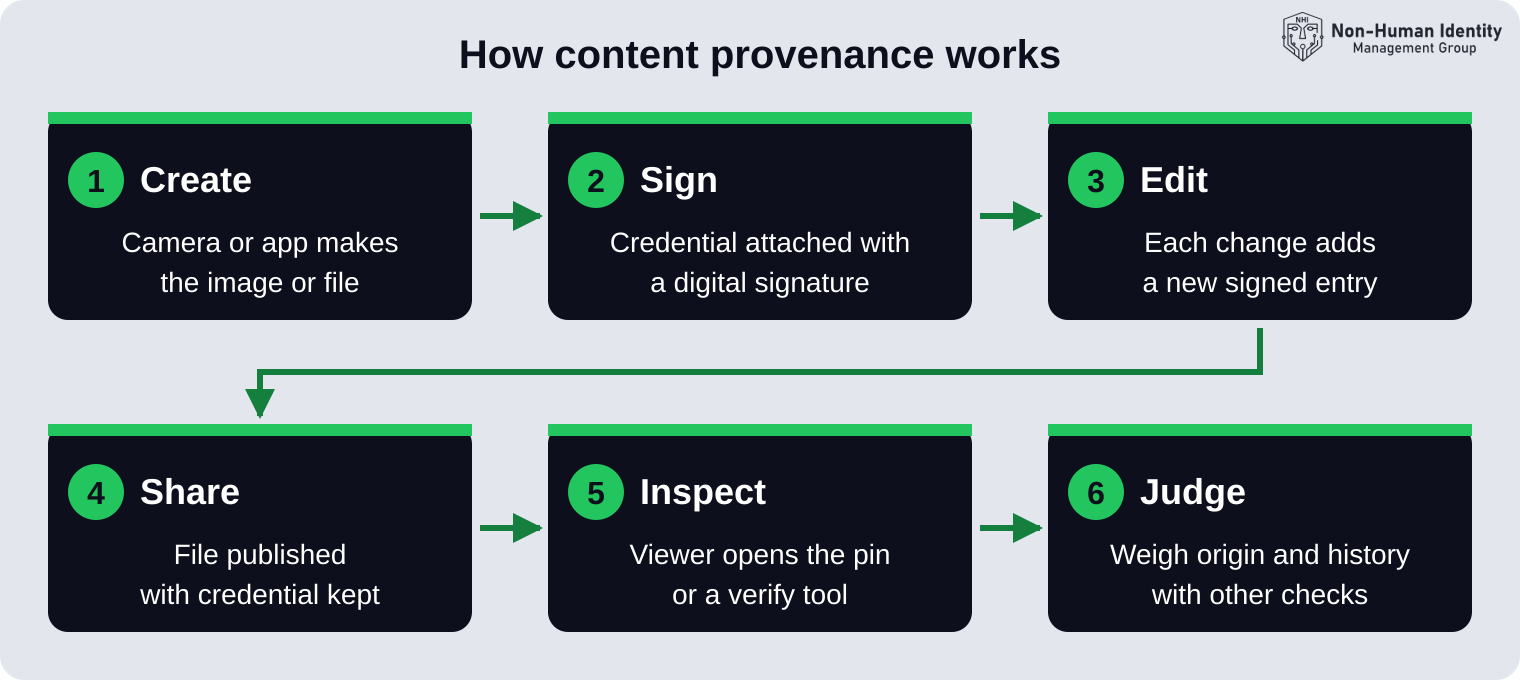
Products differ in the details, but the basic flow is similar.
- Create. A device or app that supports the standard makes a file, for example a photo on a supporting camera or an image from an AI tool. The NSA guidance notes credentials can be added at capture on hardware or when a file is exported from editing or generative AI software.[4]
- Sign. The app writes a manifest made of assertions, which are individual statements about the file, and signs it with a private key that belongs to the software or hardware.[1] A cryptographic hash, a fixed-length fingerprint of the file, links the record to the exact content. The specification calls this a hard binding.[1]
- Edit. When someone edits the file in a supporting app, the app can add a new signed entry describing the change, while keeping the earlier history.
- Share. The file is published or sent. If the platform keeps the metadata, the credential travels with it. Some services strip metadata, which removes the label.[4]
- Inspect. A viewer clicks the Content Credentials pin on a supporting website or opens the file in a verify tool, which shows how the content was made and its editing history.[3] If the file or its record has been changed outside the process, the hashes no longer match and the check shows tampering.[1]
- Judge. The viewer weighs what the label says, including who signed it, alongside other evidence before deciding whether to trust the file.
Useful distinctions
- Provenance is not detection. Deepfake detection tools guess whether content was faked by looking for signs in the content itself. Provenance instead records history from the start. They answer different questions and work well together.
- Provenance is not the same as a watermark. A watermark is a marker hidden in the pixels or sound itself. C2PA describes "durable" credentials that combine the signed record with an invisible watermark or a fingerprint lookup, so the record can be found again if the metadata is stripped.[1][4]
- A label does not have to name a person. The core specification does not require human or organisational identity, which C2PA says respects user privacy; identity can be added through extensions.[1]
- A valid signature is not a stamp of approval. It shows the record has not been changed since signing and which key signed it. Whether you trust that signer is a separate decision.
A worked example
Harbour Home Insurance is a fictional insurer with 25 staff. Lena works in the claims team. A customer sends a photo of a flooded kitchen with a claim for a new floor.
Lena opens the photo in a Content Credentials verify tool. It shows a credential signed by a phone camera app, a capture date the day after a reported storm, and one edit: the image was cropped. Nothing suggests the record was tampered with. Lena notes this in the claim file as supporting information.
A week later, a second claim arrives with a photo of a cracked windscreen. This photo has no credential at all. Lena does not treat that as proof of fraud, because many phones and messaging apps do not add or keep credentials. Instead she follows the normal process: she asks for more photos and arranges an inspection.
A third photo does carry a credential, and it says the image was generated by an AI image tool. Lena flags it for the fraud team, who contact the customer. The label did not decide the outcome, and the team still has to investigate, but it gave them a clear reason to look more closely.
Harbour Home also starts adding Content Credentials to the photos in its own press releases, so journalists can check that the images genuinely came from the company.
Myths and misunderstandings
| What people think | What is true |
|---|---|
| A Content Credential proves an image is true. | It shows origin and history. C2PA says provenance alone cannot tell you whether content is true, accurate or factual.[1] |
| No label means the file is fake. | Labels are often stripped or never added. The joint agency guidance says missing credentials do not automatically mean content is untrustworthy.[4] |
| Provenance is only for AI images. | It can describe photos from cameras, edited graphics, video and audio, as well as AI-generated content. |
| Anyone can quietly edit the label. | A change to the file or its signed record breaks the hash match, so a checking tool shows tampering.[1] |
| A label always reveals the creator's name. | The core standard does not require identity, so a label may describe the tool and edits without naming a person.[1] |
Key terms
- C2PA
- An open standard for content provenance and authenticity that lets digital files carry tamper-evident credentials showing their origin and edit history.
- Content Credentials
- The everyday name for the signed provenance record attached to a file, describing its origin, authorship and edits.
- Metadata
- Descriptive information stored about data, such as when and how a file was made.
- Digital signature
- A cryptographic seal made with a private key and checked with the matching public key, showing the data has not changed since signing.
- Cryptographic hash
- A fixed-length fingerprint of data, used to check that the data has not changed.
- Tamper evident
- Designed to show clear signs if it has been altered or interfered with.
- Watermarking
- Embedding a hidden or visible marker in content to help identify its origin.
- Deepfake
- Synthetic or altered media made with AI so that a person appears to say or do something they never did.
- Synthetic media
- Audio, video or images generated or altered by AI.
Common questions
What is C2PA in simple terms?
It is an open standard that lets a file carry a signed record of where it came from and how it was edited, so other people can check that record later.
Is a Content Credential the same as a watermark?
No. A credential is a signed record usually stored in the file's metadata. A watermark is hidden in the content itself. Durable credentials combine the two so the record can be recovered if metadata is stripped.[1]
How can I check whether an image has a Content Credential?
Look for the Content Credentials pin on a supporting website, or upload the file to a verify tool linked from the Content Credentials site.[3]
Why do so many images have no label?
Many devices and apps do not add credentials yet, and processes that detach or strip metadata remove them.[4]
Can a criminal add a false label?
Someone can sign a file with their own key, so a label is only as trustworthy as its signer. That is why you check who signed it and still use other verification steps.
Does provenance work for text?
The joint agency guidance notes the standard is still evolving and that provenance for text is the least mature area.[4]
First steps
Three things you can do this week:
- Try a verify tool. Check a few images from your own website and from news sites, so you know what a credential looks like and what "no credential" looks like.
- Keep your originals. Store original photos and design files securely, preferably read-only, so you can show the source if a copy is questioned. The joint agency guidance recommends this.[4]
- Check your publishing chain. Find out whether your website, image tools or social media scheduler strip metadata from images, and whether your design or AI tools can add Content Credentials on export.
Checklist
- Staff who handle images or claims know what a Content Credential is and how to check one.
- We treat a credential as one signal, not proof that content is true.
- We do not treat a missing credential as proof of fakery.
- We keep original files in secure, read-only storage.
- We know which of our tools keep, add or strip metadata.
- Images we publish carry Content Credentials where our tools support it.
- Payment or approval requests that rely on images, voice or video are verified another way, such as a call back to a known number.
Check your understanding
1. What does a Content Credential show, and what does it not show?
Answer: it shows where a file came from and how it was edited. It does not show whether the content is true.
2. An image arrives with no credential. Is it fake?
Answer: not necessarily. Many tools do not add credentials and many platforms strip them, so use other checks.
3. What happens if someone changes a signed image outside a supporting app?
Answer: the hash no longer matches the record, so a checking tool shows that the file or record has been altered.
4. How is a durable credential different from an ordinary one?
Answer: it adds a watermark or fingerprint lookup so the record can be found again if the metadata is stripped.
Suggested learning pathway
- To see how provenance compares with AI watermarking, read SynthID vs C2PA Content Credentials.
- For everyday scam warning signs, see the Spotting Deepfake Scams Guide.
- For the wider fraud picture, read the Deepfake and AI Impersonation Guide.
- For the full practitioner design, including signing keys and validation, see the AI Content Provenance and C2PA Guide.
- For provenance of AI models themselves, see the AI Model Provenance and Watermarking Guide.
Standards and references
- C2PA and Content Credentials Explainer. Coalition for Content Provenance and Authenticity (C2PA). https://spec.c2pa.org/specifications/specifications/2.2/explainer/Explainer.html, accessed 27 Nov 2026.
- About C2PA. Coalition for Content Provenance and Authenticity (C2PA). https://c2pa.org/about/, accessed 27 Nov 2026.
- Content Credentials. Coalition for Content Provenance and Authenticity (C2PA). https://contentcredentials.org/, accessed 27 Nov 2026.
- Content Credentials: Strengthening Multimedia Integrity in the Generative AI Era. National Security Agency (NSA), Australian Signals Directorate's Australian Cyber Security Centre, Canadian Centre for Cyber Security and UK National Cyber Security Centre, January 2025. https://media.defense.gov/2025/Jan/29/2003634788/-1/-1/0/CSI-CONTENT-CREDENTIALS.PDF.
Related NHI Mgmt Group resources: SynthID vs C2PA Content Credentials · Spotting Deepfake Scams Guide · Deepfake and AI Impersonation Guide