Data retention means deciding how long to keep information, then deleting it safely when that time is up.
This guide is for anyone who looks after files, records or customer details at work. You do not need to be in IT to be affected: every business keeps records, and old records you no longer need can still leak.
In short
- Keep each kind of record only as long as you have a clear reason to.
- Write those time limits down in a simple list, called a retention schedule.
- Pressing delete or emptying the bin may leave data that can be recovered.
- When old devices go, wipe them properly or use a trusted disposal firm.
What you will learn
- Explain what data retention means in one sentence.
- Spot records your team is keeping for no clear reason.
- Explain why pressing delete is not the same as secure deletion.
- Ask how old laptops and phones are wiped before they leave.
Status: correct as at 28 November 2026, based on the UK Information Commissioner's Office guidance on storage limitation. Laws change; check the official text.
This guide explains the topic in general terms and is not legal advice.
- Time limit list (retention schedule)
- a list of each kind of record and how long you keep it.
- Safe wiping (secure deletion)
- removing data so that it is very hard to get back.
- Pause on deleting (legal hold)
- an order to keep certain records, even past their time limit, because of a legal matter.
What is data retention?
Think of a filing cabinet with a date on every folder. When the date comes, the folder goes to the shredder, not the bin.
Data retention works the same way for computer records. You decide how long each kind of record is kept. That might be invoices, staff files, emails or customer details. When the time is up, you delete the record in a way that stops people reading it again.
For personal details about people, UK data protection law says you should keep them no longer than you need them. The law does not set fixed times for each kind of record. You decide, based on why you hold the data, and you should check it from time to time.[1]
Where the comparison stops working: a cabinet holds one copy of each folder. Computer records are often copied to backups, laptops, email and cloud services. Each copy needs the same date.
Why does it matter?
Old data you no longer need still carries risk. If it leaks, it can harm the people it is about, and it was doing your business no good.
If you run a small business
What could happen: a shared drive still holds customer details from ten years ago, and a break-in exposes them all.
Check this: pick one folder and ask why each old file is still there.
If you look after office equipment
What could happen: an old laptop or printer is sold on, and someone recovers files from it.
Check this: ask how devices are wiped before they leave the building.
Next: Backup Retention Design
If you manage a team
What could happen: staff keep everything "just in case", so nobody knows what you hold.
Check this: make sure someone owns the time limit list and reviews it each year.
What does it look like?
A retention schedule can be a short table. Here is a made-up one for a dental practice.
Example only. All values are made up.
Retention schedule: EXAMPLE Dental (made up)
Record             Keep for         Owner       Then
Job applications   FAKE 6 months    Office      delete     (1)
Invoices           FAKE 0000 years  Accounts    delete     (2)
Patient notes      see guidance     Practice    review     (3)
Old laptops        until replaced   IT          wipe       (4)
Legal hold:        none open        Manager                (5)
- In a real file, this line would contain a time based on why the record is kept.
- In a real file, this line would contain a time that follows the tax or accounting rules that apply.
- Some records have their own official guidance. The schedule points to it.
- Devices are on the list too, because data lives on them.
- A legal hold pauses deletion for the records it covers.
Why this is risky: without a list like this, records pile up. Nobody can say what is held, why, or when it should go.
The safer way: every kind of record has a time limit, an owner and an end step. The list is checked each year, and deletion follows it.
How does it work?
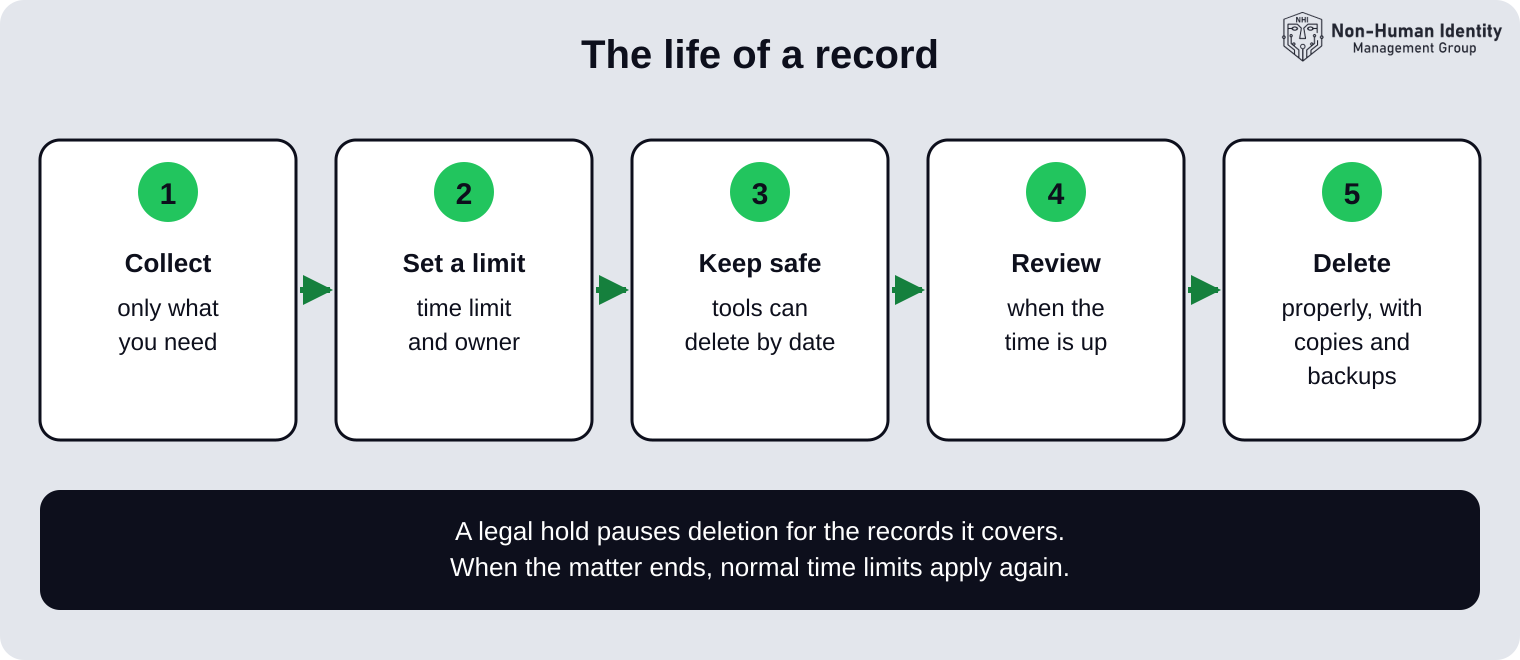
Here is the life of a record, from the day it arrives to the day it goes.
- Collect only what you need. Less data in means less to protect and less to delete later.
- Set a time limit. Write down how long each kind of record is kept, and why.[1]
- Let tools help. Many email and file systems can keep records for a set time and then delete them by themselves. In Microsoft 365, these are called retention policies and labels.[4]
- Review and act. When the time is up, delete or anonymise the record. Anonymise means removing the details that show who it is about. Keeping it offline does not count as deleting it.[1]
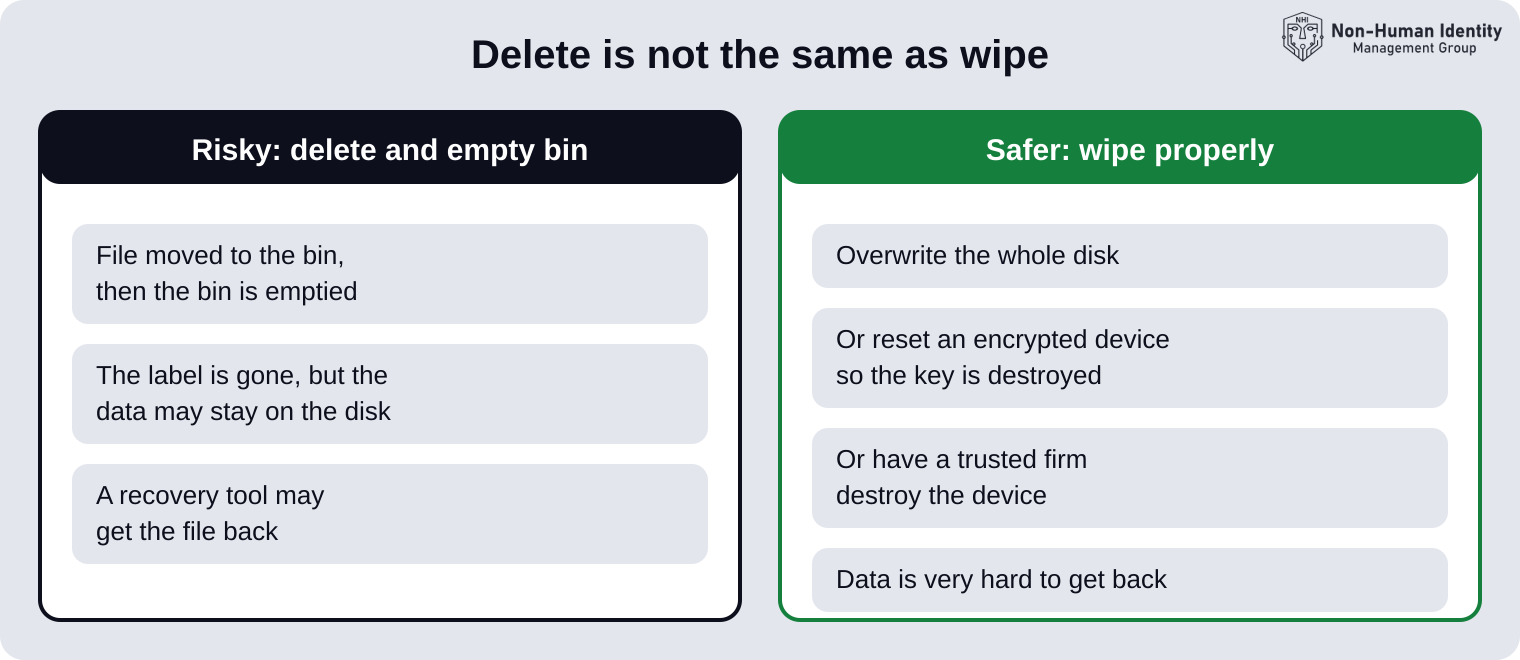
- Wipe devices properly. Pressing delete is often not enough. Devices should be overwritten, wiped with a reset that destroys the encryption key, or physically destroyed.[2]
Secure deletion is about how hard it is to get data back. Deleting a file often removes only the label that points to it. The data can stay on the disk until it is written over. The UK's National Cyber Security Centre says simply pressing delete is not enough, and it reports files recovered from old office printers and copiers.[2]
Encryption helps here. Encryption scrambles data so it needs a key to read it. If a device was encrypted, a factory reset that destroys the key leaves the data unreadable in most cases. This is called cryptographic erasure.[2] A US government guide on wiping storage covers the same ideas in depth.[3]
A worked example
Tess Wright is the practice manager at Larkspur Dental, a fictional practice with nine staff. The practice is replacing four old laptops and moving to a new booking system.
First, Tess looks at the shared drive. She finds a folder of job applications going back eight years. Nobody can say why they are still there. She remembers the filing cabinet idea: each folder should have a date.
She sits down with the dentist who owns the practice. Together they write a short schedule. Job applications go after a few months. Invoices follow the tax rules their accountant gives them. Patient notes follow the official health guidance, so they note where that guidance lives instead of guessing a number.
Next, the old booking system. Tess asks the supplier how data is removed when the contract ends. The supplier sends written details of how and when the data will be deleted.
Then the laptops. Each one had encryption switched on. Their IT helper resets each laptop in a way that destroys the encryption key. For the oldest machine, which had no encryption, they use a certified disposal firm and keep the paperwork.
Last, Tess sets a reminder to review the schedule each year. She also adds a line: if a legal claim comes in, deletion pauses for the records it covers.
The job takes two afternoons. The practice now holds less data, and Tess can say what it holds and why.
Myths and mistakes
| What people think | What is true |
|---|---|
| Keeping everything is the safe choice. | Data you do not need still has to be protected, and it can still leak. Keep it only while there is a reason. |
| The law gives a fixed time for every record. | UK data protection law does not set fixed times for each kind of personal data. You decide and write it down.[1] |
| Emptying the bin deletes the file. | The data may stay on the disk and be recovered. Use proper wiping for devices that leave your control.[2] |
| Moving old files to a spare drive counts as deleting them. | Offline storage is still storage. If you no longer need the data, delete or anonymise it.[1] |
| Backups do not count. | Backups hold copies too. Plan how old copies age out of them. |
What can I do this week?
- List the five main kinds of record your team keeps.
- Write a time limit and an owner next to each one.
- Find one old folder and delete what has no reason to stay.
- Ask how old laptops, phones and printers are wiped before they go.
Checklist
- We have a written list of record types and how long we keep each.
- Each record type has a named owner.
- The list is reviewed at least once a year.
- Email and file tools delete by date where they can.
- Old devices are wiped properly or destroyed by a trusted firm, with records kept.
- Suppliers tell us how our data is removed when a contract ends.
- Everyone knows that a legal hold pauses deletion for the records it covers.
Common questions
How long should we keep personal data?
Only as long as you need it for the reason you collected it. UK law does not give one number for each kind of record. Write down your own time limits, base them on your reasons and any rules that apply, and review them from time to time.
Is emptying the recycle bin enough?
Usually not for a device that is leaving your control. Emptying the bin often removes only the pointer to the file. Before you sell, give away or recycle a device, wipe it properly or use a trusted disposal firm.
What is a legal hold?
A legal hold is an instruction to keep certain records because of a legal claim or investigation. It pauses normal deletion for those records only. When the matter ends, the records go back to their usual time limits. Your legal adviser decides when a hold applies.
Do backups need to follow the schedule too?
Yes, as far as you can manage it. Backups hold copies of the same records. Plan how long backups are kept, so old copies age out. The UK regulator's guidance talks about putting data beyond use, including in backups where that fits.[1]
Does encryption help with deletion?
Yes, it can make deletion much easier. If a device was encrypted, destroying the key leaves the data unreadable in most cases. A factory reset on an encrypted laptop or phone often does this. Check that encryption was switched on before relying on it.[2]
Where next?
Ready for the detail? Read the practitioner guide: Data Retention and Secure Deletion Guide. It goes further into building a full retention schedule, legal hold processes and how to choose between wiping, cryptographic erasure and destruction.
Also useful:
- Data Retention and Disposal Policy Template
- Backup Retention Design
- Microsoft Purview Retention Policies and Labels Guide
- AI Data Retention and Deletion
Related NHI Mgmt Group resources: Log Management and Retention Guide · SaaS Audit Log Retention and Licensing Guide · Zero Data Retention for AI
Key terms
- Data retention
- Deciding how long each kind of record is kept, and keeping it only that long.
- Retention schedule
- A list of record types, how long each is kept and what happens at the end.
- Legal hold
- An instruction to keep certain records past their normal time because of a legal matter.
- Data minimisation
- Collecting and keeping only the data you need for a clear reason.
- Data sanitisation
- Treating storage so that the data on it is very hard to recover.
- Crypto-shredding
- Making encrypted data unreadable by destroying the key that unlocks it.
Sources and further reading
- Principle (e): Storage limitation. Information Commissioner's Office (UK). https://ico.org.uk/for-organisations/uk-gdpr-guidance-and-resources/data-protection-principles/a-guide-to-the-data-protection-principles/storage-limitation/, accessed 28 Nov 2026. The ICO notes this guidance is under review following the Data (Use and Access) Act.
- Secure sanitisation and disposal of storage media, version 2.0. National Cyber Security Centre (UK), reviewed 5 February 2025. https://www.ncsc.gov.uk/guidance/secure-sanitisation-storage-media, accessed 28 Nov 2026.
- NIST SP 800-88 Rev. 2, Guidelines for Media Sanitization. National Institute of Standards and Technology, September 2025. https://csrc.nist.gov/pubs/sp/800/88/r2/final, accessed 28 Nov 2026.
- Learn about retention policies and retention labels. Microsoft Learn, Microsoft. https://learn.microsoft.com/en-us/purview/retention, accessed 28 Nov 2026.