Kerberoasting is an attack that copies locked sign-in tickets and guesses the service account password behind them.
This guide is for new IT staff, students and anyone who has seen the word in a security report. You do not need to run Windows servers to be affected: if your organisation uses Microsoft Active Directory, its service accounts may be exposed.
In short
- Kerberoasting targets service accounts, the accounts that business software uses to run.
- Anyone with an ordinary work login can usually ask for the locked tickets, and the guessing then happens on the attacker's own computer, out of sight.
- Short or old passwords on service accounts are what make the attack work.
- Long random passwords, accounts that change their own passwords, stronger ticket locks and fewer powerful service accounts all reduce the risk.
What you will learn
- Explain what Kerberoasting is in one sentence.
- Spot the service accounts most likely to be at risk.
- Explain why the guessing is hard to see while it happens.
- Ask your IT team how service account passwords are set and changed.
- Software account (service account)
- an account that a program uses to run, not a person.
- Sign-in ticket (Kerberos ticket)
- a locked pass that proves you may use a service on a Windows network.
- Offline guessing (password cracking)
- trying many passwords on a copy, away from the real system.
What is Kerberoasting?
Think of a cinema ticket booth that hands out a ticket for each screen. Each ticket is sealed with a lock that only that screen's password can open.
Many workplaces use Microsoft Active Directory, a central system that keeps track of users and computers. It signs people in using Kerberos, which works like that ticket booth. When you want to use a service, you get a ticket for it.
Some services run under a service account, an account used by software rather than a person. Each one is listed with a service name, called a service principal name (SPN). The ticket for that service is locked with a key made from the service account's password.[1]
In Kerberoasting, an attacker who has any ordinary work login asks for these tickets. They copy the tickets to their own computer. Then they try password after password until one opens the lock. If one does, they now know the service account's password.[1]
Where the comparison stops working: a real cinema would notice someone collecting tickets for every screen. On a busy network, ticket requests are normal, so a few extra may not stand out.
Why does it matter?
Service accounts often have a lot of power. Microsoft says the attack usually goes after the most powerful ones. A cracked account can help an attacker reach other systems or spread ransomware.[1] Because the guessing happens away from the network, it does not trigger account lockouts.[1]
If you are new to IT work
What could happen: you set up a service account with an easy password because "nobody types it", and it is cracked months later.
Check this: ask whether your team uses accounts that change their own passwords before you create a new one.
If you manage an IT team
What could happen: one old service account in an admin group gives an attacker control of the whole network.
Check this: ask for a list of service accounts, who owns each one and when each password last changed.
Next: How to Find Kerberoastable Accounts in Active Directory and Fix Them
If you are studying security
What could happen: you learn the attack but not the fix, and miss the part employers value most.
Check this: practise spotting weak service accounts and the signs of the attack in logs, not just the attack.
Next: Kerberos for Beginners
What does it look like?
Here is a made-up review card that an IT team might fill in for its service accounts. It shows the warning signs to look for.
Example only. All values are made up.
SERVICE ACCOUNT REVIEW (EXAMPLE)
Account:          svc-example-reports
Has a service name (SPN):   yes            (1)
Password last changed:      2019           (2)
Password length:            10 characters  (3)
Ticket lock type:           RC4 allowed    (4)
Member of admin group:      yes            (5)
Owner:                      unknown        (6)
- Accounts with a service name can have tickets requested for them.
- In a real file, this line would show the date of the last change. Years-old passwords give attackers longer to work.
- A short password is much easier to guess offline.
- RC4 is an older lock type that makes guessing faster.
- If cracked, this account would hand over admin powers.
- Nobody to ask whether the account is still needed.
Why this is risky: every line points the same way. Any staff login could request the ticket, and a short old password behind a weak lock may give way to offline guessing.
The safer way: switch the service to an account whose password Windows manages itself. If that is not possible, set a long random password, use the stronger lock type and remove admin rights it does not need.
How does it work?
Here is the attack in plain steps, followed by where defenders can step in.
- A foothold. The attacker first gets an ordinary work login, for example through a phishing email.
- A list of targets. They look up which accounts have a service name, since only those get these tickets.[1]
- The tickets. They ask the domain controller, the server that hands out tickets, for a ticket to each service.[2]
- The guessing. They copy the tickets to their own computer and try huge numbers of passwords. Nothing on the network sees these failed guesses.[1]
- The payoff. If a guess works, they sign in as the service account and use its access.[2]
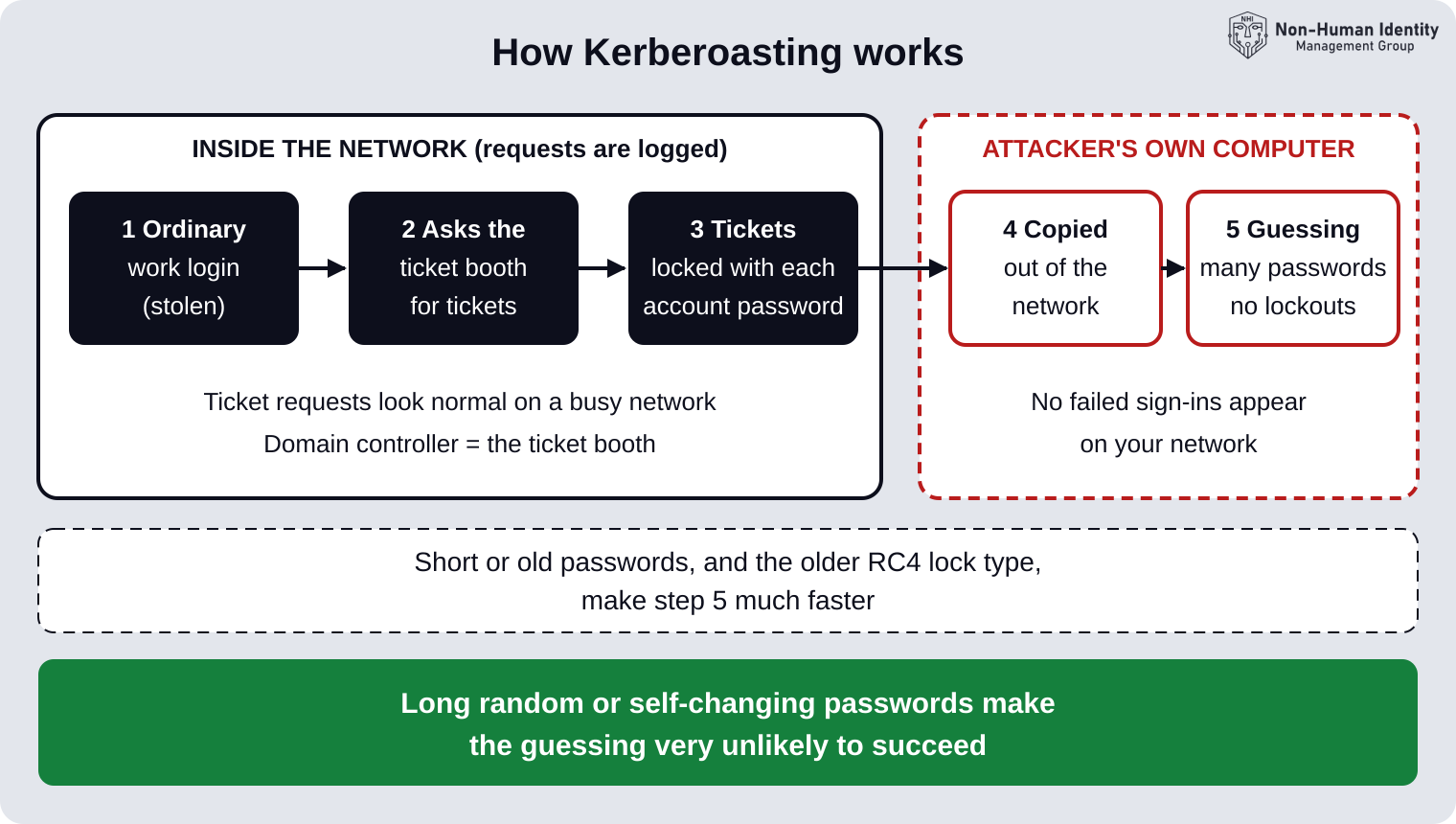
Two things decide whether the guessing works. The first is the password. Microsoft says group managed service accounts get passwords that are 120 characters long and randomly generated.[1] Windows creates and changes these passwords itself, so nobody has to.[3] Where that is not possible, Microsoft suggests at least 14 characters, and longer random passwords if feasible.[1]
The second is the lock type. Microsoft says the older RC4 type is easier to attack, and recommends the stronger AES type. It adds that AES alone is not enough without strong passwords.[1]
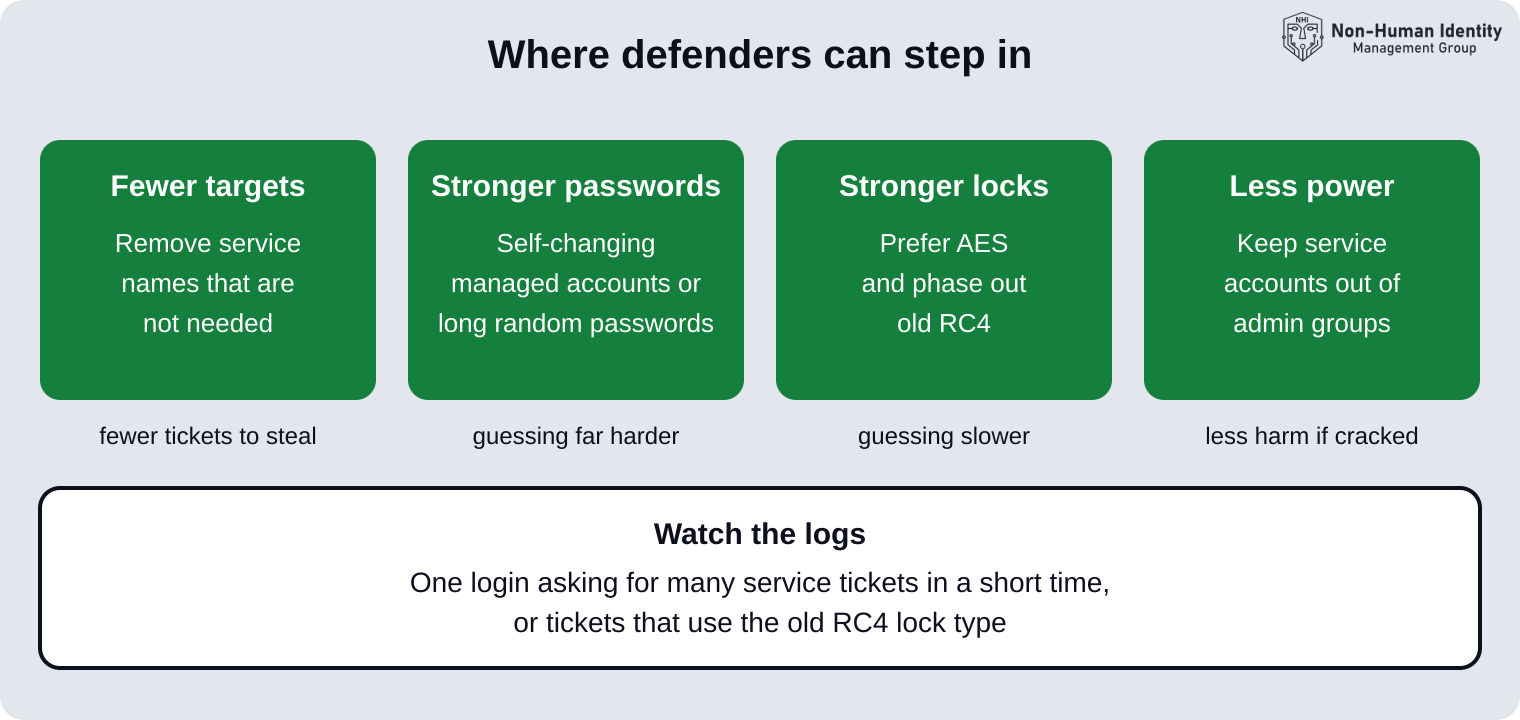
Defenders can also watch the logs. MITRE is a US research group that lists attacker methods. Both it and Microsoft suggest looking for one account asking for many service tickets in a short time. They also flag tickets that use the old RC4 type.[1][2]
A worked example
Cobble Kitchens is a fictional chain of six restaurants. Its office runs Active Directory for bookings, payroll and stock. Soren Strand has just joined as a junior IT technician.
Soren's manager, Kofi Vance, has read about Kerberoasting and asks him to check the risk. Soren starts by listing every account with a service name. He finds eleven.
Soren pictures the ticket booth. Any staff login can collect these tickets, so the password behind each one is all that stands in the way.
Three accounts worry him. One runs the old stock reports. Its password was set in 2018, it allows the older RC4 lock, and it sits in an admin group. Nobody knows who owns it.
Kofi checks with the stock supplier. The reports moved to a cloud service last year, so the account is no longer used. They disable it and plan to delete it after a month.
The payroll service still needs its account. Soren moves it to a group managed service account, so Windows now sets and changes the long password itself. The booking system cannot use one yet. So Soren gives its account a long random password, keeps it in the team's vault and takes it out of the admin group.
Last, Soren asks the security supplier to alert on one login asking for many service tickets at once. He adds a yearly review of service accounts to the team calendar.
The chain has not been attacked. But if someone tries, the tickets they collect should now be far harder to crack.
Myths and mistakes
| What people think | What is true |
|---|---|
| Attackers need admin rights to do this. | An ordinary work login is usually enough to request the tickets.[1] |
| Account lockout will stop the guessing. | The guessing happens on the attacker's own computer, so lockout rules do not apply.[1] |
| Nobody types the service account password, so it can be simple. | Its strength is the main defence. Use a self-changing managed account or a long random password. |
| Switching to AES fixes it. | AES slows guessing, but Microsoft says it still needs strong passwords. Change the password after switching.[1] |
| Old service accounts are harmless if nobody uses them. | Unused accounts with service names can still be targeted. Disable or remove them. |
What can I do this week?
- Ask your IT team for a list of accounts with service names, and who owns each one.
- Find any service account in an admin group, and ask whether it really needs to be there.
- Check when each service account password last changed.
- Ask whether group managed service accounts are used where they could be.
- Ask whether anyone would be alerted if one login requested many service tickets at once.
Checklist
- Every account with a service name is listed and has a named owner.
- Service names that are no longer needed are removed.
- Managed service accounts are used wherever the software supports them.
- Other service accounts have long random passwords, stored in a vault.
- Service accounts use the stronger AES lock type, with RC4 phased out where possible.
- Service accounts sit outside admin groups unless there is an approved reason.
- Logs are watched for bursts of service ticket requests and old RC4 tickets.
- Service accounts are reviewed at least yearly, and unused ones are disabled.
Common questions
Why is it called Kerberoasting?
The name joins Kerberos, the sign-in system involved, with "roasting", slang for cracking passwords. The attack does not break Kerberos itself. It takes advantage of weak passwords on service accounts.
Is Kerberoasting a bug that Microsoft can patch?
Not as a single fix. Kerberoasting uses Kerberos as it is designed to work, so the main defence is strong passwords on service accounts. Moving to the stronger AES lock type helps, but Microsoft says weak passwords can still be guessed under stronger locks.
Does Kerberoasting affect cloud-only accounts?
Generally not. It targets the Kerberos tickets that on-premises Active Directory hands out for service accounts. Organisations that sync Active Directory to the cloud still have those on-premises accounts, so the risk stays wherever Active Directory runs.
Are service accounts non-human identities?
Yes. A non-human identity (NHI) is a digital identity, or the credential behind it. It lets a machine, app or automated process connect to systems without a person. Service accounts are one common type. Kerberoasting is a good example of why NHIs need owners, strong secrets and regular reviews.
Can we tell if Kerberoasting happened?
Sometimes. The ticket requests are logged on domain controllers, so bursts of requests or old RC4 tickets can be spotted if logging is on. The guessing itself happens elsewhere and leaves no trace on your network. See How to Hunt for Kerberoasting.
Where next?
Ready for the detail? Read the practitioner guide: How to Hunt for Kerberoasting. It goes further into the Windows log events to collect, which fields matter, how to build a baseline and what to do with each hit.
Also useful:
- How to Find Kerberoastable Accounts in Active Directory and Fix Them
- Kerberoasting and AS-REP Roasting Defence Guide
- Kerberos for Beginners
- Service Accounts for Beginners
- NHI Foundation Level Training
Related NHI Mgmt Group resources: Kerberos RC4 Deprecation · Service Account Security Guide · Kerberos Security Guide
Key terms
- Kerberoasting
- An attack that requests service tickets and tries to guess the service account password behind them offline.
- Kerberos
- A sign-in system that hands out tickets to prove who you are to each service.
- Service account
- An account used by a program or service rather than a person.
- SPN
- A service principal name, the label that links a service to the account it runs under.
- Offline password cracking
- Guessing a password against a copied lock, away from the real system, so no lockout applies.
- gMSA
- A Windows service account whose long random password is created and changed by Windows.
- Domain controller
- The server that runs Active Directory and hands out sign-in tickets.
Sources and further reading
- Microsoft's guidance to help mitigate Kerberoasting. Microsoft Security Blog, Microsoft, 11 October 2024. https://www.microsoft.com/en-us/security/blog/2024/10/11/microsofts-guidance-to-help-mitigate-kerberoasting/, accessed 28 Nov 2026.
- Steal or Forge Kerberos Tickets: Kerberoasting, technique T1558.003. MITRE ATT&CK, MITRE. https://attack.mitre.org/techniques/T1558/003/, accessed 28 Nov 2026.
- Group Managed Service Accounts overview. Microsoft Learn, Microsoft. https://learn.microsoft.com/en-us/windows-server/identity/ad-ds/manage/group-managed-service-accounts/group-managed-service-accounts/group-managed-service-accounts-overview, accessed 28 Nov 2026.