A secret in code is a password, API key, token or private key written directly into a program's files, where anyone who can see the code, or its saved history, can copy it and use it.
This is one of the most common ways organisations lose control of their systems, and it usually starts with a small shortcut. This guide explains in plain English how secrets end up in Git, why deleting them is not enough, and the simple habits and tools that stop it. You do not need to be a developer to follow it.
By the end of this guide you will be able to:
- Explain what a secret in code is and why Git keeps it in history.
- Understand why revoking a leaked secret matters more than deleting it.
- Describe where secrets should be stored instead of in code.
- Identify the safety nets that catch secrets before they spread.
Key takeaways
- Git remembers everything. A secret saved in an old version of a file stays in the project's history even after you delete the line.
- The fix is to cancel the secret, not just hide it. GitHub's guidance is to revoke or rotate a leaked secret first; once it no longer works, it is no longer dangerous.[5]
- Prevention beats clean-up. Keep secrets in a secrets manager or secure settings, and use a .gitignore file so secret files are never saved to Git.
- Tools can catch mistakes. Secret scanning and push protection spot common secret formats and can block them before they reach a shared repository.[4][6]
- Private code is not a safe place. Code is copied to laptops, suppliers and forks, and can be made public by accident.
What it is, in plain English
Programs often need to log in to other services: a database, a payment provider, a cloud account. To do that they use a secret, the general name for a password, API key, token or certificate used by software. The quick but risky way is to type the secret straight into the code. This is called hard-coding.
Git is the most widely used tool for tracking changes to code. Each time a developer saves a set of changes, Git records a commit: a snapshot of the files at that moment, kept forever in the project's history. A project's files and full history together are called a repository (or repo). Repositories are often shared on a code-hosting service such as GitHub or GitLab (listed alphabetically).
Think of Git like a notebook where every page is photocopied and filed each time you write on it. If you write your bank PIN on page 3, then rub it out on page 4, the photocopy of page 3 is still in the file. Anyone who can read the file can find it.
Where the analogy breaks down: a paper file sits in one place. A Git repository is copied in full to every person and computer that downloads it, so the "photocopy" may exist in many places you cannot reach.
Why it matters to you
GitHub's documentation explains that hard-coded secrets become part of Git history and stay accessible after being removed from the latest version. It lists the usual ways they get in: keys added during local testing and committed by accident, secrets in configuration files such as .env files, real keys used in example code or README files, and secrets pasted into issues or comments. It also notes that secrets spread to forks, backups and build logs, and that public repositories are indexed by search engines and specialised scanning services.[3]
The OWASP Non-Human Identities Top 10 lists secret leakage as its second risk (NHI2:2025) and rates it easy to exploit, because the secret lets an attacker log in as the real application.[1]
A real example: in the Toyota T-Connect key exposure, Toyota said a development contractor uploaded part of the website's source code, including an access key to a data server, to a public GitHub repository in December 2017. It stayed public until 15 September 2022. Toyota said the email addresses and customer management numbers of 296,019 customers may have been exposed, although it found no sign in its logs that a third party had accessed them.[8][9]
- For a small business: if a freelancer or agency builds your website or app, ask where they keep your passwords and keys. "In the code" is the wrong answer.
- If you are new to a security job: leaked secrets in code are a daily task in many teams. Learn the order: revoke, replace, check logs, then decide whether to clean history.
- For a manager: make "no secrets in code" a written rule for staff and suppliers, and fund the simple tools that enforce it.
How it works, step by step
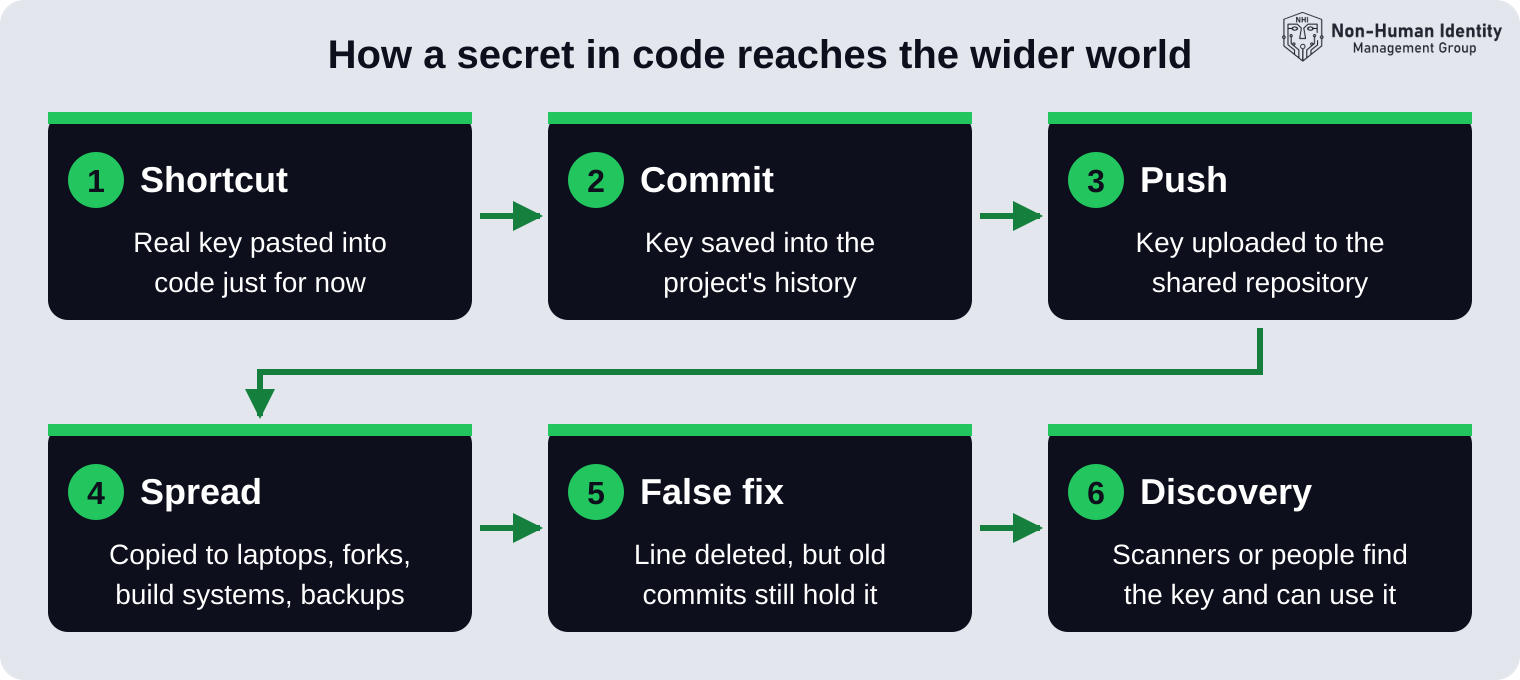
Here is how a secret usually travels from a laptop to the wider world:
- The shortcut. A developer testing a feature pastes a real key into the code "just for now".
- The commit. They save their work with a commit. The key is now in the project's history.
- The push. They push (upload) their commits to the shared repository. Everyone who downloads the project now has the key.
- The spread. The repository is copied: to colleagues' laptops, to a supplier, to a fork (someone else's copy on the hosting service), into build systems and backups.
- The "fix" that is not a fix. Someone spots the key and deletes the line in a new commit. The latest files look clean, but every earlier copy and every history still holds it.[3][5]
- The discovery. If the repository is, or becomes, public, automated scanners can find the key. Anyone who finds it can use it.[3]
Where secrets should live instead
| Option | What it is | When it suits |
|---|---|---|
| Secrets manager | A tool that stores secrets encrypted, controls who can read them and logs every access | Most teams and all production systems |
| Platform secure settings | The protected settings or secrets store built into your hosting or build service | Small teams and simple sites |
| Environment variables from a local file kept out of Git | Values the program reads when it starts, held in a file listed in .gitignore | A developer's own laptop for testing; never shared through Git |
| Short-lived credentials | Passes created on demand that expire quickly, so there is no long-term secret to leak | Cloud and build systems that support them; OWASP recommends these where possible[1] |
Safety nets that catch mistakes
| Safety net | When it acts | What it does |
|---|---|---|
| .gitignore file | Before a commit | Tells Git to ignore named files, such as a local secrets file. The Git documentation notes it does not affect files Git already tracks.[7] |
| Pre-commit check | On the developer's computer, as they commit | A small scanner that stops the commit if it looks like a secret; OWASP suggests detection at this stage[2] |
| Push protection | When code is pushed to the hosting service | Blocks the push if a known secret format is found, and tells the developer where |
| Secret scanning | After code is stored | Searches the repository and its history and raises an alert for any secret found |
Both GitHub and GitLab (listed alphabetically) offer push protection. GitHub's push protection blocks pushes containing supported secrets from the command line, the web interface, file uploads and its REST API, and GitHub turns on push protection for individual users by default for pushes to public repositories. GitLab's secret push protection checks commits pushed over HTTPS and SSH and blocks the push by default when it finds a secret, showing the commit, file, line and secret type. Both let an authorised person bypass a block with a recorded reason or audit event, so bypasses are worth reviewing.[4][6]
Availability: as of November 2026, GitHub documents repository-level push protection as part of GitHub Secret Protection, off by default and enabled by an administrator. GitLab documents secret push protection on its Ultimate tier, enabled per project.[4][6]
A worked example
Priya runs Fernhill Lettings, a fictional letting agency with eight staff. A contractor built its property booking app. One afternoon the contractor emails: "I accidentally pushed the database password to our shared repository an hour ago. I've deleted it."
- Revoke first. Priya asks the contractor to change the database password straight away. Deleting the line was not enough, because the old commit still holds the password.
- Update the app. The new password goes into the hosting platform's secure settings, not into the code. The app reads it from there.
- Check for misuse. The contractor reviews the database logs for logins from unknown places since the push. None are found.
- Decide on history. Because the old password no longer works, they agree not to rewrite the repository history. GitHub's guidance notes that rewriting history is disruptive, and that once a secret is revoked this may be enough.[5]
- Add safety nets. The contractor adds the local settings file to .gitignore, turns on push protection and secret scanning, and adds a pre-commit check to the project.
Total time: under two hours, and the logs showed no sign of misuse. The speed came from knowing the order: cancel the secret first, tidy up after. The team still treats the old password as compromised and keeps watching the logs for a few weeks.
Myths and misunderstandings
| What people think | What is true |
|---|---|
| I deleted the secret, so it is gone. | It is still in earlier commits and in every copy of the repository. Revoke or rotate it at the service. |
| Our repository is private, so it is fine. | Private code is shared with staff and suppliers, copied to laptops and build systems, and can be made public by mistake. |
| Adding the file to .gitignore removes it. | .gitignore only stops Git tracking new, untracked files. A file already committed stays in history. |
| Rewriting history is the main fix. | GitHub warns that rewriting history has many side effects, and copies in clones and forks remain. Revoking the secret is the step that removes most of the risk.[5] |
| Scanners catch every secret. | Scanners find known formats well, but can miss unusual passwords. Keeping secrets out of code is still the main defence. |
Key terms
- Secret
- A password, key, token or certificate that software uses to prove its identity.
- Hard-coding
- Writing a secret directly into code or a configuration file.
- Git
- A tool that tracks every change to a set of files and keeps the full history.
- Commit
- A saved snapshot of changes in Git, kept in the project's history.
- Repository
- A project's files plus their full Git history, often shared on a hosting service.
- .gitignore
- A file listing files Git should not track, such as local secrets files.
- Push protection
- A hosting-service feature that blocks uploads containing known secret formats.
- Secrets manager
- A tool that stores secrets encrypted, controls access and logs use.
- Environment variable
- A named value a program reads from its surroundings when it starts, instead of from its code.
Common questions
How do I remove a password from Git history?
First change or revoke the password so it stops working. Only then decide whether to rewrite history, which needs care and coordination. See How to Remove Secrets From Git History.
Is it safe to keep secrets in a private repository?
No. Private repositories are copied and shared widely, and access changes over time. Keep secrets in a secrets manager or secure settings.
Do I need to tell anyone if I leak a secret?
Yes. We suggest telling whoever owns the system or the security contact straight away, even if you have already deleted the line. Quick reporting means the secret can be revoked before anyone uses it, and nobody should be blamed for reporting an honest mistake.
Should I commit my .env file?
No. A .env file usually holds real secrets. List it in .gitignore and share a template with blank values instead.
What is push protection?
A hosting-service feature that checks your upload for known secret formats and blocks it before the secret lands in the shared repository.
What should I do if my push is blocked for a secret?
Remove the secret from your commits, store it properly, and push again. If the secret was ever shared, replace it. See What to do when git push is blocked by secret scanning push protection.
First steps
- Turn on the safety nets. Switch on secret scanning and push protection wherever your code is stored, if your plan includes them.
- Add a .gitignore entry. Make sure local secrets files, such as .env files, are listed so they are never committed.
- Ask one question. Ask each developer or supplier: "Where are our passwords and keys stored?" Move any found in code to a secrets manager or secure settings, and replace them.
Checklist
- No passwords, keys or tokens are written into code, configuration files or example files.
- Secrets are stored in a secrets manager or the platform's secure settings.
- Every repository has a .gitignore that covers local secrets files.
- Push protection and secret scanning are turned on, and bypasses are reviewed.
- Developers have a pre-commit secret check on their computers.
- Everyone knows the order after a leak: revoke or rotate first, update the app, check logs, then consider history clean-up.
- Suppliers who write code for you follow the same rules, in writing.
Check your understanding
1. You delete a password from your code and commit the change. Is the password safe now?
Answer: no. It is still in the earlier commit and in every copy. Change or revoke the password.
2. What does a .gitignore file do?
Answer: it tells Git not to track certain new files, such as a local secrets file. It does not remove files already committed.
3. Which comes first after a leak: rewriting history or revoking the secret?
Answer: revoking the secret. Once it no longer works, it cannot be misused.
Suggested learning pathway
- API Keys for Beginners: a related beginner guide to read next.
- NHI Risks for Beginners: a related beginner guide to read next.
- See Environment Variables and .env Files for handling local secrets safely.
- See the Git Secret Scanning Guide for scanning at every layer.
- See the Push Protection Guide for blocking secrets at upload in depth.
- See How to Remove Secrets From Git History for the full clean-up procedure.
- See the GitHub and GitHub Actions Security Guide and the GitLab Security Guide for platform settings.
- See the Secrets Management Guide for running secrets properly across an organisation.
Standards and references
- OWASP Non-Human Identities Top 10, NHI2:2025 Secret Leakage. OWASP Foundation, 2025. https://owasp.org/www-project-non-human-identities-top-10/2025/2-secret-leakage/, accessed 27 Nov 2026.
- Secrets Management Cheat Sheet. OWASP Cheat Sheet Series, OWASP Foundation. https://cheatsheetseries.owasp.org/cheatsheets/Secrets_Management_Cheat_Sheet.html, accessed 27 Nov 2026.
- Secret leakage risks. GitHub Docs, GitHub. https://docs.github.com/en/code-security/concepts/secret-security/secret-leakage-risks, accessed 27 Nov 2026.
- Push protection. GitHub Docs, GitHub. https://docs.github.com/en/code-security/concepts/secret-security/push-protection, accessed 27 Nov 2026.
- Removing sensitive data from a repository. GitHub Docs, GitHub. https://docs.github.com/en/authentication/keeping-your-account-and-data-secure/removing-sensitive-data-from-a-repository, accessed 27 Nov 2026.
- Secret push protection. GitLab Docs, GitLab. https://docs.gitlab.com/user/application_security/secret_detection/secret_push_protection/, accessed 27 Nov 2026.
- gitignore documentation. Git. https://git-scm.com/docs/gitignore, accessed 27 Nov 2026.
- Notice of apology regarding the possible leak of customers' email addresses (Japanese). Toyota Motor Corporation, 7 October 2022. https://global.toyota/jp/newsroom/corporate/38095972.html.
- Toyota discloses data leak after access key exposed on GitHub. BleepingComputer, 10 October 2022. https://www.bleepingcomputer.com/news/security/toyota-discloses-data-leak-after-access-key-exposed-on-github/.
Related NHI Mgmt Group resources: Git Secret Scanning Guide · How to Remove Secrets From Git History · Secrets Management Guide · OWASP NHI2: Secret Leakage Guide