A non-human identity, or NHI, is a login used by software instead of a person: the account, key, token or certificate an app, script, device or AI agent uses to prove who it is and get into other systems. Most of the logins inside a modern organisation are made by software, and they are often the least watched.
This guide explains NHIs from the ground up for newcomers, career changers, students and managers, with no security knowledge needed. It covers the common types, why they matter, the lifecycle every NHI goes through, a worked example and simple first steps.
By the end of this guide you will be able to:
- Explain what a non-human identity is and name the common types.
- Understand why software logins are easy to lose track of.
- Describe the lifecycle of an NHI from creation to retirement.
- Identify three practical steps to find and tidy up your own NHIs.
Key takeaways
- An NHI is a login for software. Whenever one program connects to another and has to prove who it is, it uses a non-human identity.
- There are a lot of them. In CyberArk's 2025 vendor survey of 2,600 security decision makers at larger organisations, respondents reported 82 machine identities for every human.[4] Other studies count differently, so treat the exact ratio as a rough signal.
- The secret is the identity. Most NHIs prove who they are with a key or token, so anyone who copies it can act as the software.
- Nobody signs them out. People leave jobs and lose access. Software identities often have no end date, so they pile up and stay active.
- Owner, purpose, expiry. Give every NHI a named person, a written reason to exist and an end date, and you remove many of the common causes of trouble.
What it is, in plain English
When you log in to your work email, you type a password and perhaps approve a prompt on your phone. That is a human identity: an account tied to a real person.
Now think about what happens without anyone typing. Your online shop checks stock every few minutes. A nightly job copies files to a backup. A payment page talks to a card company. Each program has to prove who it is before the other side lets it in. The login it uses is a non-human identity.
Think of an office building. Staff carry photo badges. The cleaning robot, the lift system and the parcel lockers also need to open doors, so they get their own access cards. Those cards are NHIs. Where the analogy breaks down: in a building, a guard can see who holds a card. In computer systems, a copied key works exactly the same for whoever presents it.
OWASP, an open community that publishes widely used security guidance, describes NHIs in its Non-Human Identities Top 10 (2025) as the accounts and credentials used by software and automated processes.[1] The NIST Cybersecurity Framework 2.0 likewise expects organisations to manage identities and credentials for services and hardware, not only for users (outcome PR.AA-01).[7] Common types:
- Service account: an account made for a program to run under. Google Cloud calls it a special kind of account typically used by an application or compute workload.[2]
- API key: a long string a program sends with each request to say "this is me". An API (application programming interface) is the doorway one program uses to talk to another.
- Access token: a short-lived digital pass, like a visitor badge that stops working at the end of the day.
- Certificate: cryptographic proof of identity, used for example when two servers set up a secure connection.
- Workload identity: Microsoft defines it as an identity you assign to a software workload, such as an application, service, script or container, so it can access other services.[3]
- AI agent: software that uses an AI model to decide and take actions. When it logs in to tools for you, it uses an NHI too.
Why it matters to you
- If you run a small business: your payment provider, website, backups and connected apps all use NHIs. A leaked key can let someone take money, data or your website.
- If you are new to a security job: CyberArk's 2025 Identity Security Landscape survey reported 82 machine identities per human in organisations with 500 or more staff.[4] Studies count differently, so treat any ratio as a rough signal. Microsoft's documentation says NHI numbers are rising dramatically and attackers increasingly target them.[3] Much of your work will touch them.
- If you are a manager: software often holds broad access, such as a whole customer database. Someone must own each NHI, or nobody notices when one is misused.
A real case shows the impact. In the Capital One breach in 2019, reporting at the time said the attacker used credentials belonging to the company's web application firewall, a piece of software, to reach customer data stored in the cloud, and Capital One said it had fixed the configuration weakness involved.[8] The US Department of Justice later said the intrusion affected more than 100 million US customers.[9] The lesson we draw is that a software identity should hold only the access its job needs.
OWASP names ten common ways NHIs go wrong:[1]
| OWASP risk (2025) | What it means in plain English |
|---|---|
| NHI1 Improper Offboarding | An app is retired but its account or key is never switched off. |
| NHI2 Secret Leakage | A key ends up in code, a config file or a chat message where others can copy it. |
| NHI3 Vulnerable Third-Party NHI | An outside tool or plug-in you connected is compromised, taking your access with it. |
| NHI4 Insecure Authentication | Old or weak login methods are still in use. |
| NHI5 Overprivileged NHI | The software can do far more than its job needs. |
| NHI6 Insecure Cloud Deployment Configurations | Build and deployment pipelines use leaked static keys or loosely checked tokens. |
| NHI7 Long-Lived Secrets | Keys that never expire, so a stolen one works for years. |
| NHI8 Environment Isolation | The same identity is used in test and live systems, so a weakness in one reaches the other. |
| NHI9 NHI Reuse | One identity is shared by several apps, so one leak exposes them all. |
| NHI10 Human Use of NHI | People log in with a software account, so logs cannot tell person from program. |
How it works, step by step
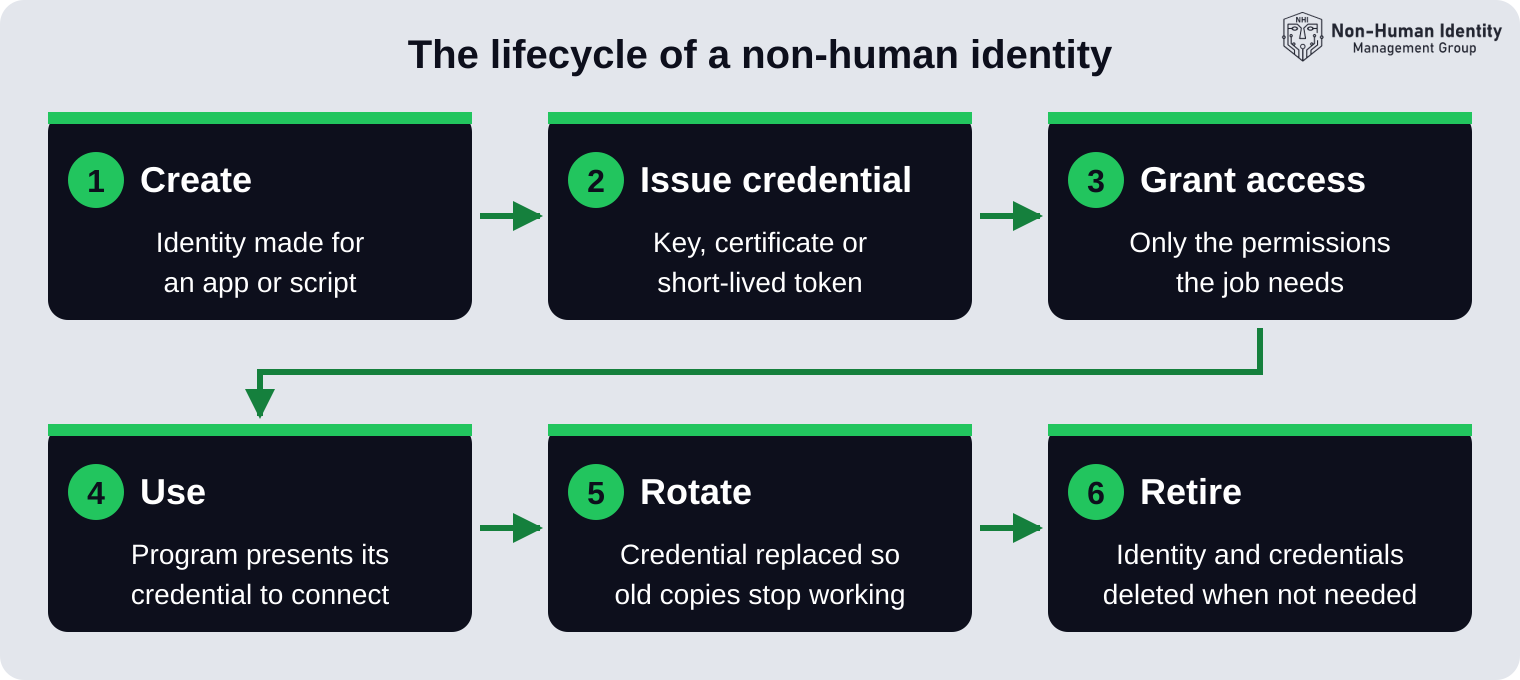
Every NHI goes through the same journey, called its lifecycle.
- Creation: a developer or administrator creates the identity in a cloud console, directory or app admin page.
- Credential issue: it gets a credential, the thing used to prove identity, such as a key, certificate or a way to request short-lived tokens. This is the part attackers want.
- Permission grant: it gets rights, such as "read the orders table". Least privilege means giving only what the job needs. AWS puts it as granting only the permissions required to perform a task.[5]
- Use: the program presents its credential each time it connects, and the other system allows or blocks it.
- Rotation: the credential is replaced on a schedule, so old copies stop working.
- Retirement: when the program is no longer needed, the identity and its credentials are deleted.
The safest pattern removes stored keys altogether. AWS recommends that workloads use temporary credentials with IAM roles rather than long-term access keys.[5] Google Cloud says service account keys are a security risk if not managed correctly and advises choosing a more secure alternative whenever possible.[2]
| Credential type | How long it usually lasts | Beginner rule of thumb |
|---|---|---|
| Static API key or password | Until someone changes it, often years | Keep it in a secrets manager, never in code; rotate it |
| Cloud access key | Until deleted | Use roles or attached identities where the platform offers them |
| Short-lived token | Minutes to hours | The preferred option; a leak expires quickly |
| Certificate | Until its expiry date | Track expiry dates so nothing breaks or lingers |
A worked example
Priya runs operations at Brightloaf, a fictional online bakery with 15 staff. A contractor built the website two years ago. Asked to list every login the business uses, Priya realises she only knows the human ones.
In one afternoon with the contractor she finds an API key for card payments, a cloud storage key used by a nightly backup script, a token linking the shop to the delivery company, an old key for an email marketing tool the bakery dropped last year, and a shared "website-admin" account three staff use by hand.
Three problems stand out. The payment key is written into the website code, which the contractor shares with a freelancer (secret leakage). The old marketing key still works (improper offboarding). Nobody can tell which staff member changed what on the website (human use of an NHI).
Priya writes a one-page list with an owner, purpose and review date for each. The contractor moves the payment key into the hosting provider's secrets store and issues a fresh one. The marketing key is deleted. Each staff member gets their own login. The backup script switches to a role-based credential the cloud renews automatically. Cost: one afternoon and a few contractor hours.
Myths and misunderstandings
| What people think | What is true |
|---|---|
| Only big companies have NHIs. | Any business using cloud services, online payments or connected apps has them. |
| Multi-factor authentication protects them. | MFA asks a person for a second proof, like a phone prompt. Software cannot tap a phone, so most NHIs rely on the secret alone. |
| A private code repository is a safe place for keys. | Private repositories are shared, copied and sometimes made public by mistake. Keys belong in a secrets manager. |
| If it still works, leave it alone. | An unused key that still works adds risk and no value. If nobody can explain it, plan to remove it. |
| AI agents are a separate problem. | Agents log in with tokens and keys like other software. They are NHIs that also choose their own next step. |
Key terms
- Non-human identity (NHI)
- A digital identity used by software, a device or an AI agent rather than a person.
- Machine identity
- Often used to mean the same as NHI; some people use it mainly for certificates and keys.
- Credential
- The thing used to prove identity: a password, key, token or certificate.
- Secret
- A credential that must be kept private, such as an API key.
- Service account
- An account made for a program to run under, not a person.
- API key
- A string a program sends to identify itself to another program.
- Access token
- A short-lived digital pass issued after a successful login.
- Least privilege
- Giving an identity only the access its job needs.
- Credential rotation
- Replacing a credential so old copies stop working.
- Secrets manager
- A secure store for keys and passwords that programs fetch from when they run.
- Offboarding
- Removing access when a person or program no longer needs it.
Common questions
Is a non-human identity the same as a machine identity?
Mostly, yes. Both mean identities used by software. Some vendors use "machine identity" mainly for certificates and encryption keys, and "NHI" for the wider group including service accounts, API keys and AI agents.
Is an API key a non-human identity?
Yes. OWASP lists API keys among NHI examples.[1] The key is how the software proves who it is, so a leaked key is effectively a stolen identity.
Are AI agents non-human identities?
Yes. When an agent connects to email, files or other tools, it uses tokens or keys like any program. It needs the same care, plus limits on what it may do by itself.
Why can't NHIs just use MFA?
MFA relies on a person responding. Software cannot, so the main protections are short-lived credentials, careful storage and tight permissions.
Do NHIs ever expire on their own?
Some do. Short-lived tokens and certificates have built-in expiry, but many keys and service accounts last until someone deletes them, which is why a regular review helps.
Who should own an NHI?
A named person, usually whoever runs the app or integration that uses it. A team name alone tends to mean nobody checks it.
First steps
- Make a list. Open the admin pages of your main cloud, email and business apps and look for sections called service accounts, API keys, apps or connected apps. Write each one down with an owner and purpose.
- Turn on secret scanning. If you keep code on GitHub, its secret scanning checks repositories for exposed keys and runs automatically for free on public repositories.[6] Other code platforms offer similar features.
- Remove what is unused. Major cloud platforms can show when credentials were last used; AWS calls this last accessed information.[5] We suggest disabling unused ones first, waiting a week, then deleting them. If something breaks, re-enable the credential as a short, recorded exception with a named owner and a review date, rather than leaving it on indefinitely.
Checklist
- Keep a written list of every service account, API key, token, certificate and connected app.
- Record a named owner, purpose and review date for each NHI.
- Keep keys out of code, documents, tickets and chat; store them in a secrets manager.
- Use short-lived or platform-issued credentials instead of long-lived keys wherever the platform allows.
- Give each NHI only the permissions its job needs, with separate identities for test and live systems.
- Never let people log in with software accounts, and never share one identity across several apps.
- Switch off and delete NHIs when the app or integration is retired.
- Review the list every quarter and after any staff or supplier change.
Check your understanding
1. A backup script logs in to cloud storage every night. Is that a human or non-human identity?
Answer: non-human. No person types anything; the script proves itself with its own credential.
2. Why is a key written into website code risky even if the repository is private?
Answer: anyone with access to the code, or any copy of it, can use the key. Private repositories are shared and can be exposed by mistake.
3. Which is safer: a key that never expires or a token that lasts one hour?
Answer: the one-hour token. If it leaks, it stops working soon.
4. What three things should be recorded for every NHI?
Answer: a named owner, its purpose and a review or end date.
Suggested learning pathway
- NHI Risks for Beginners: a related beginner guide to read next.
- Zero Standing Privilege for Beginners: a related beginner guide to read next.
- AI Agent Identity for Beginners: a related beginner guide to read next.
- For the most common type of NHI in plain English, read Service Accounts for Beginners.
- For the keys many programs use, read API Keys for Beginners.
- For the full professional overview, read the Non-Human Identity (NHI) Guide.
- To store keys properly, see the Secrets Management Guide.
- To secure service accounts in depth, see the Service Account Security Guide.
- To replace stored cloud keys with short-lived credentials, see the Workload Identity Federation Guide.
Standards and references
- OWASP Non-Human Identities Top 10 (2025). OWASP Foundation. https://owasp.org/www-project-non-human-identities-top-10/2025/top-10-2025/, accessed 27 Nov 2026.
- Service accounts overview. Google Cloud IAM documentation, Google. https://docs.cloud.google.com/iam/docs/service-account-overview, accessed 27 Nov 2026.
- What are workload identities? Microsoft Entra Workload ID documentation, Microsoft Learn, Microsoft. https://learn.microsoft.com/en-us/entra/workload-id/workload-identities-overview, accessed 27 Nov 2026.
- Machine Identities Outnumber Humans by More Than 80 to 1: New Report Exposes the Exponential Threats of Fragmented Identity Security (CyberArk 2025 Identity Security Landscape announcement; vendor survey of 2,600 security decision makers, conducted by Vanson Bourne). CyberArk via Business Wire, 23 April 2025. https://www.businesswire.com/news/home/20250423817886/en/Machine-Identities-Outnumber-Humans-by-More-Than-80-to-1-New-Report-Exposes-the-Exponential-Threats-of-Fragmented-Identity-Security.
- Security best practices in IAM. AWS Identity and Access Management User Guide, Amazon Web Services. https://docs.aws.amazon.com/IAM/latest/UserGuide/best-practices.html, accessed 27 Nov 2026.
- About secret scanning. GitHub Docs, GitHub. https://docs.github.com/en/code-security/secret-scanning/introduction/about-secret-scanning, accessed 27 Nov 2026.
- The NIST Cybersecurity Framework (CSF) 2.0. National Institute of Standards and Technology (NIST), February 2024. https://www.nist.gov/cyberframework.
- Capital One Data Theft Impacts 106M People. KrebsOnSecurity, July 2019. https://krebsonsecurity.com/2019/07/capital-one-data-theft-impacts-106m-people/, accessed 27 Nov 2026.
- Former Seattle tech worker convicted of wire fraud and computer intrusions. US Attorney's Office, Western District of Washington, US Department of Justice, 17 June 2022. https://www.justice.gov/usao-wdwa/pr/former-seattle-tech-worker-convicted-wire-fraud-and-computer-intrusions, accessed 27 Nov 2026.
Related NHI Mgmt Group resources: Non-Human Identity (NHI) Guide, OWASP NHI Top 10 NHI2 Secret Leakage Guide, OWASP NHI Top 10 NHI1 Improper Offboarding Guide, Service Account Breaches Lessons Guide.