Cross-site scripting (XSS) is a web application flaw where untrusted text ends up in a web page in a way that makes the visitor's browser run it as code.
This guide is for newcomers, students, career changers and managers who want to understand XSS without needing to be web developers. It explains what XSS is, why it is the most common dangerous software weakness on current lists, how it happens at a concept level, and how developers and small teams reduce the risk. It is written for defence only and contains no attack code or test strings.
By the end of this guide you will be able to:
- Explain what cross-site scripting is in plain words.
- Describe the three main types: stored, reflected and DOM-based.
- Understand why output encoding and safe frameworks are the main defences.
- Identify extra layers, such as Content Security Policy, and first steps for your own sites.
Key takeaways
- The browser is tricked, not the server. XSS happens when a site sends untrusted text to a visitor's browser in a way that the browser treats as code.
- It tops the list. Cross-site scripting is ranked first in the 2025 CWE Top 25 most dangerous software weaknesses.
- Harm happens in the user's session. Injected script runs as if it were part of the trusted site, so it can act as the signed-in user or alter what they see.
- The main defences are in the code. Modern frameworks that encode output automatically, plus encoding for the right context and safe sanitising of user HTML, do most of the work.
- Extra layers reduce impact. Content Security Policy, HttpOnly cookies and a web application firewall help, but none of them fixes vulnerable code.
What it is, in plain English
A web page is made of text, layout instructions and small programs written in JavaScript, a programming language that browsers run to make pages interactive. Your browser trusts the scripts that come from a site you visit, because it assumes the site put them there on purpose.
Many sites also show content that came from someone else: comments, profile names, search terms, product reviews, messages. That content is untrusted: the site did not write it and cannot be sure what it contains.
Cross-site scripting (XSS) happens when the site places that untrusted content into a page in a way that lets the browser treat it as code instead of plain text. OWASP, the Open Worldwide Application Security Project, puts it simply: XSS happens when an application puts untrusted data into a page in a way that lets the browser treat it as code.[2] Because the browser thinks the script came from the trusted site, it runs it with the same access as the site's own scripts.[1]
A helpful comparison is a community notice board in a shop. Anyone can pin up a card, and shoppers trust the board because it is inside the shop. Now imagine a card that says "Staff: please give the bearer of this card the till keys", and staff obey anything pinned to the board. The fix is a rule that cards are only ever read as notices, never as staff instructions. Where the analogy breaks down: staff can use judgement, but a browser has none. It runs whatever the page tells it is code, so the site must make sure untrusted content is always shown as plain text.
Why it matters to you
- If you run a small business: a website with comments, contact forms, reviews or a customer portal could carry an XSS flaw in custom code or a plug-in, putting your customers' sessions at risk.
- If you are new to a security job: XSS is one of the most frequent findings in web testing reports, and you will need to explain it to developers and managers.
- If you are a manager: XSS is a known, avoidable class of flaw. It is fair to ask developers and suppliers how their frameworks and testing keep it out.
In the 2025 CWE Top 25, MITRE's list of the most dangerous software weaknesses, cross-site scripting (CWE-79) is ranked first.[3] OWASP's Top 10:2025 includes XSS in its Injection category (A05) and notes that more than 30,000 published vulnerability records (CVEs) are linked to it.[7] The US Cybersecurity and Infrastructure Security Agency (CISA) and the FBI issued a joint Secure by Design alert stating that cross-site scripting vulnerabilities are preventable and should not be present in software products.[4]
OWASP explains that the impact ranges from annoyance to full account compromise. The most severe cases involve theft of the user's session cookie, the small piece of data that tells the site you are already signed in, which can let an attacker take over the session. Other outcomes include exposing user files, redirecting users to other sites and changing page content.[1]
How it works, step by step
This is the concept only. Details differ between frameworks and browsers.
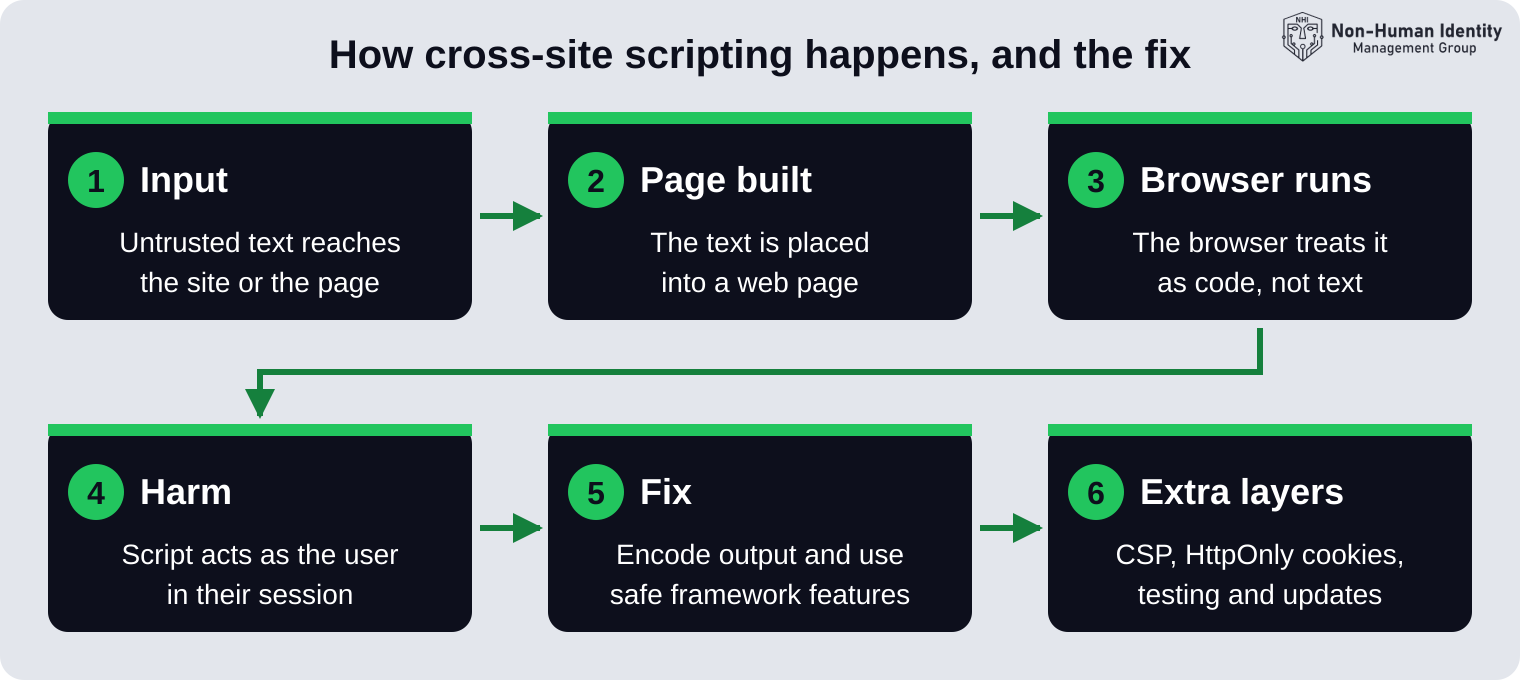
- Untrusted input arrives. Text comes from a user or another system: a comment, a search term, a profile field or part of a web address.
- The page is built. The site or the page's own JavaScript places that text into the page shown to a visitor.
- The browser misreads it. If the text is not made safe for the place it lands, the browser reads part of it as code rather than as words to display.
- Script runs as the user. The script runs inside the trusted site with the visitor's session, so it may read or change what the user sees, or make requests as that user.
- The fix: encode and use safe features. Output encoding converts untrusted text into a safe form for the exact place it is shown, such as the page body, an attribute or a web address. OWASP stresses that encoding for one context does not protect another.[2]
- Add extra layers. A Content Security Policy, HttpOnly cookies, testing and prompt updates reduce the chance and impact of any flaw that slips through.
The three main types
| Type | Where the untrusted text comes from | Why it matters |
|---|---|---|
| Stored XSS (persistent) | Saved on the server, for example in a comment or forum post, and served to everyone who views it.[1] | One flaw can affect many visitors over time. |
| Reflected XSS | Sent in a single request and echoed straight back in the response; victims usually have to be lured to a crafted link.[1] | Often delivered through phishing links. |
| DOM-based XSS | Handled entirely in the browser by the page's own JavaScript.[1] | The server may never see it, so server-side filters can miss it. |
Main defences and extra layers
| Control | What it does | Role |
|---|---|---|
| Framework auto-escaping | Modern frameworks encode output by default; risk returns when developers use their "escape hatches".[2] | Main defence |
| Context-aware output encoding | Encodes text for where it lands: page body, attribute, JavaScript, CSS or web address.[2] | Main defence |
| HTML sanitising | Where users must write formatted text, a maintained sanitiser library removes dangerous parts.[2] | Main defence for rich text |
| Content Security Policy (CSP) | A browser header that controls which scripts a page may load, mainly as a defence against XSS.[5] | Extra layer; OWASP says it should not be the primary defence[2] |
| HttpOnly cookies | Stops JavaScript reading the cookie, which reduces cookie theft through XSS.[6] | Extra layer |
| Web application firewall (WAF) | Filters some malicious requests; OWASP notes WAFs cannot reliably catch all XSS and may miss DOM-based XSS.[2] | Extra layer |
Useful distinctions
- Input validation helps but is not the fix. OWASP says validation does not replace output encoding, safe APIs and sanitising, because validation cannot know how data will later be displayed.[2]
- HttpOnly limits cookie theft, not all harm. MDN notes an HttpOnly cookie is still sent with requests the page's scripts make, so injected script can still act within the session while it runs.[6]
- XSS is not CSRF. Cross-site request forgery tricks a browser into sending a request from another site; XSS runs script inside the trusted site. See XSS vs CSRF.
A worked example
Northgate Community Theatre is a fictional charity with a small website where members can post reviews of shows. A volunteer built the review feature some years ago.
A member, Leena, notices that one review makes the page behave oddly, with a pop-up appearing when the page loads. She reports it to the volunteer web lead, Tom. Tom asks a friend who works in web security to take a look. Their review finds that the review form saves whatever is typed and the page shows it back without encoding, a stored XSS flaw. Anyone signed in who viewed that page could have been affected.
Tom and the trustees agree a plan:
- Contain: Tom hides the reviews page and removes the suspicious review, keeping a copy for the record.
- Fix the code: the review page is moved onto the site's templating system, which encodes output by default, and the old hand-built page is retired.
- Limit impact: session cookies are set to HttpOnly, and a Content Security Policy is introduced in report-only mode first, then enforced once it causes no problems.
- Protect members: all signed-in sessions are ended so members sign in again, and the trustees consider whether any personal data was exposed and whether they need to notify anyone.
- Retest: the security reviewer checks the fixed page before it goes live again.
The fix reduces the risk on that page, but it is not the end of the job. Tom adds a check of other user content areas and plug-ins to the theatre's yearly to-do list.
Myths and misunderstandings
| What people think | What is true |
|---|---|
| XSS only causes harmless pop-ups. | A pop-up is just a common demonstration. OWASP lists outcomes up to full account compromise through session theft.[1] |
| Validating input fixes XSS. | Validation helps, but output encoding, safe APIs and sanitising are still required.[2] |
| Using a modern framework means we cannot have XSS. | Frameworks encode by default, but escape hatches and unsafe patterns can bring the risk back.[2] |
| A Content Security Policy is all we need. | CSP is a useful extra layer, but OWASP warns it is easy to get wrong and should not be the primary defence.[2] |
| The server will always see the attack. | DOM-based XSS happens in the browser and the server may never see it.[1] |
Key terms
- Cross-site scripting (XSS)
- A web application flaw where untrusted input is rendered in a way that causes script to run in a user's browser.
- JavaScript
- A programming language used to add dynamic behaviour to web pages; it runs in browsers and other runtimes.
- Stored XSS
- XSS where malicious script is saved in content such as comments or profiles and served to other users later.
- Reflected XSS
- XSS where an application takes untrusted input from a request and immediately includes it in the response without safe encoding.
- DOM-based XSS
- A client-side flaw where the page's own JavaScript writes unsafe data into the page, which the server may never process.
- Output encoding
- Converting untrusted data into a safe form before the application shows it in a browser, so it is not read as script or markup.
- Sanitisation
- Transforming or constraining input so it can be used safely, for example removing dangerous parts of user-written HTML.
- Content Security Policy (CSP)
- A browser security control that restricts which sources a page can load or run content from.
- A small piece of data a website stores in a browser to remember that a user has already signed in.
- A cookie that JavaScript cannot read, which reduces the risk of theft through injected script.
Common questions
What does cross-site scripting mean?
It means a website lets untrusted text into a page in a way that makes visitors' browsers run it as code, with the trust the browser gives that site.
Why is it called cross-site scripting?
The name comes from early attacks that worked across sites. OWASP notes the term has since broadened to cover injecting almost any content into a page.[2]
What is the best defence against XSS?
Use a modern framework that encodes output automatically and avoid its unsafe escape hatches, encode for the right context, and sanitise user-written HTML with a maintained library. CISA and the FBI also recommend code review, threat modelling and testing throughout development.[4]
Can a user protect themselves?
Users have limited control, because the flaw is in the website. Keeping your browser updated and being careful with unexpected links helps with reflected XSS, but the main fix belongs to the site owner.
How is XSS different from SQL injection?
Both come from untrusted input being treated as code. SQL injection targets the database behind a site; XSS targets the browsers of the site's visitors. See the SQL Injection Prevention Guide.
Does a Content Security Policy break websites?
It can if introduced too strictly at once. We suggest starting in report-only mode, fixing what it reports, then enforcing it. See the Content Security Policy Guide.
First steps
Three things you can do this week:
- Find user content areas. List every page on your sites where visitors can type text that others will see, such as comments, reviews, profiles and messages.
- Update platforms and plug-ins. Apply security updates to your content management system, themes and plug-ins.
- Check your cookies. Ask your developer or hosting provider whether session cookies are set to HttpOnly and whether the site sends a Content Security Policy header.
- Ask the XSS question. Ask developers and suppliers: "Do you rely on framework encoding, and how do you test for cross-site scripting?"
Checklist
- We know every page where user-supplied content is displayed.
- Our sites use a framework or templating system that encodes output by default.
- Developers avoid framework escape hatches, or review each use.
- Any user-written HTML is cleaned with a maintained sanitiser library.
- Session cookies are set to HttpOnly.
- A Content Security Policy is in place, tested in report-only mode first.
- Web applications are security tested, with findings fixed and retested.
- Platforms, themes and plug-ins are kept up to date.
Check your understanding
1. Whose computer runs the injected script in an XSS attack?
Answer: the browser of the person visiting the vulnerable site, not the site's server.
2. What is the difference between stored and reflected XSS?
Answer: stored XSS is saved on the site and shown to many visitors; reflected XSS is echoed back from a single request, usually via a crafted link.
3. Why is output encoding so important?
Answer: it turns untrusted text into a safe form for the place it is shown, so the browser displays it as text instead of running it as code.
4. Does an HttpOnly cookie remove the risk of XSS?
Answer: no. It stops scripts reading the cookie, but injected script can still act within the user's session while it runs.
Suggested learning pathway
- SQL Injection for Beginners: a related beginner guide to read next.
- The OWASP Top 10 for Beginners: a related beginner guide to read next.
- API Security for Beginners: a related beginner guide to read next.
- Start with the wider field in the Application Security Guide.
- For the wider list of web risks, see the OWASP Top 10 Guide.
- For developer-level defences in detail, see the Cross-Site Scripting (XSS) Prevention Guide.
- For encoding and validation together, see the Input Validation and Output Encoding Guide.
- For browser-side protection of the page's own scripts, see the Trusted Types and DOM XSS Prevention Guide.
Standards and references
- Cross Site Scripting (XSS). OWASP Community, OWASP Foundation. https://community.owasp.org/attacks/xss/, accessed 27 Nov 2026.
- Cross Site Scripting Prevention Cheat Sheet. OWASP Cheat Sheet Series, OWASP Foundation. https://cheatsheetseries.owasp.org/cheatsheets/Cross_Site_Scripting_Prevention_Cheat_Sheet.html, accessed 27 Nov 2026.
- 2025 CWE Top 25 Most Dangerous Software Weaknesses. MITRE, page last updated 15 December 2025. https://cwe.mitre.org/top25/archive/2025/2025_cwe_top25.html, accessed 27 Nov 2026.
- Secure by Design Alert: Eliminating Cross-Site Scripting Vulnerabilities. Cybersecurity and Infrastructure Security Agency (CISA) and Federal Bureau of Investigation (FBI). https://www.cisa.gov/resources-tools/resources/secure-design-alert-eliminating-cross-site-scripting-vulnerabilities, accessed 27 Nov 2026.
- Content Security Policy (CSP). MDN Web Docs, Mozilla. https://developer.mozilla.org/en-US/docs/Web/HTTP/Guides/CSP, accessed 27 Nov 2026.
- Set-Cookie header. MDN Web Docs, Mozilla. https://developer.mozilla.org/en-US/docs/Web/HTTP/Reference/Headers/Set-Cookie, accessed 27 Nov 2026.
- A05:2025 Injection. OWASP Top 10:2025, OWASP Foundation. https://top10.owasp.org/2025/A05_2025-Injection/, accessed 27 Nov 2026.
Related NHI Mgmt Group resources: XSS vs CSRF · Web Application Firewall Guide · Small Business Cybersecurity Basics Guide