Patch management is the routine work of finding, prioritising, testing, installing and checking the software updates that fix security flaws and bugs in your devices and systems.
Every phone, laptop, server, router and app needs updates during its life. This guide explains patch management in plain English for newcomers, students, career changers, small business owners and managers who are not security specialists. It covers why updates matter, how a simple patch cycle works, a worked example, common myths and practical first steps for this week.
By the end of this guide you will be able to:
- Explain what a patch is and what patch management involves.
- Understand why some updates must be installed faster than others.
- Describe a simple patch cycle, from inventory to checking the result.
- Identify practical steps to keep your own systems up to date.
Key takeaways
- Updates fix holes attackers use. Many security updates close known weaknesses, and attackers look for systems that have not installed them yet.
- You cannot patch what you do not know you have. A list of your devices and software comes first.
- Not every update is equally urgent. Updates for flaws that are already being exploited, or for systems exposed to the internet, go first.
- Test briefly, then move. A short pilot on a few machines catches most problems; long delays leave the door open.
- Unsupported software is a standing risk. When a product stops getting security updates, plan to replace it. The NIST Cybersecurity Framework 2.0 expects software to be maintained, replaced and removed in line with risk (outcome PR.PS-02).[7]
What it is, in plain English
A patch is a piece of software from the maker of a product that fixes a problem in it. Some patches fix ordinary bugs. A security patch fixes a vulnerability: a weakness that an attacker could abuse to break in, steal data or stop a system working. You will also hear the words "update" and "upgrade". In everyday use they mean much the same thing: a newer version that includes fixes.
NIST, the US standards body, defines enterprise patch management as the process of identifying, prioritising, acquiring, installing and verifying the installation of patches, updates and upgrades across an organisation.[1] It describes patching as a critical part of preventive maintenance for technology, in the same way that servicing keeps a car safe to drive.[1]
A helpful comparison is a product recall for a car. The maker finds a fault, publishes a fix and asks owners to bring the car in. Owners who never respond keep driving with the fault. Patch management is the habit of noticing recalls, booking the work in the right order and checking it was done. Where the analogy breaks down: car recalls are rare, while software updates arrive every week or month, and attackers actively hunt for devices that have missed them.
Why it matters to you
- If you run a small business: turning on automatic updates and replacing unsupported devices are among the cheapest security improvements you can make. They are also part of the UK Cyber Essentials scheme.[3]
- If you are new to a security job: patch status is one of the first things auditors, insurers and colleagues ask about, and you will often be asked to report it.
- If you are a manager: patching needs planned downtime, testing time and budget for replacing old kit. NIST notes that business owners and technology teams often disagree about how much patching is worth, and treats it as a normal cost of doing business.[1]
When a vendor releases a security patch, the details of the flaw often become public. The UK National Cyber Security Centre (NCSC) warns that attackers can work out what the original flaws were from the patches themselves, so taking too long to test leaves you exposed.[2] In the US, the Cybersecurity and Infrastructure Security Agency (CISA) keeps a public list of vulnerabilities known to be exploited in real attacks, the Known Exploited Vulnerabilities (KEV) catalog, which many teams use to decide what to fix first.[4]
How it works, step by step
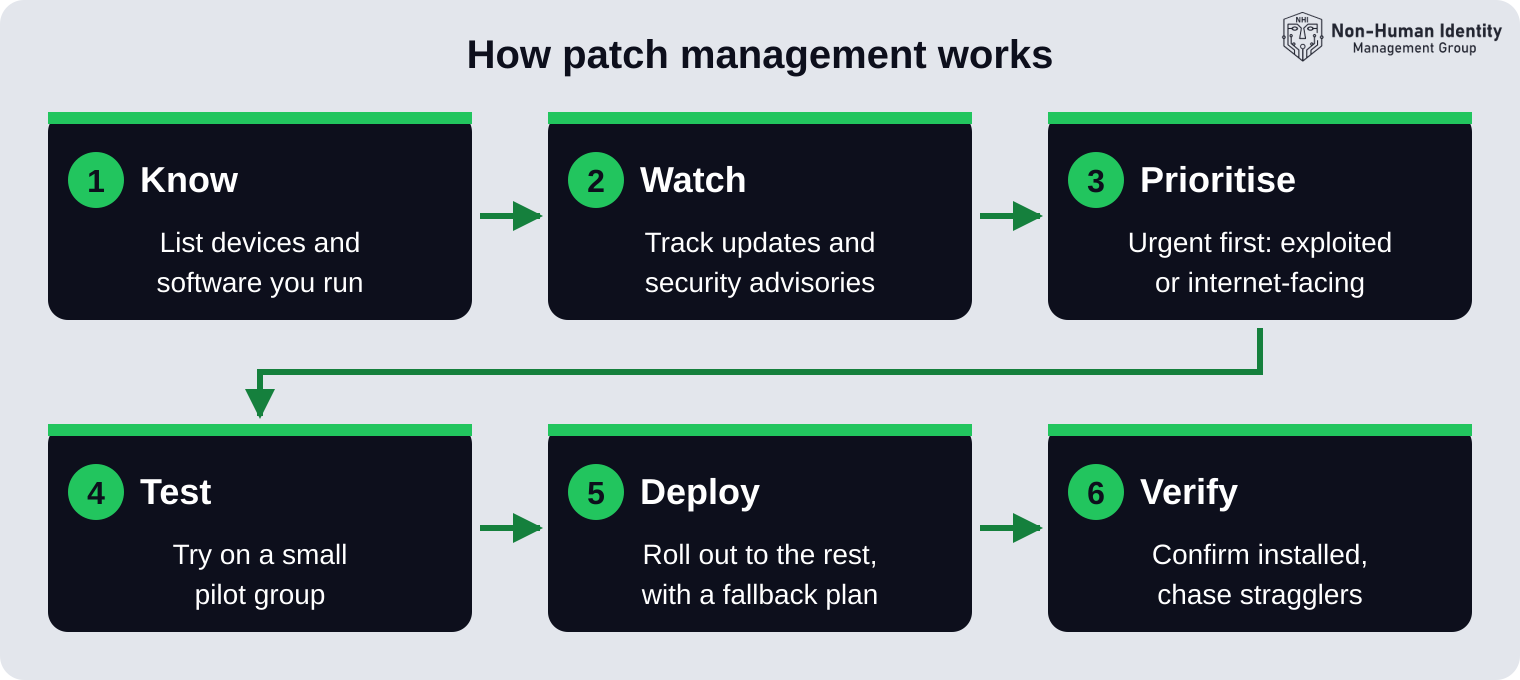
Tools and team sizes vary, but most patch cycles follow the same steps.
- Know what you have. Keep a list of devices, operating systems, apps and network equipment, and who looks after each. NIST lists this as control CM-8 (System Component Inventory) in SP 800-53.[6]
- Watch for updates. Turn on automatic updates where possible, and follow your vendors' security advisories for things that do not update themselves, such as routers and firewalls.[2]
- Prioritise. Decide what goes first. Useful signals include the vendor's severity rating, the CVSS score (a 0 to 10 severity score maintained by FIRST, now at version 4.0), whether the flaw is in the KEV catalog, and whether the system is reachable from the internet.[5][4]
- Test. Install the update on a small pilot group first, such as the IT team's own machines, and check that key apps still work. Keep this short.[2]
- Deploy. Roll out to everyone else, often in waves, inside an agreed maintenance window if a restart or downtime is needed. Have a fallback plan, such as a recent backup or the ability to uninstall the update.
- Verify. Check that the update actually installed. Automatic updates can fail when a device is short of storage, power or a restart.[2] Chase the devices that missed it.
The table below shows one way to sort updates by urgency. These are suggestions, not a standard; your own policy should set the timescales.
| Situation | Suggested urgency | Why |
|---|---|---|
| Flaw listed as known exploited, on an internet-facing system | Emergency: as soon as possible | Attackers are already using it and can reach the system. |
| Vendor rates the update critical or high, or CVSS v3 base score 7 or above | Within 14 days (the Cyber Essentials requirement)[3] | Serious flaws that attackers are likely to target. |
| Other security updates | Next regular cycle | Lower severity, but still worth applying; Cyber Essentials strongly recommends all updates within 14 days.[3] |
| No update exists yet (a zero-day vulnerability) | Use the vendor's workaround | Reduce exposure, for example by switching off the affected feature, until a fix arrives. |
Useful distinctions
- Patch management is not the same as vulnerability management. Vulnerability management is the wider job of finding and dealing with all weaknesses, including bad settings. Patching is one of the main ways to fix them.
- Cloud services shift some patching to the provider. In the Cyber Essentials requirements, security update management for software as a service (SaaS) is the provider's job, while for infrastructure as a service (IaaS) and platform as a service (PaaS) it is shared.[3] On Amazon EC2, for example, AWS states that customers are responsible for patching their guest operating system and applications.[8]
- Rolling back is a controlled exception. If an update breaks something important, removing it should be approved, recorded and time-limited, with a date to try again, not a quiet decision to skip that update for good.
- Patching tools are powerful accounts. The tool that pushes updates to every machine can also push anything else. Protect its admin accounts like any other privileged access.
A worked example
Harbour Dental is a fictional dental practice with 25 staff, 30 laptops and desktops, two servers, a router and a cloud email service. Leah, the practice manager, looks after IT with help from an outside support company.
Leah sets up a simple routine:
- Inventory: the support company exports a device list from its management tool. Leah finds an old reception PC running an operating system that no longer gets security updates, and an X-ray workstation nobody had listed.
- Automatic updates: automatic updates are turned on for operating systems, browsers and office apps on all staff devices.
- Pilot ring: Leah's own laptop and one dentist's laptop get updates two days before everyone else.
- Monthly check: on the first Monday of each month, Leah reviews a report of devices that are behind on updates.
In March, the router maker publishes an urgent security update for a flaw that appears in the KEV catalog. Because the router is internet-facing and does not update itself, Leah's support company installs it that evening, after checking the router's settings are backed up. An update for the X-ray software breaks image import on the pilot laptop, so Leah records an approved two-week delay for that one update, asks the supplier for a fixed version, and installs it when it arrives.
The old reception PC is replaced the next quarter. Until then, it is kept off the internet and used only for the booking system. The routine does not make the practice immune to attack, but it closes the most obvious gaps and gives Leah a clear picture of what is still outstanding.
Myths and misunderstandings
| What people think | What is true |
|---|---|
| Automatic updates mean I never have to think about patching. | They help a lot, but they can fail or stall, and many devices such as routers, printers and some business apps do not update automatically. Check regularly.[2] |
| Updates break things, so it is safer to wait. | Waiting has its own risk, because attackers study new patches. A short pilot is a better answer than a long delay.[2] |
| Only Windows computers need patching. | Phones, Macs, Linux servers, browsers, apps, network devices and firmware all receive security updates. |
| A high CVSS score always means fix it first. | CVSS describes how severe a flaw is.[5] Whether it is being exploited, and whether your system is exposed, matter just as much for deciding order. |
| Old software is fine if it still works. | Once software is unsupported it gets no more security fixes. The NCSC advises replacing unsupported software and devices as soon as you are able.[2] |
Key terms
- Patch
- A software or firmware update that fixes bugs or closes security vulnerabilities.
- Security patch
- An update that fixes a specific vulnerability.
- Patch management
- The process of evaluating, testing and deploying updates to fix vulnerabilities and improve stability.
- Vulnerability
- A flaw or weakness in code, settings or design that could be abused.
- Exploit
- A method or piece of code that takes advantage of a weakness to gain access or cause harm.
- CVE
- Common Vulnerabilities and Exposures: a standard identifier for a publicly known vulnerability. It names the flaw but does not score it.
- CVSS
- Common Vulnerability Scoring System: a standard way to rate how severe a vulnerability is.
- Zero-day vulnerability
- A flaw with no official fix available at the time it is discovered or exploited.
- End-of-life software
- Software that no longer receives security fixes or vendor support.
- Maintenance window
- An agreed period when planned work, such as installing updates and restarting, can be done with controlled disruption.
- Hotfix
- A small, urgent fix released outside the normal update cycle.
- Firmware
- The low-level software built into hardware such as routers, drives and controllers.
Common questions
What is patch management in simple terms?
It is keeping track of which updates your devices and software need, installing the important ones quickly and safely, and checking they worked.
How quickly should security updates be installed?
It depends on the risk. As one benchmark, the UK Cyber Essentials scheme requires critical and high-risk updates within 14 days of release.[3] Flaws that are being actively exploited on internet-facing systems deserve faster action.
What is Patch Tuesday?
It is the informal name for the regular monthly day when some large vendors, most famously Microsoft, release a batch of security updates. Many teams plan their patch cycle around it.
What if an update breaks something?
Roll back on the affected machines only, as an approved, recorded and time-limited exception, and ask the vendor for a fix. Meanwhile, reduce exposure in other ways, for example by limiting who can reach that system.
Do I need to patch cloud services?
Partly. Software as a service is largely patched by the provider, but servers and platforms you run in the cloud usually still need your updates.[3][8]
Is patch management the same as vulnerability management?
No. Vulnerability management finds and tracks all weaknesses, including settings. Patching is one of the main ways to fix them. NIST lists them as separate controls: RA-5 (Vulnerability Monitoring and Scanning) and SI-2 (Flaw Remediation).[6]
First steps
Three things you can do this week:
- Turn on automatic updates for operating systems, browsers and office apps on every device you control, then check a few devices to confirm they are current.
- Make a simple list of your devices and key software, including routers, firewalls and printers, and note which ones are no longer supported by their maker.
- Pick a pilot group and a monthly routine. Choose two or three machines to receive updates first, and book a regular time to review what is behind. We suggest starting the review with anything internet-facing.
Checklist
- We have a list of our devices and software, and someone owns it.
- Automatic updates are on wherever the product supports them.
- We know which devices do not update themselves, and check them on a schedule.
- Critical and high-risk updates are installed within a set time, such as 14 days.
- Known exploited flaws on internet-facing systems are treated as emergencies.
- Updates go to a small pilot group first.
- We confirm updates installed and follow up on devices that missed them.
- Any delayed or rolled-back update has an approval, a record and an end date.
- Unsupported software and devices have a replacement plan.
Simple measures that show progress: the percentage of devices fully up to date, the average time from release to install for critical updates, the number of unsupported systems still in use, and the number of open patching exceptions.
Check your understanding
1. Why is the first step of patch management making a list of your devices and software?
Answer: because you cannot update, or even notice the need to update, something you do not know you have.
2. Which should usually go first: a medium-severity update for an office PC, or a fix for a known exploited flaw on your internet-facing router?
Answer: the router fix. The flaw is already being used by attackers and the device can be reached from the internet.
3. Why is a long testing period risky?
Answer: attackers can study a patch to work out the flaw it fixes, so systems left unpatched become easier targets over time.
4. What should happen when software reaches end of life?
Answer: plan to replace it, and reduce its exposure until you do, because it will not receive new security fixes.
Suggested learning pathway
- For the basics around patching, start with the Small Business Cybersecurity Basics Guide.
- For managing laptops and phones centrally, see the Small Business Device Management Guide.
- To see how patching fits the wider discipline, read Vulnerability Management vs Patch Management.
- For the full practitioner process, see the Patch Management Guide.
- For NIST's planning approach in depth, see the NIST SP 800-40 Rev 4 Patch Management Guide.
- For urgent fixes, see the Emergency Out-of-Band Patching Playbook.
- To write down your own rules, use the Patch Management Policy Template.
Standards and references
- SP 800-40 Rev. 4, Guide to Enterprise Patch Management Planning: Preventive Maintenance for Technology. National Institute of Standards and Technology (NIST), April 2022. https://csrc.nist.gov/pubs/sp/800/40/r4/final.
- Device Security Guidance: Keeping devices and software up to date. National Cyber Security Centre (NCSC). https://www.ncsc.gov.uk/collection/device-security-guidance/managing-deployed-devices/keeping-devices-and-software-up-to-date, accessed 27 Nov 2026.
- Cyber Essentials: Requirements for IT Infrastructure v3.3. National Cyber Security Centre (NCSC), April 2026, effective 27 April 2026. https://www.ncsc.gov.uk/cyberessentials/resources, accessed 27 Nov 2026.
- Known Exploited Vulnerabilities Catalog. Cybersecurity and Infrastructure Security Agency (CISA). https://www.cisa.gov/known-exploited-vulnerabilities-catalog, accessed 27 Nov 2026.
- Common Vulnerability Scoring System SIG. Forum of Incident Response and Security Teams (FIRST). https://www.first.org/cvss/, accessed 27 Nov 2026.
- SP 800-53 Rev. 5, Security and Privacy Controls for Information Systems and Organizations. National Institute of Standards and Technology (NIST). https://csrc.nist.gov/pubs/sp/800/53/r5/upd1/final.
- The NIST Cybersecurity Framework (CSF) 2.0. National Institute of Standards and Technology (NIST), February 2024. https://www.nist.gov/cyberframework.
- Shared Responsibility Model. Amazon Web Services. https://aws.amazon.com/compliance/shared-responsibility-model/, accessed 27 Nov 2026.
Related NHI Mgmt Group resources: Vulnerability Management Guide · Ransomware Basics for Small Businesses Guide · Small Business Cyber Security Checklist