A cookie is a small note a website asks your browser to keep and show again later.
This guide is for anyone who has clicked past a cookie banner and wondered what it meant. You do not need any technical background. If your business has a website, the same rules decide what your site may store on visitors' devices.
In short
- Cookies help sites remember things, such as what is in your basket. Some are also used to follow what you do.
- Tracking also uses other tools, such as tiny hidden images and device "fingerprints", not just cookies.
- In the UK and EU, sites usually need your consent before using non-essential cookies or trackers.
- Saying no should be as easy as saying yes, and you can change your mind later.
What you will learn
- Explain what a cookie does and why sites use them.
- Spot a cookie banner that makes saying no harder than saying yes.
- Check and change your cookie choices on a site and in your browser.
- Ask what trackers your own website uses.
Status: correct as at 28 November 2026, based on the UK Information Commissioner's Office guidance and the EU ePrivacy Directive on EUR-Lex. Laws change; check the official text.
This guide explains the topic in general terms and is not legal advice.
- Website note (cookie)
- a small piece of data a site stores in your browser and reads back later.
- Following you around (tracking)
- recording what you do online, often across many sites.
- Your yes or no (consent)
- a clear choice you make before a site uses non-essential trackers.
What are cookies and online tracking?
Think of a cloakroom ticket. You hand over your coat, get a ticket, and show it when you come back. A cookie works like that ticket for websites.
A website does not remember you between clicks on its own. So it sends your browser a small piece of data, a cookie. Your browser sends it back with later visits to the same site.[5]
Cookies have three main uses. They keep you signed in and remember your basket. They remember choices such as your language. And they can record what you do, which is called tracking.[5]
Tracking does not only use cookies. The UK data protection regulator lists other tools too. These include tracking pixels, which are tiny hidden images that tell a server a page or email was opened. They also include device fingerprinting, which recognises a device from details of its hardware and software.[2]
Where the comparison stops working: you can see a cloakroom ticket, and only the cloakroom reads it. Cookies are hidden, and some come from other companies whose content sits on the page.
Why does it matter?
Most cookies are helpful. But cookies from other companies on a page can be used to build a profile of your browsing across many sites.[5]
If you browse at home
What could happen: you press "Accept all" every time, and advertisers build a detailed picture of your interests.
Check this: look for a "Reject" or "Manage" button before you press Accept.
If you run a small business website
What could happen: an add-on you installed sets advertising cookies before visitors agree, which the rules do not allow.
Check this: ask your web supplier which cookies and trackers your site uses, and when they start.
Next: GDPR for Beginners
If you are new to marketing
What could happen: you add a tracking pixel to emails without thinking about consent.
Check this: treat pixels, scripts and fingerprinting like cookies when you plan consent.
What does it look like?
Here is a made-up cookie banner. It shows a common problem.
Example only. All values are made up.
shop.example.com
We value your privacy!                         (1)
We and our 214 partners use cookies to
improve your experience and show you ads.      (2)
Analytics and ads are switched ON              (3)
[ ACCEPT ALL ]          more options           (4)
- A friendly heading. It tells you nothing about what happens next.
- Many partners means your visit may be shared with many other firms.
- Non-essential trackers are already switched on before you choose.
- A big Accept button, a small link, and no Reject button at all.
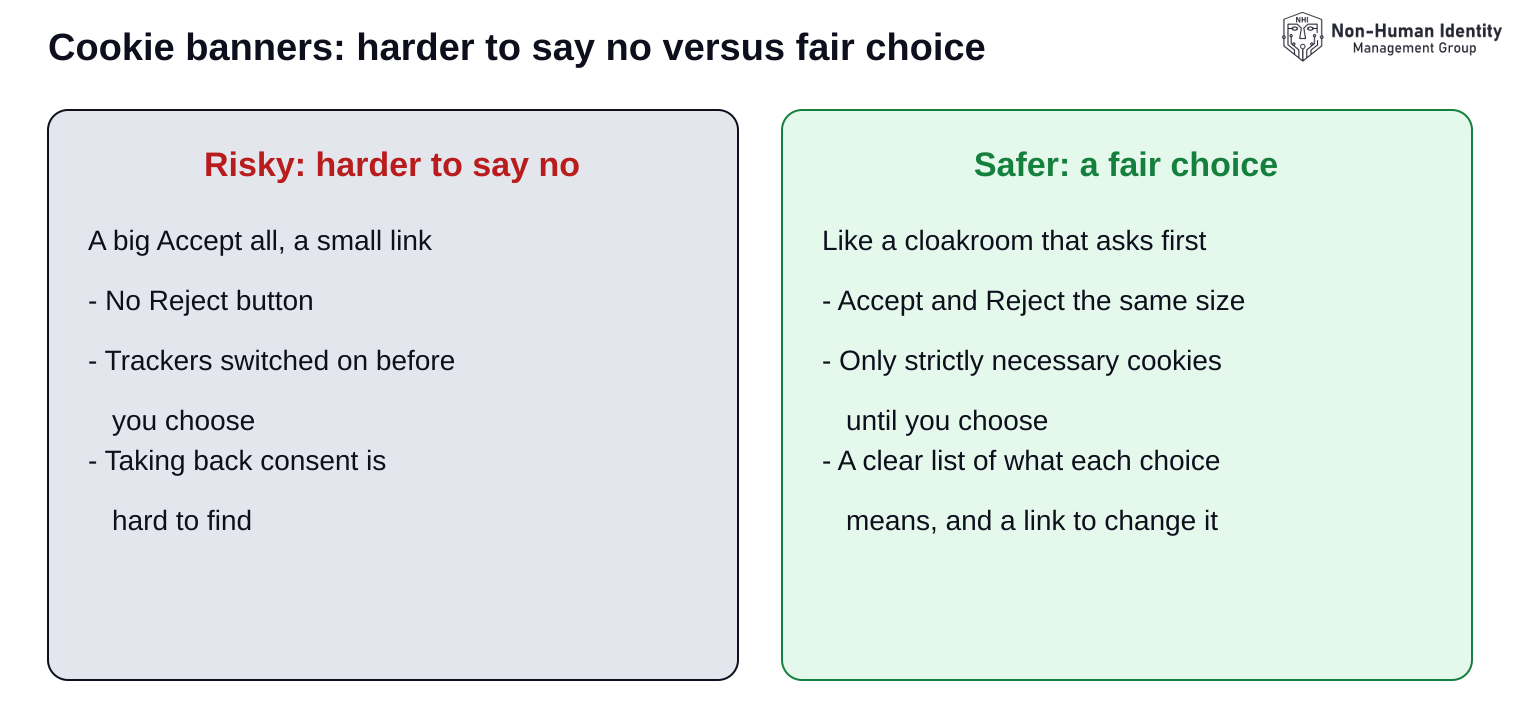
Why this is risky: saying yes takes one click, while saying no is hidden. The UK regulator gives a banner like this as an example of poor practice.[3]
The safer way: a banner with Accept and Reject buttons of equal size, and non-essential trackers off until you choose.
How does it work?
Here is what usually happens when you visit a site that follows UK or EU rules:
- The site asks. A banner appears before non-essential trackers run. Cookies that are strictly necessary, such as the one that keeps your basket, can be used without asking.[4]
- You choose. You accept, reject or pick categories. Carrying on browsing without choosing does not count as consent.[3]
- Trackers run, or do not. If you agreed, the site and its partners set cookies or use other trackers.
- Your browser sends cookies back. On later visits, your browser shows each site its own cookies.[5]
- You can change your mind. Taking back consent should be as easy as giving it.[3]
The legal rule behind this is about your device. In the EU, storing information on your device, or reading what is already there, needs your consent after clear information. There are two exceptions: sending a communication, and what is strictly necessary for a service you asked for.[1] The UK has a similar rule. It also has extra exceptions for simple visitor counts and for remembering how you like a site to look, as long as you can object.[4]
A worked example
Ezra Bello is shopping online for a new pair of walking boots. A banner pops up on the first site he visits.
It has a big "Accept all" button and a small "more options" link. There is no Reject button. Ezra is in a hurry, but he has read that saying no should be as easy as saying yes.
He clicks "more options". He finds that advertising and "personalisation" are already switched on. He switches them off, keeps the basket cookies, and saves his choice. The site still works, and he can add boots to his basket.
The next site shows a fairer banner, with Accept and Reject buttons of the same size. He presses Reject in one click.
Later that week, Ezra notices boot adverts following him from site to site. He opens the cookie settings in his browser and deletes the cookies for shops he does not use. He also checks that his browser blocks cookies from other companies, which some browsers do by default.[5]
He knows this will not end all tracking. Hidden images and fingerprinting can still be used.[2] But he now makes a choice on each banner instead of clicking Accept out of habit. The adverts that follow him become fewer, and he feels more in control.
Myths and mistakes
| What people think | What is true |
|---|---|
| Cookie rules only cover cookies. | The rules cover storing or reading information on a device, so pixels, fingerprinting and web storage can be covered too.[2] |
| If I keep browsing, I have agreed. | The UK regulator says silence or doing nothing does not count as consent.[3] |
| Cookies are viruses or spyware. | Cookies are small pieces of data, not programs. The privacy question is what they are used for. |
| Blocking third-party cookies stops all tracking. | It reduces one kind. Pixels, link tricks and fingerprinting can still track you.[2] |
| Advertising cookies count as essential. | The UK regulator says advertising is not exempt from the consent rules.[4] |
What can I do this week?
- Look for the Reject button on the next three banners you see, before you press anything.
- Open your browser's privacy settings and check how it handles cookies from other companies.
- Delete cookies for sites you no longer use.
- Ask your web supplier, if you run a site, for a list of its cookies and trackers and when each one starts.
Checklist
- I can explain what a cookie is in one sentence.
- I look for a Reject or Manage option before accepting cookies.
- I know where to change cookie choices on a site and in my browser.
- I know that tracking can also use pixels and fingerprinting.
- Our website keeps non-essential trackers off until a visitor agrees.
- Our banner makes rejecting as easy as accepting.
- Visitors can change their minds easily, and we stop the trackers when they do.
Common questions
Do all cookies need consent?
No. Cookies that are strictly necessary for a service you asked for, such as keeping your basket, can be used without asking.[4] In the UK, simple visitor counts and appearance settings also have exceptions, as long as you get clear information and a free way to object.
Is it safe to reject cookies?
Yes. Rejecting extra cookies should not stop the main parts of a site from working. The cookies a site needs for that are allowed without consent. Some extras, such as embedded videos or social media buttons, may not work the same way.
What is the difference between first-party and third-party cookies?
A first-party cookie usually comes from the site you are visiting. A third-party cookie usually comes from another company whose content is on the page. The UK regulator notes these labels matter less than who uses the data and why.[2]
Are tracking pixels in emails covered?
Yes, they can be. The UK regulator lists tracking pixels, including ones that record when an email is opened, among the tools the consent rules cover.[2] See the Email Tracking Pixels Guide for more.
What is "consent or pay"?
Some sites offer a choice: agree to personalised adverts, or pay to avoid them. The UK regulator says this can be lawful if the site can show that consent is freely given. Our Consent or Pay Models guide explains more.[6]
Where next?
Ready for the detail? Read the practitioner guide: Cookie and Tracking Technology Compliance Guide. It goes further into auditing a site's trackers, designing a compliant banner and keeping records of consent.
Also useful:
- Consent Management Guide: Cookies, CMPs and GPC
- ePrivacy Directive Guide
- Data Privacy for Beginners
- Browser Security for Beginners
Related NHI Mgmt Group resources: ePrivacy Directive vs GDPR · Cookie Security Guide · Email Tracking Pixels Guide · Consent or Pay Models
Key terms
- A small piece of data a website stores in your browser and reads back on later visits.
- A cookie set by another company whose content appears on the page, often used to track across sites.
- A cookie that stays after you close the browser, until it expires or is deleted.
- Cookies a site needs to provide the service you asked for, such as a basket, which do not need consent.
- Tracking pixel
- A tiny hidden image or code that tells a server when a page or email is opened.
- Device fingerprinting
- Recognising a device from details of its hardware and software, without a cookie.
- The pop-up where a site asks for your choice about cookies and trackers.
- ePrivacy Directive
- The EU law that sets the consent rule for storing or reading information on your device.
Sources and further reading
- Directive 2002/58/EC concerning the processing of personal data and the protection of privacy in the electronic communications sector (Directive on privacy and electronic communications), Article 5(3), consolidated text as amended by Directive 2009/136/EC. EUR-Lex. https://eur-lex.europa.eu/legal-content/EN/TXT/HTML/?uri=CELEX:02002L0058-20091219, accessed 28 Nov 2026.
- What are storage and access technologies? Guidance on the use of storage and access technologies. Information Commissioner's Office (ICO). https://ico.org.uk/for-organisations/direct-marketing-and-privacy-and-electronic-communications/guidance-on-the-use-of-storage-and-access-technologies/what-are-storage-and-access-technologies/, accessed 28 Nov 2026.
- How do we manage consent in practice? Guidance on the use of storage and access technologies. Information Commissioner's Office (ICO). https://ico.org.uk/for-organisations/direct-marketing-and-privacy-and-electronic-communications/guidance-on-the-use-of-storage-and-access-technologies/how-do-we-manage-consent-in-practice/, accessed 28 Nov 2026.
- What are the exceptions? Guidance on the use of storage and access technologies. Information Commissioner's Office (ICO). https://ico.org.uk/for-organisations/direct-marketing-and-privacy-and-electronic-communications/guidance-on-the-use-of-storage-and-access-technologies/what-are-the-exceptions/, accessed 28 Nov 2026.
- Using HTTP cookies. MDN Web Docs, Mozilla. https://developer.mozilla.org/en-US/docs/Web/HTTP/Guides/Cookies, accessed 28 Nov 2026.
- Consent or pay. Information Commissioner's Office (ICO), published 20 October 2025. https://ico.org.uk/for-the-public/consent-or-pay/, accessed 28 Nov 2026.