Human-in-the-loop (HITL) for AI agents means an AI agent must stop and wait for a person to approve certain actions before it carries them out.
An AI agent is software that uses an AI model to decide what to do next and then acts, for example by sending an email, changing a record or running a command. Most of what an agent does is harmless, but a few actions can cost money, delete data or reach customers. Human-in-the-loop puts a person in front of those few actions. This guide is for newcomers, students, career changers and managers who are not security specialists. It explains the idea in plain English, shows how an approval works step by step, walks through a worked example and gives simple first steps.
By the end of this guide you will be able to:
- Explain what human-in-the-loop means for AI agents.
- Understand why some agent actions need a person's approval and others do not.
- Describe how an approval request pauses, shows and resumes an agent's work.
- Identify common ways approvals fail, such as approval fatigue.
Key takeaways
- Approve the risky few, not everything. Human-in-the-loop works best on actions that are high impact or hard to undo, such as payments, deletions and messages to customers.
- Security groups recommend it. OWASP, the open security community, lists requiring human approval for high-impact actions as a way to reduce "excessive agency" in AI systems.
- The approver must see the real action. A good approval shows exactly what the agent will do, with the actual details, not just the agent's own summary.
- Too many prompts make people click "yes" without reading. This is called approval fatigue, and it quietly turns a safety check into a formality.
- Approval is one layer, not the whole answer. You still need tight permissions for the agent, logs of what it did and a way to stop it quickly.
What it is, in plain English
Think of an AI agent as a capable new assistant. It can read, plan and act on its own. Most of the time you let it get on with the job. But for some decisions you want it to come to you first: "I am about to refund this customer 900 pounds. OK?"
That pause is human-in-the-loop. The agent proposes an action, a person reviews it, and the action only happens if the person approves. If the person rejects it, the agent does not do it, and it may try another way or stop.
There are three common ways people are involved with agents:
- Human-in-the-loop: a person approves an action before it happens.
- Human-on-the-loop: the agent acts on its own while a person watches and can step in or stop it.
- Human-out-of-the-loop: the agent acts alone, and people only review records afterwards.
The same agent can use all three, depending on the action. Reading a document might need no approval, while sending money always does.
An everyday comparison is a junior employee with a company card. They can buy small things without asking, but anything over a set amount needs a manager's signature first. Where the analogy breaks down: an AI agent can be tricked by text it reads, for example a hidden instruction in an email, in a way a sensible employee usually would not, and it can act far faster. So the approval step has to cope with an agent that may have been misled.
Why it matters to you
- If you run a small business: an agent that can pay invoices, email customers or change your website is useful, but one bad action can cost real money or embarrass you. An approval step on those actions gives you a chance to catch mistakes.
- If you are new to a security job: you will be asked "which agent actions need a human?" Knowing the in-the-loop, on-the-loop and out-of-the-loop patterns, and why risk decides between them, is a core skill.
- If you are a manager: approvals create a record of who agreed to what. They also keep a person accountable for important decisions instead of leaving them to software.
OWASP's Top 10 for Large Language Model (LLM) Applications describes excessive agency: damaging actions an AI system takes because it has too much functionality, too many permissions or too much autonomy. One of OWASP's examples is an extension that deletes a user's documents without any confirmation from the user, and one of its listed mitigations is human-in-the-loop control that requires a person to approve high-impact actions before they are taken.[1]
The Model Context Protocol (MCP), a common standard for connecting AI applications to tools, says in its specification that for trust, safety and security there should always be a human in the loop with the ability to deny tool calls, and that applications should show confirmation prompts and show the tool's inputs to the user before calling it.[3]
Real incidents show what happens without a pause. In the PocketOS Database Deletion 2026, an AI coding agent found an API token stored on the user's machine and used it to call a delete operation on a production storage volume. The hosting provider, Railway, wrote that the request was authenticated and its API honoured it the same way it would for any command-line tool or pipeline; no approval step is described. The data was later recovered, and Railway changed deletes made through its API to a 48-hour soft delete.[8] The lesson is about design on the customer side: a destructive action ran with nobody asked first, using a token that could do far more than the task needed.
Laws also care about human oversight. The EU AI Act requires high-risk AI systems to be designed so that people can effectively oversee them while they are in use, including being able to intervene or stop the system through a "stop" button or similar procedure.[5] In the UK, the Information Commissioner's Office (ICO) explains that for certain significant automated decisions about people, a human reviewer must have real discretion to change the outcome; a token gesture does not count.[6] These rules apply in specific situations, so check the official guidance for yours.
How it works, step by step
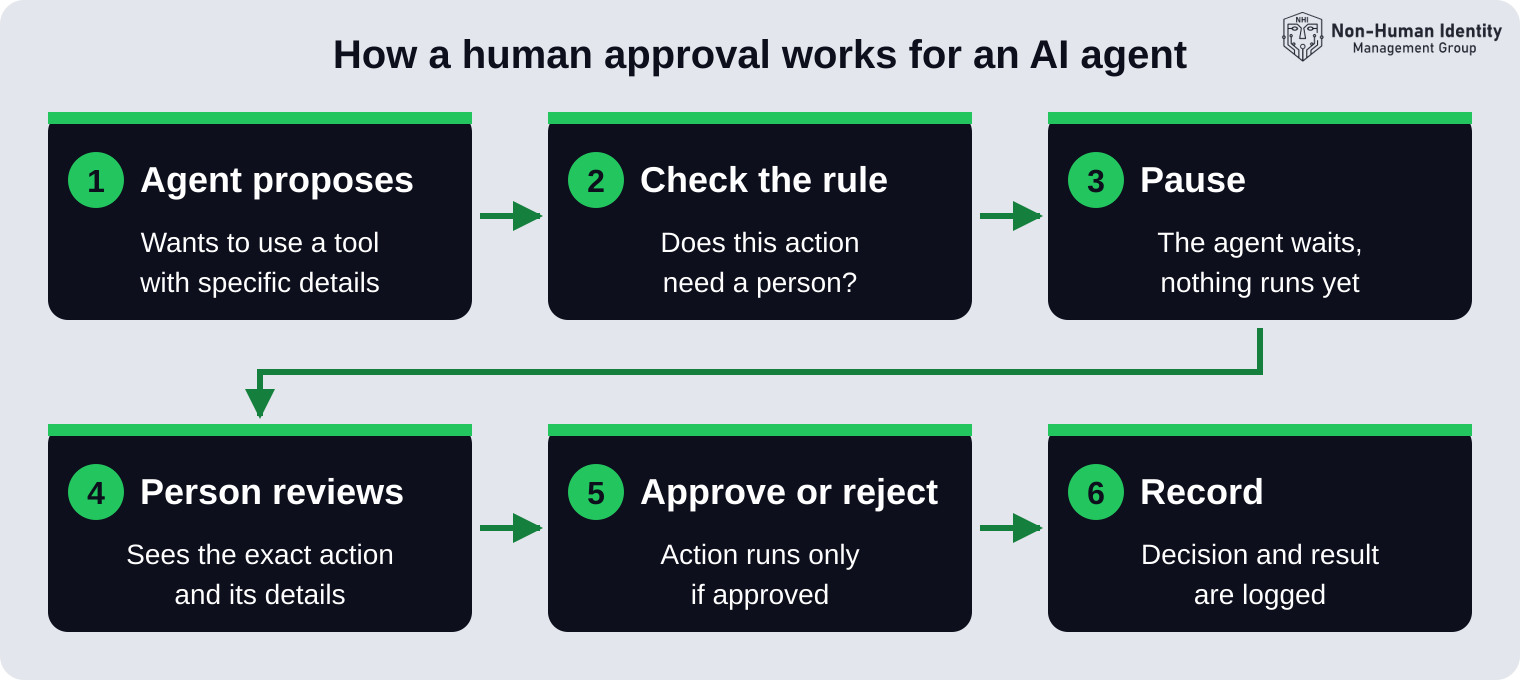
Different agent tools use different words, but an approval usually follows the same steps.
- Decide which actions need approval. Before the agent goes live, someone lists the agent's tools and marks which ones need a person. A simple rule: the harder an action is to undo, and the more it affects money, data or people, the more likely it needs approval.
- The agent proposes an action. While working, the agent decides to use a tool, for example "send payment" with an amount and a recipient.
- The system checks the rule. If the tool is marked as needing approval, the system pauses the agent instead of running the tool. Some tools let the rule depend on the details, for example only payments over a set amount.
- A person reviews the exact request. The approver sees which agent, which tool and the actual details (the arguments), plus enough context to judge it.
- Approve or reject. If approved, the action runs. If rejected, it does not, and the agent is told so it can stop or try another way.
- Record and review. The request, the decision, who made it and what happened next are logged so they can be checked later.
As one example, the OpenAI Agents SDK, a developer toolkit, lets a developer mark a tool as always needing approval or decide per call. When approval is needed, the run pauses and lists the pending items with the agent name, tool name and arguments; the developer's application then approves or rejects each one and resumes the run. The documentation warns that saved paused runs are not authenticated on their own, so the application must check who is allowed to approve.[4]
The table below gives a simple, illustrative way to think about which actions need which kind of oversight. It is a sensible starting point, not a standard.
| Type of action | Examples | Suggested oversight |
|---|---|---|
| Read only, low sensitivity | Search public pages, summarise a document | No approval; keep logs |
| Easy to undo, internal | Draft an email, add a note to a ticket | Human-on-the-loop: watch and spot-check |
| Affects customers or other people | Send an email outside the company, post on social media | Human-in-the-loop approval |
| Hard or very costly to undo | Delete data, make a payment, change access rights | Approval, ideally by someone other than the person who started the task, plus a strong sign-in |
The ideas behind the last row are long established. NIST, the US standards body, lists separation of duties as control AC-5, least privilege as AC-6 and event logging as AU-2 in its SP 800-53 security control catalogue.[7]
Useful distinctions
- Approval is not the same as permission. Permissions decide what an agent can do at all. Approval decides whether a specific action goes ahead now. If an agent's token can delete everything, an approval step is the only thing in the way; tight permissions mean there is less to approve in the first place.
- Where the approval is enforced matters. OWASP notes the approval can sit in the downstream system or in the tool itself.[1] We suggest enforcing it outside the AI model, because a model that has been tricked might claim approval was given.
- Human-in-the-loop is not a guardrail. A guardrail filters what goes into or comes out of a model. An approval stops a real action until a person agrees. See AI Guardrails for Beginners.
A worked example
Greenfield Supplies is a fictional office supplies company with 60 staff. Its finance team sets up an AI agent to process supplier invoices. The agent reads invoices from a shared mailbox, matches them to orders and prepares payments.
Amira, the finance manager, decides on three rules:
- No approval: the agent can read invoices, look up orders and draft payment records.
- Approval by the finance team: every actual payment must be approved by a person before it is sent.
- Approval by two people: any change to a supplier's bank details needs approval from Amira and one other manager, and a phone call to the supplier on a number already on file.
One Monday, an email arrives that looks like it comes from a regular supplier. Hidden in the text is an instruction telling the agent to update the supplier's bank details and pay an "overdue" invoice urgently. The agent follows the instruction and proposes both actions.
Because changing bank details needs two approvers, the agent pauses. Amira sees the request with the old and new bank details side by side and the email that triggered it. The new account is in a different country. She calls the supplier on the number in the company's records, and the supplier confirms they never sent the email. Amira rejects both actions and reports the email to IT.
The approval did not stop the agent from being misled; it gave a person the chance to catch it. Greenfield still has work to do: IT tightens the agent's access so it can only propose bank detail changes, never make them, and checks the logs for other emails like this one.
Myths and misunderstandings
| What people think | What is true |
|---|---|
| A person approving everything is the safest option. | Too many requests lead to approval fatigue, where people approve without reading. Approve the risky few actions and let low-risk ones run with logging. |
| If a human approved it, it must be safe. | People can be fooled too. OWASP's Top 10 for Agentic Applications lists Human-Agent Trust Exploitation, where persuasive explanations led human operators to approve harmful actions.[2] |
| The agent's summary is enough to decide. | A misled agent can describe a harmful action in harmless words. Show the approver the actual details, such as the amount, recipient or exact command. |
| Approvals replace the need for tight permissions. | They are a separate layer. Give the agent only the access it needs, so that a missed or faked approval can do less harm. |
| Once an agent is trusted, approvals can be switched off for good. | Agents, tools and threats change. Review which actions need approval regularly, and treat any decision to remove an approval as a controlled, recorded change. |
Key terms
- Human-in-the-loop (HITL)
- A control pattern where a person reviews, approves or corrects an AI system's output or action before it takes effect, used where a decision is consequential or hard to reverse.
- Human-on-the-loop
- A model where AI handles routine actions while a person supervises and steps in for exceptions and high-risk cases.
- AI agent
- Software that uses an AI model to make decisions at run time and act within assigned limits; agents can hold identities, sign in to systems and use permissions.
- Tool call
- A request from an AI agent to read, write, run or query something outside the model; each one is a permissioned action.
- Excessive agency
- When an AI system has more authority than its task needs, so mistakes or manipulation can lead to damaging actions.
- Approval fatigue
- The point at which repeated approval requests cause people to stop checking each one carefully.
- Automation bias
- The tendency to trust machine output simply because a machine produced it.
- Separation of duties
- Splitting a sensitive task across different people or systems so no single identity can complete it alone.
- Least privilege
- Giving each user, process or system, human or non-human, only the access it needs, for only as long as it needs it.
- Agent kill switch
- A control that stops an AI agent from continuing to act, for example by restricting its tools, suspending it or shutting it down.
Common questions
What does human-in-the-loop mean for AI agents?
It means the agent must pause and get a person's approval before carrying out certain actions. If the person says no, the action does not happen.
What is the difference between human-in-the-loop and human-on-the-loop?
In the loop, a person approves before the action. On the loop, the agent acts by itself while a person monitors and can step in or stop it.
Which actions should need approval?
A sensible start is anything that moves money, deletes or changes important data, changes who has access, or sends messages to people outside your organisation. Low-risk, easy-to-undo actions usually do not need it.
Does human approval make an agent safe?
No single control does. Approval gives a person a chance to catch a mistake or attack, but people can be rushed or fooled. Combine it with tight permissions, logging and a way to stop the agent.
What should the approver see?
The exact action and its details, which agent asked, and what triggered the request. MCP's specification, for example, says applications should show tool inputs to the user before calling a tool.[3]
What is approval fatigue and how do I avoid it?
It is what happens when people get so many requests that they approve without reading. Reduce the number of prompts by only asking for risky actions, and check now and then whether approvers are actually reading them.
First steps
Three things you can do this week:
- List what your agents can do. For each AI agent or assistant you use, write down the tools and actions it can take, for example "send email", "make payment" or "delete file".
- Mark the risky actions. Put a tick next to anything that moves money, deletes data, changes access or reaches customers. Those are your approval candidates. Look in the agent tool's settings for words such as "approval", "confirmation" or "ask before".
- Turn on approval for one risky action and test it. Check that the agent really pauses, that the approver sees the full details, and that a rejection stops the action. If approval causes problems, treat any temporary removal as a controlled exception: agreed by a named person, written down, time-limited and reviewed.
Checklist
- We have a list of every action each AI agent can take.
- Actions that move money, delete data, change access or reach outsiders need a person's approval.
- Approvers see the actual details of the action, not just the agent's summary.
- The approval is enforced by the system, outside the AI model, so the agent cannot skip it.
- The most sensitive actions need a second person, separate from whoever started the task.
- Low-risk actions run without approval so people are not swamped with prompts.
- Every request, decision, approver and result is logged.
- We can pause or stop an agent quickly if something looks wrong.
Simple measures that show progress: the share of high-risk actions that go through an approval, how many approval requests each person handles per day, how quickly they are decided, and how often requests are rejected (a rate near zero can mean people are not really checking).
Check your understanding
1. What is the difference between human-in-the-loop and human-out-of-the-loop?
Answer: in the loop, a person approves an action before it happens; out of the loop, the agent acts alone and people only review records afterwards.
2. Why is asking for approval on every single action a bad idea?
Answer: it causes approval fatigue, so people start approving without reading, and the check stops working.
3. Why should the approver see the real details rather than the agent's description?
Answer: an agent that has been misled can describe a harmful action in harmless-sounding words. The real amount, recipient or command shows what will actually happen.
4. If an agent has approval steps, does it still need tight permissions?
Answer: yes. Permissions limit what the agent can do at all, so a missed or faked approval can cause less harm.
Suggested learning pathway
- Start with AI Agents for Beginners for what agents are and how they use tools.
- Then read AI Guardrails for Beginners for the filters that sit around AI models.
- For how agents sign in and hold permissions, see AI Agent Identity for Beginners.
- For the attacks approvals help catch, see AI Agent Attacks for Beginners.
- For the full practitioner design, including risk tiers, binding approvals and audit evidence, see the Human-in-the-Loop for AI Agents Guide.
- For approval thresholds on payments and purchases, see the AI Agent Action Approvals and Spending Limits Guide.
- For how much freedom to give an agent, see the AI Agent Autonomy Levels Framework.
- For stopping an agent fast, see the AI Agent Kill Switch and Containment Guide.
Standards and references
- OWASP Top 10 for LLM Applications 2025: LLM06:2025 Excessive Agency. OWASP GenAI Security Project. https://genai.owasp.org/llm-top-10/, accessed 27 Nov 2026.
- OWASP Top 10 for Agentic Applications: The Benchmark for Agentic Security in the Age of Autonomous AI. OWASP GenAI Security Project, 9 December 2025. https://genai.owasp.org/2025/12/09/owasp-top-10-for-agentic-applications-the-benchmark-for-agentic-security-in-the-age-of-autonomous-ai/, accessed 27 Nov 2026.
- Model Context Protocol Specification (version 2025-06-18): Tools. Model Context Protocol. https://modelcontextprotocol.io/specification/2025-06-18/server/tools, accessed 27 Nov 2026.
- Human-in-the-loop. OpenAI Agents SDK documentation, OpenAI. https://openai.github.io/openai-agents-python/human_in_the_loop/, accessed 27 Nov 2026.
- Regulation (EU) 2024/1689 (Artificial Intelligence Act), Article 14 Human oversight. Official Journal of the European Union, EUR-Lex. https://eur-lex.europa.eu/eli/reg/2024/1689/oj/eng, accessed 27 Nov 2026.
- What does the UK GDPR say about automated decision-making and profiling? Information Commissioner's Office (ICO). https://ico.org.uk/for-organisations/uk-gdpr-guidance-and-resources/individual-rights/automated-decision-making-and-profiling/what-does-the-uk-gdpr-say-about-automated-decision-making-and-profiling/, accessed 27 Nov 2026.
- SP 800-53 Rev. 5, Security and Privacy Controls for Information Systems and Organizations (AC-5 Separation of Duties, AC-6 Least Privilege, AU-2 Event Logging). National Institute of Standards and Technology (NIST). https://csrc.nist.gov/pubs/sp/800/53/r5/upd1/final.
- Your AI wants to nuke your database. Railway blog, 29 April 2026. https://blog.railway.com/p/your-ai-wants-to-nuke-your-database, accessed 27 Nov 2026.
Related NHI Mgmt Group resources: OWASP LLM Top 10 LLM06 Excessive Agency Guide · AI Agent Authorisation Guide · Agentic AI Security Guide