A machine identity is the way a server, device or piece of software proves who it is to other systems, and a digital certificate is the most common form it takes.
Every time you see the padlock in your browser, a server has just proved who it is with a certificate, and when one of those certificates expires or is copied, websites go down or customers get fooled. This guide explains machine identities and certificates in plain English for newcomers, students, career changers and non-specialist managers. It covers what a certificate is, why it matters, how a certificate check works step by step, a worked example and simple first steps. No knowledge of cryptography is needed; every technical term is explained when it first appears.
By the end of this guide you will be able to:
- Explain what a machine identity and a digital certificate are.
- Understand why the private key, not the certificate, is the secret.
- Describe how a certificate is issued and checked when you visit a website.
- Identify first steps to avoid certificate expiry outages.
Key takeaways
- Machines need identities too. Servers, laptops, devices and applications have to prove who they are, just as people do, and certificates are the usual way.
- A certificate is a signed ID card for a machine. It links a name, such as a website address, to a cryptographic key, and a trusted authority vouches for that link.
- The private key is the real secret. The certificate itself is public. Whoever holds the matching private key can act as that machine, so private keys must be protected.
- Certificates expire on purpose. Expiry limits damage, but a forgotten renewal causes outages, and public website certificates are moving towards a 47-day maximum lifetime.
- Know what you have and automate renewal. A simple inventory and automatic renewal reduce the most common certificate problems, such as missed renewals.
What it is, in plain English
An identity answers the question "who are you?". A machine identity answers it for something that is not a person: a web server, a laptop, a smart meter, a container or an application. Machine identities are one kind of non-human identity (NHI), the wider family that also includes service accounts and API keys.
Think of a passport. It shows your name, it has an expiry date, and it is trusted because a government issued it with security features that are hard to fake. A digital certificate is a passport for a machine. It contains:
- A name: for a website, its address, such as
shop.example.com. - A public key: one half of a matched pair of keys (explained below).
- Validity dates: a start date and an expiry date.
- The issuer: who vouches for it, called a certificate authority.
- A digital signature: the issuer's tamper-proof seal.
Where the analogy breaks down: anyone can look at a certificate, because it is public. What really proves identity is a separate secret, the private key, which a passport has no equivalent for.
The keys need a short explanation. In public key cryptography, each machine has two linked keys. The public key can be shared with anyone. The private key must stay secret. Something signed with the private key can be checked by anyone with the public key, but nobody can produce that signature without the private key. So a server proves it is really shop.example.com by showing a certificate (with the public key) and then proving it holds the private key.
A certificate authority (CA) is an organisation or system that checks a request and then signs certificates. Your browser and operating system come with a built-in list of trusted CAs, called a trust store. The format used by almost all these certificates is called X.509, defined for the internet in IETF RFC 5280.[1] The whole system of CAs, certificates and trust stores is called a public key infrastructure (PKI). NIST's security control catalogue, SP 800-53, includes controls for PKI certificates (SC-17) and for identifying and authenticating services (IA-9).[6]
| Kind of machine identity | What it proves | Everyday example |
|---|---|---|
| TLS server certificate | A website or service is who it claims to be | The padlock when you visit your bank's website |
| Client or device certificate | A laptop, phone or device belongs to the organisation | A company laptop joining the office Wi-Fi without a password |
| Code signing certificate | Software came from the stated publisher and was not changed | Your computer showing the publisher's name when you install an app |
| SSH key or certificate | An administrator or tool may log in to a server | An automated tool updating servers overnight |
| Workload certificate | One internal service is talking to the right other service | An online shop's ordering service calling its payments service |
Why it matters to you
- If you run a small business: an expired certificate on your website shows customers a warning page and can stop online sales until it is fixed.
- If you are new to a security job: certificate inventory and renewal problems come up constantly, and understanding them makes you useful from day one.
- If you are a manager: public certificate lifetimes are shrinking to 47 days by 2029,[3] so we suggest planning to replace manual renewal with automation.
The detail behind those points:
- Encryption without identity is not enough: TLS (Transport Layer Security), the protocol behind the padlock, scrambles traffic so others cannot read it. But scrambling your data on its way to an impostor does not help. The certificate is what proves you reached the real server.
- Expired certificates cause outages: when a certificate passes its expiry date, browsers and other systems refuse to connect. Services stop, often at a bad moment, until someone renews it. NIST's practice guide SP 1800-16 exists to help organisations run a formal TLS certificate management programme and to avoid, detect and recover from certificate-related incidents.[4]
- Stolen private keys allow impersonation: anyone who copies a server's private key can pretend to be that server until the certificate is revoked or expires.
- There can be a lot of them: every server, device and internal service may hold one or more certificates. Without a list, nobody knows what is about to expire.
- Lifetimes are getting shorter: in April 2025 the CA/Browser Forum, the body of certificate authorities and browser makers that sets rules for public website certificates, passed ballot SC-081. It reduces the maximum validity of public TLS certificates from 398 days to 47 days in stages starting in March 2026 and concluding in March 2029 (status checked November 2026).[3] Manual renewal will struggle to keep up, which is why automation matters.
How it works, step by step
Here is what happens, in simple terms, from getting a certificate to a browser trusting it.
- The server makes a key pair. Software on the server creates a private key and a matching public key. The private key never leaves the server.
- It asks a CA for a certificate. The server sends a certificate signing request (CSR): its name and public key, signed with its private key.
- The CA checks the request. For a website, the CA checks the requester really controls the domain name, for example by asking them to publish a specific DNS record or place a file at a known web address. Let's Encrypt describes performing these checks from multiple network perspectives so they are harder to trick.[5]
- The CA signs and issues the certificate. Public certificates are also published in open Certificate Transparency logs, so anyone can see what has been issued for a domain.[5]
- The server installs it. The certificate, plus any intermediate certificates linking it to a trusted root, is configured on the web server.
- A visitor connects. During the TLS handshake (the opening exchange of a secure connection), the server sends its certificate and proves it holds the private key.
- The visitor's device checks it. It checks the signature leads back to a CA in its trust store, the name matches the address typed, and the dates are valid. If any check fails, you see a warning page.
- Renewal and revocation. Before expiry, the server gets a new certificate by repeating the process. If a private key is stolen, the owner asks the CA to revoke the certificate, which publishes it as no longer trusted.
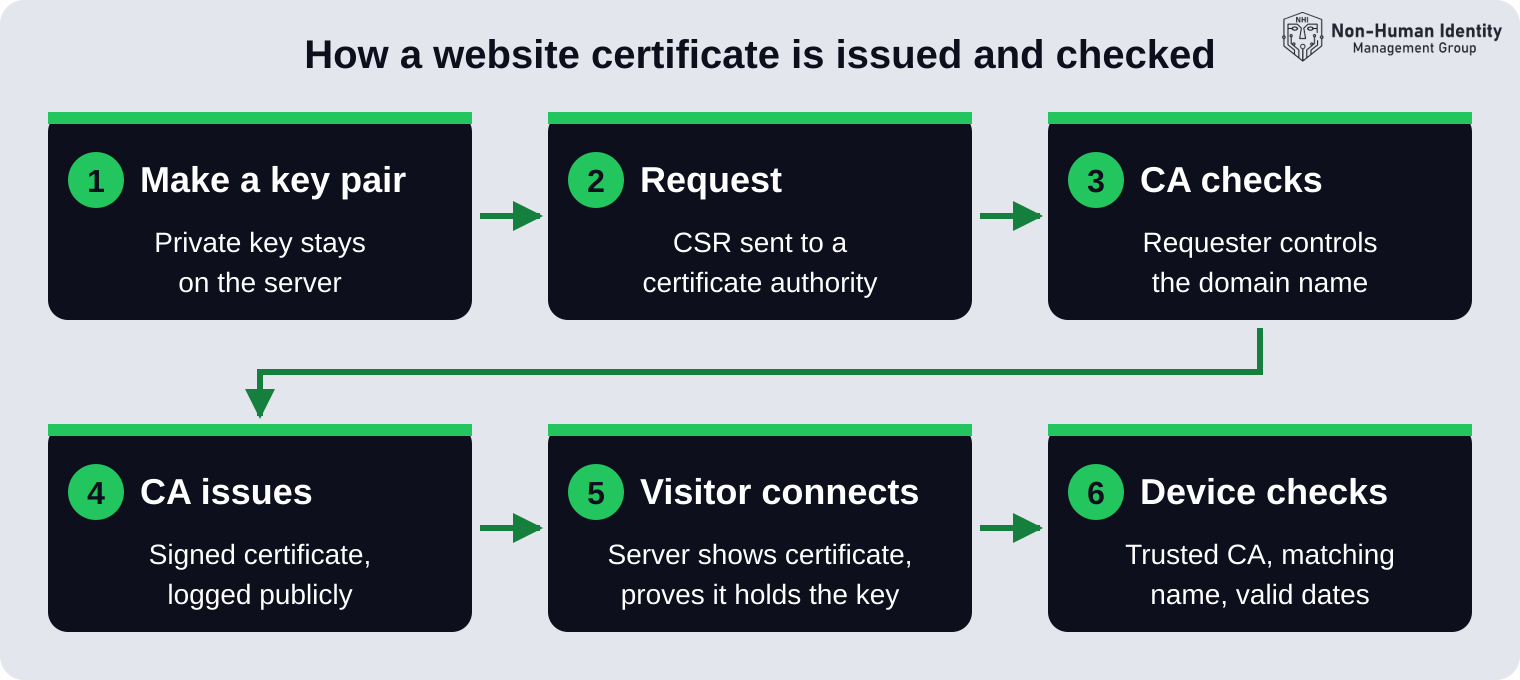
The ACME protocol (Automatic Certificate Management Environment), used by Let's Encrypt and many other CAs, lets software perform steps 1 to 5 and renewal automatically, with no person involved.[2][5]
Public and private certificates
| Public CA certificate | Private (internal) CA certificate | |
|---|---|---|
| Trusted by | All browsers and devices by default | Only devices your organisation configures to trust it |
| Typical use | Public websites and APIs | Internal servers, staff laptops, Wi-Fi, service-to-service traffic |
| Rules set by | CA/Browser Forum and browser makers | Your organisation |
| Main risk | Missed renewals as lifetimes shrink | The internal CA itself becoming a single point of failure if poorly protected |
A worked example
Quayside Dental is a fictional group of four dental practices. It has an online booking website, a patient portal and an internal server that stores X-ray images. An IT contractor set up certificates for all three two years ago, each renewed by hand.
One Monday morning, patients start phoning: the booking site shows a security warning. The certificate expired on Sunday. The contractor who used to renew it has moved on, and the renewal reminder emails were going to his old address. Bookings stop for most of the day while someone works out where the certificate came from and how to replace it.
In the review afterwards, Quayside's practice manager finds two more surprises: the X-ray server's certificate expires next month, and a copy of the portal's private key was sitting in a shared folder "for backup".
Their fixes are simple:
- Inventory: a one-page list of every certificate, where it is installed, who issued it, its expiry date and a named owner.
- Automation: the booking site and portal move to automatic renewal with ACME, so certificates renew weeks before expiry without anyone acting.
- Alerts to a team, not a person: expiry warnings go to a shared mailbox and the IT provider's ticket queue.
- Key hygiene: the copied private key is deleted, the portal certificate is replaced with a fresh key, and the old one is revoked.
Myths and misunderstandings
| What people think | What is true |
|---|---|
| The padlock means the website is safe. | It means the connection is encrypted and the certificate matches the name. A scam site can have a valid certificate for its own scam address. |
| The certificate is the secret. | The certificate is public by design. The private key is the secret that must be protected. |
| Longer certificates are less hassle, so they are better. | Long lifetimes mean a stolen key stays useful for longer. The industry is moving to shorter lifetimes with automation instead. |
| Certificates are only for websites. | They also identify laptops, Wi-Fi clients, software publishers, internal services and devices. |
| Clicking through a certificate warning is fine on internal systems. | Teaching people to ignore warnings makes real impostor attacks invisible. Fix the certificate instead. |
Key terms
- Machine identity
- The way a server, device or application proves who it is, usually with a certificate and private key.
- Digital certificate
- A signed document linking a name to a public key, with an issuer and validity dates.
- X.509 certificate
- The standard certificate format used across the internet, defined in RFC 5280.
- Public key
- The half of a key pair that can be shared with anyone and is used to check signatures.
- Private key
- The half of a key pair that must stay secret; holding it proves ownership of the certificate.
- A trusted issuer that checks requests and signs certificates.
- Trust store
- The list of CAs a device or browser trusts.
- TLS
- Transport Layer Security, the protocol that encrypts connections and uses certificates to prove the server's identity.
- Revocation
- Declaring a certificate untrusted before it expires, usually because its private key was exposed.
- ACME
- A standard protocol that lets software request and renew certificates automatically.
Common questions
What happens when an SSL certificate expires?
Browsers and other systems refuse to trust it, so visitors see a warning page and many connections fail until a new certificate is installed. (People still say "SSL certificate", but today's protocol is TLS.)
Is a machine identity the same as a non-human identity?
It is one kind. Non-human identity is the wider family that also includes service accounts, API keys and AI agents. See Machine Identity vs Workload Identity vs NHI.
How long do TLS certificates last?
Under CA/Browser Forum ballot SC-081, the maximum for public TLS certificates falls in stages from 398 days to 47 days between March 2026 and March 2029 (checked November 2026).[3] Internal certificates follow your own policy.
Are free certificates less secure than paid ones?
For proving control of a website address, a free certificate from a trusted CA gives the same encryption and browser trust. Paid options may add support, extra identity checks or management tools.
What should I do if a private key leaks?
Create a new key and certificate, install them, then ask the CA to revoke the old certificate.
First steps
Three things you can do this week:
- List your certificates. For each public website, click the padlock, view the certificate and note the issuer and expiry date. Ask your IT team or provider about internal servers, Wi-Fi and devices too, and name an owning team for each.
- Turn on automatic renewal. Many hosting providers and web servers support ACME or built-in auto-renewal. Start with your most important public site.
- Set expiry alerts and tidy keys. Send warnings at least 30 days before expiry to a shared inbox or ticket queue, and remove private key copies from shared folders, email and chat.
Checklist
- Every certificate is in one inventory with location, issuer, expiry date and owning team.
- Public certificates renew automatically and well before expiry.
- Expiry alerts go to a shared team channel and are tested.
- Private keys are generated on the server or in protected hardware and are never emailed or copied to shared folders.
- There is a written, practised way to replace and revoke a certificate quickly if a key is exposed.
- Internal CAs are protected as critical systems with limited administrator access.
- Staff are taught not to click through certificate warnings, and warnings on internal systems are fixed.
- Plans account for the move to 47-day public certificates by 2029.[3]
Check your understanding
1. Which part must stay secret: the certificate or the private key?
Answer: the private key. The certificate is public.
2. What three things does your browser check about a website's certificate?
Answer: that it chains back to a trusted CA, that the name matches the address, and that it is within its validity dates.
3. Why are shorter certificate lifetimes a reason to automate?
Answer: renewals happen far more often, so doing them by hand makes missed renewals and outages more likely.
4. What should you do first if a private key is exposed?
Answer: create a new key and certificate, install them, then ask the CA to revoke the old certificate.
Suggested learning pathway
- NHI Risks for Beginners: a related beginner guide to read next.
- Service Accounts for Beginners: a related beginner guide to read next.
- For the wider family machine identities belong to, start with Non-Human Identities for Beginners.
- See the PKI Basics Guide for the practitioner detail on certificate fields, chains of trust and revocation.
- See How TLS Works Guide for a step-by-step look at the secure connection certificates make possible.
- See the ACME and Automated Certificate Management Guide to set up automatic renewal properly.
- See the Certificate Expiry Outages and 47-Day TLS Certificates Guide for the shrinking-lifetime timeline and how to prepare.
- See How to build a TLS certificate inventory for a hands-on way to make your first list.
Standards and references
- RFC 5280: Internet X.509 Public Key Infrastructure Certificate and Certificate Revocation List (CRL) Profile. IETF, May 2008. https://www.rfc-editor.org/rfc/rfc5280.
- RFC 8555: Automatic Certificate Management Environment (ACME). IETF, March 2019. https://www.rfc-editor.org/rfc/rfc8555.
- Ballot SC-081v3: Introduce Schedule of Reducing Validity and Data Reuse Periods. CA/Browser Forum, 11 April 2025. https://cabforum.org/2025/04/11/ballot-sc081v3-introduce-schedule-of-reducing-validity-and-data-reuse-periods/, accessed 27 Nov 2026.
- SP 1800-16, Securing Web Transactions: TLS Server Certificate Management. National Institute of Standards and Technology (NIST). https://csrc.nist.gov/pubs/sp/1800/16/final.
- How It Works. Let's Encrypt. https://letsencrypt.org/how-it-works/, accessed 27 Nov 2026.
- SP 800-53 Rev. 5, Security and Privacy Controls for Information Systems and Organizations (SC-17 Public Key Infrastructure Certificates; IA-9 Service Identification and Authentication). National Institute of Standards and Technology (NIST). https://csrc.nist.gov/pubs/sp/800/53/r5/upd1/final.
Related NHI Mgmt Group resources: PKI Basics Guide · Non-Human Identity (NHI) Guide · Certificate Inventory Register Template · NHI Offboarding and Decommissioning Guide