Manufacturing cyber security keeps the computers that run a factory, and the machines they control, safe from attack.
This guide is for factory owners, plant managers, office staff and students who want the plain picture. You do not need to be technical to be affected: if your factory takes orders by email or has machines on a network, an attack on a computer can stop production.
In short
- A factory runs on two kinds of computer: office systems for orders and stock, and machine systems that control the production line.
- Many attacks start in the office, often with an email, and can then spread towards the machines or stop the systems that plan the work.
- The biggest harm is usually lost production, missed deliveries and safety worries, not just lost data.
- Keep machines off the open internet, change default passwords, split office and machine networks, and practise running by hand.
What you will learn
- Explain the difference between office computers and machine computers in a factory.
- Spot the common ways an attack reaches the production line.
- Check five basic protections against your own site.
- Ask your machine suppliers the right questions about remote access.
- Machine computers (operational technology, OT)
- computers and controllers that run physical equipment, such as a packing line or an oven.
- Office computers (IT)
- the laptops, email and business systems used for orders, stock and invoices.
- Machine controller (PLC)
- a small, tough computer that tells one machine what to do, step by step.
What is manufacturing cyber security?
Think of a factory production line. If one machine stops, everything behind it stops too. Cyber attacks on factories work the same way: hit one key computer and the whole line can come to a halt.
Most factories have two worlds. The office world handles email, orders, stock and pay. The machine world runs the kit on the floor. Security people call the machine world operational technology, or OT. The UK cyber security agency says OT is tech that works with the physical world.[1]
This kind of security looks after both worlds and the links between them. In the office, the main worry is often stolen or locked data. On the floor, the main worries are safety and keeping machines running.[1]
Where the comparison stops working: a jammed machine is easy to see. A computer attack can stay quiet for weeks. It can also hit many lines at once.
Why does it matter?
When a factory stops, the cost grows by the hour. Orders slip, staff stand idle and customers look elsewhere. Some products, like food or medicine, may have to be thrown away.
If you own a small manufacturing firm
What could happen: one infected office laptop locks the system that plans each day's work, and the line cannot start.
Check this: could you run for a day with paper job sheets if your computers were down?
Next: Business Continuity and Disaster Recovery for Beginners
If you manage a plant or shift
What could happen: a supplier's remote link into a machine is left open, and a stranger finds it.
Check this: ask who can connect to your machines from outside, and how they log in.
If you are a student or new to engineering
What could happen: you plug a laptop or USB stick into a machine network without thinking about where it has been.
Check this: learn your site's rules for connecting devices to machines before you touch anything.
What does it look like?
Here is a made-up "Am I exposed?" card for a small food factory. Each line is a common weak spot.
Example only. All values are made up.
SITE CHECK: Example Foods Ltd, Line 2 (packing)
Office and machine networks on one network?   YES   (1)
Packing machine reachable from the internet?  YES   (2)
Controller login still factory default?       YES   (3)
Supplier remote access always switched on?    YES   (4)
Paper job sheets ready if systems go down?    NO    (5)
- An attack on an office laptop can travel straight to the machines.
- Anyone on the internet who finds the machine can try to log in.
- Default logins are often published in manuals that anyone can read.
- A link that is always on is a door that is always unlocked.
- Without a manual fallback, the line stops whenever the computers stop.
Why this is risky: a US government security agency asks OT owners to fix each of the first four problems first.[2] Together they give an attacker an easy path to the line.
The safer way: the first four answers become "NO" and the last becomes "YES". Machines sit on their own network, logins are changed, the supplier link is switched on only when needed, and staff have practised running by hand.
How does it work?
Here is a common path from an ordinary email to a stopped factory.
- The way in. Someone in the office opens a bad email attachment, or an attacker finds a machine or remote link open to the internet.[2]
- The quiet spread. The attacker moves from computer to computer, looking for passwords and important systems.
- The crossing. If office and machine networks are joined, the attacker can reach the computers near the production line.
- The strike. Often the attacker uses ransomware (software that locks files and demands payment). The systems that plan, track or run production stop.
- The choice. The firm either runs by hand while it recovers, or the line stays down until computers are rebuilt.
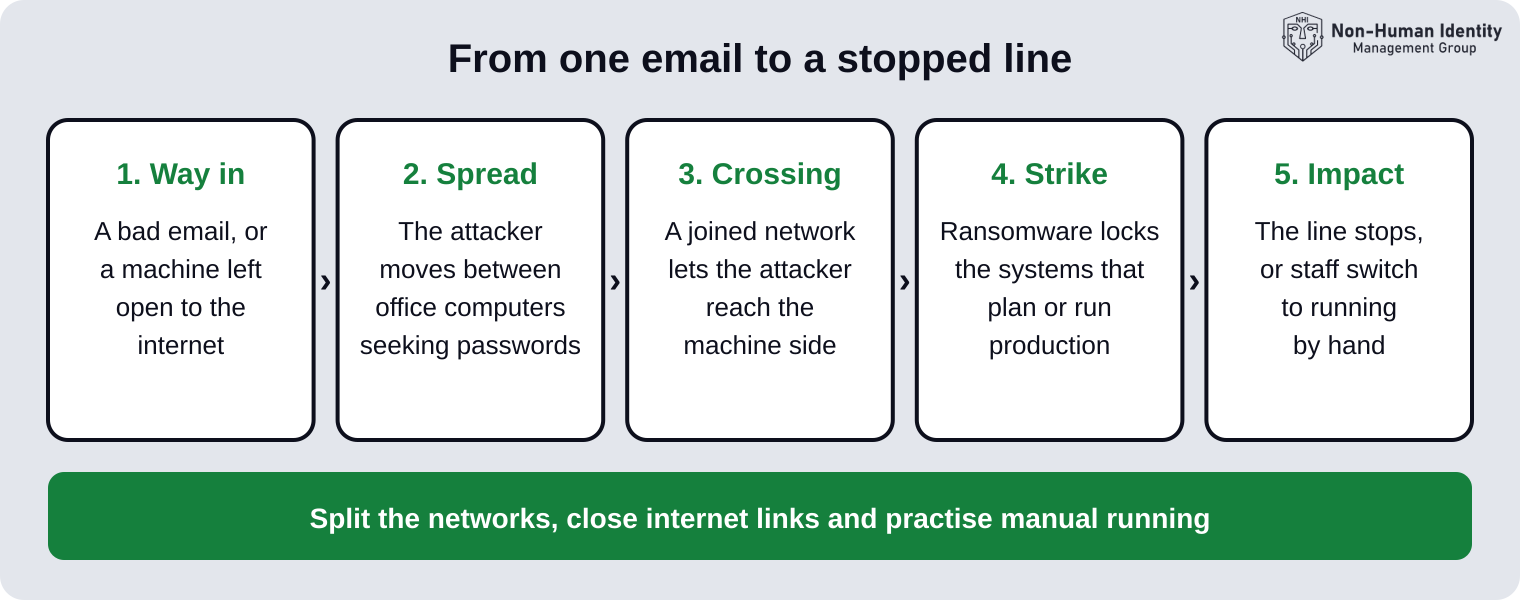
Many attacks never touch a machine controller at all. Locking the office systems that send orders and plans to the floor can be enough to stop work.
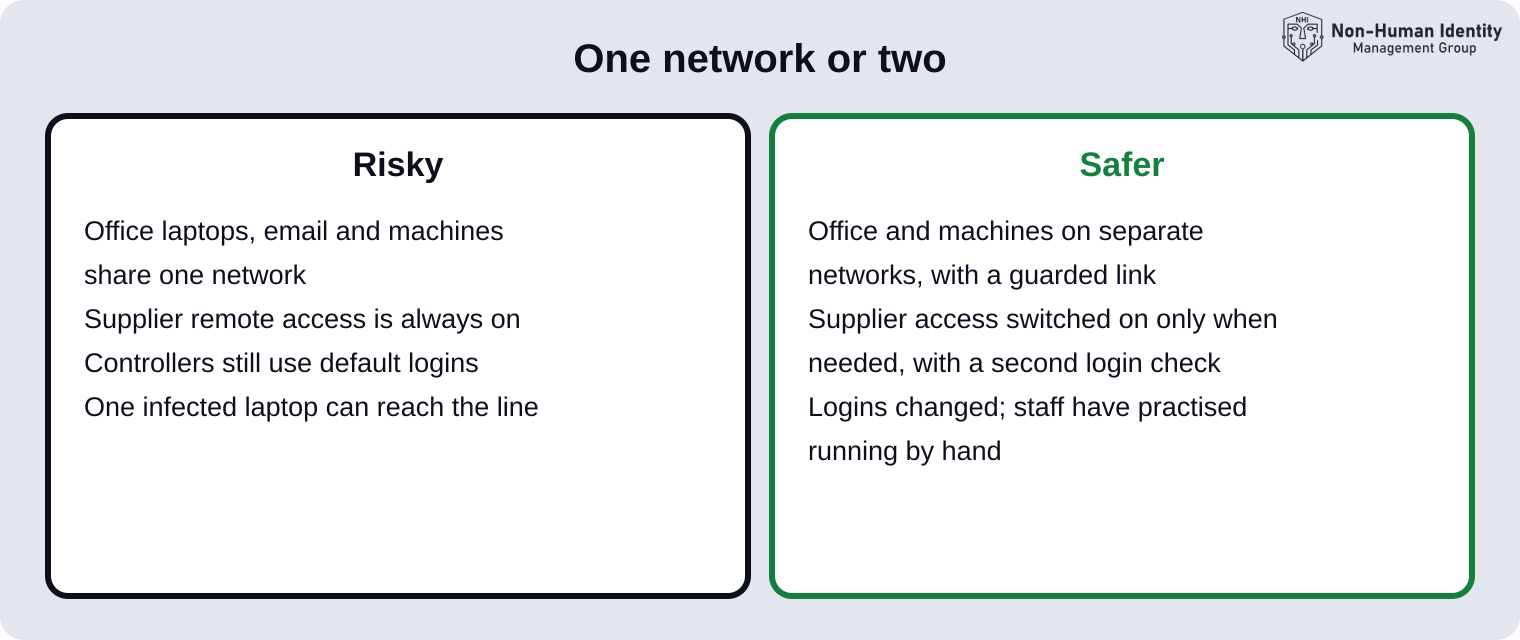
Splitting the networks is called segmentation (dividing a network into parts with guarded links between them). It means trouble in the office has a harder job reaching the floor.[2]
A worked example
Celia Novak runs Sorrel Brewery, a fictional brewery with forty staff. Yusuf Jovanovic is her engineering lead. He looks after the brewing kit and the bottling line.
One Monday, the office team cannot open their files. A message on each screen demands payment. The bottling line still runs, but the system that tells it which beer to bottle, and in what order, is locked.
Celia remembers the production line picture. If the planning step stops, everything behind it stops too. So she asks Yusuf one question: can the line keep going without the office computers?
Six months earlier, Yusuf had split the office and brewing networks. The guarded link between them is now switched off. The brewing kit is on its own side, so it keeps running.
Yusuf also kept a printed copy of the week's bottling plan, as practised in a drill. The team works from paper. They bottle more slowly, but orders still go out.
Celia calls her IT provider and her insurer. She does not pay. The office systems are rebuilt from backups over four days.
Afterwards, Yusuf changes the last default passwords on two older machines. He also sets the bottling supplier's remote link to work only when he switches it on.
A real case shows the same lesson at a larger scale. In 2019 ransomware hit the aluminium maker Norsk Hydro. According to a Microsoft account of the attack, some plants switched to manual running, and the cost came close to 71 million US dollars.[3]
Myths and mistakes
| What people think | What is true |
|---|---|
| We are too small to be a target. | Many attacks are not aimed at one firm. Attackers scan for any open door, and small firms have open doors too. |
| Our machines are not on the internet. | Machines are often linked to the office network, or to a supplier, which may be on the internet. Check, do not assume. |
| Cyber security is the IT team's job. | The floor team knows the machines. Both teams need to plan together, and supplier links need an owner. |
| If it is working, do not touch it. | Old machines can run for years with default logins. Change what you can, and guard what you cannot change. |
| Backups are enough. | Backups help you rebuild. Being able to run by hand helps you keep shipping while you rebuild.[2] |
What can I do this week?
- Walk the floor with your engineer and list every machine that is connected to a network.
- Ask each machine supplier how they connect from outside, and when.
- Find any machine still using its default password, and plan to change it.
- Print one day's production plan and agree how you would work from paper.
- Book a short talk with your IT provider about splitting office and machine networks.
Checklist
- We have a list of every networked machine and who looks after it.
- No machine controller can be reached directly from the internet.
- Default passwords on machines and controllers have been changed where possible.
- Office and machine networks are separated, with a guarded link between them.
- Supplier remote access is off by default and uses a second login check.
- Staff have practised running key lines by hand.
- Backups of office and production systems are kept offline and tested.
- Everyone knows who to call if screens lock or machines act strangely.
Common questions
What is the difference between IT and OT?
IT is the office side: email, orders, stock and pay. OT is the machine side: the computers that run the kit on the floor. Both can be attacked. But harm to OT can stop work or put people at risk, so it needs extra care.
Why are factories attacked?
Mostly because downtime costs a lot. A factory that cannot ship loses money fast, so criminals hope it will pay to get going again. Many factories also run old machines and leave supplier links open. That can make it easier to get in.
Can we just update the machine software?
Sometimes, but not always fast. A machine update may need the supplier to agree, some testing and a planned stop. That is why split networks, closed internet links and new logins matter. They guard machines that cannot be updated straight away. A US government guide covers this in depth.[6]
Where can a small manufacturer get help?
Start with national advice. In the US, a government scheme for manufacturers offers free guides and local centres that can check your risks.[5] In the UK, the national cyber security agency publishes guidance on OT. Your insurer and IT provider may help too.
Is manufacturing seen as critical infrastructure?
Some of it is. The US government counts makers of metals, machines, electrical kit and vehicles as a critical sector. That is because other vital services rely on what they make.[4] Even if your firm is not on that list, your customers may depend on you.
Where next?
Ready for the detail? Read the practitioner guide: Manufacturing Cybersecurity Programme Guide. It goes further into mapping production dependencies, controls for each layer of the plant, and working with machine builders and integrators.
Also useful:
- Industrial Control Systems and SCADA for Beginners
- Famous Industrial Cyber Attacks for Beginners
- Ransomware for Beginners
- Network Segmentation for Beginners
- Top 10 Manufacturing Cyber Threats
Related NHI Mgmt Group resources: OT Remote Access Guide · Manufacturing Identity and OT Access Guide · Manufacturing Threat Actors Guide
Key terms
- Operational technology (OT)
- Computers and controllers that run physical equipment and processes.
- PLC
- A small, tough computer that controls one machine or process step by step.
- SCADA
- Software that lets staff watch and control many machines or sites from one screen.
- Ransomware
- Harmful software that locks files or systems and demands payment to unlock them.
- Network segmentation
- Dividing a network into separate parts, with guarded links between them.
- Default password
- The password a device ships with, which is often published and should be changed.
- Remote access
- A way for someone to connect to a system from another place, such as a supplier's office.
Sources and further reading
- Operational technology. National Cyber Security Centre (NCSC). https://www.ncsc.gov.uk/collection/operational-technology, accessed 28 Nov 2026.
- Primary Mitigations to Reduce Cyber Threats to Operational Technology. Cybersecurity and Infrastructure Security Agency (CISA). https://www.cisa.gov/resources-tools/resources/primary-mitigations-reduce-cyber-threats-operational-technology, accessed 28 Nov 2026.
- Hackers hit Norsk Hydro with ransomware. The company responded with transparency. Microsoft, 17 December 2019. https://news.microsoft.com/en-my/2019/12/17/hackers-hit-norsk-hydro-with-ransomware-the-company-responded-with-transparency/, accessed 28 Nov 2026.
- Critical Manufacturing Sector. Cybersecurity and Infrastructure Security Agency (CISA). https://www.cisa.gov/topics/critical-infrastructure-security-and-resilience/critical-infrastructure-sectors/critical-manufacturing-sector, accessed 28 Nov 2026.
- Cybersecurity Resources for Manufacturers. NIST Manufacturing Extension Partnership (MEP). https://www.nist.gov/mep/cybersecurity-resources-manufacturers, accessed 28 Nov 2026.
- SP 800-82 Rev. 3, Guide to Operational Technology (OT) Security. NIST, September 2023. https://csrc.nist.gov/pubs/sp/800/82/r3/final, accessed 28 Nov 2026. Further reading.