Ransomware is harmful software that locks an organisation's files or systems, usually by encrypting them, and then demands payment to unlock them, often with a threat to publish stolen data as well.
This guide is for newcomers, students, career changers and managers who are not security specialists. It explains, in plain English, what ransomware is, how an attack usually unfolds from the first break-in to the ransom note, a worked example, common myths and the steps that make recovery possible. Small business owners who want a focused checklist can also read our Ransomware Basics for Small Businesses Guide.
By the end of this guide you will be able to:
- Explain what ransomware is and what "double extortion" means.
- Describe how a typical ransomware attack spreads through an organisation.
- Understand why tested, separate backups decide how well you recover.
- Identify the first actions to take before and during an attack.
Key takeaways
- The ransom note is the last step, not the first. Attackers are often inside for days or longer before they encrypt anything, which gives defenders a chance to spot them.
- Most attacks start in ordinary ways. Phishing, stolen passwords and unpatched internet-facing systems are common ways in.
- Backups are your recovery plan. Keep copies that are separate from your network, and practise restoring them.
- Data theft adds a second threat. Many groups copy data first, so good backups help you restore but do not stop a leak threat.
- Paying is no promise of recovery. UK law enforcement does not encourage paying, and there is no assurance you get your data back.
What it is, in plain English
Ransomware is a type of malware (malicious software). The US #StopRansomware Guide describes it as malware designed to encrypt files on a device, making those files and the systems that rely on them unusable.[1] Encryption scrambles data so it cannot be read without the right key. In a ransomware attack, the criminals hold the key and demand payment, usually in cryptocurrency, in exchange for it.
Many groups now also steal a copy of the data before encrypting it, then threaten to publish it if the victim does not pay. Using both threats together is known as double extortion; some groups use data theft alone as their threat.[1]
Imagine a burglar who gets into an office overnight, photocopies the filing cabinets, then puts new locks on every cabinet and leaves a note: "pay us for the keys, or we post the copies online". Where the analogy breaks down: a real burglar has to be physically present and can only carry so much, while ransomware criminals work remotely, can reach every connected computer at once, and often try to destroy the spare keys (your backups) before you notice.
Ransomware is often run as a business. In ransomware as a service (RaaS), one group develops the ransomware and leak site, and "affiliates" carry out the attacks in return for a share of payments. Some criminals, called initial access brokers, specialise in breaking in and then sell that access to others. This is why an attack can feel organised and fast.
Why it matters to you
- If you run a small business: an attack can stop you trading, taking orders or paying staff until systems are restored.
- If you are new to a security job: spotting the early signs, such as unusual admin activity or backups being deleted, is one of the most valuable things a defender can do.
- If you are a manager: you may face hard decisions about shutting systems down, telling customers and regulators, and whether to engage with criminals. Planning those decisions in advance saves time.
In the UK government's Cyber Security Breaches Survey 2025, the share of businesses hit by a ransomware crime rose from under 0.5% in 2024 to 1% in 2025, an estimated 19,000 businesses.[3] For the businesses affected, the disruption can be severe.
A well-known example is the Colonial Pipeline Ransomware Attack 2021. Colonial's chief executive told a US Senate committee that attackers got in through a legacy remote access (VPN) profile the company no longer used, which did not have multi-factor authentication.[5] The company paid a ransom of approximately 75 bitcoins to a group known as DarkSide, and the US Department of Justice later seized 63.7 bitcoins of it.[4] The lesson for beginners: one forgotten account without a second sign-in check was enough to start a crisis.
How it works, step by step
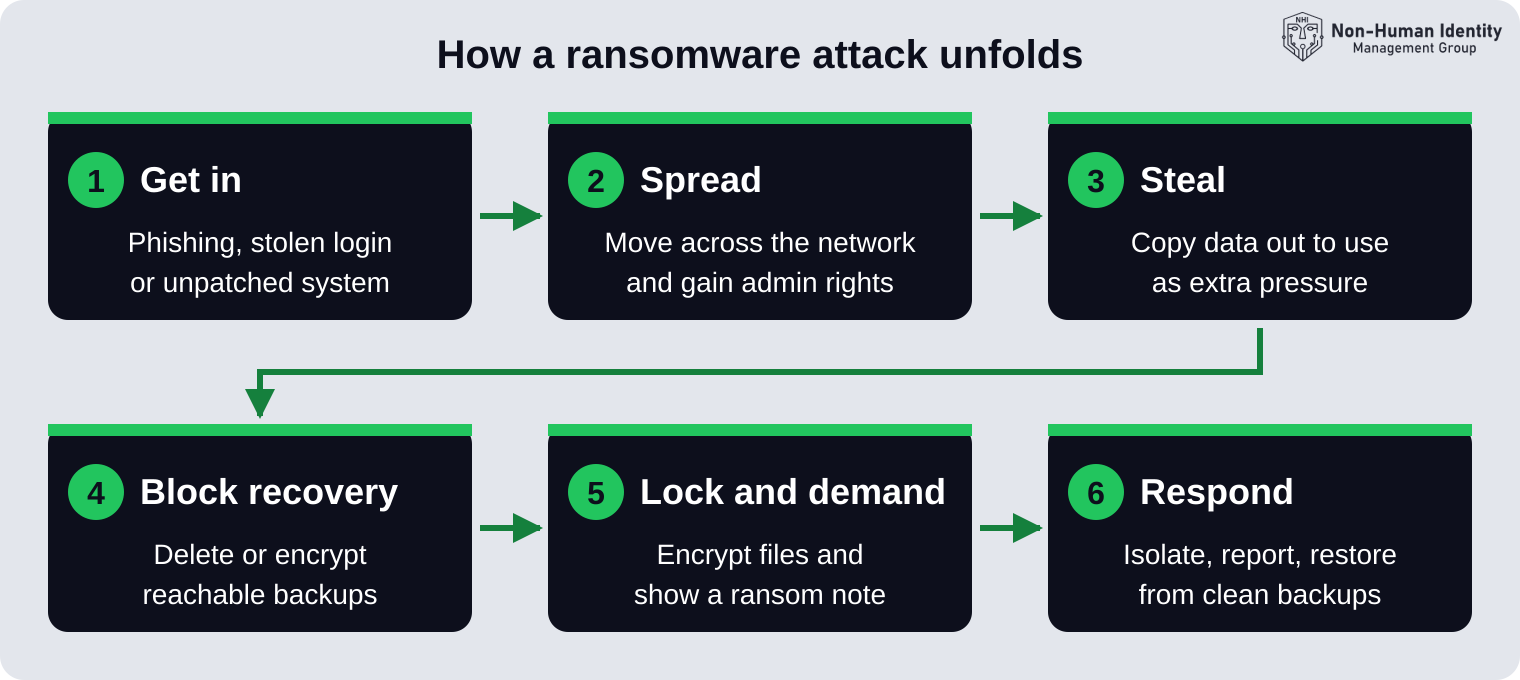
Every attack is different, but many follow a similar path. MITRE ATT&CK, a public catalogue of attacker behaviour, describes the final stages as Data Encrypted for Impact (T1486) and Inhibit System Recovery (T1490), which covers deleting or disabling backups and recovery features.[6][7]
- Get in. The attacker finds a way into the network. The #StopRansomware Guide lists common routes: internet-facing vulnerabilities and misconfigurations (including exposed remote desktop services), compromised passwords, phishing, earlier malware infections, social engineering, and third parties such as IT service providers.[1]
- Spread and gain control. Once inside, the attacker looks around, collects more passwords and moves from computer to computer, a step called lateral movement. Their aim is usually an administrator account that can reach everything.
- Steal data. Many groups copy valuable data out of the organisation to use as extra pressure. This is called data exfiltration.
- Block recovery. The attacker tries to delete, encrypt or switch off backups and recovery tools that they can reach, so the victim has fewer options.[1]
- Lock and demand. The ransomware encrypts files and systems, and a ransom note appears with payment instructions and, often, a threat to leak data.
- Respond and recover. The defender's step: isolate affected systems, report, investigate how the attacker got in, close that route, and restore from clean backups.
What reduces the risk at each stage
| Stage | What helps |
|---|---|
| Get in | Multi-factor authentication on email, remote access and admin accounts; prompt software updates for internet-facing systems; turning off remote desktop access you do not need; email filtering. |
| Spread and gain control | Few admin accounts, separate admin accounts from everyday ones, removing old and unused accounts, monitoring for unusual sign-ins. |
| Steal data | Knowing where sensitive data lives, limiting who can reach it, watching for large unexpected uploads. |
| Block recovery | Offline or immutable backups that attackers cannot reach with normal admin rights; separate credentials for the backup system. |
| Lock and demand | Endpoint security tools that can spot mass encryption; a rehearsed response plan. |
| Respond and recover | Tested restores, "golden images" (clean, ready-to-deploy system templates) and an out-of-band way to talk, such as phones, if email is down. |
These measures come from the #StopRansomware Guide and NCSC guidance, which both recommend offline, tested backups, multi-factor authentication and patching, with CISA recommending phishing-resistant MFA for all services where possible.[1][2]
Useful distinctions
- Offline versus immutable backups. An offline backup is physically or logically disconnected from your network. An immutable backup is a copy that cannot be altered or deleted during its retention period. Both aim to keep a clean copy out of the attacker's reach; many organisations use both.
- Disconnect, do not switch off (usually). The #StopRansomware Guide advises isolating affected systems first and powering devices down only if you cannot disconnect them, because switching off destroys evidence held in memory.[1]
- Wipers can look like ransomware. The NCSC notes that some malware is disguised as ransomware but simply destroys data, so paying does not bring files back.[2]
A worked example
Meadow Veterinary Group is a fictional chain of four animal clinics with 60 staff. Its IT is looked after by Dev, with help from an outside provider.
On a Saturday morning, the backup system sends Dev an alert: several scheduled backup jobs have been deleted. Dev also sees that an old account, created years ago for a contractor, signed in overnight from an unusual location. Dev does not know yet what is happening, but the pattern (an unused account active at night, backups disappearing) matches the early stages of a ransomware attack.
Following the clinic group's one-page incident plan, Dev:
- Isolates: asks the IT provider to disconnect the main server network from the internet and from the clinics, rather than switching machines off.
- Escalates: phones the practice manager, Rosa, on her mobile, not by email, in case email is being watched.
- Locks accounts: disables the old contractor account and resets passwords for admin accounts from a clean device.
- Checks backups: confirms that last week's offline backup, stored on a drive kept unplugged in a locked cabinet, is untouched.
Some file shares had already been encrypted by the time the network was isolated. The group reports the incident, brings in specialist help, and restores those shares from the offline backup after checking it for malware. Two days of appointment notes have to be re-entered from paper records. Investigators find that some client data may have been copied out, so Rosa takes advice on notifying clients and the data protection regulator.
What worked and what did not: early alerts and a separate backup turned a potential shutdown into a painful but manageable recovery. It was not a clean escape. The forgotten contractor account should have been removed long ago, and the possible data theft still had to be handled even though files were restored.
Myths and misunderstandings
| What people think | What is true |
|---|---|
| We have backups, so ransomware cannot hurt us. | Backups that are connected to the network can be encrypted or deleted too. They need to be separate and tested. Backups also do not stop a threat to leak stolen data. |
| Paying the ransom gets everything back. | The NCSC says there is no assurance you will get access to your data, your systems may still be infected, and paying funds criminals and can make you a target again. |
| Ransomware is a sudden event. | Attackers are often inside for some time first. Unusual sign-ins, new admin accounts and deleted backups are early warning signs. |
| We are too small to be a target. | Many attacks are opportunistic: criminals look for any weak door, such as an old account or an unpatched device, regardless of company size. |
| Antivirus alone will stop it. | Security software helps, but attackers often use stolen accounts and normal admin tools. Strong sign-in, few admins, updates and backups all matter. |
| Switch everything off straight away. | Disconnecting from the network is usually the first move. Switching off can destroy evidence; guidance suggests it only if you cannot disconnect. |
Key terms
- Ransomware
- Malicious software or an attack campaign that blocks access to systems or data and then pressures the victim for payment.
- Malware
- Software designed to harm a system, for example by stealing data, encrypting files or giving an attacker a way back in.
- Encryption
- Turning readable data into scrambled data that cannot be understood without the correct key.
- Double extortion
- A ransomware strategy that combines encrypting files with stealing data and threatening to publish it.
- Ransomware as a service (RaaS)
- A criminal model in which developers lease ransomware and leak sites to affiliates, who carry out attacks for a share of payments.
- Initial access broker
- A criminal who gains footholds, such as stolen logins, and sells them to other attackers.
- Lateral movement
- How an attacker moves from the first compromised system to others, often by reusing stolen passwords.
- Data exfiltration
- The unauthorised transfer of data out of an organisation to a place the attacker controls.
- Immutable backup
- A backup copy that cannot be altered or deleted during its retention period.
- 3-2-1 backup rule
- Keeping three copies of data, on two different types of storage, with one copy stored offsite.
- Decryptor
- A tool that reverses encryption and restores readable data when the right key or method is available.
Common questions
Should we pay the ransom?
It is a serious decision that needs legal and specialist advice. The NCSC states that law enforcement does not encourage, endorse or condone paying ransoms, and warns there is no assurance you will get your data back.[2] Paying can also raise legal issues, for example if the group is subject to sanctions.
Can files be decrypted without paying?
Sometimes. The NCSC notes that most encrypted files cannot be decrypted by anyone other than the attacker, but the No More Ransom project offers free decryption tools for some ransomware families.[2] Your backups are the more dependable route.
What is the first thing to do if ransomware hits?
Isolate the affected systems from the network, use phone or another out-of-band channel to alert your response team, and follow your incident plan. The #StopRansomware Guide asks responders to work through its first steps in order.[1]
Who should we report it to?
Report to the national authorities in your country. In the UK, the NCSC guidance points to its incident reporting service.[2] If personal data may have been stolen, data protection law may require you to notify a regulator and the people affected.
How often should backups be tested?
Regularly. The NCSC advises checking that you know how to restore files and testing restores regularly.[2] We suggest at least one full restore test of a critical system each quarter, and after any big change.
Does cloud storage protect us from ransomware?
Not automatically. Files synced to the cloud can be encrypted and synced too. The NCSC warns against relying on several copies in a single cloud service.[2] Check that your cloud service keeps earlier versions and that backups are separate.
First steps
Practical things you can do this week:
- Check one backup. Find out where your most important data is backed up, whether a copy is kept separate from the network, and try restoring one file.
- Turn on MFA for remote access and email. Start with VPNs, remote desktop gateways, email and admin accounts.
- Remove forgotten accounts. List accounts for people who have left, old contractors and test users, and disable those nobody needs.
- Write a one-page plan. Who to call, how to isolate systems, where the backups are, and how to reach each other if email is down. Keep a printed copy.
Checklist
- We keep at least one backup copy that is offline or immutable, and separate from everyday admin accounts.
- We have restored from backup in the last three months and timed how long it took.
- Remote access, email and admin accounts use multi-factor authentication.
- Internet-facing systems receive security updates promptly.
- Remote desktop is not exposed directly to the internet.
- Unused and leavers' accounts are disabled within days.
- Everyday user accounts do not have admin rights.
- We have a printed incident plan with phone numbers, and we have rehearsed it at least once.
- We get alerts when backups fail or are deleted.
Simple measures that show progress: the date and result of the last restore test, the share of remote access and admin accounts with MFA, the number of unused accounts found and removed, and how quickly critical updates are applied to internet-facing systems.
Check your understanding
1. What is double extortion?
Answer: encrypting a victim's files and also stealing data, then threatening to publish it unless the ransom is paid.
2. Why do attackers try to delete backups before encrypting files?
Answer: so the victim cannot simply restore and has more reason to pay.
3. Why is disconnecting a system usually better than switching it off?
Answer: it stops the spread while keeping evidence in memory that investigators may need.
4. Name two common ways ransomware attackers get in.
Answer: any two of: phishing, stolen or guessed passwords, unpatched internet-facing systems, exposed remote desktop, a compromised IT supplier.
Suggested learning pathway
- Business Continuity and Disaster Recovery for Beginners: a related beginner guide to read next.
- Data Security for Beginners: a related beginner guide to read next.
- For a small business checklist, read the Ransomware Basics for Small Businesses Guide.
- For the most common way in, see the How to Spot a Phishing Email Guide and Multi-Factor Authentication for Beginners.
- For the controls that stop attacks early, continue with the Ransomware Prevention Guide.
- For protecting the backups themselves, see the Backup Security and Immutable Backup Guide.
- For what to do during and after an attack, see the Ransomware Response and Recovery Guide.
Standards and references
- #StopRansomware Guide. Cybersecurity and Infrastructure Security Agency (CISA), MS-ISAC, FBI and NSA, September 2023. https://www.cisa.gov/stopransomware/ransomware-guide, accessed 27 Nov 2026.
- Mitigating malware and ransomware attacks. National Cyber Security Centre (NCSC), version 3.0, reviewed 9 September 2021. https://www.ncsc.gov.uk/guidance/mitigating-malware-and-ransomware-attacks, accessed 27 Nov 2026.
- Cyber Security Breaches Survey 2025. UK Department for Science, Innovation and Technology and Home Office, published 10 April 2025. https://www.gov.uk/government/statistics/cyber-security-breaches-survey-2025/cyber-security-breaches-survey-2025, accessed 27 Nov 2026.
- Department of Justice Seizes $2.3 Million in Cryptocurrency Paid to the Ransomware Extortionists Darkside. US Department of Justice, Office of Public Affairs, 7 June 2021. https://www.justice.gov/archives/opa/pr/department-justice-seizes-23-million-cryptocurrency-paid-ransomware-extortionists-darkside.
- Colonial CEO says ransomware hackers exploited legacy VPN. Cybersecurity Dive, 9 June 2021. https://www.cybersecuritydive.com/news/colonial-Joseph-Blount-ransomware-legacy-vpn/601523/, accessed 27 Nov 2026.
- Data Encrypted for Impact, Technique T1486. MITRE ATT&CK, version 20. https://attack.mitre.org/techniques/T1486/, accessed 27 Nov 2026.
- Inhibit System Recovery, Technique T1490. MITRE ATT&CK, version 20. https://attack.mitre.org/techniques/T1490/, accessed 27 Nov 2026.
Related NHI Mgmt Group resources: Ransomware Myths and Facts · Ransomware-as-a-Service Business Model Guide · Ransomware Readiness Checklist