A penetration test report explains the weak spots that hired testers found and how to fix them.
This guide is for managers, small business owners and developers who have been handed a report and are not sure where to start. You do not need to be technical to use one: the report is written so that someone can decide what gets fixed first, and that is often a manager's job.
In short
- A report has a short summary for managers and a detailed findings section for the people who fix things.
- Each finding has a risk rating, but your own team decides what the risk means for your business.
- Check what was tested and what was left out before you trust the results.
- Give every finding an owner and a date, then ask the testers to check the fixes again.
What you will learn
- Explain what each part of a penetration test report is for.
- Spot what was tested and what was not.
- Check a risk rating against what matters to your business.
- Ask the right questions so every finding gets fixed.
- Allowed test attack (penetration test)
- a test where hired experts try to break in, with your permission, to find weak spots.
- Weak spot found (finding)
- one problem the testers found, written up with its risk and a suggested fix.
- How serious it is (risk rating)
- a label such as Low, Medium, High or Critical that shows how urgent a finding is.
What is a penetration test report?
Think of the survey report you get before buying a house. A surveyor walks round, lists every problem, and marks which ones need urgent work. A penetration test report does the same job for your computer systems.
A penetration test is an allowed test attack. You hire testers to try to break into a website, an app or a network, so you can find weak spots before criminals do. The report is what they hand you at the end. It lists each weak spot, called a finding, how serious it is, and how to fix it.[1]
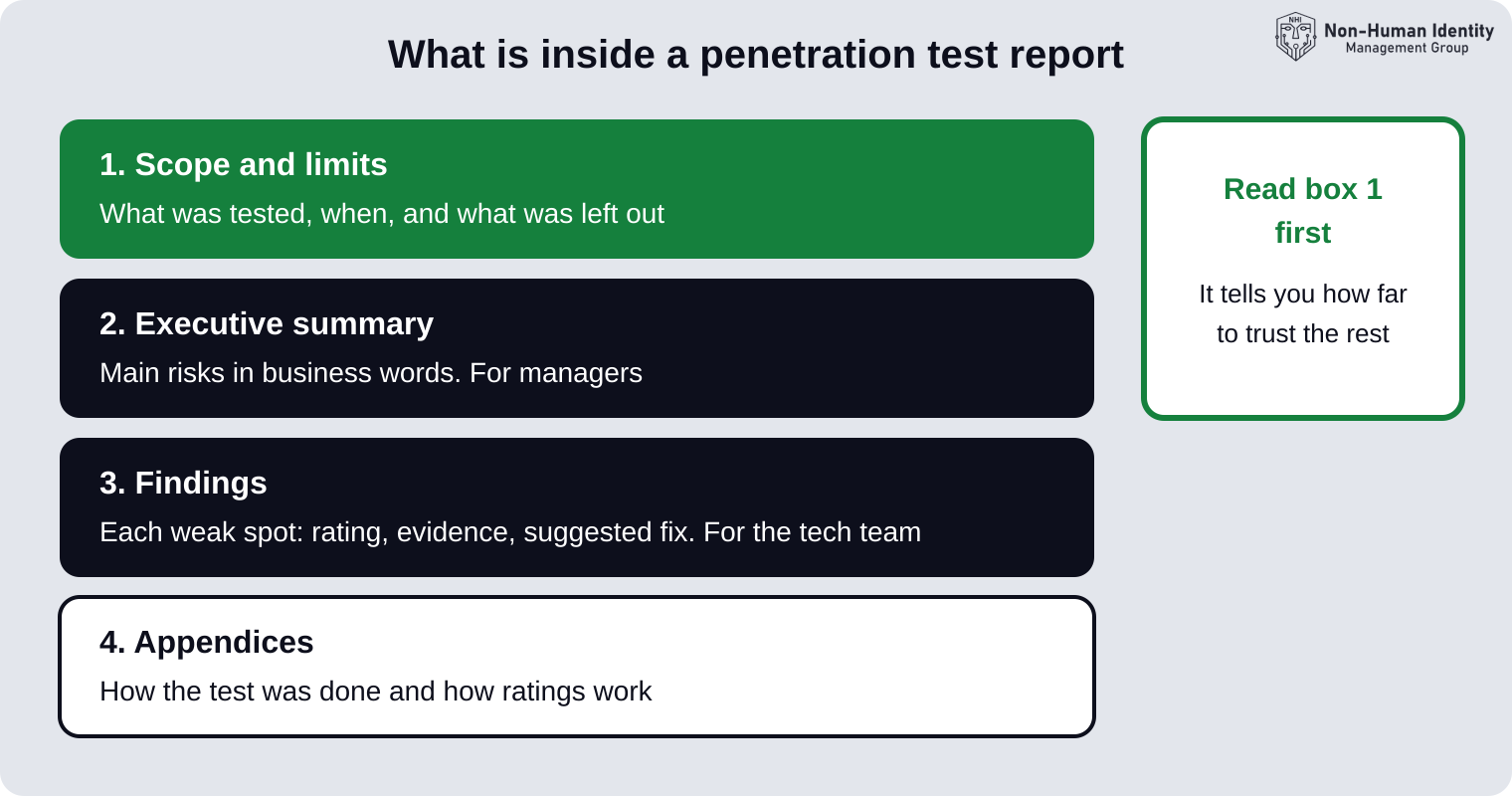
Most reports have the same main parts. There is a short summary for managers and a section on what was tested. Then comes a list of findings, with extra detail at the back for the technical team.[2]
Where the comparison stops working: a house changes slowly, so a survey stays useful for a while. Computer systems change every week, and new flaws are found all the time. A report shows what the testers saw on the days they tested, and not after that.[1]
Why does it matter?
A report only helps if someone reads it and acts on it. A common problem is that the report arrives, nobody owns the findings, and the same flaws turn up again at the next test.
If you manage a team or a budget
What could happen: a High finding sits unread in an inbox while everyone assumes someone else is fixing it.
Check this: every finding has a named owner and a target date.
If you run a small business
What could happen: you pay for a test, file the report, and a customer later asks what you fixed.
Check this: keep a short list of each finding, what you did and when.
If you are a developer
What could happen: you fix the one page named in a finding, but the same mistake sits in five other places.
Check this: ask whether the cause of each finding could exist elsewhere in your code.
What does it look like?
Here is a made-up findings summary, the table most readers look at first.
Example only. All values are made up.
Findings summary: EXAMPLE Ltd web shop, tested 0000-00-00
Scope: shop.example.com and its admin page        (1)
Not tested: payment provider, staff laptops       (2)

ID     Title                               Rating
F-01   Admin page has no second login step High      (3)
F-02   Old software version on web server  Medium
F-03   Error page shows internal details   Low
F-04   Cookie settings could be tighter    Informational  (4)
- The scope: exactly what the testers were allowed to test.
- What was left out. Problems here would not show up in this report.
- In a real file, each ID would link to a full write-up with evidence and a suggested fix.
- Informational means good to know, with no direct risk on its own.
Why this is risky: readers often jump to the ratings and skip the scope lines. A short list of findings can look reassuring when large parts of the business were never tested.
The safer way: read the scope and the "not tested" list first. Then read the summary, then the findings, starting with the highest rating.
How does it work?
Here is a simple order for reading a report and turning it into action. US government testing guidance also treats looking at the findings and planning fixes as part of the test, not an extra.[4]
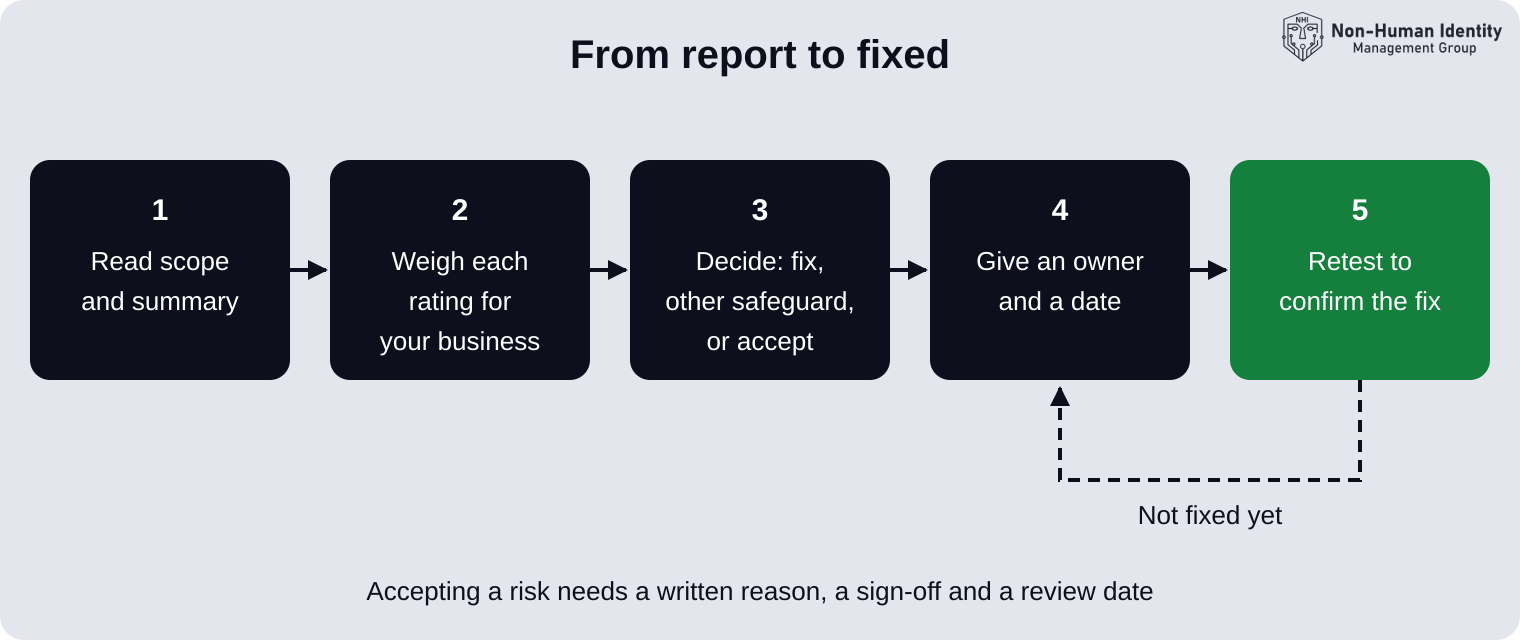
- Check what was tested. Read the scope, the dates and any limits, such as areas the testers could not reach or time that ran out.[2]
- Read the executive summary. This short section explains the main findings in business terms, without technical detail. It is written for managers.[2]
- Go through the findings. Each one usually has a title, a rating, a description, evidence and a suggested fix.[2]
- Weigh each rating yourself. Testers may not know your business, so they may rate an issue higher or lower than you would. Your organisation owns the final risk decision.[1]
- Choose how to deal with each finding. The suggested fix is not the only option. You might remove the software, add another safeguard, or watch it more closely.[1]
- Fix, then check again. Give each finding an owner and a date. When the fixes are in, ask the testers to test them again. This is called a retest.
Many reports also give a score from a scoring system called CVSS (Common Vulnerability Scoring System). It rates a flaw from 0 to 10. A score of 7.0 to 8.9 is High and 9.0 to 10.0 is Critical.[3] The score describes how severe the flaw is in general. Its makers say users should add their own details about threats and their setup to judge the risk to their organisation.[3]
A worked example
Hugo Gallardo is the operations manager at Fernvale Bakeries, a fictional firm with an online ordering site. The firm paid for its first penetration test, and the report has just arrived. It is 40 pages long.
Hugo remembers the house survey. Before reading the problems, he checks what the surveyor actually looked at. The scope covers the ordering site and its admin page. The "not tested" list includes the payment provider and staff laptops. He notes that down.
The executive summary names one High finding. The admin page asks only for a password, with no second check, so a stolen password could open it. There are also two Medium and three Low findings.
Hugo meets Cyrus Novak, the freelance developer who looks after the site. Cyrus reads the technical detail. He agrees with most ratings, but he points out that one Medium finding sits on a test page that customers cannot reach. They agree it is lower risk for Fernvale and write down why.
They put the findings in a simple table: owner, action and date. Cyrus turns on a second sign-in step for the admin page that week. He updates the old server software the week after. For one Low finding, Hugo signs off on leaving it for now, with a review date.
A month later the testers retest. The admin page and server fixes are confirmed. Hugo files the retest letter with the report, so he can show the bakery's largest customer what was found and fixed.
Myths and mistakes
| What people think | What is true |
|---|---|
| Few findings means we are secure. | It may mean little was tested. Check the scope and the limits first. |
| The testers' rating is final. | Testers may lack business context. Your organisation owns the risk decision.[1] |
| A clean report lasts until next year. | A test shows the position on the days of testing. New flaws can appear the next week.[1] |
| Low and Informational findings can be ignored. | Several small issues can sometimes be combined into a bigger one. Note a decision for each, even if it is to accept it. |
| Fixing the example in the report fixes the problem. | The same cause may exist in other places. Fix the cause, then retest. |
What can I do this week?
- Find your most recent report and read the scope and "not tested" sections.
- List every finding with an owner and a target date.
- Ask your technical team or supplier which ratings they would change, and why.
- Book a retest for the fixes that are already done.
- Store the report somewhere locked, because it describes how to break in.
Checklist
- I know what was tested, when, and what was left out.
- I have read the executive summary and understand the main risks.
- Every finding has a named owner and a target date.
- Ratings have been checked against our own business context.
- Any finding we accept has a written reason, a sign-off and a review date.
- Fixes have been retested, and the retest result is filed.
- The report is stored securely and shared only with people who need it.
Common questions
What should I read first in a penetration test report?
Read the scope first, then the executive summary. The scope tells you what was tested and what was left out, so you know how far to trust the results. The summary then explains the main risks in plain business terms before you look at the detail.
What is the difference between High and Critical?
Critical is the most urgent level. On the common CVSS scale, High is 7.0 to 8.9 and Critical is 9.0 to 10.0. Testers may use their own scale too, so check the appendix that explains how the report's ratings work before comparing reports.
Do we have to fix every finding?
No, but you should make a decision on every finding. You can fix it, add another safeguard, or accept the risk. Acceptance should be written down, signed off by someone with authority and given a review date, so it is a choice and not something forgotten.
Who should see the report?
Only the people who need it. A report explains your weak spots and sometimes how to use them, so treat it as confidential. Share the executive summary more widely if needed, and keep the full findings with the people fixing them.
What is a retest?
A retest is a second, shorter check after you fix things. The testers look again at each finding you say is fixed and confirm whether it really is. A retest letter or updated report is useful proof for customers, auditors and insurers.
Where next?
Ready for the detail? Read the practitioner guide: Penetration Test Report Template. It goes further into rating methods, evidence standards and how each section of a report should be written.
Also useful:
- How to Read a Penetration Test Report
- Penetration Testing for Beginners
- CVE and CVSS for Beginners
- Vulnerability Management for Beginners
Related NHI Mgmt Group resources: Penetration Test Remediation Tracker Template · Top 10 Penetration Test Findings · How to Read a SOC 2 Report Guide
Key terms
- Penetration testing
- An allowed test attack that tries to use weak spots the way a real attacker would.
- Penetration test report
- The document testers deliver, listing what they tested, what they found and how to fix it.
- Scope
- The agreed list of systems the testers were allowed to test.
- Executive summary
- A short section that explains the main risks in business terms for decision makers.
- CVSS
- A common scoring system that rates how severe a flaw is, from 0 to 10.
- Risk acceptance
- A recorded, approved decision to live with a known risk for now, with a review date.
- Retesting
- A follow-up check that confirms a fix really closed a finding.
Sources and further reading
- Penetration testing. National Cyber Security Centre (NCSC), reviewed 10 January 2022. https://www.ncsc.gov.uk/guidance/penetration-testing, accessed 28 Nov 2026.
- Web Security Testing Guide: Reporting Structure. OWASP Foundation. https://github.com/OWASP/wstg/blob/master/document/5-Reporting/01-Reporting_Structure.md, accessed 28 Nov 2026.
- Common Vulnerability Scoring System v4.0: Specification Document. FIRST. https://www.first.org/cvss/v4.0/specification-document, accessed 28 Nov 2026.
- SP 800-115, Technical Guide to Information Security Testing and Assessment. NIST, September 2008. https://csrc.nist.gov/pubs/sp/800/115/final, accessed 28 Nov 2026.