Vulnerability management is the ongoing process of finding security weaknesses in your systems, deciding which matter most, fixing them and checking that the fixes worked.
Every piece of software has flaws, and new ones are found every day. You will never fix all of them at once, so the skill is in finding them quickly and fixing the dangerous ones first. This guide is for newcomers, students, career changers and managers who are not security specialists. It explains the cycle step by step, how scanning and prioritisation work, a worked example, common misunderstandings and first steps a small team can take this week.
By the end of this guide you will be able to:
- Explain what vulnerability management is and why it never finishes.
- Describe the cycle from inventory to verified fix.
- Understand how severity scores, exploitation data and exposure help you rank fixes.
- Identify three practical first steps for a small team.
Key takeaways
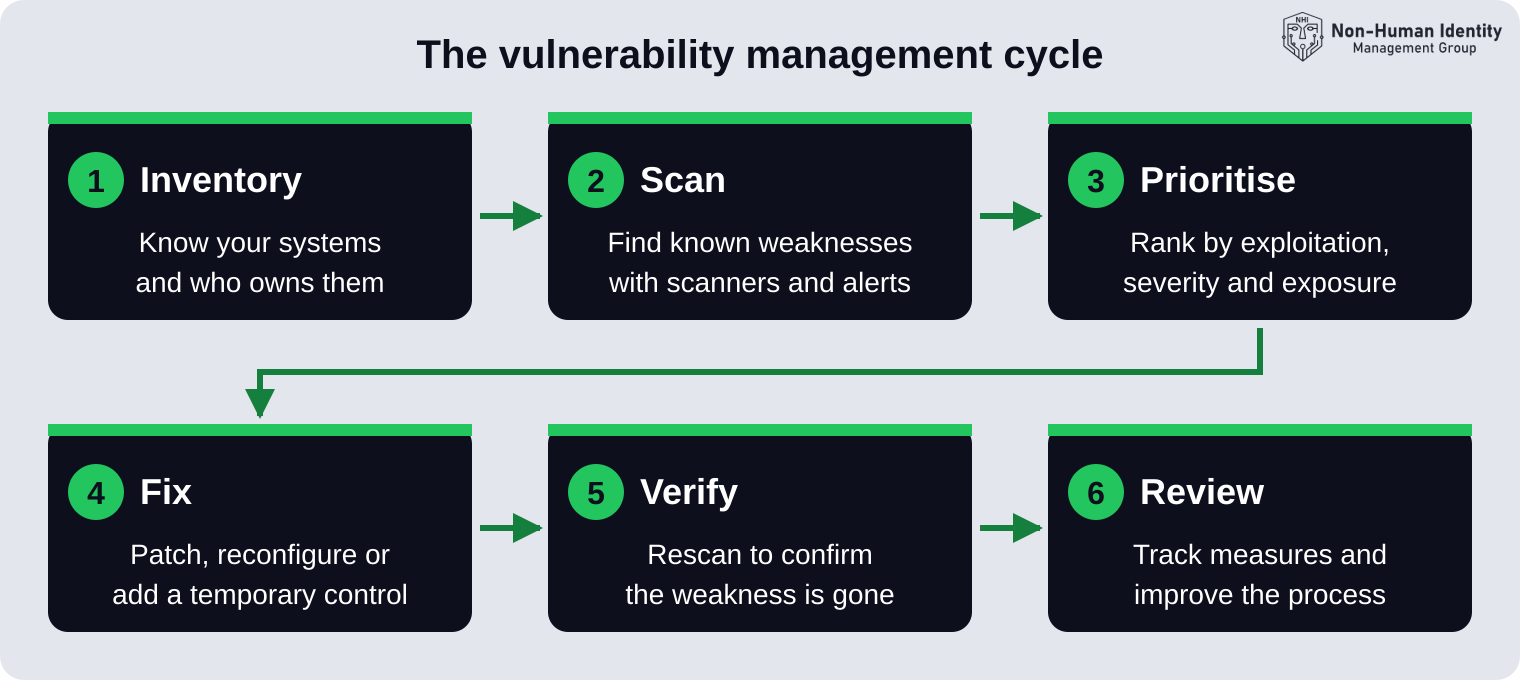
- It is a cycle, not a project. Inventory, scan, prioritise, fix, verify and review, then start again.
- You cannot fix what you do not know you have. An up-to-date list of systems and owners comes first.
- Severity is not the same as urgency. A high severity score matters, but a flaw that attackers are already using, on a system exposed to the internet, usually comes first.
- Fixing includes more than patching. Changing a setting, removing unused software or adding a temporary protective control can also reduce the risk.
- Not fixing is a decision. When a weakness cannot be fixed yet, a senior person should accept the risk on record, for a limited time.
What it is, in plain English
A vulnerability is a flaw or weakness in software, hardware or settings that an attacker could abuse. Some are coding mistakes; others are misconfigurations, such as a storage area left open to the public. A vulnerability on its own means risk, not that you have been attacked.
Publicly known software vulnerabilities are given an identifier called a CVE (Common Vulnerabilities and Exposures), such as CVE-2021-44228, the Apache Log4j flaw widely known as Log4Shell.[1] The identifier lets scanners, suppliers and security teams all talk about the same flaw.
Vulnerability management is the routine that keeps these weaknesses under control. The UK National Cyber Security Centre (NCSC) sets out principles that include updating by default, responding to active exploitation, knowing what systems and software you have, triaging and prioritising, treating a decision not to update as a senior-level risk decision, and reviewing the process as things change.[2]
An everyday comparison is maintaining a block of flats. The caretaker keeps a list of every door, window and boiler, walks round regularly to spot problems, fixes a broken front door lock before a squeaky cupboard, and checks afterwards that the lock works. Where the analogy breaks down: in software, new faults appear in parts you have not touched, often announced publicly, and attackers may learn about them at the same time you do.
Why it matters to you
- If you run a small business: attackers scan the internet for known, unpatched weaknesses in common products such as remote access gateways and firewalls. Keeping those up to date is one of the most effective things you can do.
- If you are new to a security job: reading scan results, checking whether a flaw is being exploited and chasing fixes with system owners is everyday work in many security teams.
- If you are a manager: you will be asked to approve exceptions and to balance downtime for patching against security risk. NIST describes patching as preventive maintenance, a normal cost of running technology.[3]
Some schemes set clear expectations. For example, the UK Cyber Essentials requirements (version 3.3, April 2026) ask organisations to apply updates within 14 days of release where the vendor calls the fix critical or high risk, where the vendor gives no severity details, or where the vulnerability has a CVSS v3 base score of 7 or above.[4]
How it works, step by step
- Build the inventory. List your devices, servers, cloud services and software, and who owns each one. The NCSC treats knowing your estate, and who is responsible for it, as a core principle.[2]
- Find weaknesses. A vulnerability scanner checks systems against databases of known flaws and reports what it finds. Scanning with valid sign-in details usually finds more than scanning from outside. Supplier security advisories and threat alerts add flaws a scanner may miss.
- Prioritise. Rank what you found. Useful questions: Is it being exploited in real attacks? How severe is it? Is the system exposed to the internet? How important is the system to the business?
- Fix (remediate). Apply the patch (the supplier's fix), change the setting, or remove the software if nobody needs it. Where a fix is not yet possible, add a compensating control, such as blocking the affected service at the firewall, and record it.
- Verify. Scan again to confirm the weakness is gone. A patch that failed to install looks fine on a spreadsheet but not on a rescan.
- Review and report. Track what is open, how long fixes take and which teams need help. Feed lessons back into the next cycle.
Three signals that help you rank fixes
| Signal | What it tells you | Where it comes from |
|---|---|---|
| CVSS score | How severe the flaw is technically, on a 0 to 10 scale: Low 0.1 to 3.9, Medium 4.0 to 6.9, High 7.0 to 8.9, Critical 9.0 to 10.0[5] | FIRST (Forum of Incident Response and Security Teams); usually shown in scanner results and advisories |
| Known exploitation | Whether attackers are already using the flaw in real attacks | CISA's Known Exploited Vulnerabilities (KEV) catalogue[1], supplier advisories, threat intelligence |
| EPSS score | An estimate of the probability that a published CVE will be exploited in the wild in the next 30 days, from 0 to 1[6] | FIRST, published daily for every CVE[6] |
Your own context matters as much as these scores: whether the system faces the internet, what data it holds and whether other controls already protect it. CVSS version 4.0 itself has four metric groups, Base, Threat, Environmental and Supplemental, so that the threat situation and your environment can be reflected, not only the flaw itself.[5]
Useful distinctions
- Vulnerability management is wider than patch management. Patch management is about testing and deploying updates. Vulnerability management also covers finding weaknesses, misconfigurations, ranking them and handling cases where no patch exists. NIST describes enterprise patch management as identifying, prioritising, acquiring, installing and verifying patches, updates and upgrades.[3]
- A CVE is a name, not a score. The CVE identifier names the flaw; CVSS rates its severity; EPSS and KEV speak to exploitation.
- Zero-days are a special case. A zero-day vulnerability is one attackers use before a fix is available, so the response leans on compensating controls and detection until a patch arrives.
- Where it fits in frameworks. The NIST Cybersecurity Framework 2.0 includes ID.RA-01, vulnerabilities in assets are identified, validated and recorded.[7] In NIST SP 800-53, RA-5 covers vulnerability monitoring and scanning, and SI-2 covers flaw remediation.[8]
A worked example
Northfield Dental Group is a fictional chain of six dental practices with 80 staff and a one-person IT function, Grace, supported by an outside IT company.
Grace starts with an inventory: 90 laptops and desktops, two servers, a remote access gateway used by the practice managers, a cloud booking system and a firewall at each site. Each item gets an owner. She then runs the scanner the IT company provides, signing in to each machine so it can see installed software.
The first scan reports over 400 findings. Grace does not try to fix them in order of the list. She checks each high and critical finding against the KEV catalogue and asks three questions: is it on the KEV list, is the system reachable from the internet, and does it hold patient data? One finding stands out: the remote access gateway has a flaw that appears in the KEV catalogue and faces the internet. That goes first. The IT company applies the supplier's update that evening, and Grace rescans the next morning to confirm it is fixed.
Next come laptop browser and operating system updates, which she moves to automatic updating. An old X-ray imaging PC cannot be updated because its software supplier no longer supports newer versions. Grace and the practice director agree a controlled exception: the PC is moved to a separate network segment with no internet access, the decision is recorded in the risk register with the director's approval, and it is reviewed in three months while a replacement is budgeted. A month later the open high and critical findings are far lower. Northfield is not free of vulnerabilities, but its most exposed and most actively exploited weaknesses are being found and fixed quickly.
Myths and misunderstandings
| What people think | What is true |
|---|---|
| Fix everything with a high CVSS score first. | CVSS shows severity, not whether a flaw is being exploited or reachable. Known exploitation and exposure often matter more for urgency. |
| A clean scan means we are secure. | Scanners only find what they can see and what they know about. Systems missing from the inventory, and unknown flaws, will not appear. |
| Vulnerability management is just patching. | It also covers settings, unsupported software, risk decisions and checking that fixes worked. |
| If we cannot patch, there is nothing to do. | You can often reduce the risk with a compensating control, such as isolating the system or blocking the affected service, while a fix is found. |
| Accepting a risk is a technical team decision. | The NCSC describes the decision not to update as a senior-level risk decision.[2] It should be recorded, owned and time-limited. |
Key terms
- Vulnerability
- A flaw or weakness in code, logic, settings or design that can be abused; it indicates risk, not compromise.
- Vulnerability management
- The ongoing process of finding, evaluating, prioritising and fixing security weaknesses, then verifying the fixes.
- CVE
- Common Vulnerabilities and Exposures: a standard identifier for a publicly known vulnerability. It does not measure severity on its own.
- CVSS
- The Common Vulnerability Scoring System: a standard way to rate how severe a vulnerability is, which does not by itself tell you how likely it is to be exploited in your environment.
- EPSS
- The Exploit Prediction Scoring System: an estimate of the likelihood that a vulnerability will be exploited in the wild.
- Vulnerability scanner
- A tool that automatically checks systems for known weaknesses and reports findings.
- Patch
- A software or firmware update that fixes bugs or closes security vulnerabilities.
- Remediation
- The corrective action taken in response to a finding, such as patching, changing a setting or removing software.
- Compensating control
- A documented, approved control used in place of the normal fix that addresses the same risk.
- Risk acceptance
- The formal, owned and preferably time-limited decision to live with a risk rather than fix it immediately.
- Mean time to remediate
- The average time it takes to fix an issue after it is found.
Common questions
How often should we scan?
Often enough to catch new flaws before attackers do. Many teams scan internet-facing systems more often than internal ones, and use continuous agent-based checks where they can. Rescan after every important fix.
How quickly should we fix vulnerabilities?
It depends on your rules and obligations. As one example, Cyber Essentials (version 3.3) asks for critical and high-risk updates within 14 days of release.[4] Flaws known to be exploited on internet-facing systems usually justify faster action.
What is the KEV catalogue?
A list maintained by the US Cybersecurity and Infrastructure Security Agency (CISA) of vulnerabilities known to be exploited in real attacks. Each entry gives the CVE, the date it was added, the required action and whether it is known to be used in ransomware campaigns.[1]
What if the supplier has not released a fix?
Follow the supplier's advice on temporary mitigations, add a compensating control, increase monitoring of the affected system and record the decision. The NCSC notes you will need a process for cases where no update exists yet.[2]
Do cloud services need vulnerability management?
Yes, for the parts you control: your virtual machines, containers, settings and the software you deploy. The cloud provider patches the parts it runs.
Is penetration testing the same thing?
No. A penetration test is a point-in-time exercise in which authorised testers try to find and chain weaknesses. Vulnerability management is the continuous routine. Test results feed into it.
First steps
Three things you can do this week:
- List your internet-facing systems. Remote access gateways, firewalls, websites and email services first, with an owner for each.
- Turn on automatic updates for operating systems and browsers on staff devices where your setup allows it.
- Check your exposed systems against the KEV catalogue. For each product on your list, look it up and confirm you are on a fixed version. We suggest recording what you checked and when, so the next check is quicker.
Checklist
- We have an inventory of systems and software, with an owner for each.
- We scan our systems regularly, including with valid sign-in details where possible.
- Internet-facing systems are scanned and checked more often than internal ones.
- We check findings against known exploitation (such as KEV), not only severity scores.
- We have written target times for fixing findings, by priority.
- We rescan to confirm fixes worked.
- Unsupported software is listed, with a plan to replace or isolate it.
- Every exception is approved by a senior owner, recorded, time-limited and reviewed.
Simple measures that show progress: the share of systems in the inventory that are scanned, the number of open findings that appear in KEV, the mean time to remediate by priority, and the number of exceptions past their review date.
Check your understanding
1. Why does inventory come before scanning?
Answer: you cannot scan or fix systems you do not know about, and each finding needs an owner to fix it.
2. What is the difference between CVSS and EPSS?
Answer: CVSS rates how severe a flaw is. EPSS estimates how likely it is to be exploited in the next 30 days.
3. A medium-severity flaw is in the KEV catalogue and on an internet-facing server. A critical flaw is on an isolated test machine. Which might you fix first, and why?
Answer: often the KEV flaw on the internet-facing server, because attackers are already using it and can reach it. Your own context decides, but exploitation and exposure weigh heavily.
4. What should happen when a vulnerability cannot be fixed yet?
Answer: add a compensating control, have a senior owner accept the remaining risk on record, and set a review date.
Suggested learning pathway
- Start with what to protect: Asset Inventory for Beginners.
- Learn how flaws are named and scored: CVE and CVSS for Beginners.
- See how fixes are rolled out: Patch Management for Beginners.
- Understand flaws with no fix yet: Zero Day Vulnerabilities for Beginners.
- For the full practitioner programme, see the Vulnerability Management Guide.
- For ranking in depth, see the Vulnerability Prioritisation Guide.
- For using known exploitation data, see the CISA KEV Catalogue Guide.
- For exploitation probability scores, see the EPSS Guide.
Standards and references
- Known Exploited Vulnerabilities (KEV) catalog data (JSON and CSV), including entry CVE-2021-44228. Cybersecurity and Infrastructure Security Agency (CISA), via the official cisagov/kev-data repository. https://github.com/cisagov/kev-data, catalogue version 2026.10.21, accessed 27 Nov 2026.
- Vulnerability management. National Cyber Security Centre (NCSC). https://www.ncsc.gov.uk/guidance/vulnerability-management, accessed 27 Nov 2026.
- SP 800-40 Rev. 4, Guide to Enterprise Patch Management Planning: Preventive Maintenance for Technology. National Institute of Standards and Technology (NIST), April 2022. https://csrc.nist.gov/pubs/sp/800/40/r4/final.
- Cyber Essentials: Requirements for IT infrastructure, version 3.3. NCSC, April 2026. https://www.ncsc.gov.uk/files/cyber-essentials-requirements-for-it-infrastructure-v3-3.pdf, accessed 27 Nov 2026.
- Common Vulnerability Scoring System Version 4.0: Specification Document. FIRST. https://www.first.org/cvss/v4.0/specification-document, accessed 27 Nov 2026.
- Exploit Prediction Scoring System (EPSS). FIRST. https://www.first.org/epss/, accessed 27 Nov 2026.
- The NIST Cybersecurity Framework (CSF) 2.0 (ID.RA-01). NIST, 26 February 2024. https://www.nist.gov/cyberframework.
- SP 800-53 Rev. 5, Security and Privacy Controls for Information Systems and Organizations (RA-5, SI-2). NIST. https://csrc.nist.gov/pubs/sp/800/53/r5/upd1/final.
Related NHI Mgmt Group resources: Patch Management Guide · CVSS v4 Guide · CIS Control 7 Continuous Vulnerability Management Guide