Security metrics are numbers that show whether your security work is happening and whether it is helping.
This guide is for managers, students and anyone new to security who has been asked "are we secure?" and wants a better answer than "I think so". You do not need to be technical: if you approve budgets or read reports, you will be shown security numbers.
In short
- A security metric turns a question, such as "are our laptops up to date?", into a number you can track.
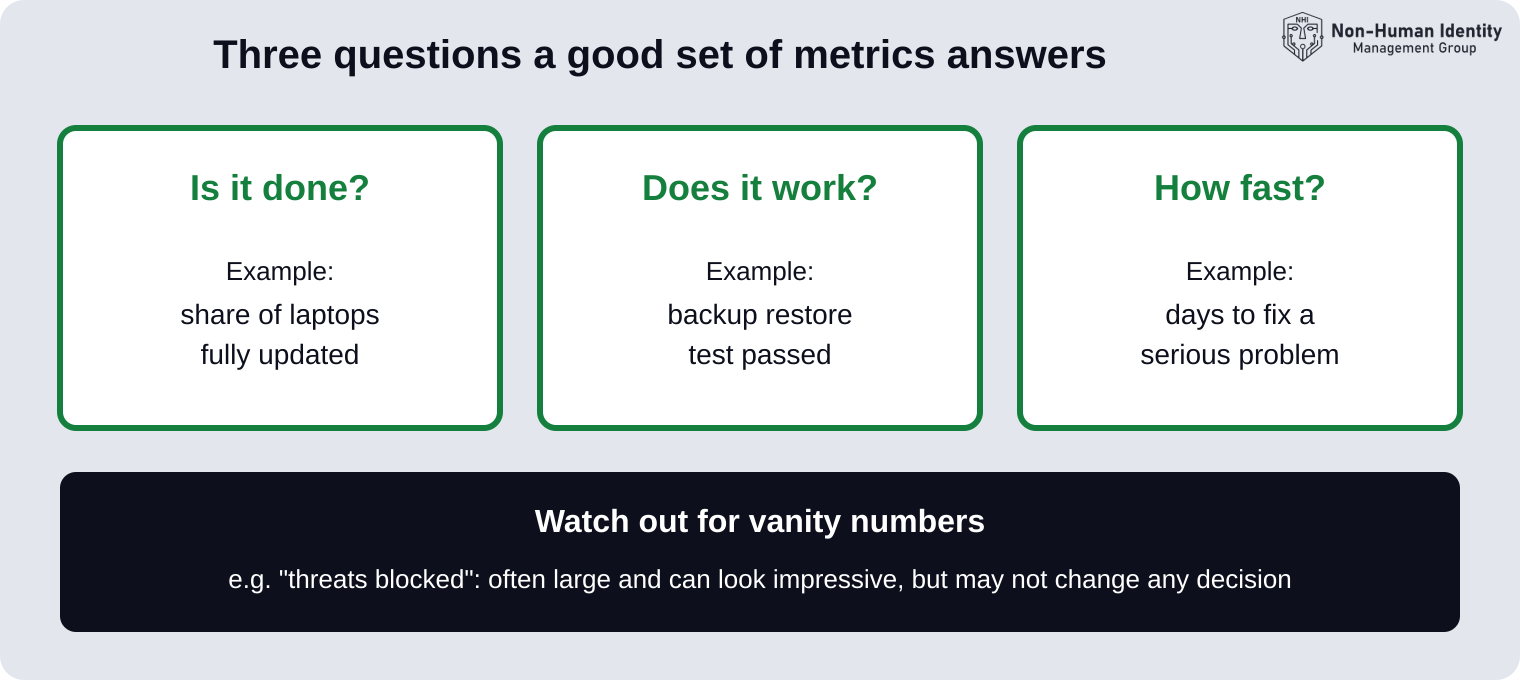
- Good metrics show three things: is it done, does it work, and how fast do we fix problems.
- Start with a few numbers tied to your biggest worries, measured the same way each month.
- Watch the trend, not one month, and be wary of numbers that only look good.
What you will learn
- Explain what a security metric is in one sentence.
- Spot the difference between a useful number and a vanity number.
- Check whether a metric has a clear owner, source and target.
- Ask better questions when someone shows you a security report.
- Starting point (baseline)
- the first measurement, which later numbers are compared with.
- Key number to track (KPI)
- a key performance indicator: a number chosen to show whether a goal is being met.
What are security metrics?
Think of the dashboard in a car. You do not need to understand the engine to read the fuel gauge, the speed and the warning lights. They tell you whether to keep going, slow down or stop.
Security metrics do the same job for an organisation. Each one answers a plain question with a number. For example: what share of our laptops have the latest updates? How many staff use a second check at login? How long did it take to fix the last serious problem?
A US government guide on security measurement splits these numbers into a few kinds. Some show how far a control is in place. Others show whether it works, how quickly problems are dealt with, or the effect on the business.[1] A control here just means a safety step, such as updates or backups.
Where the comparison stops working: a car's gauges are built in and accurate. Security numbers have to be chosen, collected and checked by people, so a gauge can be missing or wrong without anyone noticing.
Why does it matter?
Without numbers, people argue from feelings. With the right few numbers, a team can see what is improving, what is stuck and where to spend money next.
UK government guidance for company boards says boards should govern cyber risk, and it is meant to be the first reference for board members.[3] The UK's national cyber security agency also has a toolkit for boards. It gives questions boards can ask to judge how their organisation is doing.[5] Clear numbers help answer those questions.
If you manage a team or a budget
What could happen: you approve spending based on a report full of large numbers that do not show any change in risk.
Check this: ask "what decision does this number help me make?"
If you are new to a security job
What could happen: you are asked to build a report and copy whatever numbers the tools produce.
Check this: write down the question each number answers before you add it.
If you run a small business
What could happen: you have no idea whether backups or updates are really happening.
Check this: pick three simple numbers and ask your IT helper for them each month.
What does it look like?
Here is a made-up one-page metrics card for a small firm. Each line shows a number, a target and a trend.
Example only. All values are made up.
EXAMPLE LTD - security metrics, month 3
Laptops fully updated          82%   target 95%   up from 70%   (1)
Staff using a second check     60%   target 100%  no change     (2)
Days to fix a serious problem  12    target 7     down from 20  (3)
Backup restore test passed     yes   target yes   same          (4)
Phishing emails reported       14    (no target)  up from 5     (5)
- An "is it done?" number. A useful report also says where each number comes from, such as the device management tool.
- Stuck numbers are worth a question: what is blocking progress?
- A "how fast?" number. Lower is better here, so "down" is good news.
- A "does it work?" check. A backup is only useful if it can be restored.
- More reports can be a good sign. It can mean staff feel safe to speak up.
Why this is risky: without targets, owners and sources, a card like this can turn into a list of numbers nobody acts on.
The safer way: each line has a target, a trend and a named owner, and the card is reviewed at the same meeting each month.
How does it work?
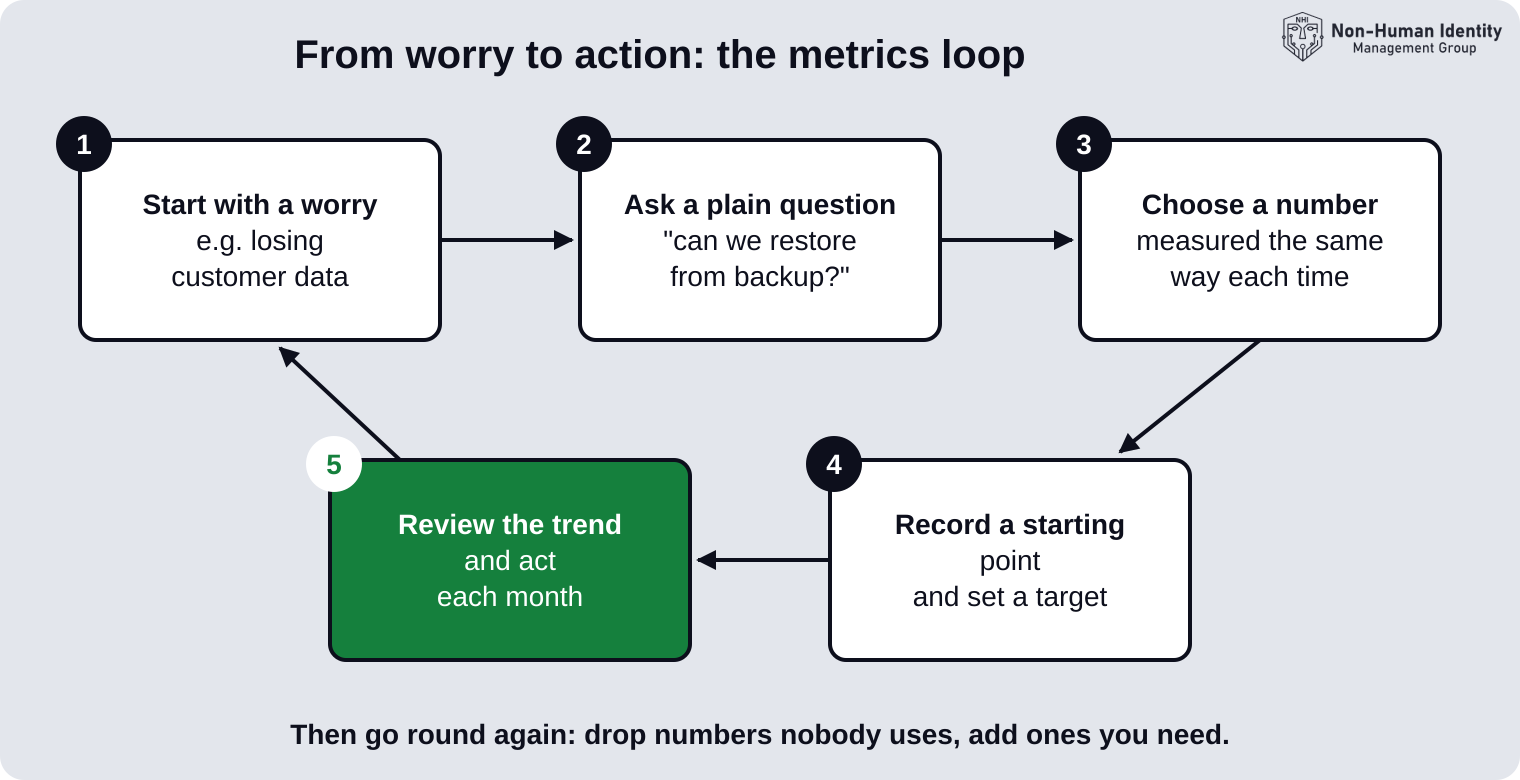
Building useful security metrics is a short loop that you repeat.
- Start with a worry. Pick the risks that matter most to you. Examples are losing customer data, or ransomware (malicious software that locks files until a payment is made).
- Ask a plain question. For each worry, ask what would show that you are protected, such as "can we restore from backup?"
- Choose a number. Turn the question into a number you can collect the same way each time. Good measures are accurate, repeatable and taken at a fixed point in time.[2]
- Record a starting point. Measure once to get your baseline, then set a realistic target.
- Review and act. Look at the trend each month. When a number is stuck, find out why and decide what to change.
A worked example
Anil Delmar owns Elm Bakery, a fictional business with three shops and an online ordering site. Jana Lindahl looks after its computers two days a week.
Anil asks Jana a simple question. "Are we secure?" Jana says she does not know how to answer that honestly in one word. So they agree to track a few numbers instead.
First they list their worries. The biggest is the ordering site going down, or customer details being stolen. Next is someone taking over the shared email account.
Jana turns each worry into a number. How many of the bakery's laptops and tills are up to date? How many staff accounts use a second check at login? Did this month's backup restore properly?
In month one, the numbers are not pretty. Only half the accounts use a second check, and nobody has ever tested a restore. Anil is tempted to hide the card. Jana explains that a poor starting point is useful, because now they can show progress.
By month three, every account uses a second check. The first restore test fails because a password for the backup service has been lost. They fix it and the next test passes.
The security tool also reports that it blocked thousands of threats. Anil asks what decision that number helps him make. Neither of them can think of one, so they leave it off the card.
Myths and mistakes
| What people think | What is true |
|---|---|
| More numbers make a better report. | A few numbers linked to real worries are easier to act on. |
| A big "threats blocked" count shows we are safe. | It shows the tool is busy. It says little about what got through. |
| Fewer people clicking a test phishing email is the best measure. | UK guidance suggests also tracking how many people report suspicious emails.[4] |
| Green everywhere means everything is fine. | All-green can mean the targets are too easy or the data is wrong. Ask how each number is collected. |
| We can compare our numbers with other firms straight away. | Firms measure in different ways. Compare with your own past first. |
What can I do this week?
- Write down your top three security worries in plain words.
- Turn each worry into one question and one number.
- Ask who can collect each number, and from which tool or record.
- Record this month's value as your starting point.
- Book a short monthly slot to look at the trend.
Checklist
- Every metric answers a question someone actually cares about.
- Every metric has a named owner.
- Every metric has a clear data source and is collected the same way each time.
- There is a starting point and a realistic target.
- The set includes "is it done", "does it work" and "how fast" numbers.
- Numbers are shown as trends, not single months.
- Each review ends with at least one decision or action.
Common questions
What is the difference between a metric and a KPI?
A KPI is a metric you have chosen as especially important. A metric is any number you track. A KPI is linked to a goal and usually has a target, such as "every staff account uses a second check at login". Most teams track many metrics and report only a few KPIs.
How many security metrics should we start with?
Start small, with perhaps three to five numbers linked to your biggest worries. We suggest adding more only when the first set is collected reliably and used in decisions. A short list that people act on is worth more than a long list nobody reads.
What is a vanity metric?
A vanity metric is a number that looks impressive but does not help anyone decide anything. "Threats blocked" and "emails scanned" are common examples. They are often large and go up over time, but they do not tell you whether your most important risks are under control.
Can numbers be gamed?
Yes. When a number becomes a target, people may improve the number without improving security. For example, closing tickets quickly without fixing the problem. Pair numbers that balance each other, such as speed and quality, and check a sample of the work behind them.
Who should see security metrics?
Different people need different views. The team doing the work needs detailed numbers to manage tasks. Managers need trends and stuck items. Boards need a short view of the biggest risks and whether they are getting better or worse.
Where next?
Ready for the detail? Read the practitioner guide: Security Metrics and KPIs Programme Guide. It goes further into measure types, data quality, targets and baselines, and reporting to different audiences.
Also useful:
- Board Cyber Risk Reporting Guide
- Board Cyber Report Template
- Cyber Risk Quantification for Beginners
- Identity Security Metrics Guide
Related NHI Mgmt Group resources: Cyber Risk Management for Beginners · Governance, Risk and Compliance for Beginners · Incident Response Metrics and KPIs Guide
Key terms
- Security metrics
- Numbers that show how well security work is being done and whether it is helping.
- Key performance indicator (KPI)
- A number chosen to show whether an important goal is being met.
- Key risk indicator (KRI)
- A number that warns when a risk is growing, such as a rise in unpatched laptops.
- Baseline
- A first measurement that later results are compared with.
- Vanity metric
- A number that looks impressive but does not help anyone make a decision.
- Mean time to respond
- The average time a team takes to deal with a security problem once it is found.
- Patch compliance
- The share of devices or systems that have the required updates installed.
Sources and further reading
- NIST SP 800-55 Vol. 1, Measurement Guide for Information Security: Volume 1, Identifying and Selecting Measures. National Institute of Standards and Technology, December 2024. https://csrc.nist.gov/pubs/sp/800/55/v1/final, accessed 28 Nov 2026.
- NIST SP 800-55 Vol. 1 (full text, PDF). National Institute of Standards and Technology, December 2024. https://nvlpubs.nist.gov/nistpubs/SpecialPublications/NIST.SP.800-55v1.pdf, accessed 28 Nov 2026.
- Cyber Governance Code of Practice. Department for Science, Innovation and Technology and National Cyber Security Centre, 8 April 2025. https://www.gov.uk/government/publications/cyber-governance-code-of-practice, accessed 28 Nov 2026.
- Phishing attacks: defending your organisation. National Cyber Security Centre. https://www.ncsc.gov.uk/guidance/phishing, accessed 28 Nov 2026.
- Cyber Security Toolkit for Boards. National Cyber Security Centre. https://www.ncsc.gov.uk/collection/board-toolkit, accessed 28 Nov 2026.