SPIFFE is an open standard that gives each piece of running software its own short-lived, checkable identity, and SPIRE is the open-source system that hands those identities out.
When one piece of software talks to another, each side needs to know who is on the other end, and today that is usually proved with a shared password or key that can be copied, leaked or forgotten. This guide explains both in plain English for newcomers, students, career changers and managers. It covers what problem they solve, how they work step by step, a worked example, common misunderstandings and simple first steps. You do not need to know cryptography or Kubernetes to follow it; every technical term is explained when it first appears.
By the end of this guide you will be able to:
- Explain the difference between SPIFFE and SPIRE.
- Understand why short-lived, checkable identities reduce reliance on shared secrets.
- Describe how SPIRE checks a workload and hands it an identity.
- Identify sensible first steps for a pilot.
Key takeaways
- SPIFFE is a standard, SPIRE is a product of that standard. SPIFFE describes what a software identity looks like; SPIRE is the open-source system that issues and renews those identities.[1][3]
- Identity is proved, not handed out as a secret. Software gets its identity because the platform can check facts about it, such as which server or container it runs in, so there is no starter password to leak.[3]
- Identities are short-lived and renewed automatically. If one is stolen, it stops working soon, and nobody has to remember to change it.[2]
- Knowing who is calling is not the same as allowing it. SPIFFE and SPIRE prove identity. A separate rule still has to decide what each identity may do.
- It suits larger, fast-changing environments. A handful of servers may not need it; hundreds of containers across several clouds often do.
What it is, in plain English
First, two words you will see a lot. A workload is a piece of running software with one job, such as a payments service, a website back end or a nightly report. An identity is the answer to "who are you?". People prove identity with passwords and phones. Workloads need a way too.
Picture a large hotel. Instead of giving every cleaner a permanent master key, the front desk checks each cleaner's staff badge at the start of a shift and issues a key card that only works today and only on certain floors. If a card is lost, it expires tonight anyway. SPIFFE is the rulebook for what those key cards look like and how doors check them. SPIRE is the front desk that checks badges and prints the cards.
Where the analogy breaks down: a hotel desk checks a person's badge, but SPIRE checks facts about the software itself, such as which machine and container it runs in, and it renews the card automatically many times a day without anyone queueing.
The SPIFFE project describes itself as a set of open-source standards for securely identifying software systems in dynamic and heterogeneous environments, meaning environments that change constantly and mix many kinds of technology. SPIFFE stands for Secure Production Identity Framework For Everyone. SPIRE stands for the SPIFFE Runtime Environment.[1]
Both are hosted by the Cloud Native Computing Foundation (CNCF), the open-source foundation that also hosts Kubernetes. The CNCF lists SPIFFE as a Graduated project, its highest maturity level, accepted on 29 March 2018 and graduated on 23 August 2022 (status checked November 2026).[5]
| Piece | What it is | Hotel analogy |
|---|---|---|
| SPIFFE ID | A name for a workload, written like a web address: spiffe://example.org/payments | The name printed on the key card |
| Trust domain | The part after spiffe://; the group of workloads that share one root of trust, often one organisation or environment | The hotel itself |
| SVID | SPIFFE Verifiable Identity Document: the signed document a workload shows to prove its SPIFFE ID | The key card |
| Trust bundle | The public certificates used to check that an SVID was really signed by the trust domain | The door's list of genuine card designs |
| Workload API | A local service a workload asks for its SVID, with no password needed | The front desk window |
| SPIRE server and agents | The server signs identities; an agent on each machine checks local workloads and passes identities to them | Head office and the desk on each floor |
Why it matters to you
- If you run a small business: you probably do not need SPIRE yourself, but cloud and software suppliers may use it or similar ideas. The lesson to take is simple: fewer long-lived shared passwords between systems.
- If you are new to a security job: SPIFFE terms such as SVID and trust domain appear in Kubernetes, service mesh and zero trust work, so knowing them makes those conversations easier.
- If you are a manager: SPIFFE can reduce the risk of leaked service keys, but it is a platform project that needs an owner and protected infrastructure.
Most software still proves who it is with a static secret: a password, API key or certificate that stays the same for months or years. Every static secret has to be created, copied to the right place, stored safely and changed regularly. Each of those steps is a chance to leak it into code, a log file or a chat message. And the software needs a first secret just to fetch its other secrets, a puzzle often called "secret zero".
Older approaches also trust network location: "anything coming from this IP address is the payments service". The SPIFFE project notes that controls such as IP-based network policies struggle to scale in modern environments, where containers start and stop every few minutes and addresses change constantly.[1]
SPIFFE changes the question from "do you know the password?" to "can the platform prove what you are?". That reduces reliance on long-lived secrets, ties identity to the workload itself rather than its address, and makes renewal automatic. These ideas sit at the heart of zero trust, the approach of checking every request rather than trusting anything inside the network. NIST's security control catalogue includes a matching control, IA-9 Service Identification and Authentication, for identifying and authenticating services before connections are set up.[6] For a broader view of workload identity options, see the Cloud Workload Identity Guide.
How it works, step by step
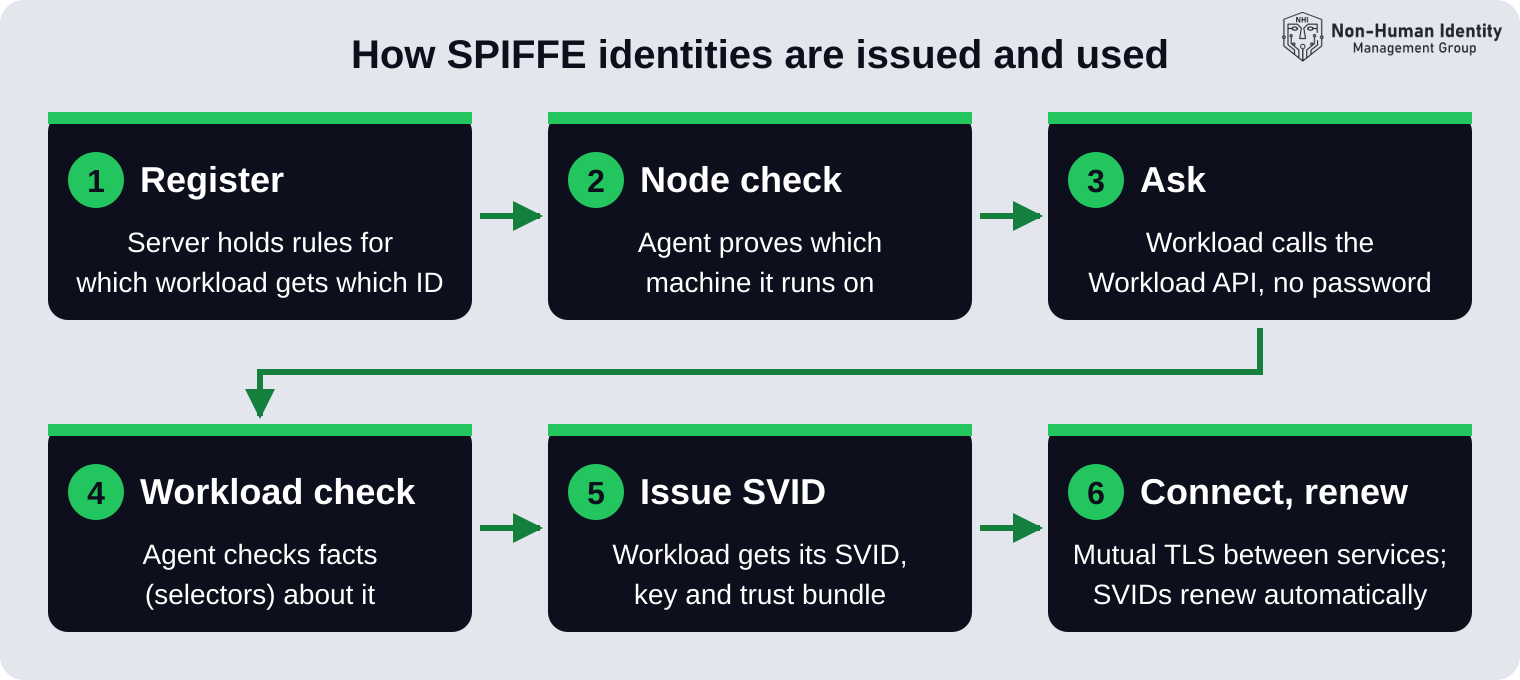
This is the journey from a newly started server to two workloads talking securely, based on the SPIRE concepts documentation.[3]
- The SPIRE server is set up for a trust domain. It holds the signing keys and a list of rules, called registration entries, that say which workloads should get which SPIFFE ID.
- An agent starts on each machine and proves where it is running. This is node attestation. Attestation simply means providing evidence. On AWS, for example, the agent presents the Instance Identity Document that AWS gives each virtual machine, and the server checks it with AWS. In Kubernetes, the node can use a Kubernetes service account token. Where a platform has no such proof, the server can issue a one-time join token that expires after use.[3]
- The agent receives its own identity. A successful node attestation gives the agent a unique SPIFFE ID, which then acts as the parent for the workloads on that machine.
- A workload asks the agent "who am I?". It calls the Workload API on its own machine. It does not need a password or even to know its own name; the SPIFFE concepts page says the Workload API does not require that a calling workload have any knowledge of its own identity.[2]
- The agent checks the workload. This is workload attestation. The agent looks up facts about the calling process from the operating system or local components such as the kubelet (the Kubernetes agent on each node). These facts are called selectors, for example a Unix user ID, or a Kubernetes namespace and service account.[3]
- The agent hands over the matching identity. If the selectors match a registration entry, the workload receives its SVID, its private key and the trust bundle.
- Two workloads authenticate each other. Usually each side shows an X.509-SVID (a standard certificate) and they set up mutual TLS (mTLS), an encrypted connection where both ends prove their identity. Each side checks the other's SVID against the trust bundle.[2][4]
- Identities renew themselves. SPIFFE describes all private keys and their certificates as short lived, rotated frequently and automatically. The workload simply fetches fresh ones from the Workload API before the old ones expire.[2]
The two SVID formats
| Format | What it is | When it is used |
|---|---|---|
| X.509-SVID | A standard X.509 certificate carrying the SPIFFE ID | The preferred option; used for mutual TLS between services |
| JWT-SVID | A signed JSON Web Token (a compact signed text token) | Where something in the middle, such as a load balancer, breaks the direct encrypted connection. The SPIFFE project warns that tokens like this can be replayed if intercepted, so it advises using X.509-SVIDs whenever possible.[2] |
A worked example
Larkspur Travel is a fictional online travel agency. Its booking website runs as many small services in containers on Kubernetes. Two of them matter here: booking, which takes customer bookings, and payments, which charges cards.
Before: booking called payments using a shared API key. The key sat in a configuration file, was copied into three environments and had not changed in two years. When a developer pasted a debugging log into a support ticket, the key went with it. Anyone with the key could pretend to be booking.
After: Larkspur deploys SPIRE. The platform team writes two registration entries:
- Booking: any container running in namespace
shopwith Kubernetes service accountbookinggetsspiffe://larkspur.example/shop/booking. - Payments: any container in namespace
shopwith service accountpaymentsgetsspiffe://larkspur.example/shop/payments.
Now, when a booking container starts, the SPIRE agent on that node checks its namespace and service account, then hands it a certificate that lasts a short time and is renewed automatically. When it calls payments, both sides show their certificates over mutual TLS. The payments service has one simple rule: accept card charges only from spiffe://larkspur.example/shop/booking.
There is no API key to paste into a ticket any more. If an attacker somehow copied a certificate, it would stop working soon, although it could still be misused until it expired, so the team keeps its logging and alerts in place. The team also learns a lesson during testing: their first draft rule matched only the namespace, which would have given every container in shop the booking identity. They tightened it to namespace plus service account before going live.
Myths and misunderstandings
| What people think | What is true |
|---|---|
| SPIFFE and SPIRE are the same thing. | SPIFFE is the set of specifications. SPIRE is one implementation of them. Other tools, including several service meshes, can also issue SPIFFE-style identities. |
| Once we have identities, access is controlled. | Identity only tells you who is calling. You still need authorisation rules, in the application, a proxy or a service mesh, that say what each SPIFFE ID may do. |
| It only works in Kubernetes. | Kubernetes is common, but SPIRE also attests virtual machines and servers, for example using cloud provider identity documents or join tokens. |
| There are no secrets at all now. | Workloads still hold private keys; they are just short-lived and delivered automatically. The SPIRE server's own signing keys become very valuable, so the server must be protected like any critical system. |
| Short-lived means we can be relaxed about rules. | A loose registration entry gives the right identity to the wrong workload, every time, automatically. Rules deserve careful review. |
Key terms
- Workload
- A piece of running software with a single purpose, such as one service or job.
- SPIFFE
- Secure Production Identity Framework For Everyone: open standards for naming and proving workload identity.
- SPIRE
- The SPIFFE Runtime Environment: open-source software that attests workloads and issues SPIFFE identities.
- SPIFFE ID
- A workload's name in the form
spiffe://trust-domain/path. - Trust domain
- The root of trust for a group of workloads, often one organisation or environment.
- SVID
- The signed identity document (a certificate or token) a workload presents.
- Attestation
- Checking evidence about a machine or process before giving it an identity.
- Workload attestation
- Checking facts about a running process, such as its user or container, before giving it an identity.
- Selector
- A fact about a workload, such as its Kubernetes namespace, used to decide which identity it gets.
- Mutual TLS (mTLS)
- An encrypted connection where both sides prove their identity with certificates.
Common questions
What is the difference between SPIFFE and SPIRE?
SPIFFE is the standard that says what a workload identity looks like and how it is checked. SPIRE is open-source software that implements that standard and issues the identities.
Is SPIFFE a CNCF project?
Yes. The CNCF lists SPIFFE as a Graduated project, graduated on 23 August 2022 (checked November 2026).[5]
Do I need Kubernetes to use SPIRE?
No. SPIRE can attest Kubernetes nodes, cloud virtual machines and other servers, using the proof each platform provides or a one-time join token.[3]
Should I use X.509-SVIDs or JWT-SVIDs?
The SPIFFE project advises X.509-SVIDs whenever possible, because tokens can be replayed if intercepted.[2] Use JWT-SVIDs only where something in the middle breaks the direct encrypted connection.
Does SPIFFE replace a secrets vault?
It removes the need for many service-to-service secrets, but you may still need a vault for things like third-party API keys and database passwords. See the Secrets Management Guide.
First steps
Three things you can do this week:
- Count your shared secrets. List the passwords, API keys and certificates your services use to call each other, and note how old each one is.
- Pick one low-risk pair of services. Choose two internal services that talk often, as a learning pilot, and read the SPIRE concepts page with your team.
- Try SPIRE in a lab. Run it in a test environment, not production, and write registration entries with more than one selector, for example namespace and service account together.
Checklist
- Each environment with different security needs, such as staging and production, has its own trust domain, as the SPIFFE concepts page advises.[2]
- Registration entries use specific selectors and are reviewed like firewall rules.
- X.509-SVIDs and mutual TLS are used by default; JWT-SVIDs only where a proxy breaks the connection.
- Every service checks the caller's SPIFFE ID against an allow rule, not just "any valid certificate".
- The SPIRE server, its signing keys and its database are treated as critical systems with limited administrator access.
- Shared secrets replaced by SPIFFE identities are actually deleted.
- Failed attestations and expired SVIDs are logged and someone looks at them.
Check your understanding
1. What does a workload get from the Workload API?
Answer: its SVID (identity document), its private key and the trust bundle used to check other workloads.
2. Why does SPIFFE not need a starter password?
Answer: the SPIRE agent identifies the workload by checking facts about it (attestation), so the workload does not have to prove anything with a secret.
3. A registration entry matches only a Kubernetes namespace. What is the risk?
Answer: every workload in that namespace gets the same identity, including ones that should not have it.
Suggested learning pathway
- See the SPIFFE and SPIRE Guide for the full practitioner detail: registration design, federation, rollout and monitoring.
- See X.509 SVIDs vs JWT SVIDs for a closer look at the two identity formats.
- See the mTLS Guide to understand the encrypted, two-way-checked connections SVIDs are used for.
- See SPIFFE vs Cloud-Native Workload Identity to compare SPIFFE with the identity features built into cloud platforms.
- See the Non-Human Identity (NHI) Guide for how workload identity fits with service accounts, API keys and AI agents.
Standards and references
- SPIFFE Overview. SPIFFE project documentation. https://spiffe.io/docs/latest/spiffe-about/overview/, accessed 27 Nov 2026.
- SPIFFE Concepts. SPIFFE project documentation. https://spiffe.io/docs/latest/spiffe-about/spiffe-concepts/, accessed 27 Nov 2026.
- SPIRE Concepts. SPIFFE project documentation. https://spiffe.io/docs/latest/spire-about/spire-concepts/, accessed 27 Nov 2026.
- The SPIFFE Identity and Verifiable Identity Document. SPIFFE specification, GitHub. https://github.com/spiffe/spiffe/blob/main/standards/SPIFFE-ID.md, accessed 27 Nov 2026.
- SPIFFE project page. Cloud Native Computing Foundation (CNCF). https://www.cncf.io/projects/spiffe/, accessed 27 Nov 2026.
- SP 800-53 Rev. 5, Security and Privacy Controls for Information Systems and Organizations (IA-9 Service Identification and Authentication). National Institute of Standards and Technology (NIST). https://csrc.nist.gov/pubs/sp/800/53/r5/upd1/final.
Related NHI Mgmt Group resources: SPIFFE and SPIRE Guide · Cloud Workload Identity Guide · Mutual TLS vs TLS · Istio Security Hardening Guide