Zero trust is a security approach that gives no automatic trust to anyone or anything because of where they connect from, and instead checks every request to use a system, every time, based on who is asking, from what device and for what.
For decades, organisations protected their computers like a castle with a moat: anyone inside the walls was trusted. One stolen password or one infected laptop inside could reach almost everything. This guide explains zero trust from scratch. You do not need any security background, and the links at the end take you deeper when you are ready.
By the end of this guide you will be able to:
- Explain what zero trust means and how it differs from the older perimeter model.
- Describe how a single request is checked, step by step, in a zero trust design.
- Understand the main areas of work, using CISA's five pillars as a guide.
- Identify three practical first steps a small organisation can take this week.
Key takeaways
- Zero trust means no automatic trust. Being on the office network or connected through a VPN no longer counts as proof that a request is safe.
- Every request is checked. Each time someone or something asks to use an app or data, the request is judged on identity, device health and context.
- It is a strategy, not a product. NIST describes zero trust as a set of principles, and no single tool delivers it on its own.[1]
- Identity is the new front door. Strong sign-in and tightly limited permissions do most of the early work.
- It is a journey in stages. Most organisations move step by step, starting with their most valuable data and riskiest accounts.
What it is, in plain English
Imagine two hotels. In the first, a guard checks you at the front door, and after that every room, office and store cupboard is unlocked. In the second, your key card is checked at every door, it only opens the rooms you have booked, and it stops working the day you check out. The second hotel works like zero trust.
In computing, the old model is called perimeter security: guarding the boundary of the company network and trusting what is inside. The boundary is protected by a firewall, a device that filters traffic coming in and out. Remote staff joined the inside through a VPN (virtual private network), an encrypted tunnel that makes a laptop act as though it is in the office.
Zero trust drops that assumption. NIST Special Publication 800-207, the US government's reference document on the subject, published in August 2020, says zero trust assumes there is no implicit trust granted to assets or user accounts based only on their physical or network location. The focus moves from protecting the network edge to protecting users, devices and the resources they use.[1]
The phrase most often used to sum it up is "never trust, always verify". Microsoft's guidance, for example, builds on three habits:[5]
- Verify explicitly: check who is asking and whether their device is healthy, every time.
- Use least privilege: allow only the access needed for the task, and no more.
- Assume breach: design as though an attacker may already be inside, so one compromise cannot spread everywhere.
Where the analogy breaks down: a hotel checks people. Zero trust also checks devices and software, such as servers and automated accounts, which need verified identities and limited access just like guests.
Why it matters to you
The castle model made sense when everyone worked in one building on company computers. Today you may work from home, on your phone, using cloud services that sit outside the company network entirely. NIST notes that zero trust responds to these trends: remote users, bring your own device (staff using personal devices for work) and cloud-based assets outside the company's own network boundary.[1]
The bigger reason is what happens after an attacker gets in. In the Change Healthcare Breach 2024: How One Citrix Login Without MFA Became the Largest US Healthcare Data Breach, attackers signed in to a remote access portal with stolen employee credentials.[7] UnitedHealth Group's chief executive later told the US Senate the portal did not have multi-factor authentication, and that ransomware was deployed nine days after the first sign-in.[7][8] Two zero trust habits target exactly those failures: verify every sign-in strongly, and stop one account reaching everything.
- If you run a small business: most of the first steps, such as strong sign-in and device rules, are often already in your cloud subscription. See Zero Trust for Small Organisations.
- If you are new to a security job: zero trust is the language of modern security plans. You will see it in roadmaps, audits and job adverts, often alongside CISA's maturity model.
- If you are a manager: governments have made it an official direction. The US Cybersecurity and Infrastructure Security Agency (CISA) publishes a Zero Trust Maturity Model, and the UK National Cyber Security Centre (NCSC) publishes zero trust architecture design principles.[2][3]
| Question | Perimeter (castle) model | Zero trust model |
|---|---|---|
| What earns trust? | Being on the internal network or VPN | Verified identity, healthy device and the right context, checked per request |
| How often is access checked? | Mostly once, at the front door | Every time a resource is requested |
| What can a signed-in user reach? | Often most of the network | Only the specific apps and data allowed |
| What happens after one compromise? | The attacker can roam widely | The damage is limited to what that account could reach |
| Where is data assumed to live? | Inside the company network | Anywhere: office, cloud, home |
How it works, step by step
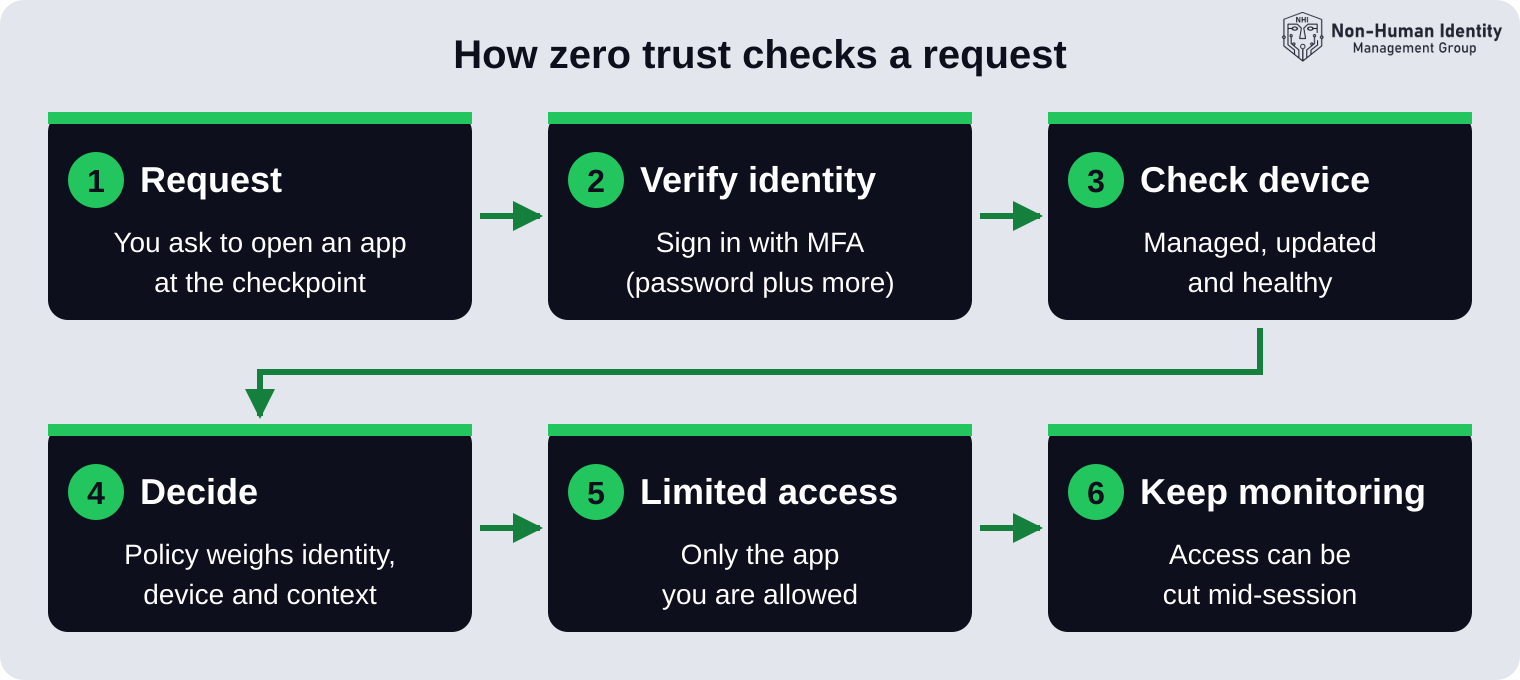
Zero trust can sound abstract, so follow a single request. Suppose you open your company's finance app. In a zero trust design, this happens:
- The request reaches a checkpoint. NIST SP 800-207 calls this the policy enforcement point: the gate in front of the app that lets nothing through without a decision.
- Your identity is verified. You sign in, ideally with multi-factor authentication (MFA), meaning a password plus a second proof such as a security key or phone app.
- Your device is checked. Is it a company-managed laptop? Is it up to date and encrypted? This is called checking device posture, the health of the device.
- Context is weighed. Location, time of day and unusual behaviour count. A sign-in from a new country at 3am may need extra checks.
- A policy makes the decision. The policy decision point compares all of this with written rules, such as "finance staff on managed devices may use the finance app".
- Access is limited. If allowed, you reach only the finance app, not the whole network. This follows least privilege.
- Monitoring continues. Activity is logged and watched. If your device becomes unhealthy or behaviour looks wrong, access can be cut mid-session.
The NCSC's design principles express the same ideas, including "know your user, service and device identities", "use policies to authorise requests" and "don't trust any network, including your own".[3]
CISA's Zero Trust Maturity Model, Version 2.0 published in April 2023, groups the work into five areas called pillars, plus three capabilities that run across all of them: visibility and analytics, automation and orchestration, and governance. It describes four stages of progress: Traditional, Initial, Advanced and Optimal.[2][6]
| CISA pillar | Plain-English question | Simple example control |
|---|---|---|
| Identity | Do we know exactly who or what is asking? | MFA for every account, strongest for admins |
| Devices | Is the device trustworthy? | Only managed, updated laptops may reach company data |
| Networks | Can one problem spread? | Splitting the network into small sections (segmentation) |
| Applications and Workloads | Is each app protected on its own? | Each app checks access itself rather than trusting the network |
| Data | Do we know what data matters and who can see it? | Labelling sensitive files and restricting who can open them |
A worked example
Harbour Lane Design is a fictional architecture firm with 40 staff, two offices and most files in a cloud storage service. Anyone with a username and password can sign in from any device, and the VPN gives remote staff the whole office network, including an old file server holding every client contract.
A designer, Sam, reuses a password that leaked from a shopping site. A criminal tries it, signs in to the VPN and starts copying contracts.
Harbour Lane takes a zero trust approach in stages:
- Stage 1, identity: MFA on every account, with security keys for the two IT administrators. Sam's leaked password alone would now fail.
- Stage 2, devices: only company-managed, updated laptops can open client files. A criminal's own computer is refused even with a valid sign-in.
- Stage 3, least privilege: designers open only their own project folders, and contracts are limited to the two partners and the office manager.
- Stage 4, network: the file server moves behind an access gateway so remote staff reach only that one app, and the full-network VPN is retired.
- Stage 5, monitoring: alerts fire on sign-ins from new countries and unusually large downloads.
Harbour Lane did not buy a single "zero trust product". It used features in its existing cloud subscription for the first three stages and paid for one gateway in stage four.
Myths and misunderstandings
| What people think | What is true |
|---|---|
| Zero trust means we do not trust our staff. | It removes trust based on network location, not trust in people. Checks protect staff whose passwords or laptops get stolen. |
| We can buy zero trust. | NIST describes it as principles and a way of planning. Vendors sell parts; a label on a box does not make a programme. |
| Zero trust means getting rid of firewalls. | Network controls still matter. They stop being the only line of defence. |
| It is only for big enterprises. | Small organisations often have most of the needed features in their existing cloud tools. |
| It is just about people. | Servers, apps and automated accounts also need verified identities and limited access. |
| It is a one-off project. | CISA's model describes stages of maturity that organisations move through over time. |
For a fuller list, see Zero Trust Myths and Facts.
Key terms
- Zero trust
- A security approach that gives no automatic trust based on network location and checks every access request.
- Perimeter security
- The older model of guarding the network boundary and trusting what is inside it.
- VPN (virtual private network)
- An encrypted connection that places a remote device on the company network.
- Least privilege
- Giving each person or program only the access needed for its task.
- Assume breach
- Designing as though an attacker may already be inside.
- Multi-factor authentication (MFA)
- Signing in with two or more different kinds of proof.
- Device posture
- The health of a device: whether it is managed, updated and protected.
- Policy decision point
- The part that decides, using rules, whether a request is allowed.
- Policy enforcement point
- The gate in front of a resource that carries out the decision.
- Network segmentation
- Dividing a network into smaller sections so a problem in one cannot easily spread.
- Zero trust network access (ZTNA)
- Technology that connects you to one specific app after checks, instead of the whole network.
Common questions
Where does the term zero trust come from?
The idea grew over many years, and NIST SP 800-207, published in August 2020, became the best-known reference definition.[1] For the history, see Zero Trust Myths and Facts.
Does zero trust replace a VPN?
It can. Zero trust network access connects you to one app at a time after checks, rather than to the whole network. If all your apps are already in the cloud, you may not need either. See the ZTNA Guide.
How long does zero trust take?
It is done in stages, often over several years. You can make useful progress in weeks by starting with MFA and device rules.
Is MFA the same as zero trust?
No. MFA is one important piece, under the identity pillar. Zero trust also covers devices, networks, apps and data.
Does zero trust apply to machines and software?
Yes. NIST's approach covers non-person entities too, such as servers, apps and automated accounts.[1]
First steps
- Turn on MFA everywhere: start with email and administrator accounts, using security keys or passkeys for admins where you can.
- List what matters: write down your most important apps and data, and who genuinely needs each one.
- Check your licences: many business cloud subscriptions already include conditional access (rules that allow or block sign-ins based on user, device and location) and device management.
Checklist
- You have a list of your critical apps and data and who needs each.
- Every account uses MFA, with phishing-resistant methods for administrators, as CISA recommends.[4]
- Access is granted to named apps, not to the whole network.
- Sensitive apps check that the device is managed and up to date.
- Permissions follow least privilege and are reviewed at least quarterly.
- Automated accounts and services have their own identities and limited permissions.
- Sign-in and access logs are collected centrally and risky events trigger alerts.
- You have a written, staged roadmap and know your CISA maturity stage for each pillar.
Check your understanding
1. In the perimeter model, what earns trust?
Answer: being on the internal network or connected through the VPN. Zero trust removes that.
2. Name the three habits behind "never trust, always verify".
Answer: verify explicitly, use least privilege and assume breach.
3. Why did Harbour Lane's device rule stop the criminal even with Sam's correct password?
Answer: the criminal's own computer was not a managed, healthy company device, so the policy refused access.
Suggested learning pathway
- Attribute-Based Access Control for Beginners: a related beginner guide to read next.
- Authorisation and Policy Engines for Beginners: a related beginner guide to read next.
- Identity and Access Management for Beginners: a related beginner guide to read next.
- NIST SP 800-207 Zero Trust Architecture Guide: the reference document explained in depth.
- CISA Zero Trust Maturity Model Guide: the pillars and stages in detail.
- Zero Trust Identity Guide: why identity is the foundation and how to build it.
- Zero Trust vs Perimeter Security: a closer comparison of the old and new models.
- Zero Trust for Small Organisations: a practical plan using tools you may already pay for.
- Zero Trust Glossary: more terms you will meet as you go deeper.
Standards and references
- SP 800-207, Zero Trust Architecture. National Institute of Standards and Technology (NIST), August 2020. https://csrc.nist.gov/pubs/sp/800/207/final.
- Zero Trust Maturity Model. Cybersecurity and Infrastructure Security Agency (CISA). https://www.cisa.gov/resources-tools/resources/zero-trust-maturity-model, accessed 27 Nov 2026.
- Zero trust architecture design principles. National Cyber Security Centre (NCSC). https://www.ncsc.gov.uk/collection/zero-trust-architecture, accessed 27 Nov 2026.
- Implementing Phishing-Resistant MFA (fact sheet). Cybersecurity and Infrastructure Security Agency (CISA). https://www.cisa.gov/sites/default/files/publications/fact-sheet-implementing-phishing-resistant-mfa-508c.pdf.
- Developing a privileged access strategy. Microsoft Learn, Microsoft. https://learn.microsoft.com/en-us/security/privileged-access-workstations/privileged-access-strategy, accessed 27 Nov 2026.
- Introduction to the CISA Zero Trust Maturity Model. Microsoft Learn, Microsoft. https://learn.microsoft.com/en-us/security/zero-trust/cisa-zero-trust-maturity-model-intro, accessed 27 Nov 2026.
- Change Healthcare, compromised by stolen credentials, did not have MFA turned on. Healthcare Dive, 30 April 2024. https://www.healthcaredive.com/news/change-healthcare-compromised-credentials-no-mfa/714824/.
- Change Healthcare hacked using stolen Citrix account with no MFA. BleepingComputer, 30 April 2024. https://www.bleepingcomputer.com/news/security/change-healthcare-hacked-using-stolen-citrix-account-with-no-mfa/.
Related NHI Mgmt Group resources: Identity-Centric vs Network-Centric Zero Trust · ZTNA Guide · Least Privilege vs Zero Trust · MFA Guide