Threat modelling is a structured way of looking at a system, before or while you build it, to work out what could go wrong with its security and what you will do about it.
This guide is for newcomers, students, career changers, developers taking their first security steps and managers who are not security specialists. It explains threat modelling in plain English, walks through the basic steps, works through a small example and gives you simple first steps. For the full practitioner method, see the Threat Modelling Guide.
By the end of this guide you will be able to:
- Explain what threat modelling is and the four questions behind it.
- Understand why finding problems at the design stage matters.
- Describe the basic steps, from drawing a diagram to deciding what to do.
- Identify a small first threat modelling session you could run this week.
Key takeaways
- It is thinking ahead, on purpose. Threat modelling asks what could go wrong with a system before attackers find out for you.
- Four questions sit at its heart. What are we working on? What can go wrong? What are we going to do about it? Did we do a good enough job?
- A simple diagram is the starting point. Drawing how data moves, and where it crosses from one level of trust to another, shows where to look.
- STRIDE is a helpful checklist, not the whole job. Its six categories prompt you to think of different kinds of threat.
- Earlier is cheaper, but it is never finished. A design flaw found on a whiteboard costs far less to fix than one found in production, and the model needs updating as the system changes.
What it is, in plain English
A threat is something that could go wrong and cause harm, for example a stranger logging in as one of your customers. A threat model is the written result of thinking those threats through for one system: what the system is, what could go wrong, and what you decided to do. Threat modelling is the activity of producing and updating that model.
The Threat Modeling Manifesto, written by a group of experienced practitioners, defines threat modelling as analysing representations of a system to highlight concerns about its security and privacy characteristics.[2] In everyday terms, you look at a picture or description of the system and ask awkward questions about it. The OWASP Threat Modeling Cheat Sheet describes it as a structured, repeatable process: model the system, identify threats from an attacker's point of view, and decide how to respond.[1]
A helpful comparison is planning a house extension. Before building, a good architect walks through the plans and asks: where could water get in, which door could a burglar force, what happens if the power fails? Fixing those points on paper is cheap. Fixing them after the walls are up is expensive. Threat modelling does the same for software and systems. Where the analogy breaks down: a house stays roughly the same once built, while software changes every few weeks, so a threat model has to be revisited rather than filed away.
Why it matters to you
- If you run a small business: a short threat modelling chat before launching a new online shop, booking system or app can catch obvious gaps, such as a discount rule that can be abused or admin pages left open to the internet.
- If you are new to a security job: threat modelling is a core application security skill. You are likely to be asked to join or run sessions with developers, and to review the models they produce.
- If you are a manager: a threat model gives you a written record of the risks the team considered, what it chose to fix, and what it chose to accept, which supports decisions and audits.
Some security problems are not coding mistakes at all: they are design mistakes. The OWASP Top 10:2021 list includes a category called Insecure Design and explains that an insecure design cannot be fixed by a perfect implementation, because the controls that were needed were never designed in.[5] The same page calls for more use of threat modelling, and suggests using it for critical authentication, access control, business logic and other key flows.[5] Threat modelling is one of the main ways teams catch these design flaws early.
How it works, step by step
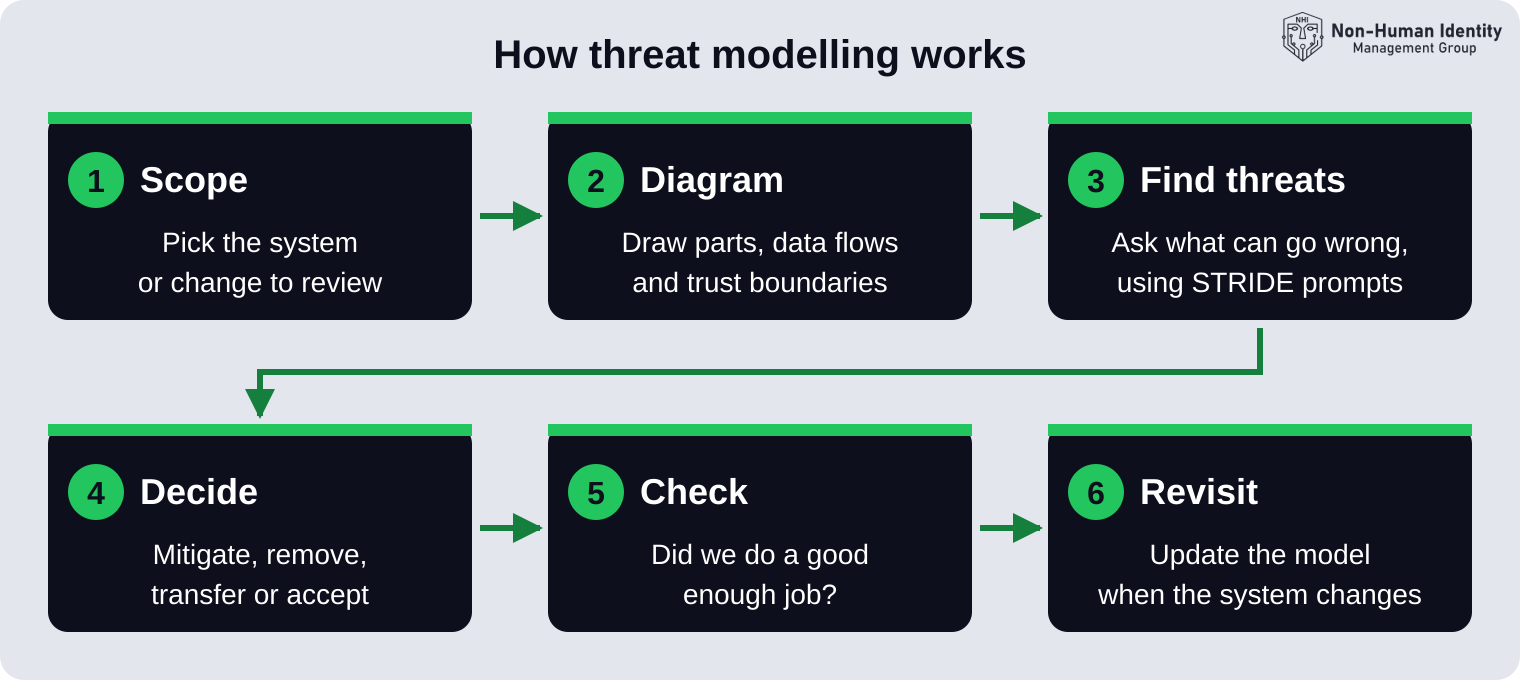
There are several methods, but most follow the four questions from the Threat Modeling Manifesto: "What are we working on?", "What can go wrong?", "What are we going to do about it?" and "Did we do a good enough job?"[2] In practice that becomes these steps.
- Pick the scope. Choose one system, feature or change to look at, such as "the new password reset flow". Small scopes keep sessions short and useful.
- Draw the system. Sketch a simple data flow diagram (DFD): the people and outside systems involved, the processes, the places data is stored, and the arrows showing how data moves. OWASP notes that DFDs are arguably the most common way to model a system for this purpose.[1]
- Mark the trust boundaries. A trust boundary is a line on the diagram where data or control passes between areas trusted to different levels, for example from the public internet into your server. OWASP points out that trust boundaries often mark likely points of attack.[1]
- Ask what can go wrong. Walk through each part of the diagram, especially each boundary crossing, and list threats. A checklist such as STRIDE (see the table below) helps you think of different kinds of problem.
- Decide what to do about each threat. OWASP lists four common responses: mitigate (reduce the likelihood or impact), remove (take away the feature or part causing it), transfer (shift responsibility to another party, which does not remove the risk itself) and accept (take no action, recorded as a conscious decision).[1]
- Check the work. Review whether the diagram is accurate, whether the list of threats looks complete, whether people agree with the responses, and whether the fixes can be tested.[1]
- Revisit when things change. Update the model when the design changes, for example a new integration or a new type of user. OWASP recommends building threat modelling into the normal development process rather than treating it as a one-off.[1]
STRIDE: a checklist for "what can go wrong?"
STRIDE is a way of grouping threats into six types. Each type breaks a different security property you want the system to have.[1][3]
| Letter | Threat type | Property it breaks | Plain-English example |
|---|---|---|---|
| S | Spoofing | Authentication | Someone signs in using another person's stolen password. |
| T | Tampering | Integrity | Someone changes data they should not be able to change, such as a price. |
| R | Repudiation | Non-repudiation (accountability) | Someone denies doing something, and there are no records to show otherwise. |
| I | Information disclosure | Confidentiality | Customer details are visible to people who should not see them. |
| D | Denial of service | Availability | The website is overwhelmed so real customers cannot use it. |
| E | Elevation of privilege | Authorisation | An ordinary user finds a way to perform admin actions. |
Useful distinctions
- Threat modelling is not a penetration test. A penetration test attacks a built system to find weaknesses. Threat modelling reasons about the design, often before anything is built. They complement each other.
- STRIDE is one method among several. Others focus on attackers' goals, on privacy, or on the data being protected. NIST's draft SP 800-154, for example, describes a data-centric approach that focuses on protecting particular types of data within systems; it is still an Initial Public Draft from 2016.[4]
- Tools help, but the thinking matters most. The Threat Modeling Manifesto values people and collaboration over processes, methodologies and tools.[2] A whiteboard and the right people in the room are enough to start.
A worked example
Hilltop Yoga is a fictional studio with three locations. It is adding an online booking page where members sign in, book classes and pay. Jo, the owner, asks Dev, the freelance developer, and Amira, the front-desk lead, to spend an hour on a threat model before the build starts.
1. What are we working on? Dev draws the diagram on a whiteboard: members' browsers, the booking website, the database of members and bookings, and the outside payment provider. He draws a dashed line around the booking server and database, and marks two trust boundaries: between the public internet and the website, and between the website and the payment provider.
2. What can go wrong? They walk through STRIDE at each boundary and come up with a short list:
- Spoofing: someone could sign in as a member using a password reused from another site.
- Tampering: someone could change the class price or the booking limit in the request their browser sends.
- Information disclosure: the class list page could show other members' full names and phone numbers.
- Elevation of privilege: the staff page for cancelling classes might be reachable by ordinary members.
3. What are we going to do about it? They agree to offer two-step sign-in, check prices and limits on the server rather than trusting the browser, show only first names on class lists, and restrict the staff page to staff accounts. Card details stay with the payment provider; that transfers part of the payment risk, but Jo notes that the studio still owns the settings and the account with that provider. They accept the small risk that a member books a class and does not turn up, because a no-show fee already covers it.
4. Did we do a good enough job? Dev writes each decision into the project task list with a test, for example "a member cannot open the staff cancellation page". Amira points out that staff sometimes book on behalf of members by phone, which nobody had drawn, so they add it to the diagram and agree to meet again before launch. The session does not make the system secure on its own, but it gives the team a short, agreed list of fixes and a record of what they chose to accept.
Myths and misunderstandings
| What people think | What is true |
|---|---|
| Threat modelling is only for security experts. | The people who know the system best, such as developers, product owners and operations staff, are essential. A security person can guide the session, but should not do it alone. |
| You need a special tool first. | A whiteboard, a simple diagram and the four questions are enough to start. Tools help with larger systems and with keeping models up to date. |
| It is a one-off document for the auditors. | A threat model is most useful when it is revisited as the system changes, and when its decisions turn into tasks and tests. |
| You have to find every possible threat. | The aim is to find the important ones and make sensible decisions. "Did we do a good enough job?" is a judgement, not a promise that nothing was missed. |
| It is too late once the system is built. | Earlier is better, but modelling an existing system still finds gaps and helps you plan fixes and monitoring. |
Key terms
- Threat modelling
- A structured way to identify how a system could be attacked before those weaknesses are exploited, and to decide which controls reduce the risk.
- Threat model
- A written description of a system's assets, trust boundaries, likely attackers and attack paths, used to decide which mitigations to build. It should be revisited when the system changes.
- STRIDE
- A way of grouping threats into six types: spoofing, tampering, repudiation, information disclosure, denial of service and elevation of privilege.
- Data flow diagram (DFD)
- A picture showing how parts of a system exchange data and where sensitive data moves and is stored.
- Trust boundary
- The point where one part of a system's authority should stop and another's should begin, such as between the internet and your server.
- Attack surface
- All the points where an attacker could try to get in, misuse or disrupt a system, such as web pages, interfaces, accounts and credentials.
- Mitigation
- An action that reduces the likelihood or impact of a threat without fully removing the weakness, so it still needs follow-up.
- Misuse case
- A description of how an attacker or careless user could abuse a system, rather than how a legitimate user completes a task.
Common questions
When should we do threat modelling?
Ideally early, while the design is still being decided, and again whenever the system changes in a meaningful way.[1] OWASP suggests building it into regular planning or refinement sessions.[5]
Who should be in the room?
The people who design, build and run the system, plus someone who can guide the security questions. We suggest keeping it to a small group so everyone speaks.
How long does a session take?
It depends on the scope. A small feature can often be covered in an hour; a whole platform needs several sessions. Keeping the scope narrow is the easiest way to keep sessions short.
Do I have to use STRIDE?
No. STRIDE is a popular checklist for beginners because it is easy to remember, but other methods exist. The four questions apply whichever method you choose.[2]
What do we do with the threats we find?
For each one, decide to mitigate, remove, transfer or accept it, and write the decision down.[1] Fixes become tasks with tests. Accepted risks should have a named owner and a review date.
Is threat modelling only for software?
No. The same questions work for networks, cloud set-ups, business processes and AI systems. Specialist guides cover these, such as the Network Threat Modelling Guide and the AI Threat Modelling Guide.
First steps
Three things you can do this week:
- Pick one small change. Choose a feature that is about to be built or changed, ideally one that handles sign-in, payments or personal data.
- Run a one-hour session. Draw the diagram with the people who know the system, mark the trust boundaries, and work through the four questions using STRIDE as prompts.
- Turn decisions into tasks. Add each fix to your normal task list with a simple test, and write down any risk you accept with the name of the person who accepted it and a date to look at it again. A free starting point is the Threat Model Template.
Checklist
- We have a simple diagram of the system that the team agrees is accurate.
- Trust boundaries are marked on the diagram.
- We have asked "what can go wrong?" at each boundary, using STRIDE or a similar checklist.
- Every threat on the list has a recorded decision: mitigate, remove, transfer or accept.
- Each mitigation is a task with a test that shows it works.
- Each accepted risk has a named owner and a review date.
- The people who build and run the system took part, not only security staff.
- We know what kind of change triggers an update to the threat model.
Simple measures that show progress: the share of new features that had a threat model before build, the number of design issues found in threat modelling compared with issues found after release, and how many accepted risks are past their review date.
Check your understanding
1. What are the four questions of threat modelling?
Answer: What are we working on? What can go wrong? What are we going to do about it? Did we do a good enough job?
2. Why are trust boundaries important on a diagram?
Answer: they show where data or control crosses between areas trusted to different levels, which is often where attacks happen, so they tell you where to look first.
3. What does the "E" in STRIDE stand for, and what property does it break?
Answer: elevation of privilege, which breaks authorisation: someone gains the ability to do things they should not be allowed to do.
4. Is transferring a risk the same as removing it?
Answer: no. Transferring shifts some responsibility to another party, but the risk still exists, so you should record what remains and who owns it.
Suggested learning pathway
- Start with the big picture in Application Security for Beginners.
- See where threat modelling fits in the build process in Secure Software Development Lifecycle for Beginners.
- Learn the common weaknesses threat models look for in The OWASP Top 10 for Beginners.
- For design flaws in workflows and rules, read Business Logic Flaws for Beginners.
- Go deeper with the practitioner Threat Modelling Guide.
- Run your first session with the Threat Model Template.
- When you need tooling for larger estates, see Threat Modelling Tools.
Standards and references
- Threat Modeling Cheat Sheet. OWASP Cheat Sheet Series, OWASP Foundation. https://cheatsheetseries.owasp.org/cheatsheets/Threat_Modeling_Cheat_Sheet.html, accessed 27 Nov 2026.
- Threat Modeling Manifesto. Threat Modeling Manifesto working group. https://www.threatmodelingmanifesto.org/, accessed 27 Nov 2026.
- Microsoft Threat Modeling Tool threats. Microsoft Learn, Microsoft, last updated 25 Aug 2022. https://learn.microsoft.com/en-us/azure/security/develop/threat-modeling-tool-threats, accessed 27 Nov 2026.
- SP 800-154 (Initial Public Draft), Guide to Data-Centric System Threat Modeling. National Institute of Standards and Technology (NIST), March 2016. https://csrc.nist.gov/pubs/sp/800/154/ipd, accessed 27 Nov 2026.
- A04:2021 Insecure Design. OWASP Top 10:2021, OWASP Foundation. https://top10.owasp.org/2021/A04_2021-Insecure_Design/index.html, accessed 27 Nov 2026.
Related NHI Mgmt Group resources: Application Security Guide · AI Agent Threat Modelling Guide · Network Threat Modelling Guide