Application security (often shortened to AppSec) is the work of protecting software, such as websites, mobile apps and the systems behind them, from being misused by attackers, from the moment it is planned until the day it is switched off.
This guide is for newcomers, students, career changers and managers who are not security specialists. It explains what application security is, why it matters, how it fits into the way software is built, a worked example, common myths and simple first steps. You do not need to be able to write code to follow it.
By the end of this guide you will be able to:
- Explain what application security means and what it covers.
- Understand why flaws in software lead to data breaches.
- Describe how security fits into each stage of building software.
- Identify practical first steps for a small team.
Key takeaways
- Software is a front door. Every website, app and connection between systems is a place where an attacker can try to get in.
- Security belongs in every stage. It works best when it starts at planning and design, not as a test just before launch.
- Most flaws are familiar. Lists such as the OWASP Top 10 show that the same kinds of mistake, like missing access checks, appear again and again.
- Your code is not the only risk. Most apps are built from third-party components, and those need tracking and updating too.
- Small steps add up. Keeping a list of your apps, updating components and checking who can see what are good places to start.
What it is, in plain English
An application is any piece of software that does a job for people: an online shop, a booking form, a phone banking app or an internal staff portal. Application security is everything you do to make sure that software behaves only as intended, even when someone deliberately feeds it strange input or tries to reach things they should not.
A vulnerability is a flaw or weakness in code, settings or design that can be abused. A vulnerability on its own is a risk, not an attack. It becomes dangerous when someone finds it and uses it, which is called exploiting it.
Application security covers more than the code your team writes. It includes the third-party components (ready-made code from other people) the app is built from, its settings, the passwords and keys it uses to talk to other systems, and how it is built, tested, released and run.
A helpful comparison is building a house. Application security is like thinking about locks, windows and who gets a key while you draw the plans, then checking the work as it goes up, rather than calling a locksmith after you move in. Where the analogy breaks down: a house stays the same once it is built, while software changes every week, and attackers can try millions of doors at once over the internet.
Official guidance says the same thing in its own words. The US National Institute of Standards and Technology (NIST) notes that few software development models address security in detail, so secure practices need to be added to whatever process a team uses.[2] The US Cybersecurity and Infrastructure Security Agency (CISA) asks technology makers to treat customer security as a core business requirement and to build it in at the design stage.[4]
Why it matters to you
- If you run a small business: your website, online shop or customer portal holds customer data and payments. A flaw in it can expose that data even if your office computers are well protected.
- If you are new to a security job: application flaws are a common way into organisations, so you will often be asked to help triage scan results, read test reports or answer customer security questions about your software.
- If you are a manager: fixing a flaw after release usually costs far more time and money than designing it out, and customers increasingly ask suppliers how they build secure software.
Some flaws are very widespread. In the 2025 edition of the OWASP Top 10, a widely used list of web application risks built partly from testing data on more than 2.8 million applications,[1] the Open Worldwide Application Security Project (OWASP) reports that every application in its testing data had some form of broken access control: a failure to stop users acting outside their permitted rights, such as seeing another customer's records.[6]
Old, well-understood flaws still cause large incidents. CISA and the FBI issued a joint alert after attackers exploited SQL injection flaws in a widely used file transfer product, affecting thousands of organisations. SQL injection is a flaw where text typed into an app is treated as part of a database command.[9]
How it works, step by step
Teams build software in different ways, but security activities fit into the same broad stages. NIST's Secure Software Development Framework (SSDF) groups its practices into four areas: prepare the organisation, protect the software, produce well-secured software, and respond to vulnerabilities.[3] In everyday terms, the stages look like this.
- Prepare. Decide who is responsible for security, agree a few basic rules (for example, which coding standard to follow) and give developers some security training.
- Plan and design. Before writing code, ask "what could go wrong?". This is called threat modelling: listing what the app protects, who might attack it and how, then choosing controls. Decide who should be allowed to do what.
- Build. Developers follow secure coding habits, such as checking input and using safe ways to talk to databases. They choose third-party components carefully and keep passwords and keys out of the code.
- Test. Check the code and the running app. Static application security testing (SAST) tools read the code without running it. Dynamic application security testing (DAST) tools probe the running app from the outside. People review each other's changes, and for important apps an authorised specialist carries out a penetration test.
- Release. Ship with safe default settings, turn off features that are not needed and protect the build and release process from tampering.
- Run and respond. Keep logs, watch for unusual activity, update components when fixes come out, and have a simple way for people to report flaws to you so you can fix them quickly.
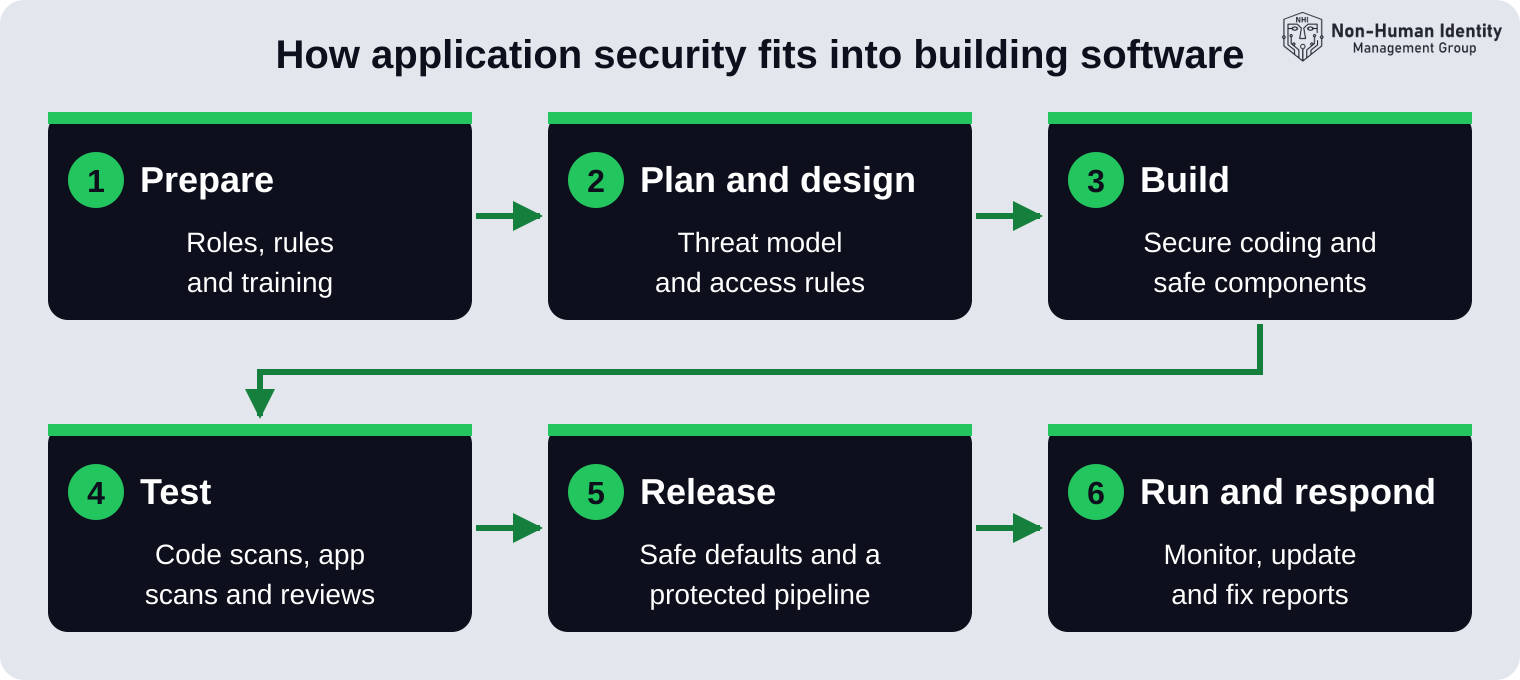
The table below shows common activities and where they fit. Names vary between organisations; these are typical, not required.
| Stage | Typical activity | What it helps catch |
|---|---|---|
| Plan and design | Threat modelling, access rules | Design flaws, such as missing checks on who can see which records |
| Build | Secure coding, component checks, secret scanning | Injection flaws, outdated components, passwords left in code |
| Test | SAST, DAST, code review, penetration testing | Flaws in code and in the running app |
| Release | Configuration review, pipeline protection | Unsafe default settings, tampered builds |
| Run and respond | Logging, alerting, patching, flaw reports | Attacks in progress, newly found flaws in components |
Useful distinctions
- Application security is not the same as network security. A firewall controls which connections reach a server, but a website has to accept connections from the public. Application security deals with what happens inside those allowed connections.
- Testing is not the same as being secure. Scanners find some flaws, not all. Good design and secure coding reduce the number of flaws that testing has to find.
- Awareness lists are not standards. OWASP describes its Top 10 as primarily an awareness document and points teams that need a testable standard to the OWASP Application Security Verification Standard (ASVS).[5][7]
- Your suppliers' code is part of your app. OWASP's 2025 list includes software supply chain failures, which cover vulnerable or malicious third-party code, tools and dependencies.[8]
A worked example
Hillside Garden Supplies is a fictional business with 25 staff and an online shop built by a two-person in-house team, Tom and Aisha. Customers can create accounts, save addresses and view past orders.
A customer emails to say that when she changed a number in the web address of her order page, she saw someone else's order. Tom checks and finds the page only confirmed that a visitor was logged in. It never checked that the order belonged to that visitor. This is broken access control.
Tom and Aisha fix the page so the server checks ownership on every order request. They then make some lasting changes:
- Design: for each new feature they ask three questions: who should be able to use this, what data does it touch, and what happens if someone sends unexpected input?
- Build and test: they turn on a free code scanner and dependency alerts in their code hosting service, and agree that every change gets a second pair of eyes before release.
- Run and respond: they add a security contact page so people know how to report problems, and they check the shop's logs for other attempts to view orders that were not the visitor's own.
The fix and the new habits reduce the chance of a repeat, but they do not make the shop flawless. The team also reports the exposure to their manager so the business can decide, with advice, whether affected customers or a regulator need to be told.
Myths and misunderstandings
| What people think | What is true |
|---|---|
| We have a firewall and antivirus, so our website is safe. | Those controls protect networks and devices. A website must accept public traffic, so flaws in the app itself can still be exploited through normal web requests. |
| Security testing just before launch is enough. | Late testing finds some flaws, but design problems are harder and costlier to fix at that point. Security works better spread across every stage. |
| We bought the software, so security is the supplier's job. | The supplier is responsible for its code, but you still choose settings, apply updates and control who has access. |
| Passing the OWASP Top 10 means the app is secure. | The Top 10 is an awareness list of common risk categories. OWASP calls it a bare minimum and a starting point if used as a standard.[5] |
| Small apps are not worth attacking. | Many attacks are automated and scan the internet for known flaws, whatever the size of the owner. |
Key terms
- Application security
- Protecting software across development, deployment and running, including its code, components, secrets and settings.
- Vulnerability
- A flaw or weakness in code, logic, settings or design that can be abused. On its own it is a risk, not a compromise.
- Secure by design
- Building security requirements into the development process from the start rather than adding them after release.
- Threat modelling
- A structured way to work out how a system could be attacked before it is built or changed, and which controls reduce that risk.
- Secure coding
- Writing software in ways that reduce the chance of introducing exploitable flaws, such as validating input and handling errors carefully.
- Static application security testing (SAST)
- Finding security flaws by examining code without running the application.
- Dynamic application security testing (DAST)
- Testing a running application from the outside to find weaknesses that only appear when it is working.
- Penetration testing
- An authorised exercise in which specialists try to exploit weaknesses the way a real attacker would.
- Broken access control
- When a system fails to restrict what a user, service or workload can do, for example letting one customer see another's data.
- Software supply chain
- Everything that shapes the software you run: source code, maintainers, third-party components, build systems and distribution.
Common questions
What is application security in simple terms?
It is making sure your software only does what it is meant to do, even when someone tries to misuse it, and keeping it that way while it is in use.
Do I need to be a programmer to work in application security?
It helps to be able to read code, but many roles start with understanding risks, running tools, reading reports and working with developers. You can learn coding skills along the way.
What is the difference between SAST and DAST?
SAST reads the source code without running it, so it can run early. DAST tests the running app from the outside, so it sees how the app actually behaves. Many teams use both.
Where should a small team start?
We suggest starting with a list of your apps and their components, turning on update alerts for those components, and checking that every page showing personal data confirms who is allowed to see it.
Is there a standard we can follow?
Yes. NIST's SSDF describes high-level secure development practices that can be added to any development process.[2] The OWASP ASVS gives a detailed list of security requirements for web applications, and version 5.0.0 was released in May 2025.[7]
Does using the cloud make my app secure?
No. Cloud providers secure their platforms, but the code you deploy, its settings and who can access it remain your responsibility.
First steps
Three things you can do this week:
- List your applications. Write down every website, app and customer portal you run or pay for, who owns each one and what data it holds.
- Turn on component alerts. Most code hosting services can warn you about known flaws in the third-party components you use. Switch these on and agree who reads them.
- Check one important page. Pick a page that shows personal data and confirm, with your developer or supplier, that the server checks the visitor is allowed to see that specific record.
- Publish a way to report flaws. Add a simple security contact so people who find problems can tell you.
Checklist
- We have a list of our applications, their owners and the data each one holds.
- Someone is named as responsible for the security of each application.
- New features include a short "what could go wrong?" discussion before building.
- Every code change is reviewed by a second person before release.
- We know which third-party components each app uses and get alerts about known flaws.
- Passwords and keys are kept out of source code.
- Our apps are scanned or tested for security flaws at least before major releases.
- Logs from our apps are kept and someone looks at them.
- People outside the company know how to report a security problem to us.
Check your understanding
1. Why does a firewall not make a public website secure on its own?
Answer: the website has to accept traffic from the public, so flaws inside the application can still be reached through normal web requests.
2. What is threat modelling?
Answer: thinking through what an app protects, who might attack it and how, before building or changing it, then choosing controls.
3. Why do third-party components matter for application security?
Answer: most apps are built from them, so a flaw or malicious change in a component becomes a flaw in your app unless you track and update it.
4. Is the OWASP Top 10 a full security standard?
Answer: no. OWASP describes it as primarily an awareness document and recommends the ASVS when you need a testable standard.
Suggested learning pathway
- DevSecOps for Beginners: a related beginner guide to read next.
- Secure Software Development Lifecycle for Beginners: a related beginner guide to read next.
- The OWASP Top 10 for Beginners: a related beginner guide to read next.
- For security basics for a small organisation, start with the Small Business Cybersecurity Basics Guide.
- For how apps talk to each other safely, read API Security for Beginners.
- For keeping passwords and keys out of code, read Secrets in Code for Beginners.
- For the full practitioner view of the discipline, see the Application Security Guide.
- For the most common web risks in depth, see the OWASP Top 10 Guide.
- For writing safer code, see the Secure Coding Guide.
- For the NIST framework behind secure development, see the NIST Secure Software Development Framework (SSDF, SP 800-218) Guide.
Standards and references
- Introduction, OWASP Top 10:2025. OWASP Foundation. https://top10.owasp.org/2025/0x00_2025-Introduction/, accessed 27 Nov 2026.
- SP 800-218, Secure Software Development Framework (SSDF) Version 1.1. National Institute of Standards and Technology (NIST), February 2022. https://csrc.nist.gov/pubs/sp/800/218/final.
- Secure Software Development Framework (project page). National Institute of Standards and Technology (NIST). https://csrc.nist.gov/projects/ssdf, accessed 27 Nov 2026.
- Secure by Design. Cybersecurity and Infrastructure Security Agency (CISA). https://www.cisa.gov/securebydesign, accessed 27 Nov 2026.
- How to use the OWASP Top 10 as a standard, OWASP Top 10:2021. OWASP Foundation. https://top10.owasp.org/2021/A00_2021_How_to_use_the_OWASP_Top_10_as_a_standard/, accessed 27 Nov 2026.
- A01:2025 Broken Access Control, OWASP Top 10:2025. OWASP Foundation. https://top10.owasp.org/2025/A01_2025-Broken_Access_Control/, accessed 27 Nov 2026.
- Application Security Verification Standard (ASVS) 5.0.0. OWASP Foundation, 30 May 2025. https://asvs.owasp.org/, accessed 27 Nov 2026.
- A03:2025 Software Supply Chain Failures, OWASP Top 10:2025. OWASP Foundation. https://top10.owasp.org/2025/A03_2025-Software_Supply_Chain_Failures/, accessed 27 Nov 2026.
- Secure by Design Alert: Eliminating SQL Injection Vulnerabilities in Software. CISA and FBI. https://www.cisa.gov/resources-tools/resources/secure-design-alert-eliminating-sql-injection-vulnerabilities-software, accessed 27 Nov 2026.
Related NHI Mgmt Group resources: Web Application Security Guide · Threat Modelling Guide · Application Security Glossary