Code signing is the practice of attaching a digital signature to software so that your computer can check who published it and that nobody has changed it since it was signed.
Every day your devices install apps, updates and drivers downloaded over the internet. Code signing is one of the main ways they decide whether to trust those files. This guide explains it in plain English for newcomers, students, career changers and managers who are not security specialists. It covers how signing works, why it matters, a worked example, common myths, and simple first steps for a small team that builds or buys software.
By the end of this guide you will be able to:
- Explain what code signing proves, and what it does not prove.
- Describe how a file is signed and how a computer checks the signature.
- Understand why signing keys must be protected so carefully.
- Identify practical steps to sign your own software or check software you install.
Key takeaways
- A signature answers two questions. Who published this file, and has it changed since it was signed?
- Signed does not mean safe. A signature shows where software came from, not whether its code is good or harmless.
- The private key is the crown jewel. Anyone who steals a publisher's signing key can make malware look like it came from that publisher.
- Operating systems use signatures to decide what to run. Windows and macOS both check signatures before opening downloaded software.
- Small teams can start simply. Keep signing keys in hardware or a managed service, sign every release, and check signatures before you install.
What it is, in plain English
When you download a program, the internet itself cannot tell you who really made it or whether it was altered on the way. Microsoft makes this point directly: a browser can warn you about downloads, but it cannot check that code is what it claims to be.[1]
Code signing solves part of this problem. The publisher uses a secret private key to create a digital signature for the file. Your computer uses the matching public key, which anyone can have, to check the signature. Microsoft describes the result like this: a signature attached to a file identifies who distributed it and ensures the contents were not changed after the signature was created.[1]
To link the public key to a real company, the publisher gets a code signing certificate from a certificate authority (CA), an organisation trusted to check identities and vouch for them. The certificate is like an ID card that says "this public key belongs to Example Software Ltd".
A helpful comparison is a wax seal on a letter. The seal shows which household sent the letter, and a broken seal shows someone opened it. Where the analogy breaks down: a wax seal can be copied by anyone with a similar stamp, while a digital signature cannot be forged without the private key. But if a thief steals that key, their forgeries are perfect.
Why it matters to you
- If you run a small business: signatures help your computers reject fake updates and tampered installers, which are a common way malware gets in.
- If you are new to a security job: you will see signatures in application control rules, malware investigations and software supply chain reviews. Knowing what a signature does and does not prove is essential.
- If you are a manager: if your company ships software, your signing key represents your brand. Losing it can let criminals sign malware in your name.
Modern operating systems lean heavily on signatures. On Windows, Smart App Control blocks unknown, unsigned code by default when it is switched on, and will allow an app it cannot otherwise assess if it is signed with a certificate from a CA in Microsoft's Trusted Root Program.[2] On a Mac, Apple says Gatekeeper checks that software downloaded outside the App Store comes from an identified developer, is notarised by Apple and has not been altered, and asks the user before opening it the first time.[3]
Because signatures carry so much trust, attackers want them. In the SolarWinds supply chain attack, investigators at Mandiant reported that a backdoored Orion component was digitally signed by SolarWinds, and that several trojanised updates were signed between March and May 2020 and posted to the company's update website.[6] The signature was genuine, because the attackers had got inside the build process before signing happened. That is the key lesson: a signature proves the file came from the publisher's signing system, not that the publisher's systems were clean.
Stolen keys are the other big risk. In the NVIDIA code signing certificate theft, BleepingComputer reported that two leaked NVIDIA certificates were used to sign malware and hacking tools, and that although the certificates had expired, Windows still allowed them to be used for driver signing.[7]
How it works, step by step
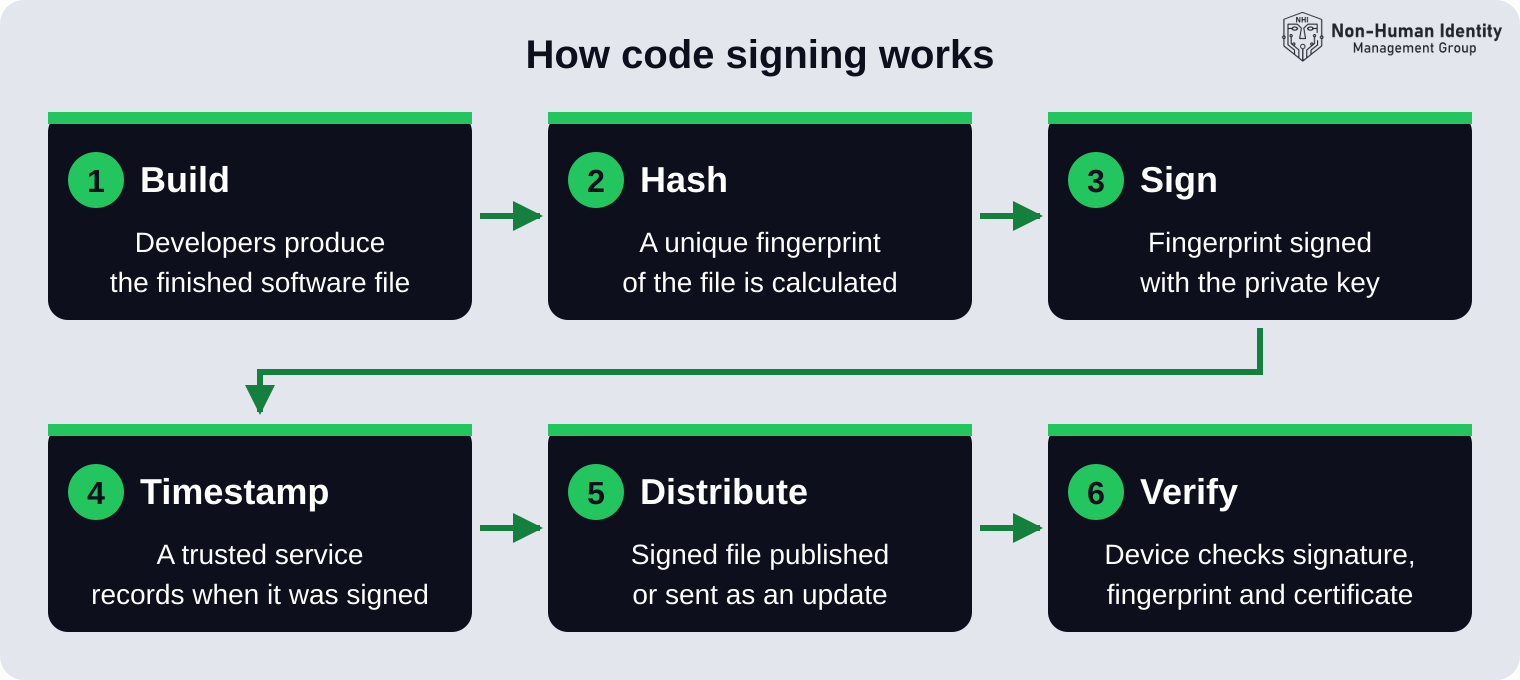
Different platforms use different tools and names, but the basic steps are the same.
- Get a key and certificate. The publisher creates a key pair and asks a certificate authority for a code signing certificate. The CA checks the publisher's identity first. Under the CA/Browser Forum's code signing rules, since 1 June 2023 the publisher's private key must be generated, stored and used in suitable hardware.[4]
- Build the software. Developers turn source code into the finished file, such as an installer or app.
- Hash the file. The signing tool calculates a cryptographic hash, a short fingerprint of the file. Changing even one byte gives a completely different fingerprint.
- Sign and timestamp. The tool uses the private key to sign the hash and attaches the signature and certificate to the file. Many publishers also add a timestamp from a trusted timestamp service, which records that the file existed and was signed at a particular time.[4]
- Distribute. The signed file is published on a website, an app store or an update server.
- Verify on the device. When you download or open the file, your computer recalculates the fingerprint, checks it against the signature using the public key, and checks the certificate chains back to a CA it trusts. If anything does not match, it warns you or blocks the file.
The table shows where you are likely to meet code signing in everyday systems.
| Where you see it | What gets signed | What the check tells you |
|---|---|---|
| Windows (Authenticode) | Programs, libraries, installers, drivers and PowerShell scripts, such as .exe, .dll, .msi, .sys and .ps1 files[1] | Who published the file and that it has not changed since signing |
| macOS (Gatekeeper) | Apps downloaded outside the App Store | The developer is identified, the app is notarised by Apple and it has not been altered[3] |
| Open source and containers (Sigstore) | Release files, container images, binaries and software bills of materials[5] | Which verified identity signed the artefact, recorded in a public log |
Useful distinctions
- Signing is not encryption. A signed file is not hidden or scrambled. Anyone can read it; the signature only proves origin and integrity.
- Expiry and revocation are different. A certificate expires on a set date. Revocation means the CA marks it as untrustworthy early, for example after a key is stolen. The NVIDIA case shows that expiry alone does not always stop abuse.[7]
- Keyless signing is a newer model. Sigstore issues a short-lived certificate tied to a verified identity, such as a developer's account or a build workflow, uses a temporary key once and then discards it, and records the signing event in a public, append-only log called Rekor.[5] This removes the need to guard a long-lived key, though you still need to protect the identity that signs.
- Your signing system is a machine identity. The certificate, key and the build pipeline that uses them are non-human identities. They need an owner, tight access rules and logging, just like an admin account.
A worked example
Harbour Tools is a fictional company of 25 people that sells a small desktop app for boat repair shops. For years, Leo, the lead developer, signed releases with a certificate file kept on a shared drive, protected by a password everyone in the team knew.
After reading about stolen signing keys, Leo and the operations manager, Aisha, make four changes:
- Key in hardware: they move to a cloud signing service where the private key stays inside a hardware security module and cannot be copied out.
- Sign only from the build pipeline: releases are signed automatically by the build system after tests pass. Developers can no longer sign files from their laptops.
- Timestamp every release: so each signature records when it was made.
- Alert on signing: Aisha gets a notification for every signing request, and checks it matches a planned release.
Three months later, Aisha sees a signing request on a Sunday night that does not match any release. The team pauses the pipeline, finds that a contractor's build account had been misused, and resets it. Because the key never left the hardware, there is less chance a copy is circulating, and the log shows exactly which files were signed. This does not mean Harbour Tools is safe from every problem. They still have to check the signed file, tell any affected customers, and review how the build account was accessed, but the damage is easier to find and contain.
Myths and misunderstandings
| What people think | What is true |
|---|---|
| A signed program is safe. | A signature shows who published the file and that it has not changed. Malware can be signed with stolen keys, or by a compromised build system. |
| Code signing encrypts my software. | No. Signing protects integrity and shows origin. The file can still be read by anyone. |
| An expired certificate cannot be misused. | Some platforms still accept signatures made with expired certificates in certain cases, as the NVIDIA incident showed.[7] |
| Only big software companies need to sign code. | Any team that ships installers, scripts or updates benefits. Unsigned files are more likely to be blocked or trigger warnings on customers' computers. |
| Keeping the key file on a shared drive with a strong password is fine. | A file can be copied. Public code signing rules now require keys to be kept in suitable hardware.[4] |
Key terms
- Code signing
- Attaching cryptographic proof to software so recipients can check who published it and that it has not been changed.
- Code signing certificate
- A digital credential that links a publisher's identity to the public key used to check its signatures.
- Digital signature
- A cryptographic result created with a private key and checked with the matching public key.
- Private key
- The secret half of a key pair, used to sign data. Whoever holds it can sign as the owner.
- A trusted organisation that checks identities and issues certificates binding them to public keys.
- Cryptographic hash
- A fixed-length fingerprint of data, used to check that the data has not changed.
- Timestamp
- A trusted time marker added to a signature to show when it was made.
- Certificate revocation
- Marking a certificate as no longer trustworthy before its expiry date, for example after key theft.
- Hardware security module (HSM)
- A tamper-resistant device or service that stores and uses keys so they never leave it in plain form.
- Sigstore
- An open source project for signing and verifying software using short-lived, identity-based certificates and a public log.
Common questions
What does code signing prove?
It shows which publisher signed the file and that the file has not changed since it was signed.[1] It does not prove the code is free of bugs or malicious features.
What happens if I run an unsigned program?
Depending on your settings, your computer may warn you or block it. Windows Smart App Control, for example, blocks unknown, unsigned code by default when it is enforcing.[2]
Why add a timestamp?
A timestamp records when the file was signed, using a trusted timestamp service.[4] On many platforms this lets a signature stay valid after the certificate expires, as long as it was signed while the certificate was valid. Check your platform's documentation for exactly how it treats timestamps.
What should we do if our signing key is stolen?
Treat it as a serious incident: stop using the key, ask your CA to revoke the certificate, get a new one, re-sign current releases and tell customers. The Compromised Code Signing Certificate Playbook covers this in depth.
Is code signing the same as a software bill of materials?
No. A signature proves origin and integrity of a file. A software bill of materials (SBOM) lists the components inside it. They work well together.
Do scripts need signing too?
Often, yes. Windows supports signing PowerShell scripts as well as programs and drivers, so script policies can require signatures.[1]
First steps
Three things you can do this week:
- Find your keys. If your team ships software, list every code signing certificate you hold, where its private key lives and who can use it.
- Check what you install. Before installing a new tool, look at its signature details. On Windows, right-click the file, choose Properties and open the Digital Signatures tab to see who signed it.
- Plan a move to hardware. If any signing key sits in a file on a laptop or shared drive, we suggest moving it to an HSM or managed signing service, and signing only from your build pipeline.
Checklist
- We know every code signing certificate we hold, its expiry date and its owner.
- Private signing keys are kept in hardware or a managed signing service, not in files.
- Only the build pipeline can request signatures for releases.
- Every release is signed and timestamped.
- Someone reviews signing activity and is alerted to unexpected requests.
- We have a written plan for a stolen or misused signing key.
- Staff know that a signature shows who published a file, not that it is safe.
- Our computers are set to warn about or block unsigned software where practical.
Check your understanding
1. What two things does a valid code signature tell you?
Answer: who published the file, and that the file has not changed since it was signed.
2. Why could malware carry a genuine signature?
Answer: because the attacker stole the publisher's signing key, or got into the publisher's build system before signing happened.
3. What is the difference between expiry and revocation?
Answer: expiry happens on a set date; revocation is when the CA marks the certificate as untrustworthy early, for example after the key is stolen.
4. Why keep signing keys in hardware?
Answer: so the key cannot be copied out and used elsewhere. An attacker would need to misuse the signing system itself, which is easier to log and spot.
Suggested learning pathway
- Software Supply Chain Security for Beginners: a related beginner guide to read next.
- Supply Chain Attacks for Beginners: a related beginner guide to read next.
- CI/CD Pipeline Security for Beginners: a related beginner guide to read next.
- Crypto Wallets and Keys for Beginners: a related beginner guide to read next.
- For how keys and certificates identify machines and software, start with Machine Identities and Certificates for Beginners.
- For the wider basics a small team needs, see the Small Business Cybersecurity Basics Guide.
- For the full practitioner picture, see the Code Signing Security Guide.
- For signing source code changes, see the Git Commit and Tag Signing Guide.
- For how signatures relate to build provenance, see Code Signing vs Artifact Attestation.
- For what to do when a key is stolen, see the Compromised Code Signing Certificate Playbook.
Standards and references
- Cryptography Tools. Microsoft Learn, Microsoft. https://learn.microsoft.com/en-us/windows/win32/seccrypto/cryptography-tools, accessed 27 Nov 2026.
- Smart App Control overview. Microsoft Learn, Microsoft. https://learn.microsoft.com/en-us/windows/apps/develop/smart-app-control/overview, accessed 27 Nov 2026.
- Gatekeeper and runtime protection in macOS. Apple Platform Security, Apple. https://support.apple.com/guide/security/gatekeeper-and-runtime-protection-sec5599b66df/web, accessed 27 Nov 2026.
- Baseline Requirements for the Issuance and Management of Publicly-Trusted Code Signing Certificates, version 3.11.0, 16 June 2026. CA/Browser Forum. https://cabforum.org/working-groups/code-signing/requirements/, accessed 27 Nov 2026.
- Sigstore overview. Sigstore documentation, Open Source Security Foundation (OpenSSF). https://docs.sigstore.dev/about/overview/, accessed 27 Nov 2026.
- Highly Evasive Attacker Leverages SolarWinds Supply Chain to Compromise Multiple Global Victims With SUNBURST Backdoor. Mandiant, Google Cloud Threat Intelligence blog, 13 December 2020. https://cloud.google.com/blog/topics/threat-intelligence/evasive-attacker-leverages-solarwinds-supply-chain-compromises-with-sunburst-backdoor, accessed 27 Nov 2026.
- Malware now using NVIDIA's stolen code signing certificates. BleepingComputer, 5 March 2022. https://www.bleepingcomputer.com/news/security/malware-now-using-nvidias-stolen-code-signing-certificates/, accessed 27 Nov 2026.
Related NHI Mgmt Group resources: Code Signing Policy Template · Apple Code Signing and Notarisation Guide · Code Signing Buyer's Guide