Credential stuffing is an attack in which criminals take usernames and passwords leaked from one website and try them, usually automatically, on many other websites, hoping people have reused the same password.
This guide is for newcomers, students, career changers, small business owners and managers who want to understand why a breach at one company can lead to break-ins somewhere else. It explains the idea in plain English, shows a worked example, clears up common myths and gives simple steps that individuals and small teams can take this week. It covers the attack only at concept level and focuses on defence.
By the end of this guide you will be able to:
- Explain what credential stuffing is and why password reuse makes it work.
- Describe how it differs from brute force and password spraying.
- Understand which defences make it harder for users and for organisations.
- Identify three practical steps to reduce your risk.
Key takeaways
- It feeds on password reuse. One leaked password can unlock every other account where the same password was used.
- The logins look real. Attackers use genuine usernames and passwords, so each attempt can look like a normal sign-in.
- It is automated. Software tries huge numbers of leaked pairs across many sites, so even a small success rate pays off for criminals.
- MFA is the strongest single defence. OWASP calls multi-factor authentication by far the best defence against password attacks, including credential stuffing.
- Layers work best. Unique passwords, a password manager, MFA, checks against leaked passwords and login monitoring together make attacks much harder.
What it is, in plain English
When a website is breached, attackers sometimes steal its list of usernames, email addresses and passwords. These pairs of username and password are called credentials. Stolen credentials are often shared or sold, and gathered into large files.
In credential stuffing, criminals test those leaked pairs on other services, such as email, shopping, banking or work systems. MITRE ATT&CK, a widely used catalogue of attacker techniques, describes it as using credentials obtained from breach dumps of unrelated accounts to gain access to target accounts.[2] It works because many people use the same password in more than one place, a habit called password reuse.
An everyday comparison: imagine you use the same key for your house, your car and your office. If someone copies the key from your gym locker, they can try it on every other lock you own. Credential stuffing is the online version, done by software trying millions of keys on thousands of doors. Where the analogy breaks down: a physical key is copied from one person, while leaked credentials usually come from a breach affecting many people at once, and the attacker does not need to know who you are.
It helps to tell credential stuffing apart from two related attacks. The OWASP Credential Stuffing Prevention Cheat Sheet describes brute force as trying many passwords against one account, credential stuffing as testing username and password pairs obtained from the breach of another site, and password spraying as trying one weak password against many accounts.[1]
Why it matters to you
- If you run a small business: staff who reuse a personal password at work can let attackers into email, accounting or cloud tools. If you run a customer login, your customers can be targeted too.
- If you are new to a security job: spotting waves of failed logins and taken-over accounts is a routine task for security and fraud teams, and you will be asked how to reduce it.
- If you are a manager: taken-over accounts lead to fraud, support costs, lost customer trust and possible regulatory action.
A real case shows the impact. In June 2025 the UK Information Commissioner's Office (ICO) fined the genetic testing company 23andMe £2.31 million after a 2023 attack. The ICO said the attacker used login credentials stolen from earlier, unrelated breaches to access accounts between April and September 2023, and that personal information of 155,592 UK residents was accessed.[4] The ICO pointed to missing mandatory multi-factor authentication, weak password protocols, predictable usernames and a lack of effective monitoring.[4]
The lesson is that a company can be harmed by a breach that happened somewhere else entirely. Its own systems were not "hacked" in the usual sense; the attacker simply logged in with passwords that worked.
How it works, step by step
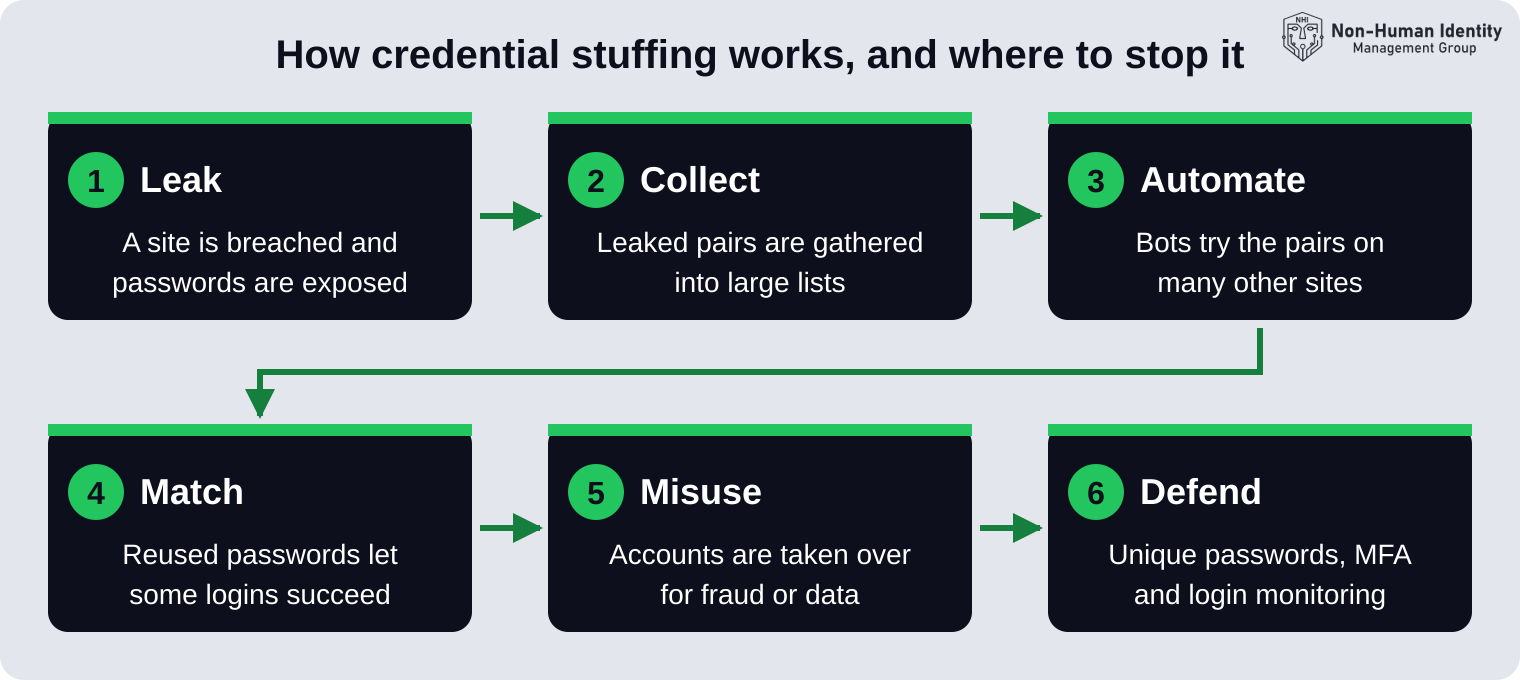
At a high level, a credential stuffing campaign follows a pattern. Knowing it helps you see where defences fit.
- A leak happens elsewhere. A website or app is breached, or passwords are stolen from people's devices, and username and password pairs are exposed.
- Credentials are collected. Leaked pairs are gathered into large lists, often called combo lists, and shared or sold.
- Login attempts are automated. Criminals use automated software, often called bots, to try the pairs against the login pages of many other services. They often spread attempts across many internet addresses so the traffic is harder to block.[1]
- Some logins succeed. Wherever someone reused a password, and no extra check is needed, the login works.
- Accounts are misused. The attacker takes over the account, an outcome known as account takeover, and may steal data, make purchases, send scams or sell the access.
- Defenders detect and respond. Organisations look for unusual login patterns, ask for extra checks, reset affected accounts and tell users.
What reduces the risk
- Multi-factor authentication (MFA). MFA asks for a second proof, such as an app prompt, a code or a security key, in addition to the password. OWASP calls it by far the best defence against the majority of password-related attacks, including credential stuffing and password spraying.[1]
- Checking passwords against leaked lists. The US standards body NIST says services must compare new passwords against a blocklist that includes known compromised passwords, and must limit failed sign-in attempts.[3]
- Resetting exposed accounts. MITRE suggests proactively resetting accounts whose credentials appear in known breaches.[2]
- Bot and login defences. Services can add challenges such as CAPTCHAs for risky logins, look at device and connection details, and slow down suspicious traffic. OWASP notes that CAPTCHAs are not perfect and that blocking internet addresses should not be the main defence, so these work best as layers.[1]
- Telling users. Alerting people to unusual sign-ins, and showing recent login activity, helps them spot misuse early.[1]
A worked example
Maple Street Florists is a fictional shop with eight staff and an online ordering site. Jo, the owner, uses the same password for her personal shopping accounts and the shop's email.
A gaming forum Jo joined years ago is breached and its password list leaks. A few weeks later, automated software tries Jo's forum email and password on many popular services. It works on the shop's email account, which has no MFA.
The attacker reads recent invoices and sends a supplier a message from Jo's real mailbox asking for future payments to go to a "new" bank account. The supplier phones the shop to check the new bank details before paying, and the scam is caught.
Jo then works through a short plan with her IT helper, Dev:
- Jo changes the email password to a new, unique one, signs out all other sessions and checks the mailbox for forwarding rules she did not set up.
- Dev turns on MFA for every staff email account and the online ordering admin page.
- Staff start using a password manager, so every account gets its own password.
- For the shop's customer accounts, Dev turns on the platform's option to reject passwords known to be leaked and to alert customers about new sign-ins.
These steps do not make the shop immune. A tricked MFA approval or a stolen session could still cause harm. But one leaked password no longer opens several doors, and the shop is far more likely to notice a problem quickly.
Myths and misunderstandings
| What people think | What is true |
|---|---|
| Nobody would target me; I am not important. | Credential stuffing is automated and untargeted. Attackers test huge lists and take whatever works. |
| A strong password keeps me safe everywhere. | Even a long, complex password is useless once it has leaked, if you reused it. Unique passwords matter as much as strong ones. |
| If the company was not breached, it is not their problem. | Regulators can still expect services to protect accounts, for example with MFA and monitoring, as the 23andMe case shows. |
| Changing passwords every month solves it. | NIST says services should not force regular password changes, but should require a change when there is evidence a password has been compromised. |
| Blocking suspicious internet addresses is enough. | Attackers spread attempts across many addresses. Address blocking helps a little but works best alongside MFA and other checks. |
Key terms
- Credential stuffing
- An attack that uses stolen username and password pairs from previous breaches to try logging into other services.
- Password reuse
- Using the same password across several accounts, so one compromise can spread to others.
- Combo list
- A file of username and password pairs gathered from leaks, breaches or malware, used to automate login attempts.
- Account takeover
- Unauthorised use of a real account after an attacker gets valid access, for example with stolen credentials.
- Brute force attack
- Repeatedly guessing passwords or other secrets until one works.
- Password spraying
- Trying a small set of common passwords against many accounts to avoid lockouts and detection.
- Multi-factor authentication (MFA)
- Requiring two or more independent checks before access is given, so a stolen password alone is not enough.
- Breached password detection
- Checking whether a password appears in known sets of compromised credentials, usually at sign-up, login or password reset.
- Bot management
- Controls that detect, challenge and stop automated traffic pretending to be real users.
- Rate limiting
- Restricting how many requests someone can make in a set period, to reduce abuse.
Common questions
What is credential stuffing in simple terms?
It is when criminals take passwords leaked from one website and try them on other websites, hoping you used the same password there.
How is it different from password spraying?
Credential stuffing uses real leaked username and password pairs. Password spraying tries a few common passwords against many accounts.[1]
How do I know if my password has leaked?
Many password managers and browsers can warn you when a saved password appears in known breaches. If you get a breach notice from a company, change that password and any others that match it.
Does MFA stop credential stuffing?
It makes it much harder, because a correct password is no longer enough on its own. It is not perfect: some MFA methods can be phished, so phishing-resistant options such as passkeys or security keys offer stronger protection.
Should my business lock accounts after failed logins?
Limiting failed attempts is sensible and NIST requires a rate-limiting mechanism.[3] MITRE warns that very strict lockouts can be abused to lock real users out, so balance them carefully.[2]
First steps
Three things you can do this week:
- Turn on MFA for your email, banking and main work accounts first, because email is often used to reset every other password.
- Start using a password manager and replace reused passwords, beginning with your most important accounts.
- If you run a login for staff or customers, check whether your platform can reject known-leaked passwords, alert users about new sign-ins and limit repeated failed logins, and switch those options on.
Checklist
- Every important account has its own unique password.
- A password manager is used by everyone in the team.
- MFA is turned on for email, finance, admin and remote access accounts.
- New passwords are checked against lists of known-leaked passwords.
- Repeated failed logins are limited and monitored.
- Users are alerted to new or unusual sign-ins.
- There is a simple plan for resetting accounts and checking for misuse after a suspected takeover.
- Staff know to report breach notices and unexpected MFA prompts.
Check your understanding
1. Why does credential stuffing work?
Answer: because many people reuse the same password, so a password leaked from one site often works on others.
2. What is the difference between credential stuffing and brute force?
Answer: brute force guesses many passwords for one account; credential stuffing tries real leaked username and password pairs.
3. Your password is very long and complex, but you used it on a site that was breached. Are you safe?
Answer: no. Once it has leaked, its strength does not help. Change it everywhere you used it.
4. Name two defences a business can add to its login page.
Answer: for example MFA, checks against leaked passwords, limiting failed attempts, bot challenges for risky logins, or alerts about new sign-ins.
Suggested learning pathway
- Password Spraying for Beginners: a related beginner guide to read next.
- Brute-Force Attacks for Beginners: a related beginner guide to read next.
- Password Security for Beginners: a related beginner guide to read next.
- For everyday protection, read Password Managers Explained for Everyone Guide.
- For the second layer, see Multi-Factor Authentication for Beginners.
- For a business view of the basics, see the Small Business Cybersecurity Basics Guide.
- For practitioner defences against both attacks, read the Password Spraying and Credential Stuffing Defence Guide.
- For what to do during an attack, see the Credential Stuffing Attack Response Playbook.
- For figures on the scale of the problem, see Account Takeover Statistics.
Standards and references
- Credential Stuffing Prevention Cheat Sheet. OWASP Cheat Sheet Series, OWASP Foundation. https://cheatsheetseries.owasp.org/cheatsheets/Credential_Stuffing_Prevention_Cheat_Sheet.html, accessed 27 Nov 2026.
- Brute Force: Credential Stuffing, Technique T1110.004. MITRE ATT&CK, The MITRE Corporation. https://attack.mitre.org/techniques/T1110/004/, accessed 27 Nov 2026.
- SP 800-63B-4, Digital Identity Guidelines: Authentication and Authenticator Management, sections 3.1.1.2 and 3.2.2. National Institute of Standards and Technology (NIST). https://pages.nist.gov/800-63-4/sp800-63b.html, accessed 27 Nov 2026.
- 23andMe fined for failing to protect UK users' genetic data. Information Commissioner's Office (ICO), 17 June 2025. https://ico.org.uk/about-the-ico/media-centre/news-and-blogs/2025/06/23andme-fined-for-failing-to-protect-uk-users-genetic-data.
Related NHI Mgmt Group resources: Two-Factor Authentication for Everyone Guide · Safe Online Shopping Guide