Multi-factor authentication (MFA) is a way of signing in that asks for two or more different kinds of proof, such as a password plus a code from your phone or a tap on a security key, so a stolen password alone is not enough to get in.
Passwords are stolen, guessed and reused every day. This guide explains MFA from first principles, with a focus on how it works inside an organisation, and shows why some kinds of MFA are much stronger than others. You do not need any security background. If you want step-by-step help for your personal accounts, see the Two-Factor Authentication for Everyone Guide.
By the end of this guide you will be able to:
- Explain what MFA is and the three kinds of factor.
- Understand why some MFA methods resist fake login pages and others do not.
- Describe what happens during an MFA sign-in, including recovery when a device is lost.
- Identify which accounts to protect first and three practical steps to take this week.
Key takeaways
- MFA means two different kinds of proof. Something you know, something you have or something you are. Two passwords do not count.
- It makes stolen passwords much less useful. A criminal who has your password still needs the second factor.
- Not all MFA is equal. Text message codes are the weakest common type; security keys and passkeys are the strongest because they resist fake login pages.
- Any MFA beats none. CISA, the US cyber security agency, says so directly, while urging organisations to aim for phishing-resistant methods.[3][2]
- Start with the accounts that matter most. Email, remote access and administrator accounts come first.
What it is, in plain English
A cash machine is the everyday example. You need your bank card (something you have) and your PIN (something you know). A thief with only the card, or only the PIN, should not be able to take your money.
Authentication means proving you are who you say you are when you sign in. A factor is one kind of proof. NIST, the US standards body, groups factors into three types:[1]
- Something you know: a secret you memorise, such as a password or PIN.
- Something you have: a physical item you control, such as a phone with an authenticator app, a smart card or a security key.
- Something you are: a body feature, such as a fingerprint or face. NIST says biometrics should not be used alone, only together with something you have.[1]
MFA requires at least two of these different types. You will also see two-factor authentication (2FA) and two-step verification (2SV). Services use these labels for very similar features, and CISA notes the setting may be called either.[3] The differences are covered in 2FA vs Two-Step Verification vs MFA.
Where the analogy breaks down: you would notice if your bank card went missing. Online, a criminal does not need to steal your phone. They can trick you into typing a code into a fake website, so the type of MFA you choose matters a lot.
Why it matters to you
Passwords fail in ordinary ways. People reuse them across sites, so one leak exposes many accounts. Criminals send fake login pages, called phishing, to trick people into typing them. Attackers try common passwords against thousands of accounts at once. MFA means a stolen password alone is no longer enough.
The cost of skipping it can be huge. In the Change Healthcare Breach 2024: How One Citrix Login Without MFA Became the Largest US Healthcare Data Breach, BleepingComputer reported that attackers first got in through a Citrix remote access portal using compromised employee credentials, and that the chief executive of the parent company, UnitedHealth, told a US House committee in written testimony that "the portal did not have multi-factor authentication". The intrusion led to a ransomware attack that seriously disrupted healthcare payments and claims.[8]
- If you run a small business: turning on MFA for email and your finance tools is one of the cheapest, most effective security steps you can take.
- If you are new to a security job: you will be asked which accounts lack MFA and which methods are in use. Knowing the strength ladder below puts you ahead.
- If you are a manager: MFA is one of the most widely required controls. It appears in NIST SP 800-53 as IA-2(1) for privileged accounts and IA-2(2) for ordinary accounts,[4] in the NIST Cybersecurity Framework 2.0 under PR.AA-03,[7] and in MITRE ATT&CK as mitigation M1032.[6] The UK NCSC also advises MFA for administrator accounts.[5] Auditors and cyber insurers commonly ask about it.
How it works, step by step
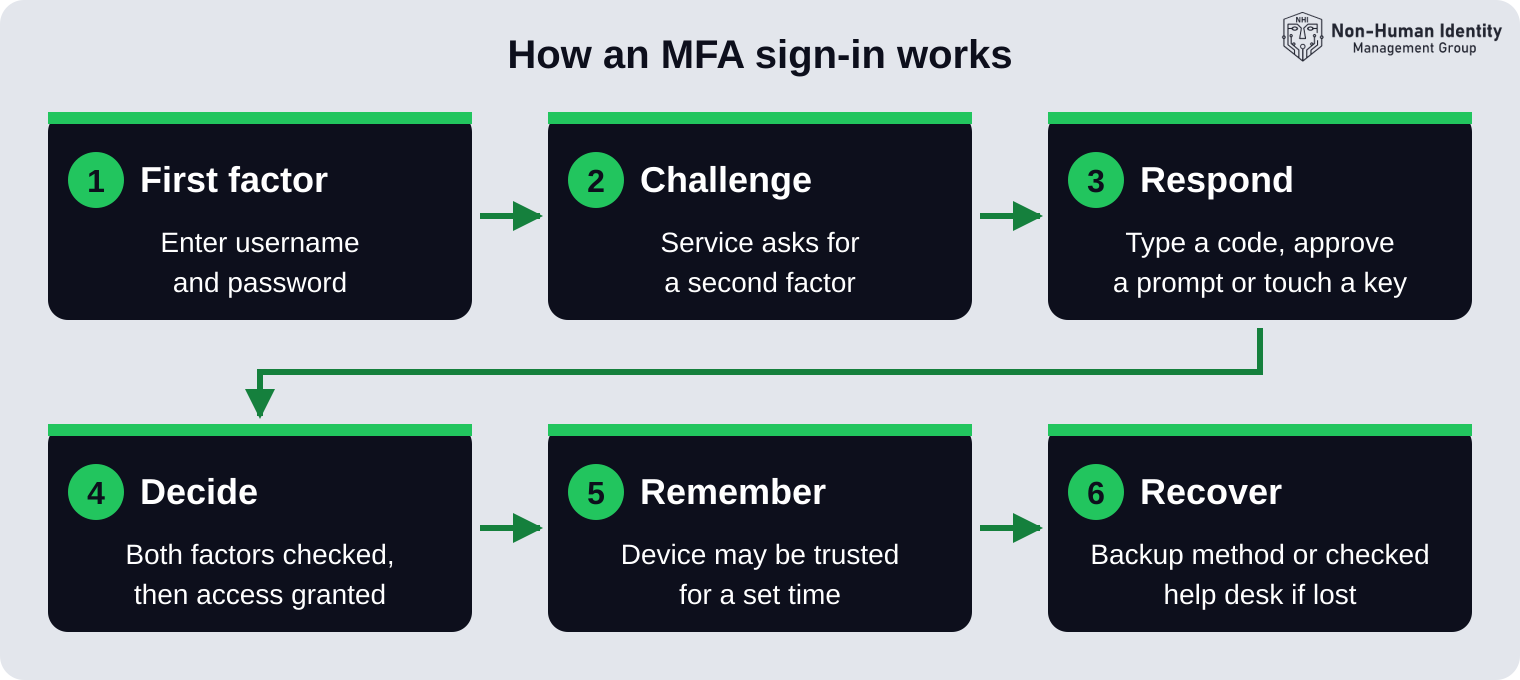
Here is what happens when you sign in to a work account protected by MFA:
- Enrolment, done once. You register a second factor, for example by scanning a QR code with an authenticator app or plugging in a security key. This links that device to your account.
- First factor. You enter your username and password as usual.
- Challenge. The service asks for the second factor. It may send a code, show a prompt on your phone or ask you to touch your security key.
- Response. You type the code, approve the prompt or touch the key. Security keys and passkeys use cryptography, a mathematical proof that only that device could produce.
- Decision. If both factors check out, you are signed in. Many services remember the device for a while so you are not asked every time.
- Recovery. If you lose your phone or key, a backup method or the help desk restores access. This step needs as much care as the others, because criminals target it too.
The methods differ greatly in strength. CISA ranks them from strongest to weakest:[2]
| Method | How it works | Main weakness | CISA view |
|---|---|---|---|
| Security keys and passkeys (FIDO2/WebAuthn) | A device proves itself with cryptography tied to the real website | Needs set-up and a backup key or method | Phishing-resistant; the only widely available phishing-resistant type |
| Smart cards (PKI) | A card holding a digital certificate | Needs mature identity systems | Phishing-resistant, suited to large organisations |
| Authenticator app codes, or push with number matching | A code that changes, or a prompt where you type a number shown on screen | A fake site can still capture a code | Resists push bombing but can be phished |
| Push approval without number matching | A simple "Approve or deny?" prompt | Attackers send repeated prompts until someone taps approve | Vulnerable to push bombing and user error |
| Text message (SMS) or voice codes | A code sent to your phone number | Can be intercepted, redirected by SIM swap or phished | Use only as a last resort |
Phishing-resistant MFA is MFA designed so it will not work on a fake website. A security key checks the real web address itself, so even if you are fooled, the key refuses to sign in to the wrong site. A code can be typed into a fake page and passed straight to the criminal. NIST's digital identity guidelines, SP 800-63B, state that passwords and one-time codes are not phishing-resistant, and class codes sent over the phone network, including SMS, as a restricted method.[1]
A worked example
Northgate Physio is a fictional clinic chain with 25 staff. Everyone signs in to email and the patient booking system with a password only. The practice manager, Aisha, gets an email that looks like a password expiry warning and enters her password on the fake page. Within an hour the criminal is reading patient emails and sending invoices with changed bank details.
Here is how Northgate rolls out MFA afterwards:
- Week 1, admins first: the two staff who manage the email system get security keys, plus a spare each stored in the office safe.
- Week 2, everyone on email: all staff enrol an authenticator app with number matching. Staff without a work phone get a security key.
- Week 3, the booking system: MFA is switched on for the patient system, which holds the most sensitive data.
- Week 4, recovery rules: the help desk must call staff back on a number already on file before resetting MFA, never on a number given in the request. Any account that cannot use MFA yet is recorded as an approved, time-limited exception with a review date.
- Later: Northgate plans to move everyone to passkeys, reducing the risk of codes being typed into fake pages.
With this in place, Aisha's stolen password on its own would not have let the criminal in, and the key-protected admin accounts would have been much harder to phish. MFA does not remove every risk: an app code can still be captured by a convincing fake page, so staff still need to report suspicious emails and unexpected prompts.
Myths and misunderstandings
| What people think | What is true |
|---|---|
| A password plus a security question is MFA. | Both are things you know. That is two steps of the same factor, not two factors. |
| MFA makes an account unhackable. | Weaker methods can be phished or worn down by repeated prompts. See the MFA Fatigue and Bypass Guide. |
| Text codes are fine for administrators. | CISA strongly urges administrators and other high-value targets to use phishing-resistant MFA.[2] |
| Approving a prompt I did not request is harmless. | An unexpected prompt usually means someone already has your password. Deny it and report it. |
| A fingerprint can replace everything else. | NIST says a fingerprint or face should be paired with a physical device, such as the phone it unlocks.[1] |
| Once MFA is on, we are done. | Exceptions, old systems that cannot use MFA and weak recovery processes are where attackers look next. Keep exceptions approved, recorded and time-limited. |
Key terms
- Authentication
- Proving your identity when you sign in.
- Authentication factors
- The kinds of proof: something you know, have or are.
- Multi-factor authentication (MFA)
- Signing in with two or more different kinds of factor.
- Authenticator app
- A phone app that produces short-lived codes or approval prompts.
- One-time password (OTP)
- A code that works once or for a short time only.
- MFA fatigue (push bombing)
- Sending repeated approval prompts hoping the user taps approve.
- Number matching
- A prompt where you type a number shown on the login screen into your app before approving.
- Security key
- A small physical device that signs you in using cryptography.
- Passkey
- A FIDO credential stored on your phone, computer or password manager that replaces the password.
- Phishing-resistant MFA
- MFA that cannot be made to work on a fake website.
- SIM swap
- A fraud where a criminal moves your phone number to their own SIM card to receive your codes.
Common questions
Is 2FA the same as MFA?
Two-factor authentication is MFA with exactly two factors. In everyday use the terms mean almost the same thing.
Which MFA method is the most secure?
Security keys and passkeys, because they are phishing-resistant. CISA calls phishing-resistant MFA the standard to aim for.[2]
Are text message codes still worth using?
They are better than no MFA, but CISA says SMS should be a last resort and a temporary step while you move to stronger methods.[2]
What should I do if I get an MFA prompt I did not ask for?
Deny it, change your password and report it to your IT or security team. Someone probably already has your password.
What happens if I lose my phone?
Use a backup method, such as a spare security key or recovery codes, or contact your help desk. See the MFA backup codes and recovery codes guide.
Can some accounts be left without MFA?
Sometimes an old system cannot support it yet. Treat that as a controlled exception: approved, written down, time-limited, protected in other ways and reviewed until it can be closed.
First steps
- Protect admins and email first: make sure every administrator and email account has MFA, using security keys or passkeys for admins where supported. CISA lists email, remote access and identity systems among the resources to protect first.[2]
- Find the gaps: list accounts and systems excluded from MFA and write down why, who approved it and when it will be reviewed.
- Strengthen weak methods: switch on number matching for push approvals, and set a date to move staff off text message codes.
Checklist
- Every administrator account uses phishing-resistant MFA.
- Email, remote access and cloud consoles require MFA for every user.
- Push approvals use number matching, or have been replaced.
- SMS codes are used only where nothing stronger is possible, with a date to remove them.
- Staff know to deny and report any prompt they did not start.
- Every MFA exception is written down, approved, time-limited and reviewed regularly.
- Help desk MFA resets follow a written identity check.
- Spare security keys or backup methods exist for administrators.
Check your understanding
1. Is a password plus a PIN multi-factor authentication?
Answer: no. Both are something you know, so it is one factor used twice.
2. Why is a security key stronger than a code from an app?
Answer: the key checks it is talking to the real website, so it will not sign in to a fake page. A code can be typed into a fake page and reused by a criminal.
3. Which accounts should get MFA first?
Answer: administrator accounts, email and remote access, because they open the most doors.
4. Why does MFA recovery need as much care as sign-in?
Answer: because a criminal who can talk the help desk into resetting your MFA can skip the second factor altogether.
Suggested learning pathway
- FIDO2 and WebAuthn for Beginners: a related beginner guide to read next.
- Kerberos for Beginners: a related beginner guide to read next.
- OAuth 2.0 for Beginners: a related beginner guide to read next.
- For setting up MFA on your own accounts, start with the Two-Factor Authentication for Everyone Guide.
- For the wider picture of sign-in and access, read Identity and Access Management for Beginners.
- For the full practitioner guide to choosing and deploying MFA, see the MFA Guide.
- For how security keys, passkeys and smart cards resist fake login pages, see the Phishing-Resistant MFA Guide.
- For how attackers get around weaker MFA, see the MFA Fatigue and Bypass Guide.
- For the gaps that most often undo a rollout, see Top 10 MFA Mistakes.
- For the next step after MFA, removing passwords altogether, see the Passwordless and Passkeys Guide.
Standards and references
- SP 800-63B-4, Digital Identity Guidelines: Authentication and Authenticator Management. National Institute of Standards and Technology (NIST). https://pages.nist.gov/800-63-4/sp800-63b.html, accessed 27 Nov 2026.
- Implementing Phishing-Resistant MFA (fact sheet). Cybersecurity and Infrastructure Security Agency (CISA). https://www.cisa.gov/sites/default/files/publications/fact-sheet-implementing-phishing-resistant-mfa-508c.pdf, accessed 27 Nov 2026.
- More than a Password. Cybersecurity and Infrastructure Security Agency (CISA). https://www.cisa.gov/MFA, accessed 27 Nov 2026.
- SP 800-53 Rev. 5, Security and Privacy Controls for Information Systems and Organizations (IA-2). National Institute of Standards and Technology (NIST). https://csrc.nist.gov/pubs/sp/800/53/r5/upd1/final.
- 10 Steps to Cyber Security: Identity and access management. National Cyber Security Centre (NCSC). https://www.ncsc.gov.uk/collection/10-steps/identity-and-access-management, accessed 27 Nov 2026.
- M1032 Multi-factor Authentication. MITRE ATT&CK, The MITRE Corporation. https://attack.mitre.org/mitigations/M1032/, accessed 27 Nov 2026.
- The NIST Cybersecurity Framework (CSF) 2.0. National Institute of Standards and Technology (NIST), February 2024. https://www.nist.gov/cyberframework, accessed 27 Nov 2026.
- Change Healthcare hacked using stolen Citrix account with no MFA. BleepingComputer, 30 April 2024. https://www.bleepingcomputer.com/news/security/change-healthcare-hacked-using-stolen-citrix-account-with-no-mfa/, accessed 27 Nov 2026.
Related NHI Mgmt Group resources: Passkeys for Everyone Guide · MFA Coverage Measurement · Privileged Access Management Guide