Incident response is the planned way an organisation spots, contains, investigates and recovers from a cyber attack or other security problem, so that the damage is kept as small as possible.
This guide is for small business owners, people new to IT or security jobs, students and managers who may one day be the first to hear "I think we have been hacked". It explains the main stages in plain English, walks through the first hours of a fictional incident, clears up common myths and gives practical steps to prepare this week. It does not replace a full incident response plan or professional help.
By the end of this guide you will be able to:
- Explain what incident response is and why preparation matters most.
- Describe the main stages, from spotting a problem to learning from it.
- Identify the first actions to take, and to avoid, in the first hours.
- Understand who needs to be told, and when.
Key takeaways
- Preparation does most of the work. The UK National Cyber Security Centre (NCSC) says good preparation is the one thing that helps you deal well with a cyber incident.[2]
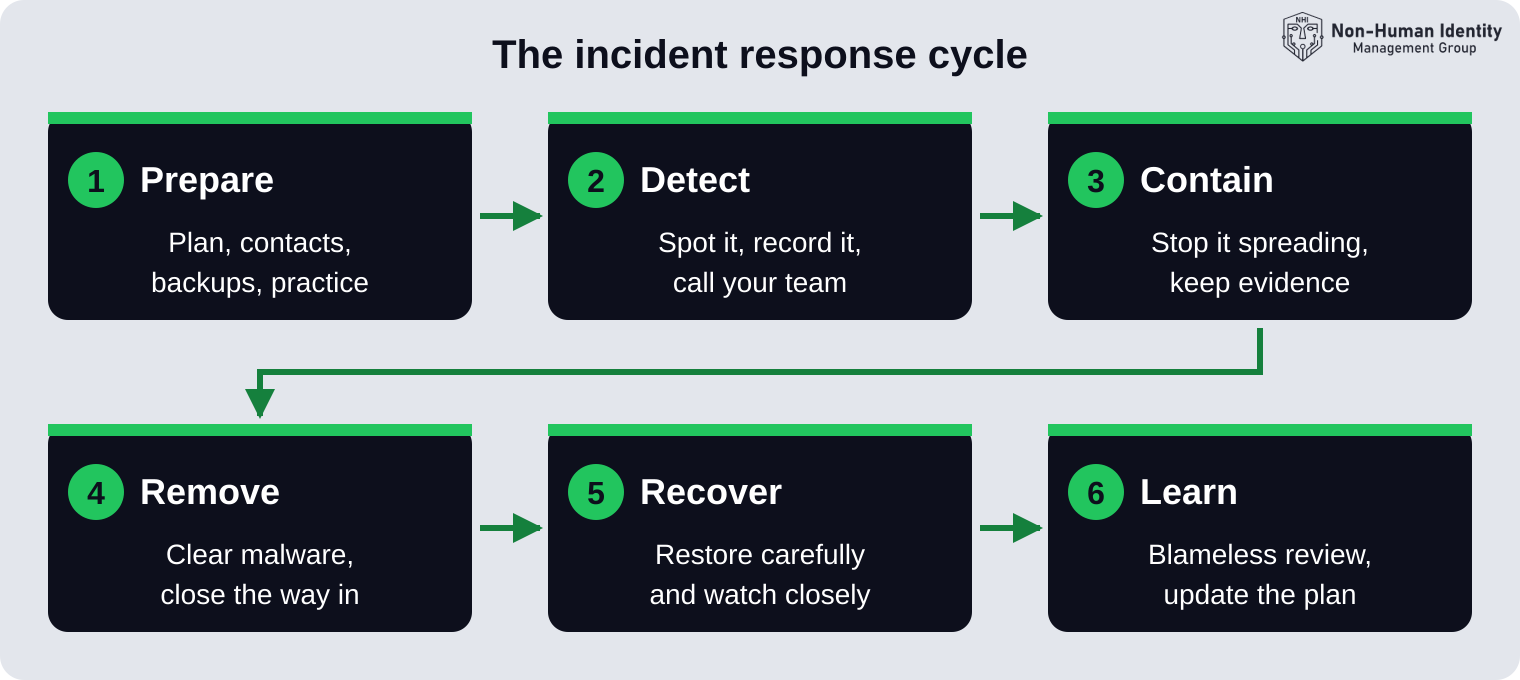
- The basic flow is prepare, detect, contain, remove, recover, learn. Each stage has a clear job.
- Contain before you clean. Stop the problem spreading first, and keep evidence, before wiping or rebuilding anything.
- Know who to call. A short, printed contact list of people, providers, your bank and your insurer saves precious time.[3]
- Some deadlines are legal. Under the GDPR, many personal data breaches must be reported to the regulator within 72 hours of becoming aware of them, where feasible.[4]
What it is, in plain English
An incident is an event that harms, or threatens, the confidentiality, integrity or availability of your information or systems. In everyday terms: data gets stolen, something gets changed that should not, or systems stop working. Examples include a hacked email account, ransomware locking files, a lost laptop full of customer data, or a fake invoice that was paid.
Incident response is everything you do about it: noticing it, stopping it from getting worse, working out what happened, fixing it, and learning so it is less likely to happen again. An incident response plan is the written version of those steps, with names, phone numbers and decisions agreed in advance.
A helpful comparison is a fire drill. Everyone knows the alarm, the exits, who calls the fire service and where to meet. Nobody has to invent the plan while smoke fills the room. Where the analogy breaks down: a fire is obvious, but a cyber attack can be quiet for days or weeks, and the "fire" may still be burning after you think it is out. Spotting it and checking it is really gone are big parts of the job.
The US standards body NIST publishes widely used guidance on incident response. Its current version, SP 800-61 Revision 3 (April 2025), places incident response inside wider cyber risk management and links it to the six functions of the NIST Cybersecurity Framework 2.0: Govern, Identify, Protect, Detect, Respond and Recover.[1] It also says organisations should use the incident response model that suits them best, so the stages in this guide are a common simple version, not the only correct one.[1]
Why it matters to you
- If you run a small business: a calm, practised response can be the difference between a bad week and losing customers, money or data for good.
- If you are new to a security job: you may be the first person someone calls. Knowing what to do, and what not to touch, is one of the most useful skills you can have.
- If you are a manager: you will make the decisions: shut systems down or not, call in outside help, tell customers, report to a regulator. Agreeing those choices in advance makes them faster and better.
Time matters in many incidents. With payment fraud, for example, the FBI advises contacting your bank immediately to ask for the funds to be recalled, because quick reports can sometimes help freeze the money.[5] With data breaches, legal reporting clocks may already be running.[4] Panicked actions can also make things worse, for example wiping a computer before anyone checks how the attacker got in, so they simply come back.
How it works, step by step
These stages are a simple, widely used way to think about a response. Real incidents loop back and forth between them.
- Prepare. Before anything happens: write a short plan, agree roles, keep a contact list (including a printed copy, in case systems are down), make and test backups, and practise. NIST treats preparation as part of everyday risk management rather than the response itself.[1]
- Detect and assess. Someone notices something odd: an alert, a strange email, files that will not open, a customer complaint. Write down what was seen and when, decide whether it is a real incident and how serious it is, and call the people in your plan.
- Contain. Stop it spreading. This might mean disconnecting a device from the network, disabling or resetting a compromised account, signing out its sessions, or blocking a payment. Containment should keep evidence, so avoid switching off or wiping devices unless your plan or expert advice says so.
- Remove the cause. Once contained, get rid of the threat and the way in: remove malware, close the gap that was used, reset passwords and keys. This stage is called eradication.
- Recover. Bring systems back carefully, often from clean backups, and watch closely for signs that the attacker is still there.
- Learn and improve. Afterwards, hold a blameless review: build a timeline, look at what went well and badly, and update the plan.[3] NIST stresses feeding lessons learned back into all activities, often as soon as they are found.[1]
The table below shows what the first hours can look like for some common small business incidents. It is a starting point, not a full playbook, and serious incidents usually need expert help.
| Incident | First containment steps | Who to involve early |
|---|---|---|
| Hacked email account | Reset the password from a clean device, sign out all sessions, turn on MFA, check for new forwarding rules. | IT provider; anyone who may have received fake emails from the account. |
| Fake invoice paid | Call your bank immediately to request a recall; keep the emails. | Bank; police or national fraud reporting service; IT provider.[5] |
| Ransomware on one or more computers | Disconnect affected devices from the network; do not wipe them; protect backups. | IT provider or incident response firm; insurer; national cyber security agency. |
| Lost or stolen laptop with personal data | Lock and wipe remotely if possible; reset accounts used on it. | IT provider; data protection lead, because a regulator report may be needed.[4] |
| Malware alert on a laptop | Isolate the device; reset passwords used on it from a clean device. | IT provider; the device's user. |
A worked example
Meadow Vets is a fictional veterinary practice with 30 staff across two sites. Its practice manager, Ola, wrote a two-page incident response plan last year with help from their IT provider, and they ran a one-hour tabletop exercise to test it.
09:10. A receptionist, Ben, tells Ola that files on the shared drive have strange new names and will not open, and there is a note on screen demanding payment. Ola opens the printed plan.
09:15. Following the plan, Ola asks Ben to unplug his computer's network cable and turn off its Wi-Fi, but not to switch it off. She calls the IT provider's emergency number from the contact list and starts a written log of times and actions.
09:40. The IT provider disconnects the shared drive and checks the other site. Two more computers show the same problem and are isolated. The provider confirms that the practice's backups are kept separately and were not reached.
10:30. Ola calls the practice's cyber insurer, as the policy requires, and the insurer arranges a specialist incident response firm. Ola tells staff to use paper appointment sheets for the day and not to discuss the incident publicly.
Afternoon. The specialists find that the attacker got in through a remote access account with a weak password and no MFA. That account is disabled. Because client records may have been accessed, Ola involves the practice's data protection lead to assess whether the regulator must be told within the legal time limit.
Recovery from backups takes three days, and the practice still loses some appointments and a day of records. The response did not undo the attack, but it limited the spread, protected the backups and kept evidence. At the review, the team adds MFA to all remote access and schedules another exercise.
Myths and misunderstandings
| What people think | What is true |
|---|---|
| Incident response starts when the attack happens. | Most of the value comes from preparation done beforehand: the plan, contacts, backups and practice.[2] |
| Switch everything off straight away. | Disconnecting from the network is often better than switching off, because powering down can destroy useful evidence. Follow your plan or expert advice. |
| Once the malware is removed, the incident is over. | Not until you know how the attacker got in and have closed that route. Otherwise they may return. |
| Small businesses do not need a plan. | A short plan with names, numbers and first steps is valuable at any size. CISA suggests even simple plans cover who to call, roles and steps before, during and after an incident.[3] |
| The review is about finding who to blame. | A blameless review focuses on improving people, process and technology, which encourages staff to report problems early.[3] |
Key terms
- Incident
- An event that compromises the confidentiality, integrity or availability of information or systems.
- Incident response
- The set of actions used to detect, contain, investigate and recover from a security event.
- Incident response plan
- A documented set of steps for handling a security incident from detection through recovery, including roles, escalation, communication and review.
- Containment
- The stage that stops an incident spreading while keeping the evidence needed to investigate it.
- Eradication
- Removing the threat and its way in, such as malware, compromised accounts and exposed secrets, so it cannot be used again.
- Playbook
- A documented, repeatable set of steps for handling a particular type of alert or incident.
- Digital forensics
- Collecting, preserving and analysing digital evidence so it can support an investigation or legal process.
- Endpoint detection and response (EDR)
- Security software that monitors devices such as laptops and servers for suspicious activity and supports investigation and containment.
Common questions
What should I do first if I think we have been hacked?
Stay calm, write down what you saw and when, and follow your plan. If you have no plan, disconnect affected devices from the network without switching them off, and contact your IT provider or a professional incident response service.
Should we pay a ransom?
That is a serious business and legal decision, not a technical one. Involve your insurer, legal advice and law enforcement, and see the Ransomware Basics for Small Businesses Guide.
Who do we have to tell?
It depends on the incident and where you operate. Under the GDPR, a personal data breach must generally be reported to the supervisory authority without undue delay and, where feasible, within 72 hours, unless it is unlikely to result in a risk to people.[4] Your insurer, bank, customers and partners may also need to know. In the UK, the NCSC offers a reporting service for cyber incidents.[6]
Do we need an incident response firm?
For serious incidents, such as ransomware or a data breach, expert help is usually worth it. Some cyber insurance policies include access to one. Arranging a contact before you need it saves time.
How often should we practise?
CISA suggests reviewing the plan regularly, quarterly in its basic guide, and running tabletop exercises, where the team talks through a pretend incident.[3] We suggest at least one short exercise a year for a small business.
Why keep a written log during an incident?
Under stress, people lose track of time and decisions. A log of times, actions and who did what helps the investigation, insurance claims and any report to a regulator. CISA specifically warns that stress can distort how people perceive time.[3]
First steps
Three things you can do this week:
- Make a one-page contact list. Include who leads, your IT provider, your bank's fraud line, your insurer and your data protection lead. Print it and keep a copy away from the office systems.
- Check your backups. Make sure at least one copy is kept separately from your main systems, and try restoring a file.
- Agree three decisions in advance: who can disconnect systems, who can call in outside help, and who speaks to customers. Any emergency exception during an incident, such as giving someone extra access, should be approved, recorded and removed once the incident is over.
Checklist
- We have a short written incident response plan, approved by the business owner or senior leadership.
- Everyone knows how to report something suspicious, and is thanked for it.
- A printed contact list exists and is up to date.
- Roles are agreed: who leads, who handles the technical work, who handles communication.[3]
- Backups are kept separately and a restore has been tested recently.
- We know which incidents may need reporting to a regulator, and how fast.
- We have practised at least one scenario in the last year.
- After each incident or exercise, we update the plan.
Check your understanding
1. Why is it often better to disconnect a computer from the network than to switch it off?
Answer: disconnecting stops the spread while keeping evidence that might be lost if the computer is powered down.
2. What is the difference between containment and eradication?
Answer: containment stops the incident spreading; eradication removes the threat and the way it got in.
3. Why should the contact list be printed?
Answer: during an incident, email and file systems may be unavailable.
4. What is the purpose of a blameless review?
Answer: to learn and improve people, process and technology, so staff feel safe reporting problems early.
Suggested learning pathway
- Cyber Resilience for Beginners: a related beginner guide to read next.
- For the wider basics of protecting a small firm, start with the Small Business Cybersecurity Basics Guide.
- To check how ready you are, use the Incident Response Readiness Assessment Checklist.
- To write your own plan, start from the Incident Response Plan Template and the Incident Response Contact and Call Tree Template.
- For the full practitioner view, read the Incident Response Guide.
- For incidents involving stolen accounts, see the Identity Incident Response Playbook.
Standards and references
- SP 800-61 Rev. 3, Incident Response Recommendations and Considerations for Cybersecurity Risk Management: A CSF 2.0 Community Profile. National Institute of Standards and Technology (NIST), April 2025. https://csrc.nist.gov/pubs/sp/800/61/r3/final, accessed 27 Nov 2026.
- Incident management. National Cyber Security Centre (NCSC). https://www.ncsc.gov.uk/collection/incident-management, accessed 27 Nov 2026.
- Incident Response Plan (IRP) Basics. Cybersecurity and Infrastructure Security Agency (CISA). https://www.cisa.gov/sites/default/files/publications/Incident-Response-Plan-Basics_508c.pdf, accessed 27 Nov 2026.
- Regulation (EU) 2016/679 (General Data Protection Regulation), Article 33. EUR-Lex, European Union. https://eur-lex.europa.eu/eli/reg/2016/679/oj, accessed 27 Nov 2026.
- Business Email Compromise: The $55 Billion Scam. Public Service Announcement I-091124-PSA, FBI Internet Crime Complaint Center (IC3), 11 September 2024. https://www.ic3.gov/PSA/2024/PSA240911, accessed 27 Nov 2026.
- Small Business Guide. National Cyber Security Centre (NCSC). https://www.ncsc.gov.uk/collection/small-business-guide, accessed 27 Nov 2026.
Related NHI Mgmt Group resources: Incident Response and DFIR Glossary · Incident Response vs Digital Forensics · CIS Control 17 Incident Response Management Guide