LDAP is a common language that apps use to look up people and groups in a company directory.
This guide is for students, new IT staff and anyone who has seen "LDAP" in an app's settings and wondered what it does. If your organisation has a staff list that apps check when people log in, LDAP is often how they ask.
In short
- A directory is the organisation's list of people, groups and computers. LDAP is a standard way for apps to ask that list questions.
- Before an app can ask, it logs in to the directory. This step is called a bind, and the account it uses is often a bind account.
- A bind account is a non-human identity. If its password leaks, someone may be able to read much of the staff list.
- Give each bind account an owner and only the access it needs, and send its password over an encrypted connection.
What you will learn
- Explain what LDAP is and how it differs from the directory itself.
- Spot a bind account in an app's directory settings.
- Explain why an unencrypted connection puts the password at risk.
- Check who owns each bind account in your organisation.
- Staff list (directory)
- a central store of people, groups and computers that apps check.
- Log in to the directory (bind)
- the step where an app proves who it is before it asks questions.
- App's directory account (bind account)
- an account an app uses, not a person, to log in to the directory.
What is LDAP?
Think of a big reference library with a help desk. You do not search the shelves yourself. You go to the desk, show your library card and ask a question in the way the desk expects. LDAP is that way of asking, for a company's directory.
LDAP stands for Lightweight Directory Access Protocol. A protocol is an agreed set of rules for how two computers talk. The LDAP rules set out how an app can log in, search, add, change, compare and delete entries in a directory.[1]
Each person, group or computer in the directory is an entry. An entry holds details, such as a name, an email address or the groups a person is in.[2] Entries sit in a tree, a bit like folders inside folders. Each entry has a full address in that tree, called a distinguished name.[2]
Many directories understand LDAP, including Microsoft's Active Directory and open source servers such as OpenLDAP. LDAP is the language, not the directory.
Where the comparison stops working: a library desk is staffed by a person who can use judgement. An LDAP server answers any question its rules allow, as fast as an app can ask. So the library card, and what it lets you see, matters a great deal.
Why does it matter?
Many apps use the directory to check passwords and groups. The app's own account in the directory can see a lot, and it is easy to forget.
If you are new to IT work
What could happen: you set up an app with an old bind account that nobody owns. Its password sits in a file.
Check this: ask who owns each bind account before you reuse it.
If you are studying for a security job
What could happen: you learn about passwords for people but miss the accounts that apps use.
Check this: learn to read a directory address and spot app accounts in it.
If you manage a small IT team
What could happen: a supplier's app talks to your directory with no encryption. Its password can be read on the network.
Check this: ask suppliers if their link to the directory is encrypted.
Bind accounts are one kind of non-human identity (NHI). An NHI is a digital identity, or the credential behind it, that represents a machine, application, automated process, service or AI agent. It lets that software log in and do its job without a person.
What does it look like?
Many apps have a "directory connection" settings screen. Here is a made-up one for a booking app.
Example only. All values are made up.
Directory connection settings (booking app)
Server:        ldap.example.invalid
Port:          389                                  (1)
Use encryption: Off                                 (2)
Bind account:  cn=svc-booking,ou=Service Accounts,dc=example,dc=com   (3)
Password:      FAKE-password-0000                   (4)
Search base:   dc=example,dc=com                    (5)
- The usual port number for plain LDAP connections.
- Encryption is switched off, so traffic can be read on the network.
- The bind account, written as a distinguished name: its full address in the directory tree.
- In a real screen, this line would contain the bind account's password.
- Where searches start. Here, the top of the whole tree.
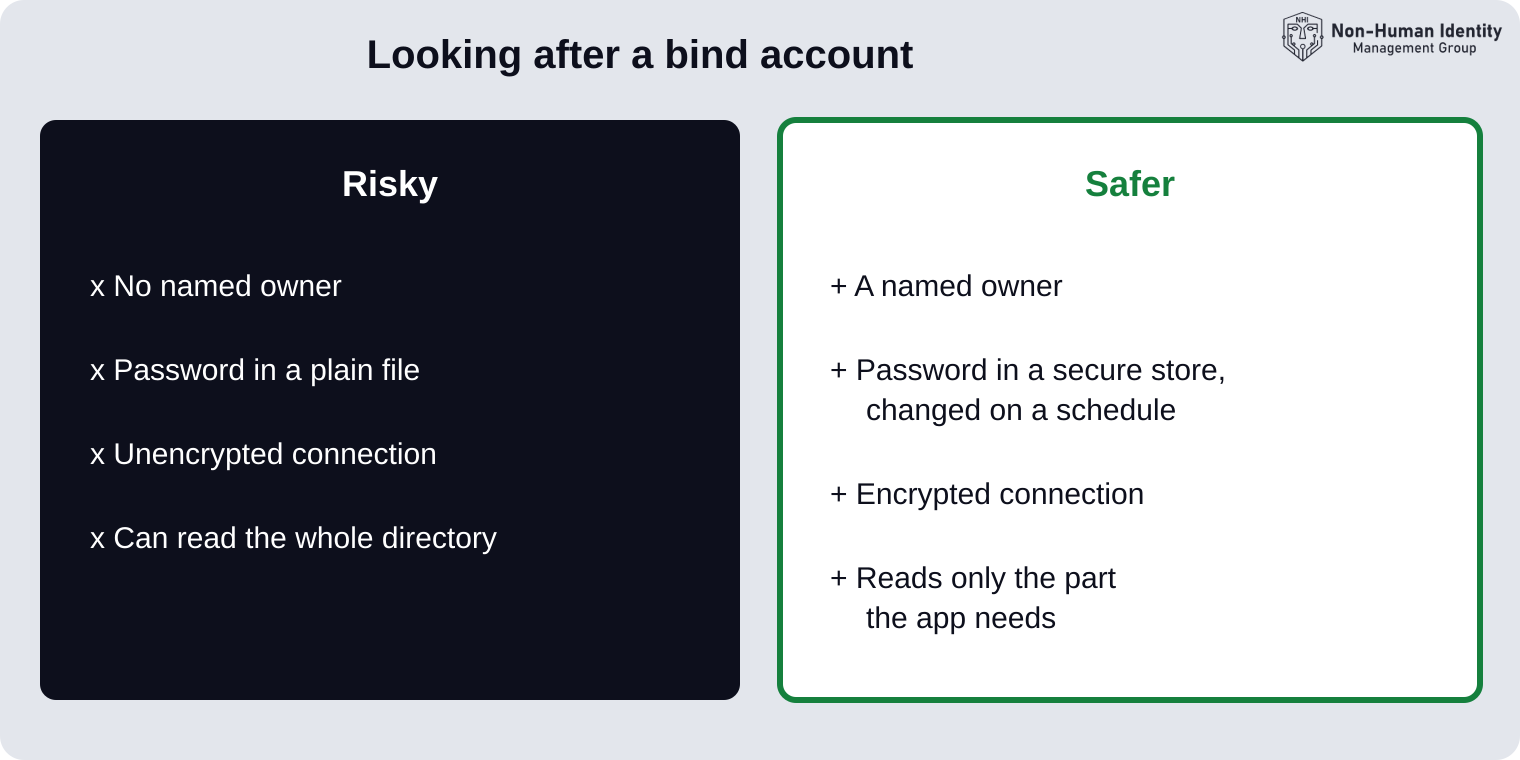
Why this is risky: the password goes across the network in a form others may read. The search starts at the top, so the app may see far more of the staff list than it needs.[3]
The safer way: turn encryption on. Start searches at the part of the tree the app needs. Give the account a named owner, and keep the password in a secure store, not a plain file.
How does it work?
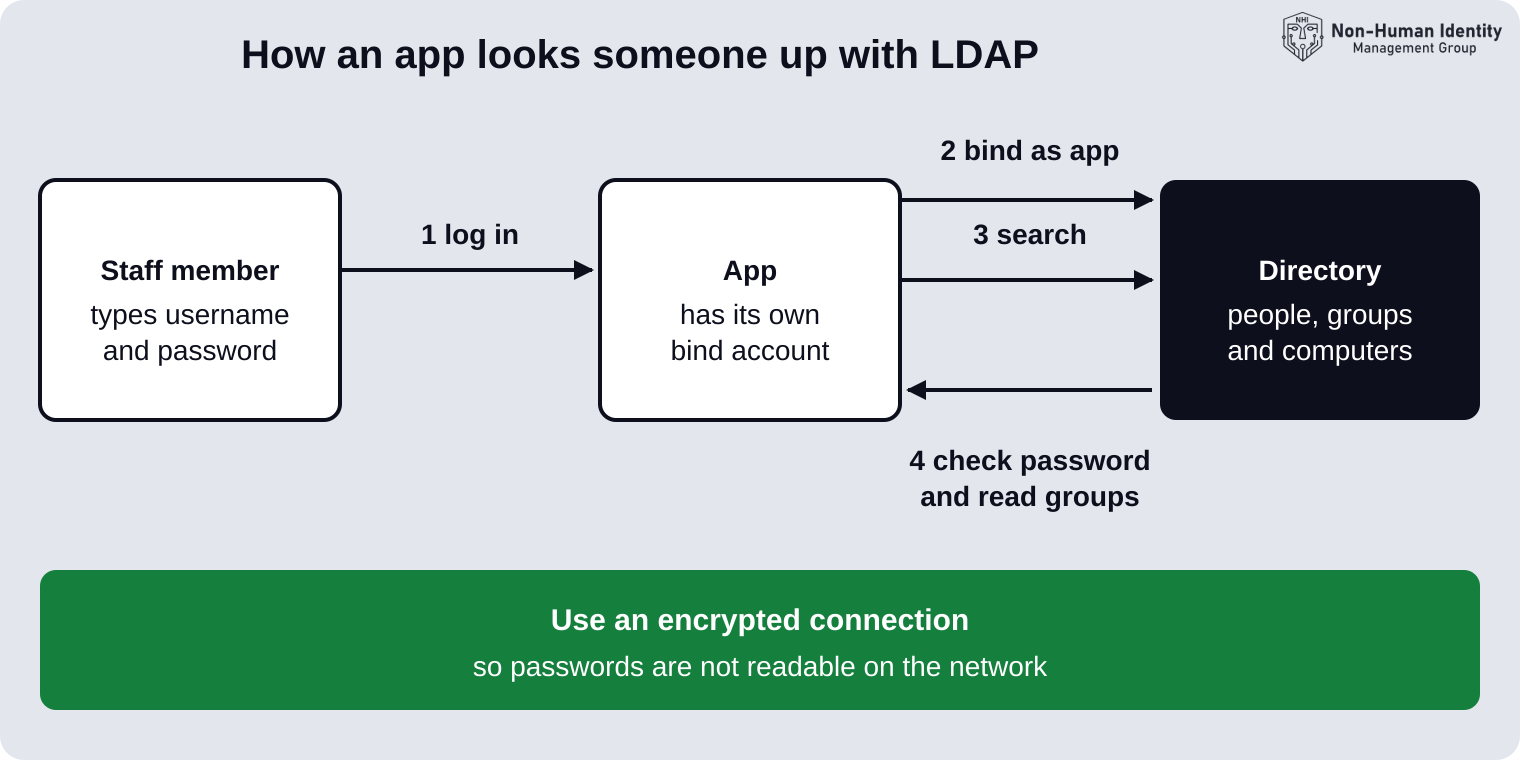
Here is what happens when a staff member logs in to an app that checks the directory.
- The app connects. It opens a connection to the directory server, which should ideally be an encrypted one.
- The app binds. It logs in to the directory with its bind account and password.[3]
- The app searches. It asks the directory a question, for example "find the entry for the user called Talia".
- The app checks the person. It often binds again as that person, using the password they typed, to see if it is right.
- The app reads groups. It checks which groups the person is in, to decide what they may do.
- The app disconnects. When it has finished, it ends the session with a step called an unbind.[1]
The standard has some traps. A "bind" with a name but no password can be accepted by some servers without checking anything. The standard warns apps not to treat that as proof of who someone is.[3] The same standard says a plain name and password login is not suitable without encryption.[3] Microsoft gives the same advice for Active Directory. It explains how to turn on settings that reject unencrypted password binds and unsigned traffic.[4]
A worked example
Talia Thorne has just started as the IT assistant at Birch Laundry, a fictional laundry business with three shops. Her manager, Bea Hollis, asks her to connect a new staff rota app to the company directory.
The app's setup screen asks for a server, a bind account and a password. Talia finds an old note in a shared folder. It lists an account called svc-scanner with its password, and says "use this for anything that needs the directory".
Talia remembers the library card picture. A library card that opens every shelf, shared by every app, with its password in a shared folder, is a risk.
She asks Bea who owns svc-scanner. Nobody knows. It was set up for a scanner that the business no longer uses.
Bea and Talia agree a plan. Talia creates a new bind account just for the rota app. It can read only the staff part of the directory, not the whole tree. Bea records herself as the owner. The password goes into the company's password vault, not a note.
Talia also turns on the app's "use encryption" option and tests that logins still work.
Last, Bea asks the directory admin to disable svc-scanner, and to change its password first in case anyone still holds a copy. They plan to check after a week that nothing broke, then delete it.
Myths and mistakes
| What people think | What is true |
|---|---|
| LDAP and Active Directory are the same thing. | Active Directory is a directory. LDAP is one language apps use to talk to it and to other directories. |
| A bind account is harmless because it can only read. | Reading the staff list can show names, groups and other details that help attackers plan. |
| One bind account for every app keeps things simple. | If it leaks, every app is affected and it is hard to change the password without breaking things. |
| Inside our network, encryption does not matter. | Passwords sent without encryption can be read by anyone able to watch that traffic.[3] |
| A successful bind always means the password was checked. | Some servers accept a name with an empty password without checking it.[3] |
What can I do this week?
- List the apps that connect to your directory and the bind account each one uses.
- Find out who owns each bind account and write it down.
- Check whether each connection uses encryption.
- Move any bind passwords you find in notes or plain files into a password vault.
Checklist
- Each app has its own bind account, not a shared one.
- Each bind account has a named owner.
- Bind accounts can read only the part of the directory they need.
- Directory connections use encryption.
- Bind passwords are kept in a secure store and changed on a schedule.
- Bind accounts for retired apps are disabled and then removed.
- Empty-password binds are not treated as proof of identity.
Common questions
Is LDAP the same as Active Directory?
No. Active Directory is Microsoft's directory, the store of people, groups and computers. LDAP is a standard language that apps use to ask a directory questions. Active Directory understands LDAP, and so do many other directories. See Active Directory for Beginners.
What is a bind account?
A bind account is the account an app uses to connect to the directory before it searches. It belongs to the app, not a person, so it is a non-human identity. It needs an owner, limited access and a protected password like any other account.
Is LDAP still used today?
Yes. Many apps, printers, VPNs and older systems still check users through LDAP. Newer cloud apps often use sign-in standards such as SAML or OpenID Connect instead. See LDAP vs SAML vs OIDC for how they differ.
What is LDAPS?
LDAPS means LDAP over an encrypted connection, so others on the network cannot read the traffic. Another way is to start a plain connection and then switch on encryption, called StartTLS. Either way, the goal is that passwords are not sent in readable form.
Can I just delete an old bind account?
Not straight away. First find out which apps still use it, or they may fail. Disable it, wait and watch for errors, then delete it. If its password may have leaked, change the password first.
Where next?
Ready for the detail? Read the practitioner guide: LDAP Bind Accounts. It goes further into finding every bind account, limiting what each one can read and replacing them with sign-in standards or managed accounts.
Also useful:
- LDAP Security Deep Dive Guide
- Active Directory for Beginners
- Service Accounts for Beginners
- Non-Human Identities for Beginners
- NHI Foundation Level Training
Related NHI Mgmt Group resources: How to fix LDAP signing and LDAPS errors when hardening domain controllers · LDAP vs SAML vs OIDC · OpenLDAP Security
Key terms
- LDAP
- A standard language apps use to search and update a directory.
- Directory service
- Software that stores a list of people, groups and computers and lets apps use it.
- LDAP bind account
- An account an app uses to log in to a directory before it searches.
- Active Directory
- Microsoft's directory service for Windows networks, which understands LDAP.
- Service account
- An account used by software rather than a person.
- Least privilege
- Giving each person or program only the access it needs.
Sources and further reading
- RFC 4511, Lightweight Directory Access Protocol (LDAP): The Protocol. IETF, June 2006. https://www.rfc-editor.org/rfc/rfc4511, accessed 28 Nov 2026.
- RFC 4512, Lightweight Directory Access Protocol (LDAP): Directory Information Models. IETF, June 2006. https://www.rfc-editor.org/rfc/rfc4512, accessed 28 Nov 2026.
- RFC 4513, Lightweight Directory Access Protocol (LDAP): Authentication Methods and Security Mechanisms. IETF, June 2006. https://www.rfc-editor.org/rfc/rfc4513, accessed 28 Nov 2026.
- How to enable LDAP signing in Windows Server. Microsoft Learn, Microsoft. https://learn.microsoft.com/en-us/troubleshoot/windows-server/active-directory/enable-ldap-signing-in-windows-server, accessed 28 Nov 2026.