Network security is the set of controls that decide which devices and traffic can reach which parts of your network, protect data as it travels, and help you spot an intruder who gets in.
This guide is for newcomers, students, career changers and managers who are not security specialists. It explains what a network is, the main building blocks of network security (firewalls, segments, safe Wi-Fi and secure remote connections), a worked example, common myths and simple first steps a small team can take this week.
By the end of this guide you will be able to:
- Explain what network security means in plain English.
- Understand what a firewall and network segmentation do.
- Describe why being "inside the network" should not mean being trusted.
- Identify practical steps to make a small office network safer.
Key takeaways
- Firewalls filter traffic. They allow or block connections according to rules, at the edge of the network and on each device.
- Segments limit the spread. Splitting a network into zones means trouble in one zone does not automatically reach the others.
- Inside does not mean trusted. Modern guidance says no request should be trusted just because it comes from inside the network.
- Wi-Fi and remote access need care. Use current Wi-Fi security, separate guest access and protect remote connections.
- Watch and maintain. Keep network equipment updated, know what is connected and review logs.
What it is, in plain English
A network is a group of devices connected so they can share information: laptops, phones, printers, servers and the internet connection that links them to the outside world. In an office, the box that connects to the internet often combines a router, a Wi-Fi access point and a basic firewall.
Network security means controlling that traffic. The main tool is the firewall. The US National Institute of Standards and Technology (NIST) describes firewalls as devices or programs that control the flow of network traffic between networks or hosts with different security postures.[1] Some firewalls sit at the edge of a network; others, called host-based firewalls, run on each device.[1]
A second key idea is network segmentation: dividing a network into smaller parts, physically or virtually, so you have more control over the traffic between them.[3]
A helpful comparison is an office building. The front door has a reception desk (the edge firewall). Inside, different floors and rooms need different key cards (segments). A visitor gets a pass that opens only the meeting room (a guest network). Where the analogy breaks down: in a building you can see who walks in, while on a network an intruder can arrive hidden inside an ordinary-looking email or a stolen password, already past the front door.
Why it matters to you
- If you run a small business: a flat network, where every device can reach every other, means one infected laptop can reach your accounts system, your backups and your card terminal.
- If you are new to a security job: firewall rules, Wi-Fi settings and remote access are among the first things you will be asked to review.
- If you are a manager: network design decides how far an incident can spread and how quickly the business can recover.
Attackers who get a foothold rarely stop at the first device. The UK National Cyber Security Centre (NCSC) calls this lateral movement: exploring the network, compromising more machines and collecting passwords to reach valuable targets.[2] The NCSC advises assuming that a determined attacker will eventually get in, so internal controls and detection matter as much as the outer defences.[2]
This is also the thinking behind zero trust. NIST SP 800-207 describes zero trust as moving the focus from a fixed network edge to protecting users, devices and resources, with no trust granted just because of network location.[4]
How it works, step by step
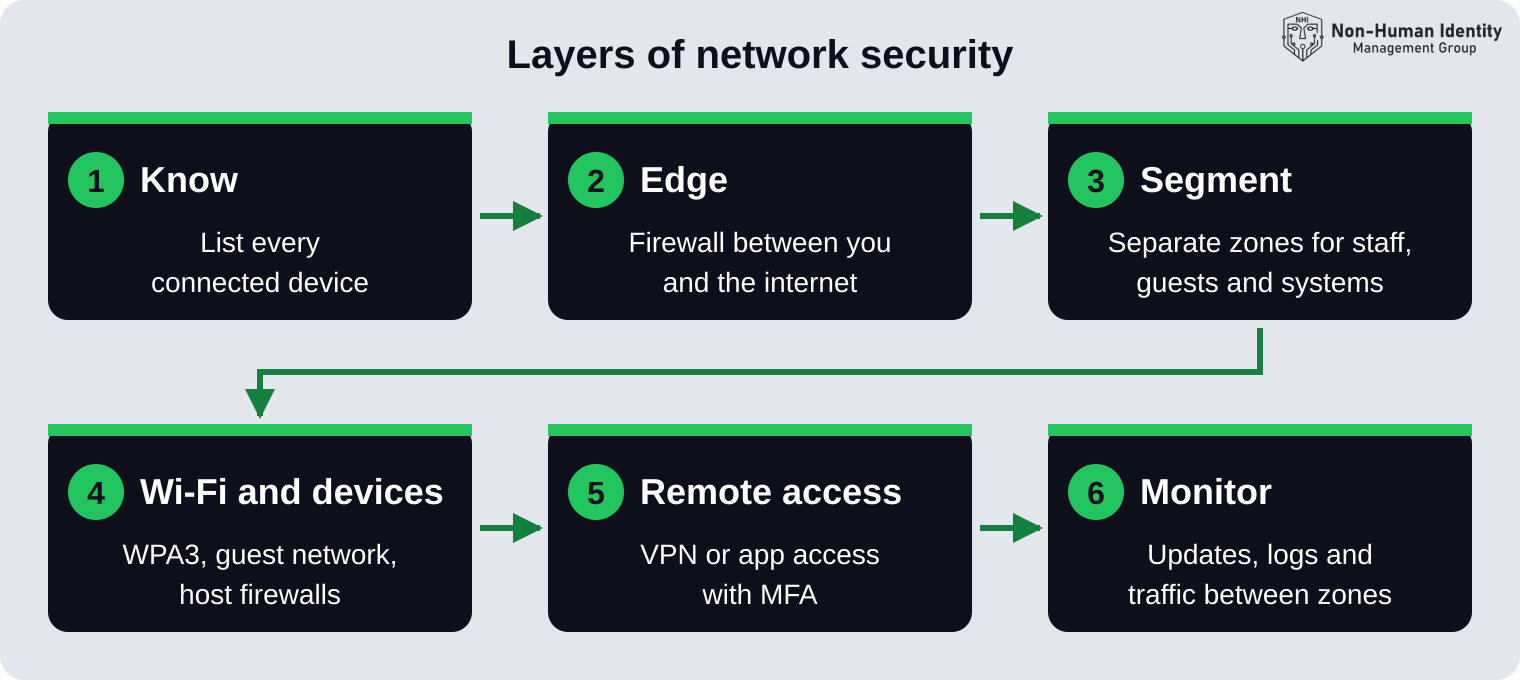
Network security is built in layers. A simple order to think about it:
- Know what is connected. List the devices on your network: computers, phones, printers, cameras and anything else. The NCSC recommends keeping an inventory of devices that connect to the network.[2]
- Control the edge. Use a firewall between your network and the internet. Block incoming connections you do not need, and change the default admin password on the router.
- Split into segments. Put different kinds of devices in different zones, for example staff computers, guests, and payment or building systems. The NCSC advises splitting the network into segments, isolating critical systems and not trusting traffic just because it starts inside.[2]
- Secure Wi-Fi and devices. Use WPA3, the current Wi-Fi security standard from the Wi-Fi Alliance, where your equipment supports it; WPA3-Personal adds stronger protection against attackers trying to guess the Wi-Fi password.[5] Turn on the firewall on each device; the NCSC suggests host firewalls that block inbound traffic by default.[2]
- Protect remote connections. Staff working from home or travelling need a safe way in. A virtual private network (VPN) creates an encrypted connection to protect data crossing untrusted networks.[6] Many organisations now give access to individual applications instead, checked by identity and device, which is called zero trust network access. Use multi-factor authentication on anything reachable from the internet.[2]
- Monitor and maintain. Keep routers, firewalls and VPN equipment updated; the NCSC notes VPN servers face the internet and need prompt security patches.[6] Turn on logging and review it, paying particular attention to traffic between segments.[2]
| Building block | What it does | Everyday example |
|---|---|---|
| Edge firewall | Filters traffic between your network and the internet | The firewall in your office router |
| Host firewall | Filters traffic to and from one device | The built-in firewall on a laptop |
| Segmentation | Separates zones so trouble spreads less easily | Card terminals on their own network |
| Guest network | Gives visitors internet access without reaching staff devices | A separate visitor Wi-Fi name and password |
| VPN | Encrypts traffic between a remote device and your network | Staff connecting from a hotel |
| Intrusion detection | Watches traffic and alerts on suspicious activity | An alert when a printer starts contacting many computers |
A worked example
Greenway Cafe Group is a fictional business with three cafes and a small head office. Every cafe used one Wi-Fi network for everything: the tills, the card terminals, staff laptops, a music player and free customer Wi-Fi, all sharing the same password.
Omar, who manages IT part time, works with the firm's broadband provider to make changes:
- Segments: each cafe now has separate networks for payments and tills, for staff devices, and for customers.
- Guest Wi-Fi: customers use a guest network that reaches the internet but not the staff or payment networks.
- Edge firewall: unused incoming connections are blocked, and default router passwords are changed.
- Wi-Fi security: staff networks use WPA3 where the equipment supports it, with new passwords that are not shared with customers.
- Remote access: the head office accountant connects through a VPN with multi-factor authentication.
A few months later, a staff laptop in one cafe is infected after someone opens a fake invoice. The laptop's security software raises an alert, and Omar disconnects it. Because the tills and card terminals sit on a separate network, the infection has a much harder path to reach them. Segmentation did not stop the laptop being infected, and Omar still has to clean it, reset the user's passwords and check the logs for anything else unusual, but the damage stays contained to one device.
Myths and misunderstandings
| What people think | What is true |
|---|---|
| A firewall at the edge is enough. | Attackers often get in through email or stolen passwords, already past the edge. Segments, host firewalls and monitoring limit what they can do next. |
| Anything inside our network is safe. | Zero trust guidance says no request should be trusted just because of network location.[4] |
| A VPN makes everything secure. | A VPN protects traffic in transit, but the NCSC notes it only protects traffic routed through it, and the VPN server itself needs prompt patching.[6] |
| Guest Wi-Fi is just a convenience. | A separate guest network keeps visitor devices away from staff and business systems. |
| Small businesses do not need segmentation. | Even a basic split between staff, guests and payment systems reduces how far one infected device can reach. |
Key terms
- Firewall
- A security control that filters network traffic according to rules, so unwanted connections are blocked.
- Network segmentation
- Dividing a network into zones with controlled traffic between them, so a problem in one zone does not expose all the others.
- Lateral movement
- An attacker moving from the first device they reach to other systems in the network.
- Zero trust
- A security model, described in NIST SP 800-207, that does not trust any request because of where on the network it comes from.
- VPN
- An encrypted connection that tunnels traffic between a device and a private network; it reduces exposure on untrusted networks but is not a complete security model by itself.
- Zero trust network access (ZTNA)
- Giving users access to specific applications, after checks on identity and device, without placing them on the internal network.
- Guest network
- A separate Wi-Fi network for visitors or lower-trust devices that limits what they can reach.
- Wi-Fi encryption
- The methods, usually WPA2 or WPA3, that protect data sent over a wireless network.
- Intrusion detection system (IDS)
- A tool that monitors network activity and alerts on suspicious behaviour without blocking it.
- DMZ
- A network segment between the internet and the internal network that holds public-facing services.
Common questions
What is the difference between a router and a firewall?
A router moves traffic between networks, such as your office and the internet. A firewall decides which traffic is allowed. Many small office boxes do both.
Do I need a separate firewall device?
Not always. Small offices often rely on the firewall built into their router plus the firewall on each device. Larger or busier networks usually use dedicated firewalls.
What is a flat network?
A network with no internal boundaries, where every device can reach every other. It is simple to run but lets problems spread easily.
Is a VPN still needed with zero trust?
It depends on your setup. The NCSC notes a VPN adds little value under a fully zero trust approach, but can still help in other designs, for example to protect older systems.[6]
Should customer Wi-Fi be separate?
Yes. A guest network gives visitors internet access without reaching your staff devices or business systems.
How does network security relate to endpoint security?
They overlap. Network controls decide what can talk to what; endpoint controls protect each device. Host firewalls sit in both.
First steps
- List what is connected. Look at your router's list of connected devices and note anything you do not recognise.
- Secure the router. Change the default admin password, install firmware updates and switch off remote management you do not use.
- Separate guests. Set up a guest Wi-Fi network for visitors and personal devices, with its own password.
- Check remote access. Make sure anything staff reach from outside, such as a VPN or remote desktop, requires multi-factor authentication.
Checklist
- We have a list of devices that connect to our network.
- Router and firewall default passwords have been changed.
- Router, firewall and VPN firmware is kept up to date.
- Incoming connections from the internet are blocked unless needed.
- Guests use a separate Wi-Fi network.
- Payment and other critical systems sit on their own segment.
- Staff Wi-Fi uses WPA3 or, where not available, WPA2 with a strong password.
- Host firewalls are switched on for every device.
- Remote access requires multi-factor authentication.
- Someone reviews firewall rules and logs on a regular schedule.
Check your understanding
1. What does a firewall do?
Answer: it controls which network traffic is allowed between networks or devices, according to rules.
2. Why does segmentation help if an attacker gets in?
Answer: it limits which other systems the attacker can reach from the first device, making lateral movement harder.
3. Should a device be trusted because it is inside the office network?
Answer: no. Zero trust guidance says trust should not be based on network location.
4. What does a VPN protect, and what does it not?
Answer: it encrypts traffic routed through it across untrusted networks; it does not protect traffic that bypasses it, and the VPN server itself must be kept patched.
Suggested learning pathway
- Firewalls for Beginners: a related beginner guide to read next.
- VPNs for Beginners: a related beginner guide to read next.
- Just-in-Time Access for Beginners: a related beginner guide to read next.
- For the wider basics a small organisation needs, start with Small Business Cybersecurity Basics Guide.
- For the model that replaces "inside means trusted", see Zero Trust for Beginners.
- For router and Wi-Fi settings, see the Securing Your Wi-Fi Network Guide.
- For remote connections, read the Choosing a VPN Safely Guide.
- For designing zones in depth, see the Network Segmentation Guide.
- For running firewalls well, see the Firewall Management Guide.
Standards and references
- SP 800-41 Rev. 1, Guidelines on Firewalls and Firewall Policy. National Institute of Standards and Technology (NIST), September 2009. https://csrc.nist.gov/pubs/sp/800/41/r1/final.
- Preventing lateral movement. National Cyber Security Centre (NCSC), published 8 Feb 2018, reviewed 10 Mar 2021. https://www.ncsc.gov.uk/guidance/preventing-lateral-movement, accessed 27 Nov 2026.
- Layering Network Security Through Segmentation (infographic). Cybersecurity and Infrastructure Security Agency (CISA). https://www.cisa.gov/resources-tools/resources/layering-network-security-through-segmentation-infographic, accessed 27 Nov 2026.
- SP 800-207, Zero Trust Architecture. National Institute of Standards and Technology (NIST), August 2020. https://csrc.nist.gov/pubs/sp/800/207/final.
- Wi-Fi security (WPA3). Wi-Fi Alliance. https://www.wi-fi.org/discover-wi-fi/security, accessed 27 Nov 2026.
- Virtual private networks (VPNs). Device security guidance, National Cyber Security Centre (NCSC), version 2.1, reviewed 13 May 2025. https://www.ncsc.gov.uk/collection/device-security-guidance/infrastructure/virtual-private-networks, accessed 27 Nov 2026.
Related NHI Mgmt Group resources: Firewall Rule Review Checklist · Microsegmentation vs ZTNA · Cloud Network Security Guide