NTLM is an old Microsoft method that lets a Windows computer prove who you are to another computer.
This guide is for new IT staff, students and anyone who looks after a small office network. You do not need to be a Windows expert to be affected: if your business has an older file server, printer or app, it may still rely on NTLM.
In short
- NTLM is a sign-in method from the early days of Windows networks. Most modern networks prefer Kerberos.
- Microsoft has deprecated every version of NTLM, which means it gets no new features and is on the way out.
- Microsoft plans to switch network NTLM off by default in a future major Windows release.
- Find out what still uses it now, so nothing breaks on the day it is switched off.
What you will learn
- Explain what NTLM is in one sentence.
- Explain why attackers like it and why Microsoft is retiring it.
- Spot NTLM in a Windows sign-in record.
- Ask the right questions before it is switched off.
- Sign-in method (authentication protocol)
- the agreed steps two computers follow to check who someone is.
- Question and answer check (challenge and response)
- the server sends a random question, and the answer proves you know the password without sending it.
- Newer Windows sign-in (Kerberos)
- the ticket-based method most Windows company networks prefer today.
What is NTLM?
Think of a doorman who asks a secret question at the door. You give the right answer, so he lets you in. But he never shows you his own badge.
NTLM works much the same way. When your computer wants to open a shared folder, the other computer sends a random question. Your computer works out an answer from your password and sends it back. The answer proves you know the password, without sending the password itself.[2]
On a company network, the server usually asks a central sign-in server, called a domain controller, to check the answer. On a small office network with no central server, called a workgroup, each computer checks its own list of accounts.[2]
NTLM is really a family. It includes very old versions called LAN Manager and NTLM version 1, and the later NTLM version 2.[2] Today most Windows company networks prefer Kerberos, a newer method that uses tickets. NTLM is often kept as a fallback for older systems.
Where the comparison stops working: a real doorman can look at your face. NTLM only checks the answer, so it has no way to tell whether the answer came from you or from someone passing it along.
Why does it matter?
Microsoft says NTLM is open to several kinds of attack. The server does not prove who it is, and an attacker in the middle may be able to pass your answer on to another server. Its older maths is also weak by modern standards.[3] That is why Microsoft is retiring it.
If you are new to IT work
What could happen: an old app breaks on the day NTLM is switched off, and nobody knows why.
Check this: ask whether your team has turned on NTLM auditing to see what still uses it.
If you run a small office
What could happen: an older file server or scanner only signs in with NTLM, and fails after an upgrade.
Check this: ask your IT supplier which of your devices still need NTLM, and what the plan is.
If you are studying security
What could happen: you meet NTLM in almost every Windows attack lab, and you need to know why.
Check this: learn how NTLM differs from Kerberos before you study the attacks.
Next: Kerberos for Beginners
What does it look like?
Windows can record each successful sign-in in its security log. Here is a made-up, shortened record. The real record has more lines.[4]
Example only. All values are made up.
An account was successfully logged on.
Account Name:            FAKE-scanner-0000      (1)
Workstation Name:        PRINTROOM-EXAMPLE
Source Network Address:  192.0.2.10
Authentication Package:  NTLM                   (2)
Package Name (NTLM only): NTLM V1               (3)
- In a real file, this line would contain the account that signed in, here a scanner.
- This line shows which sign-in method was used. It could also read Kerberos or Negotiate.
- This line only appears for NTLM. It shows which version was used, such as NTLM V1, NTLM V2 or LM.
Why this is risky: the scanner still signs in with the oldest, weakest version. Microsoft has removed NTLM version 1 from Windows 11 version 24H2 and Windows Server 2025. After an upgrade, this device may fail to sign in.[1]
The safer way: find every record like this, give each one an owner, and move the device or app to Kerberos or a supported update. Keep a short, written list of anything that truly cannot move yet.
How does it work?
Here is a simple version of an NTLM sign-in on a company network.[2]
- The request. Your computer asks a file server for a shared folder.
- The question. The server sends back a random question, called a challenge.
- The answer. Your computer mixes the challenge with a scrambled form of your password and sends the result.
- The check. The server passes the question and answer to the domain controller, which knows the scrambled password too.
- The decision. If the answer matches, the domain controller says yes, and the server lets you in.
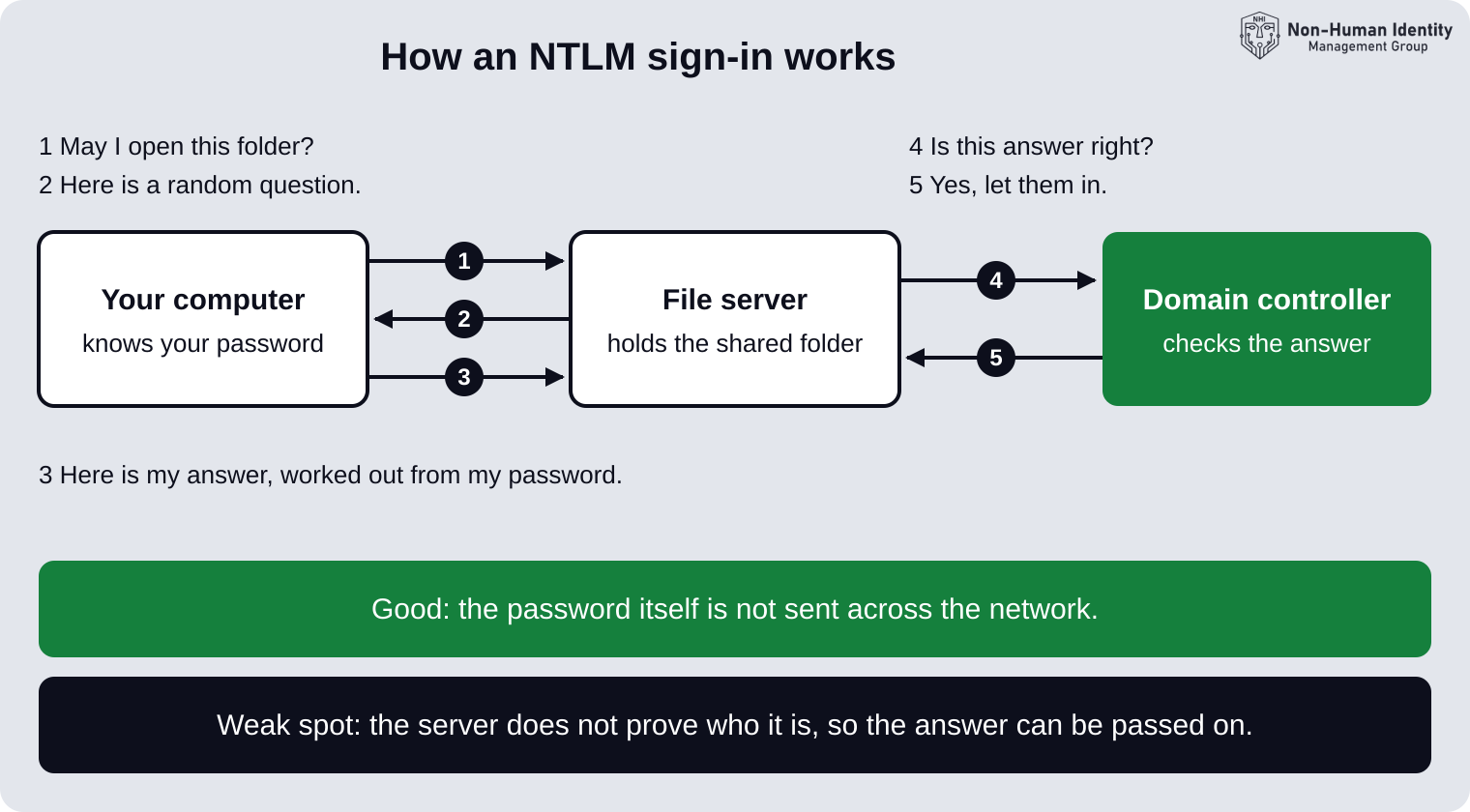
Notice what is missing. Your computer does not check that the server is the real one. Microsoft lists this missing server check among NTLM's main weaknesses.[3] Modern Windows tries Kerberos first through a chooser called Negotiate, and falls back to NTLM only when Kerberos cannot be used.[1]
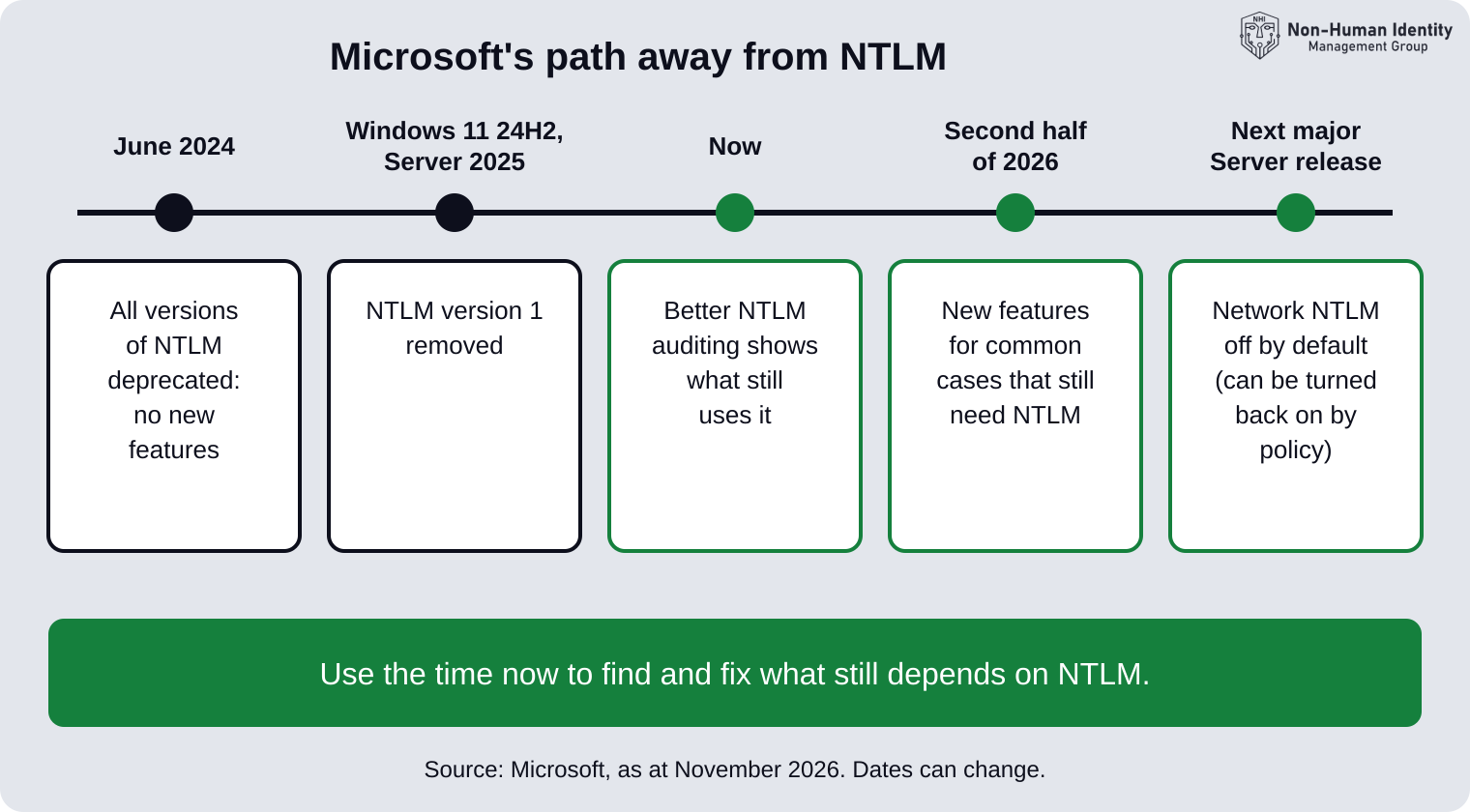
Microsoft has set out a plan in three phases. First, better auditing to show where NTLM is still used. Next, new features in the second half of 2026 to cover common cases that still need NTLM. Last, network NTLM switched off by default in the next major Windows Server release and matching Windows releases. Administrators should still be able to turn it back on with a policy, if they truly need it.[3]
A worked example
Xena Varga is the only IT person at Elm Joinery, a fictional workshop with thirty staff. She reads that Microsoft plans to switch NTLM off by default in a future release.
Xena remembers the doorman who never shows his badge. She wants to know who still uses that door before it is locked.
First, she turns on NTLM auditing on the office server for two weeks. The settings only record, so nothing breaks while she watches.
Then she looks at the records. Most sign-ins already use Kerberos. Three things still use NTLM: an old label printer, the stock app, and the big scanner in the print room. The scanner uses NTLM version 1, the oldest kind.
Xena makes a short list with an owner for each item. She calls the stock app supplier, Hana Ulrich. Hana says a newer version of the app supports Kerberos, and books the upgrade for next month.
The label printer gets a firmware update, which is the built-in software that runs a device. After that, it shows up as Kerberos in the records.
The scanner is too old for any update. Xena asks the owner of the workshop for a budget to replace it. Until then, she writes it down as a known exception, with a review date.
A month later, the only NTLM record left is the scanner. When Microsoft changes the default, Xena knows exactly what to expect.
Myths and mistakes
| What people think | What is true |
|---|---|
| NTLM sends my password across the network. | It sends an answer worked out from the password, not the password itself. The weakness is that the answer can be misused. |
| We use Kerberos, so NTLM is not used here. | Many networks quietly fall back to NTLM for older apps and devices. The sign-in records show the truth. |
| We can just switch NTLM off today. | Switching it off before you know what uses it can break printers, apps and file shares. Audit first. |
| Deprecated means it has already gone. | Deprecated means no new features and a planned exit. NTLM version 2 still works today.[1] |
| Once it is off by default, it can never come back. | Microsoft says administrators should be able to turn it back on with a policy where it is truly needed.[3] |
What can I do this week?
- Ask your IT team or supplier whether NTLM auditing is turned on.
- List the older printers, scanners, file servers and apps your office uses.
- Ask each supplier whether their product supports Kerberos.
- Check whether anything still uses NTLM version 1, and move it first.
Checklist
- NTLM auditing is turned on, so you can see what still uses it.
- Every app, device and account that uses NTLM has a named owner.
- Nothing uses NTLM version 1 or LAN Manager.
- Each supplier has told you whether their product supports Kerberos.
- Anything that cannot move yet is on a written exception list with a review date.
- Someone tracks Microsoft's NTLM announcements and checks them before each major upgrade.
Common questions
Is NTLM the same as Kerberos?
No. Both are Windows sign-in methods, but they work differently. NTLM uses a question and answer check each time. Kerberos uses tickets from a central service and lets both sides check each other. Most company networks prefer Kerberos and keep NTLM as a fallback.
Will NTLM stop working on my computer soon?
Not overnight. NTLM version 1 has already been removed from the newest Windows versions. Microsoft plans to switch network NTLM off by default in a future major release, with a policy to turn it back on. Check the official Microsoft pages for the latest dates.
Why do attackers like NTLM?
Because the server does not prove who it is. An attacker who can sit in the middle may pass your answer on to another server and sign in as you. A stolen scrambled password can also be reused in some cases. These are well-known attack types on Windows networks.
How do I find out what still uses NTLM?
Turn on Windows NTLM auditing, which records NTLM use without blocking it. Then read the records, group them by app or device, and give each one an owner. See How to Find What Still Uses NTLM Before You Block It.
Do home computers use NTLM?
Sometimes, but rarely in a way you will notice. Home computers that share folders with each other may use it. The main concern is for businesses with older servers, printers and apps. Keep your computer updated and Windows will handle the change.
Where next?
Ready for the detail? Read the practitioner guide: How to Find What Still Uses NTLM Before You Block It. It goes further into the audit settings to switch on, how to read the sign-in events and how to build exception lists.
Also useful:
- Kerberos for Beginners
- Kerberos vs NTLM
- NTLM Deprecation and Elimination Guide
- Windows Security for Beginners
- Service Accounts for Beginners
Related NHI Mgmt Group resources: NTLM Relay Guide · Pass-the-Hash and Pass-the-Ticket Guide · Kerberos and NTLM Event Detection Guide
Key terms
- NTLM
- An older Microsoft sign-in method that uses a question and answer check, still found alongside Kerberos on many networks.
- Kerberos
- A sign-in method that uses tickets from a trusted central service to prove who you are.
- Domain controller
- The central server that holds a Windows network's accounts and checks sign-ins.
- NTLM relay
- An attack where someone in the middle passes your NTLM answer on to another server to sign in as you.
- Pass-the-hash
- An attack that reuses a stolen scrambled password to sign in, without knowing the password itself.
- Password hash
- A scrambled form of a password that systems store and compare instead of the password itself.
Sources and further reading
- Deprecated features for Windows client (NTLM entry, June 2024, updated November 2024). Microsoft Learn, Microsoft. https://learn.microsoft.com/en-us/windows/whats-new/deprecated-features, accessed 28 Nov 2026.
- NTLM overview. Microsoft Learn, Microsoft. https://learn.microsoft.com/en-us/windows-server/security/kerberos/ntlm-overview, accessed 28 Nov 2026.
- Advancing Windows security: disabling NTLM by default. Windows IT Pro Blog, Microsoft Tech Community, 29 January 2026 (updated 22 October 2026). https://techcommunity.microsoft.com/blog/windows-itpro-blog/advancing-windows-security-disabling-ntlm-by-default/4489526, accessed 28 Nov 2026.
- 4624(S): An account was successfully logged on. Microsoft Learn, Microsoft. https://learn.microsoft.com/en-us/previous-versions/windows/it-pro/windows-10/security/threat-protection/auditing/event-4624, accessed 28 Nov 2026.