Phishing is a trick in which criminals send a fake message, pretending to be someone you trust, so that you click a link, open a file, hand over a password or send money.
This guide is for newcomers, students, career changers and managers who are not security specialists. It explains what phishing is, why it works on clever people, how a typical attack unfolds, a worked example, common myths and the simple layers of defence that organisations use. If you mainly want a quick routine for checking a suspicious email, our separate How to Spot a Phishing Email Guide covers that in detail.
By the end of this guide you will be able to:
- Explain what phishing is and the main forms it takes.
- Understand why phishing works and what attackers want from it.
- Describe the layers of defence an organisation can put in place.
- Identify the first steps to take this week and after a click.
Key takeaways
- Phishing targets people, not machines. It uses trust, fear and urgency to get you to act before you think.
- It arrives on many channels. Email is the classic route, but texts, phone calls, social media and chat apps are used too.
- Training alone is not enough. Good defence uses several layers: filtering, easy reporting, strong sign-in and a plan for when someone clicks.
- Reporting matters more than never clicking. A quick report gives defenders time to warn others and limit the damage.
- Some sign-in methods resist phishing far better. Security keys and passkeys are much harder to steal through a fake website than passwords or text message codes.
What it is, in plain English
Phishing is the use of deceptive messages or websites to trick people into revealing passwords, running harmful software, approving access or sending money. The UK National Cyber Security Centre (NCSC) describes it as scam emails or text messages that contain links to malicious websites, which may install malware (harmful software such as ransomware), try to steal passwords or trick people into transferring money.[1] The US Cybersecurity and Infrastructure Security Agency (CISA) notes that these messages can arrive as emails, texts, social media messages or phone calls, made to look as if they come from a trusted person or organisation.[2]
The name is a play on "fishing": criminals cast out bait and wait for someone to bite. Some campaigns go to thousands of people at once. Others, called spear phishing, are written for one person or team, using details about their job or company to seem more convincing.[1]
Think of a stranger in a high-visibility jacket who walks up to your front door, says "gas board, there's a leak, I need to come in now", and hopes you open the door before you ask for ID. Phishing is the online version: a convincing costume plus pressure. Where the analogy breaks down: the stranger at the door can only visit one house at a time, while a phishing campaign can reach millions of inboxes in minutes, and the "costume" (a logo, a sender name) costs almost nothing to copy.
Phishing has common variants with their own names:
- Smishing: phishing by text message, such as a fake parcel delivery alert.
- Vishing: voice phishing, where a caller pretends to be your bank, IT helpdesk or a supplier.
- Business email compromise (BEC): a message that impersonates a boss, colleague or supplier to change bank details or approve a payment, often with no link or attachment at all.
Why it matters to you
- If you run a small business: one fake invoice or one stolen email password can lead to a lost payment, a locked-out account or a ransomware attack.
- If you are new to a security job: phishing reports are likely to be among the first alerts you handle, and knowing how attacks unfold helps you triage them well.
- If you are a manager: how you treat people who click decides whether they report quickly or hide mistakes.
Phishing is very common. In the UK government's Cyber Security Breaches Survey 2025, 43% of businesses reported a breach or attack in the previous 12 months, and phishing was the most common type, experienced by 85% of those businesses.[4]
Phishing is rarely the end goal. It is usually the way in. MITRE ATT&CK, a widely used catalogue of attacker behaviour, lists Phishing (T1566) as an initial access technique: the first foothold that later steps build on.[6] A stolen email password can be used to send more convincing phishing to your contacts, reset other accounts or read invoices to plan a payment fraud.
How it works, step by step
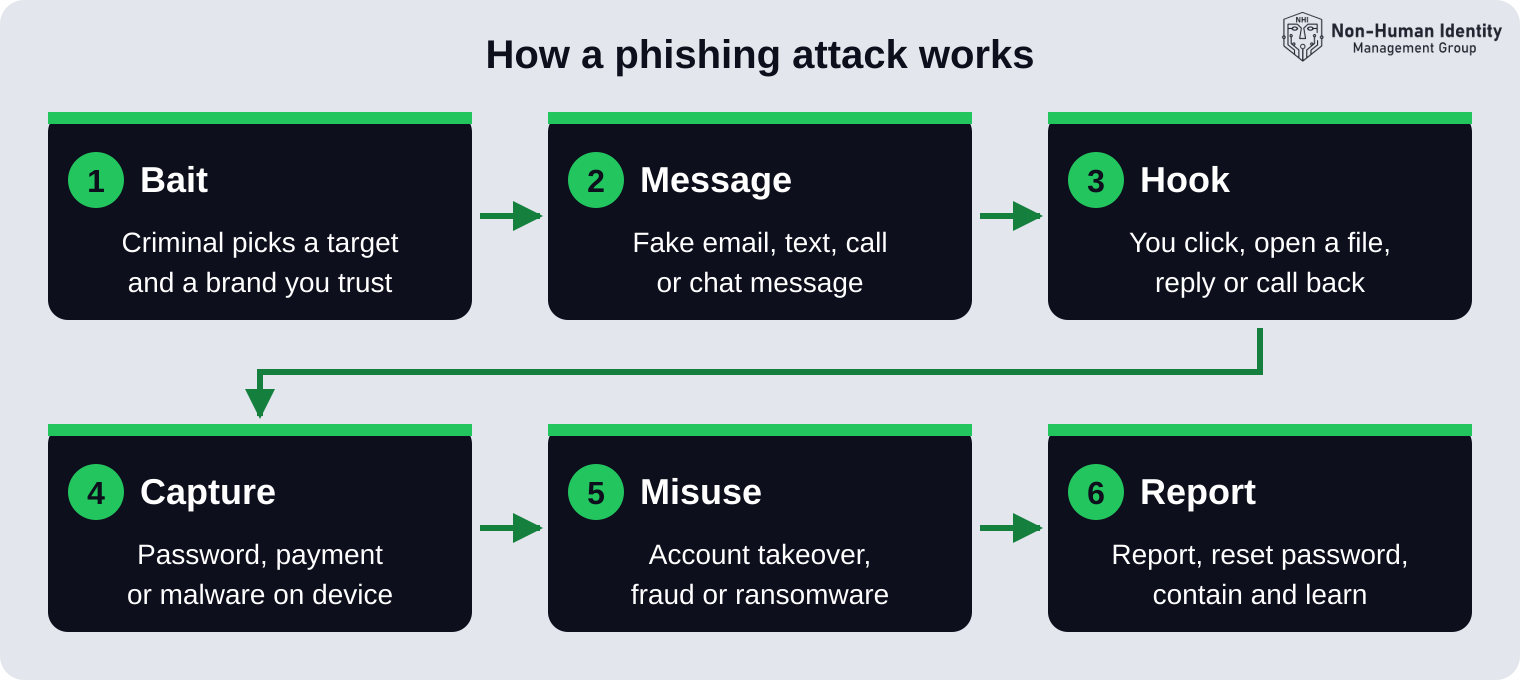
Every campaign is different, but most follow the same broad shape. Knowing the shape helps you see where you can break it.
- Bait. The criminal chooses a target, which may be one person or a whole list, and a brand or person the target trusts: a bank, a delivery firm, a software supplier or your own boss. Public information such as job titles and company news makes this easier.[1]
- Message. They send a message that looks normal but carries pressure: an unpaid invoice, a parcel on hold, an "unusual sign-in", a shared document. CISA lists urgent or emotional wording, requests for personal or financial information, shortened links and slightly misspelled addresses as common signs.[2]
- Hook. The message asks you to do one thing: click a link, open an attachment, reply, call a number or scan a QR code.
- Capture. The link might open a fake sign-in page that records your password and, sometimes, your one-time code. An attachment might install malware. A reply might start a conversation that ends with a payment to the wrong bank account.
- Misuse. The criminal uses what they captured: they sign in as you, send more phishing from your account, steal data, move money or prepare a larger attack.
- Report and respond. This is the defender's step. The sooner someone reports the message, the sooner the team can block the link, remove copies from other inboxes, reset passwords and check for misuse. The NCSC stresses an easy, quick reporting process and avoiding blame, because fear of blame stops people reporting.[1]
The layers of defence
The NCSC recommends a layered approach rather than relying on people never making a mistake.[1] The table summarises its four layers in plain terms.
| Layer | What it means | Examples |
|---|---|---|
| 1. Make it hard for attackers to reach people | Stop as many fake messages as possible before they arrive. | Email filtering; anti-spoofing records (SPF, DKIM, DMARC) so others cannot easily pretend to be your domain; sharing less detail publicly. |
| 2. Help people spot and report | Make reporting quick and blame-free, and make important processes hard to imitate. | A report button; checking payment changes through a second channel, such as a phone number you already hold. |
| 3. Limit the damage of a missed message | Assume some phishing gets through. | Software updates, few admin accounts, blocking known bad websites, multi-factor authentication, password managers. |
| 4. Respond quickly | Spot and deal with incidents early. | Security logging, an incident response plan, practice exercises. |
Useful distinctions
- Phishing versus spam. Spam is unwanted bulk messaging, such as adverts. Phishing is deliberate deception aimed at stealing something. A message can be both.
- Not all multi-factor authentication resists phishing equally. CISA explains that text message codes and app codes can be typed into a fake page and reused by an attacker, and push prompts can be abused by flooding a user with requests. It describes FIDO and WebAuthn methods, such as security keys and passkeys, as the only widely available phishing-resistant option.[5] Other MFA is still far better than a password alone.
- Good spelling is no longer a reliable sign. CISA notes that AI tools have made good grammar and spelling less useful as a warning sign.[2] Judge the request, not the writing.
A worked example
Harbour Print is a fictional printing company with 25 staff. On a busy Friday afternoon, Jo in accounts receives an email that appears to come from a regular paper supplier. It says the supplier has changed banks and asks Harbour Print to pay this month's invoice to a new account. The logo, signature and tone all look right. The sender address is one letter different from the real one.
Harbour Print had set a simple rule a few months earlier: any change to a supplier's bank details must be confirmed by calling the supplier on the number already held in the accounts system, never a number from the email. Jo calls. The supplier has not changed banks and has seen similar emails sent to other customers.
Jo presses the "report phishing" button. Alex, who looks after IT, finds the same message in two other inboxes and removes them, then blocks the look-alike domain in the email filter. Alex also checks whether anyone had replied to the sender: nobody had.
What did and did not happen: the call-back rule gave Jo a clear, blame-free reason to slow down, and the report let Alex clean up quickly. It did not stop the email arriving, and it would not have helped if the criminal had controlled the supplier's real mailbox and Jo had called a number from the email. That is why the rule says to use contact details you already hold. The company decides to repeat the rule at the next staff meeting and to thank Jo publicly for reporting.
Myths and misunderstandings
| What people think | What is true |
|---|---|
| Only careless or non-technical people fall for phishing. | Well-made phishing fools experienced people, especially when they are busy or the message fits something they expect. That is why the NCSC treats training as only one layer. |
| Phishing always contains a dodgy link or attachment. | Some phishing, such as fake payment requests, is just text asking you to do something. The request is the attack. |
| Bad spelling gives it away. | Many phishing messages are now well written. Look at what is being asked and how urgently. |
| If I clicked, it is too late to do anything. | Acting quickly helps: report it, change the password from a trusted device and let the team check for misuse. |
| Having MFA means I cannot be phished. | MFA makes a stolen password much less useful, but some methods can still be tricked. Phishing-resistant methods such as security keys and passkeys are much harder to steal through a fake page. |
| The padlock in the browser means the website is genuine. | The padlock shows the connection is encrypted. It does not tell you who runs the site, so a fake site can show one too. |
Key terms
- Phishing
- The use of deceptive messages or websites to trick people into revealing passwords, running harmful software, approving access or sending money.
- Spear phishing
- A targeted phishing attack tailored to a specific person or group, using details about their role, tools or business.
- Smishing
- Phishing delivered by text message instead of email.
- Vishing
- Voice phishing: using phone calls to persuade someone to reveal information or approve access.
- Using deception, urgency and authority to persuade a person to reveal information or take a risky action.
- Spoofing
- Faking an identity signal, such as an email sender or caller ID, to look like someone trusted.
- Business email compromise (BEC)
- Impersonating a trusted person or domain to manipulate payments, change bank details or extract sensitive information, often without malware.
- Malware
- Software designed to harm a system, for example by stealing data, encrypting files or giving an attacker a way back in.
- Multi-factor authentication (MFA)
- Signing in with two or more independent kinds of proof, which reduces the chance that a stolen password alone opens an account.
- Phishing-resistant MFA
- Sign-in methods, such as security keys and passkeys, that cannot easily be replayed or tricked out of you through a fake website.
Common questions
What should I do if I clicked a phishing link?
Do not panic and do not hide it. Report it straight away using your organisation's reporting route. If you typed a password, change it from a device and website you trust, and change it anywhere else you used the same one. If you opened a file, tell IT so they can check the device. The US Federal Trade Commission (FTC) also advises updating security software and running a scan if harmful software may have been installed.[3]
How do I check whether a message is real?
Do not use the links or phone numbers in the message. Contact the company or person another way: type the website address yourself, use the official app, or call a number you already have.[2]
Will my bank or a real company ever ask me to update payment details by link?
The FTC says legitimate companies will not email or text you a link to update your payment information.[3] Treat any such message as suspicious and check through the company's own website or app.
Where do I report phishing?
At work, use your organisation's report button or process. At home, use the "report spam" or "report phishing" option in your email or messaging app.[2] In the UK you can forward suspicious emails to the NCSC's Suspicious Email Reporting Service; in the US the FTC suggests forwarding phishing emails to the Anti-Phishing Working Group and reporting to the FTC.[3]
Is phishing simulation training worth it?
It can help people practise, but the NCSC warns against relying on training alone and against punishing people who click.[1] We suggest measuring how many people report, and how fast, not only how many click.
Why do criminals want my email account in particular?
Your mailbox is often the key to everything else. Password reset links for other services arrive there, it holds invoices and contacts, and messages sent from it look trustworthy to the people you work with.
First steps
Practical things you can do this week:
- Make reporting easy. Check that everyone knows how to report a suspicious message, and that there is a backup route (such as a phone number) if their device is affected.
- Add a call-back rule for money. Any new payee or change of bank details is confirmed using contact details you already hold, not ones in the message.
- Turn on MFA for email first. Email is the account most worth protecting. Where you can, use security keys or passkeys for administrators and finance staff.
- Ask about anti-spoofing records. Ask whoever runs your email domain whether SPF, DKIM and DMARC are set up, so it is harder for others to send email that pretends to be you.[1]
Checklist
- Everyone knows how to report a suspicious message, and reports are acknowledged.
- People who report or admit a click are thanked, not blamed.
- Payment and bank detail changes are confirmed through a second, known channel.
- Email accounts use MFA, with phishing-resistant methods for admins where possible.
- Our email domain has SPF, DKIM and DMARC records in place.
- Devices and browsers update automatically.
- Few people have admin rights on their everyday accounts.
- We have a short written plan for what to do when someone clicks or enters a password on a fake page.
Simple measures that show progress: how many suspicious messages are reported each month, the time from a message arriving to the first report, the share of accounts using MFA, and how quickly a reported message is removed from other inboxes.
Check your understanding
1. What is the difference between phishing and spear phishing?
Answer: phishing can be sent to many people at once; spear phishing is tailored to one person or group using details about them.
2. A message from a supplier asks you to pay a new bank account. What should you do?
Answer: do not reply or use details in the message. Call the supplier on a number you already hold and confirm, then report the message.
3. Why is reporting so important, even if you clicked?
Answer: a quick report lets the team block the link, remove copies from other inboxes, reset passwords and check for misuse before more harm is done.
4. Why are security keys and passkeys called phishing-resistant?
Answer: they are designed so a fake website cannot capture and reuse them the way it can capture a password or a one-time code.
Suggested learning pathway
- Business Email Compromise for Beginners: a related beginner guide to read next.
- FIDO2 and WebAuthn for Beginners: a related beginner guide to read next.
- Firewalls for Beginners: a related beginner guide to read next.
- For a quick routine to check any message, read the How to Spot a Phishing Email Guide.
- For stronger sign-in, continue with Multi-Factor Authentication for Beginners.
- For safer passwords, see Password Security for Beginners.
- For the sign-in methods that resist fake pages, see the Phishing-Resistant MFA Guide.
- For the email records that make spoofing harder, see the DMARC, SPF and DKIM Guide.
- For handling reported messages in a security team, see the Phishing Report Button and User Reported Message Triage Guide.
Standards and references
- Phishing attacks: defending your organisation. National Cyber Security Centre (NCSC), version 2.0, reviewed 13 February 2024. https://www.ncsc.gov.uk/guidance/phishing, accessed 27 Nov 2026.
- Recognize and Report Phishing. Cybersecurity and Infrastructure Security Agency (CISA), Secure Our World. https://www.cisa.gov/secure-our-world/recognize-and-report-phishing, accessed 27 Nov 2026.
- How To Recognize and Avoid Phishing Scams. Federal Trade Commission (FTC) Consumer Advice, last updated October 2024. https://consumer.ftc.gov/articles/how-recognize-and-avoid-phishing-scams, accessed 27 Nov 2026.
- Cyber Security Breaches Survey 2025. UK Department for Science, Innovation and Technology and Home Office, published 10 April 2025. https://www.gov.uk/government/statistics/cyber-security-breaches-survey-2025/cyber-security-breaches-survey-2025, accessed 27 Nov 2026.
- Implementing Phishing-Resistant MFA (fact sheet). Cybersecurity and Infrastructure Security Agency (CISA), October 2022. https://www.cisa.gov/sites/default/files/publications/fact-sheet-implementing-phishing-resistant-mfa-508c.pdf.
- Phishing, Technique T1566. MITRE ATT&CK, version 20. https://attack.mitre.org/techniques/T1566/, accessed 27 Nov 2026.
Related NHI Mgmt Group resources: Security Awareness and Human Risk Management Guide · Spear Phishing vs Whaling vs BEC · Top 10 Phishing Techniques