Retrieval-augmented generation (RAG) is a way of building AI assistants so that, before answering a question, the system looks up relevant passages from a chosen set of documents and gives them to the AI model to base its answer on.
Many workplace chatbots that "know" your policies, product manuals or help pages use RAG. This guide explains it in plain English for newcomers, students, career changers and managers who are not specialists. It covers how RAG works, why it is popular, the security questions it raises, a worked example and simple first steps.
By the end of this guide you will be able to:
- Explain what retrieval-augmented generation is.
- Understand why organisations use it instead of retraining a model.
- Describe the steps from a question to an answer.
- Identify the main security checks a RAG assistant needs.
Key takeaways
- RAG is "look it up, then answer". The system searches your documents first and hands the best matches to the model.
- It keeps answers more current. You update the documents rather than retraining the model.
- It can show sources. Answers can point to the passages they used, so people can check them.
- It does not make answers always right. The model can still misread or go beyond what the documents say.
- Access control is the big security question. The assistant should only retrieve what the person asking is allowed to see, and the documents themselves need protecting from tampering.
What it is, in plain English
A large language model (LLM) is an AI system trained on huge amounts of text. What it "knows" is fixed at training time. It does not know your company's latest holiday policy, and if asked, it may make up a plausible answer. A confident but wrong answer like this is called a hallucination.
Retrieval-augmented generation adds a lookup step. The system keeps a library of approved documents, called a knowledge base. When a question comes in, it finds the passages most likely to help and adds them to the instructions sent to the model, with a note to answer using them. AWS describes RAG as having the model reference an authoritative knowledge base outside its training data before it generates a response.[2]
The term comes from a 2020 research paper by Patrick Lewis and colleagues, presented at the NeurIPS conference. It combined a language model with a searchable index of Wikipedia passages and reported more specific and factual output than a model working from its training alone.[1]
A helpful comparison is an open-book exam. A student who can look up the right page in the textbook usually answers better than one relying on memory. Where the analogy breaks down: a student understands the page, while the model only works with the passages the search step found. If the search picks the wrong pages, or the textbook is wrong, the answer will be too.
Why it matters to you
- If you run a small business: RAG lets an assistant answer from your own price lists, policies and help articles, and you can change the answers by changing the documents.
- If you are new to a security job: RAG assistants often connect to shared drives, wikis and ticket systems, so you will be asked who can see what through them.
- If you are a manager: answers that cite their sources are easier to check, but you still need a person responsible for keeping the documents accurate and for deciding what the assistant may read.
AWS lists three reasons organisations choose RAG: the model can use information newer than its training data, responses can include citations so users can check the sources, and it is a more cost-effective way to introduce new data than retraining a model.[2] OWASP, the open security community, also recommends RAG as one way to reduce hallucinations by retrieving verified information from trusted sources.[4]
RAG also brings new risks. OWASP's Top 10 for LLM Applications includes a risk called Vector and Embedding Weaknesses. It warns that weak access controls can let the model retrieve and disclose personal or confidential data, that users sharing one store can see each other's information, and that poisoned documents can manipulate answers.[3]
How it works, step by step
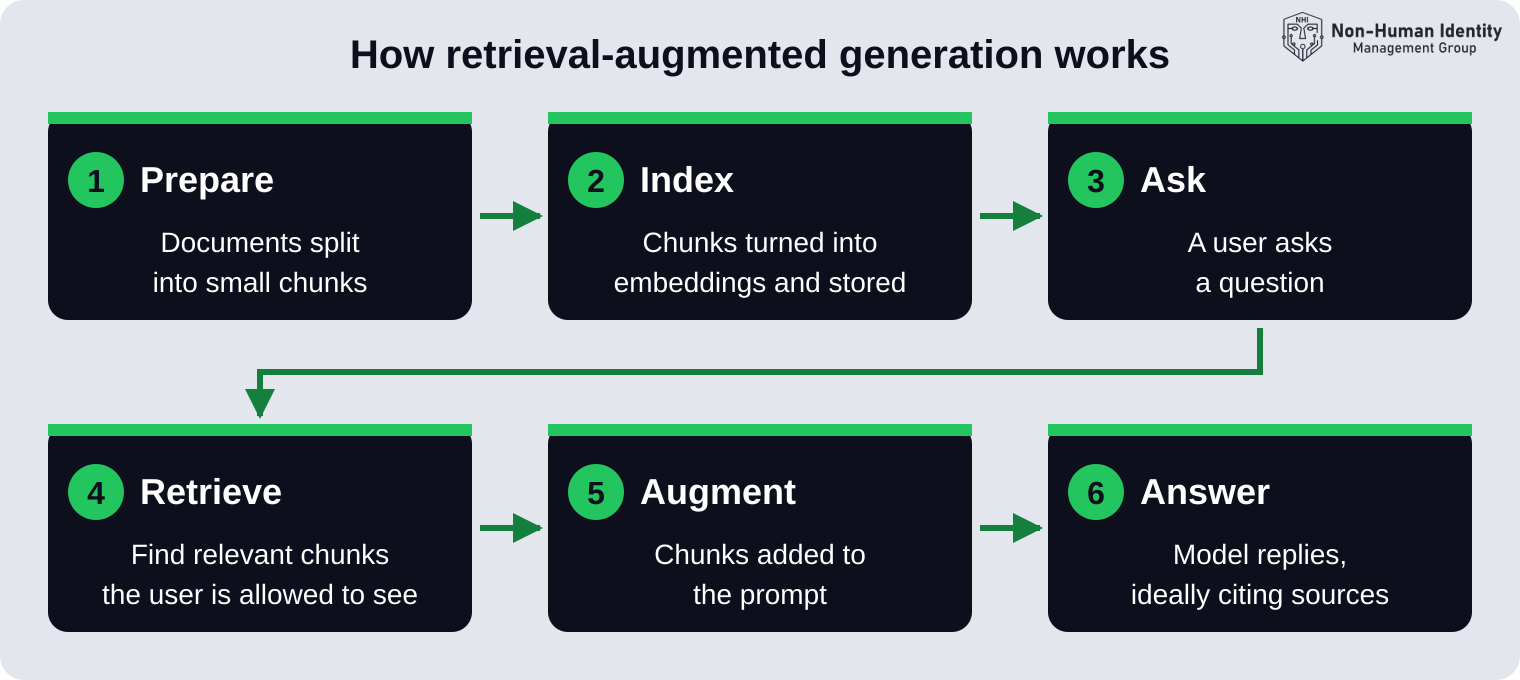
Products differ, but most RAG systems follow the same basic pattern.[2]
- Prepare the documents. Someone chooses which files the assistant may use. Long documents are split into short passages, a step called chunking.
- Index them. Each chunk is turned into an embedding: a list of numbers that captures its meaning, so similar ideas get similar numbers. The embeddings are stored in a vector database, a store built to find similar embeddings quickly.
- Ask. A user types a question. It is turned into an embedding in the same way.
- Retrieve. The system finds the chunks whose meaning is closest to the question. This is a form of semantic search, which matches meaning rather than exact words. A well-built system only returns chunks the person asking is allowed to see.[3]
- Augment. The chosen chunks are added to the prompt sent to the model, together with the user's question.
- Answer. The model writes a reply based on the chunks, ideally with references to the source documents so the user can check them.
Useful distinctions
- RAG and fine-tuning. Fine-tuning changes the model itself by training it further on new examples. RAG leaves the model unchanged and feeds it documents at question time. Many teams use RAG for facts that change often.
- RAG and ordinary search. A search engine returns a list of documents. RAG uses search as one step and then has the model write an answer from what it found.
- Citations are not proof. A cited passage helps you check an answer, but you still need to read it: the model can summarise a source wrongly.
- Retrieved text is data, not instructions. If a document in the knowledge base contains hidden instructions, the model may follow them. This is called indirect prompt injection, and it is one reason to control who can add documents.
A worked example
Northfield Dental Group is a fictional chain of six dental practices with 80 staff. Mei, the practice systems manager, wants an assistant that answers staff questions about procedures, such as "what is our process for sterilising instruments?" or "how do I book annual leave?".
Mei's first plan is to connect the assistant to the whole shared drive. During testing, a receptionist asks about holiday rules and the assistant quotes a line from a manager's spreadsheet of staff salaries, which happened to sit in the same folder. The assistant had retrieved a chunk that the receptionist was never meant to see.
Mei changes the design:
- Curated knowledge base: only the approved procedures folder and the staff handbook are indexed, not the whole drive.
- Permission-aware retrieval: each chunk keeps a label showing which staff groups may see it, and the assistant only retrieves chunks the person asking is allowed to read.
- Controlled updates: only two named people can add or change documents, and changes are recorded.
- Visible sources: every answer links to the document it used, and staff are told to check the source for clinical procedures.
The assistant now answers most routine questions well. It still sometimes gives an incomplete answer when a procedure is spread over several documents, so Mei keeps a simple way for staff to report a wrong answer and fixes the underlying document when they do.
Myths and misunderstandings
| What people think | What is true |
|---|---|
| RAG means the AI never makes things up. | RAG can reduce hallucinations, but the model can still misread sources or fill gaps. Human checks remain important for critical information.[4] |
| RAG retrains the model on our documents. | The model is unchanged. Documents are looked up and added to each question at the time it is asked.[2] |
| If a file is in our drive, the assistant will respect its permissions. | Not automatically. OWASP recommends permission-aware vector stores and strict separation of data between user groups.[3] |
| Embeddings are just numbers, so they are not sensitive. | OWASP warns that embeddings can be inverted to recover significant amounts of the original information.[3] |
| More documents always means better answers. | Out-of-date, duplicate or conflicting documents can lead to wrong answers. A smaller, curated knowledge base is often better. |
Key terms
- Retrieval-augmented generation (RAG)
- A pattern where an AI model pulls in external information before generating its answer.
- Large language model (LLM)
- An AI system trained on large amounts of text to generate and transform language based on statistical patterns.
- Knowledge base
- A curated collection of approved content that an assistant or team draws answers from.
- Chunking
- Splitting large documents into smaller passages so they can be processed and searched.
- Embedding
- A machine-readable list of numbers representing the meaning of text or other content, used for similarity search.
- Vector database
- A data store that indexes embeddings so similar content can be found quickly.
- Semantic search
- Search that looks for meaning, not just exact keywords.
- Hallucination
- An AI answer that sounds fluent and plausible but is incorrect, unsupported or made up.
- Fine-tuning
- Further training of an existing model on a smaller, task-specific dataset to change its behaviour or knowledge.
- RAG poisoning
- Corrupting the documents a RAG system retrieves so that it pulls misleading or malicious content into its answers.
Common questions
What does retrieval-augmented generation mean in simple terms?
It means the AI looks up relevant passages from a set of documents first, then writes its answer using them.
Is RAG better than fine-tuning?
They solve different problems. RAG suits facts that change often and answers that need sources. Fine-tuning changes how a model behaves. Some systems use both.
Does RAG stop hallucinations?
No. OWASP lists it as a way to reduce them, alongside cross-checking and human oversight for critical information.[4]
Is our data sent to the AI provider?
The retrieved passages are sent to the model with each question, so where the model runs matters. Check your provider's data handling terms before connecting sensitive documents.
What is the biggest security risk with RAG?
Commonly cited risks are the assistant retrieving information a user should not see, and tampered documents changing its answers. OWASP covers both under Vector and Embedding Weaknesses.[3]
Do we need a vector database?
Most RAG systems use one, or a search service that includes vector search, to find similar passages quickly.[2]
First steps
Three things you can do this week:
- Find your RAG assistants. List any chatbots or copilots that answer from your documents, and write down which folders, sites or systems each one can read.
- Check permissions with a test account. Sign in as a junior user and ask questions about sensitive topics, such as pay or disciplinary cases, to see whether the assistant retrieves anything it should not.
- Name an owner for the knowledge base. Decide who may add or change documents, and how out-of-date ones are removed.
Checklist
- We know which RAG assistants we run and what each one can read.
- Each knowledge base contains only documents chosen for that purpose.
- The assistant only retrieves content the person asking is allowed to see.
- Only named people can add or change knowledge base documents, and changes are recorded.
- Answers show their sources, and staff know to check them for important decisions.
- Out-of-date documents are removed or updated on a schedule.
- We have reviewed where questions and retrieved passages are sent and stored.
- Staff can easily report a wrong or inappropriate answer.
Check your understanding
1. What does the "retrieval" in RAG do?
Answer: it searches a set of documents for the passages most relevant to the question before the model writes its answer.
2. Why might an organisation use RAG instead of retraining a model?
Answer: it can use newer information, show sources and is usually cheaper than retraining when facts change.
3. Name one security risk specific to RAG.
Answer: the assistant retrieving information a user is not allowed to see, or poisoned documents changing its answers.
4. If an answer cites a source, is it always correct?
Answer: no. The model can still summarise the source wrongly, so check important answers against the source.
Suggested learning pathway
- Embeddings for Beginners: a related beginner guide to read next.
- Fine-Tuning and Model Training for Beginners: a related beginner guide to read next.
- Generative AI for Beginners: a related beginner guide to read next.
- For how the models themselves work, start with How Large Language Models Work.
- To compare the two main ways of adding knowledge, read RAG vs Fine-Tuning.
- For the practitioner view of securing RAG, read the RAG Security Guide.
- To map the risks in your own design, see Threat Modelling RAG Systems.
- For how attackers target retrieved content, see AML.T0066 Retrieval Content Crafting.
Standards and references
- Retrieval-Augmented Generation for Knowledge-Intensive NLP Tasks. Patrick Lewis and others, NeurIPS 2020, arXiv:2005.11401, submitted 22 May 2020. https://arxiv.org/abs/2005.11401.
- What is RAG (Retrieval-Augmented Generation)? Amazon Web Services. https://aws.amazon.com/what-is/retrieval-augmented-generation/, accessed 27 Nov 2026.
- LLM08:2025 Vector and Embedding Weaknesses. OWASP Top 10 for LLM Applications 2025, OWASP Foundation. https://genai.owasp.org/llmrisk/llm082025-vector-and-embedding-weaknesses/, accessed 27 Nov 2026.
- LLM09:2025 Misinformation. OWASP Top 10 for LLM Applications 2025, OWASP Foundation. https://genai.owasp.org/llmrisk/llm092025-misinformation/, accessed 27 Nov 2026.
Related NHI Mgmt Group resources: How Large Language Models Work · RAG vs Fine-Tuning · RAG Security Guide