SAML (Security Assertion Markup Language) is an open standard that lets one trusted login service vouch for you to many separate apps, so you sign in once at work and open email, payroll and other tools without typing more passwords.
This guide explains SAML in plain English for people new to security, students, career changers and managers who keep hearing the word in meetings. You will see what happens behind the scenes when you click "Sign in with your company account", follow one everyday example and finish with simple first steps. You do not need any security knowledge to start.
By the end of this guide you will be able to:
- Explain what SAML is and the three parties it involves.
- Describe what happens, step by step, when you sign in to an app with SAML.
- Understand what a SAML assertion contains and what an app should check.
- Identify three practical first steps for bringing SAML single sign-on to a small team.
Key takeaways
- SAML lets apps trust one login service. A central identity provider checks your password once and sends each app a signed note saying who you are.
- The signed note is called an assertion. It says who you are, when you signed in and which app it is for, and it is sealed so nobody can change it without being caught.
- Fewer passwords, but one very important login. SAML cuts password reuse and makes removing leavers faster, but the central login needs strong protection such as multi-factor authentication.
- Apps must check the note properly. Most SAML problems come from an app that accepts an assertion without checking its seal, who it is for and its time limit.
- SAML is mature, not dead. SAML 2.0 became an OASIS standard in March 2005 and is still widely used for work logins, alongside the newer OpenID Connect.[1][5]
What it is, in plain English
The OASIS standards body, which publishes SAML, describes it as a framework for exchanging security information between online business partners.[1] In everyday words, it is an agreed format and set of rules that lets one system tell another: "I have checked this person, and here is who they are."
Think of a big conference centre. Reception checks your photo ID once and gives you a printed badge with your name and today's date. After that, door staff at each room do not ask for your passport again. They look at the badge, check it is genuine and in date, and let you in. SAML has three parties, just like that:
- Principal: the person (or sometimes a system) who wants to get in. Usually, that is you.
- Identity provider (IdP): the service that checks who you are, like reception. Examples include Google Workspace, Microsoft Entra ID and Okta (listed alphabetically).
- Service provider (SP): the app you want to use, like one room. Payroll, expenses or a project tool can all be service providers.
The badge is the SAML assertion: a signed message from the identity provider about you. Being able to sign in once and use many apps is called single sign-on (SSO), and SAML is one of the main ways to deliver it.
Where the analogy breaks down: a conference badge lasts all day and opens every room, but a SAML assertion is usually made for one app only and is valid for a few minutes, so it is more like a single-use ticket for one room.
Why it matters to you
- If you run a small business: one company login for every app means fewer forgotten passwords, and when someone leaves you disable one account instead of a dozen. The UK National Cyber Security Centre (NCSC) notes that where single sign-on is used, revoking someone's work account also removes their access to linked services.[4]
- If you are new to a security or IT job: you will set up, troubleshoot and review SAML connections. Knowing the parts of an assertion makes error messages much easier to understand.
- If you are a manager: SSO is a quick win for security and staff time, but it puts many apps behind one door. Ask that the door is protected with multi-factor authentication and that only a few people can change it. NIST's security control catalogue covers this under control IA-2, identification and authentication of organisational users, which includes enhancements for multi-factor authentication.[6]
| Area | Without SSO | With SAML SSO |
|---|---|---|
| Passwords per person | One per app, often reused | One company login, plus multi-factor authentication |
| Where passwords are checked | Inside every app | Only at the identity provider; apps never see the password |
| Staff leaving | Remove the account from each app | Disable one company account and SAML sign-in to linked apps stops |
| Main risk | Many weak or forgotten passwords | The identity provider and its signing key become high-value targets |
How it works, step by step
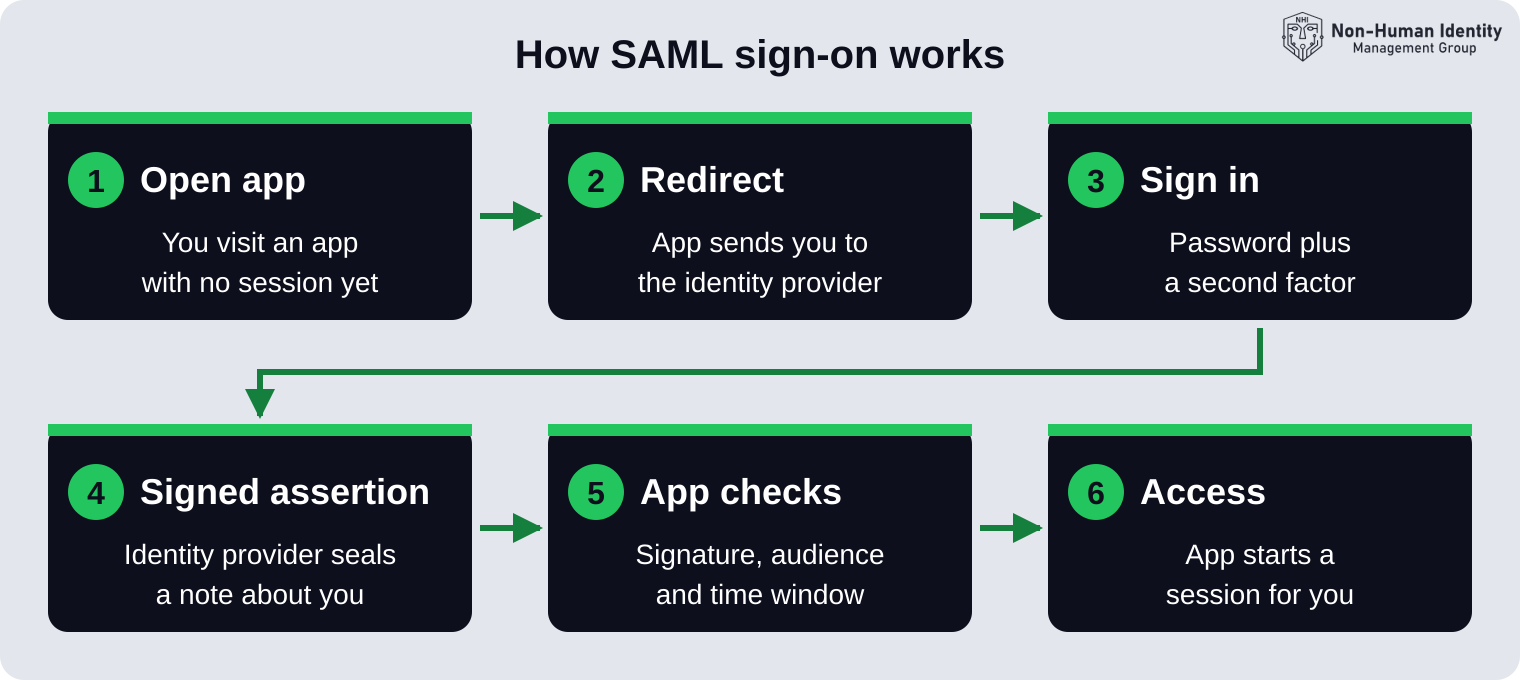
The most common pattern starts at the app, so it is called SP-initiated sign-on. The OASIS SAML technical overview describes these steps:[1]
- You open the app. Say you go to the expenses system. It sees you have no session (a record that you are signed in) and remembers which page you wanted.
- The app sends you to the identity provider. Your browser is redirected to the company login page with a short message called an authentication request (
AuthnRequest). - The identity provider checks who you are. If you are not already signed in, it asks for your password and usually a second factor, such as a phone prompt or a security key.
- The identity provider writes and signs an assertion. It puts the assertion in a SAML response and adds a digital signature: a mathematical seal made with a private key only the identity provider holds. Your browser carries it back to the app, usually in a hidden web form that submits itself.
- The app checks the assertion. It checks the seal using the identity provider's public certificate, checks the assertion is meant for this app and is still in date, then starts its own session for you.
- You land on the page you wanted. The app decides what you may do there.
What is inside an assertion? Microsoft's documentation for its SAML sign-on shows the typical parts:[2]
| Part of the assertion | Plain-English meaning | What the app should check |
|---|---|---|
| Issuer | Who wrote the note | It is the identity provider the app expects |
| Signature | The tamper-evident seal | It is valid and made with the known certificate |
| Subject (NameID) | Who the note is about | It matches the right user in the app |
| Conditions: NotBefore and NotOnOrAfter | The time window when the note is valid | The current time is inside the window |
| AudienceRestriction | Which app the note is for | It names this app and no other |
| Attribute statement | Extra facts, such as email or department | Only facts the app needs are sent |
| Authentication statement | When and how you signed in | The method meets the app's rules |
Before any of this works, the identity provider and the app swap metadata: a settings file listing each side's web addresses and the certificate used to check signatures. This one-off setup creates the trust between them.[1][2]
A worked example
Priya joins Harbour Lane Logistics, a fictional 80-person delivery firm. On her first morning IT creates one account for her in the company identity provider and adds her to the "Finance team" group.
- 9:00: Priya opens the expenses app. It sends her to the company login page. She types her password and approves a prompt on her phone.
- 9:01: The identity provider sends the expenses app a signed assertion that says, in effect: "This is Priya, finance team, signed in with two factors at 09:00, for the expenses app only, valid for the next few minutes." The app checks the seal and lets her in.
- 9:15: She opens the payroll app. It also sends her to the identity provider, which sees she is already signed in there, so it issues a new assertion for payroll without asking for her password.
- Six months later: Priya leaves. IT disables her one company account. Next time an app sends her to the identity provider, no assertion is issued, so she cannot sign in to any linked app.
Notice what never happened: the expenses and payroll apps never saw Priya's password.
Myths and misunderstandings
| What people think | What is true |
|---|---|
| SAML is a login product. | It is a standard. Identity providers and apps from many vendors follow it so they can work together. |
| SAML encrypts everything. | The signature proves who wrote the assertion and that it was not changed. Privacy in transit comes from HTTPS (TLS); encrypting the assertion itself is optional. |
| Once SAML is switched on, the app is secure. | The app must check the signature, issuer, audience and time limits every time. OWASP's SAML Security Cheat Sheet lists these checks because skipping them causes weaknesses.[3] |
| SAML and OAuth are the same. | SAML mainly proves who you are to an app. OAuth mainly lets an app access something on your behalf. |
| Signing out of one app signs you out everywhere. | Usually not. There is a session at the identity provider and a separate one in each app. |
| SAML is dead because of OpenID Connect. | OpenID Connect is newer and common in mobile and modern web apps, but SAML is still widely supported for work apps. |
Key terms
- SAML assertion
- A signed statement from the identity provider about a person, such as who they are and when they signed in.
- Identity provider (IdP)
- The service that checks a person's identity and issues assertions.
- Service provider (SP)
- The app that relies on the assertion to let the person in.
- Single sign-on (SSO)
- Signing in once to use many apps.
- SAML metadata
- A settings file each side shares, listing addresses and the certificate used to check signatures.
- Signing certificate
- The file holding the identity provider's public key, used by apps to check signatures. It expires and must be renewed.
- Digital signature
- A mathematical seal that shows who created a message and that it has not been changed.
- Federation
- A trust arrangement where one organisation's logins are accepted by another's systems.
- XML
- A text format that wraps data in labelled tags. SAML messages are written in XML.
Common questions
What does SAML stand for?
Security Assertion Markup Language. "Assertion" means a statement about you, and "markup language" refers to XML, the text format the messages use.
Is SAML the same as SSO?
No. SSO is the experience of signing in once. SAML is one of the standards that makes SSO work; OpenID Connect and Kerberos are others.
Is SAML still used?
Yes. Many business apps and identity providers support SAML 2.0 for work logins, even as newer apps often use OpenID Connect.
Does the app see my password?
No. You type your password only at the identity provider. The app receives a signed assertion instead.
What happens when the signing certificate expires?
Apps can no longer check new assertions, so sign-ins to those apps fail until the new certificate is shared with them. That is why expiry dates need a reminder.
First steps
- List your apps. Write down every business app your team uses and note which ones offer a "SAML" or "SSO" option in their admin settings.
- Protect the main login first. Turn on multi-factor authentication at your identity provider before linking apps. See the MFA Guide.
- Pilot one low-risk app. Connect one app using the vendor's setup guide, test with two or three people, keep one administrator able to sign in without SSO in case setup goes wrong, and note the certificate expiry date.
Checklist
- Multi-factor authentication is required at the identity provider for everyone who uses SSO.
- Each linked app checks the assertion's signature, issuer, audience and time window (ask the app vendor to confirm if you cannot test it).
- Assertions travel only over HTTPS, and each app receives only the attributes it needs.
- Signing certificate expiry dates are recorded, with an owner and a renewal reminder.
- Leavers are disabled at the identity provider on their last day, and any local app accounts are removed too.
- Only a few named people can change identity provider settings or add SAML apps.
- Identity provider sign-in logs are kept and someone looks at failed and unusual sign-ins regularly.
Check your understanding
1. In SAML, which party checks your password?
Answer: the identity provider. The app (service provider) only receives the signed assertion.
2. Why does an assertion include an audience?
Answer: so it only works for the one app it was made for. Other apps should reject it.
3. Does the digital signature keep the assertion secret?
Answer: no. It proves who wrote it and that it was not changed. HTTPS keeps it private on the way.
Suggested learning pathway
- Identity Federation for Beginners: a related beginner guide to read next.
- OpenID Connect for Beginners: a related beginner guide to read next.
- Kerberos for Beginners: a related beginner guide to read next.
- How Single Sign On Works: the full SSO flow, sessions and protocols.
- OAuth vs SAML: how the two standards differ.
- SAML vs OIDC Guide: when to choose SAML or OpenID Connect.
- SAML Security Guide: the checks and hardening a security team applies.
- SAML SSO Errors Troubleshooting Guide: what common error messages mean.
- Golden SAML and Federation Trust Abuse Defence Guide: why the signing key must be protected.
Standards and references
- Security Assertion Markup Language (SAML) V2.0 Technical Overview. OASIS, Committee Draft 02, 25 March 2008. https://docs.oasis-open.org/security/saml/Post2.0/sstc-saml-tech-overview-2.0.html.
- Single sign-on SAML protocol. Microsoft Learn, Microsoft. https://learn.microsoft.com/en-us/entra/identity-platform/single-sign-on-saml-protocol, accessed 27 Nov 2026.
- SAML Security Cheat Sheet. OWASP Cheat Sheet Series, OWASP Foundation. https://cheatsheetseries.owasp.org/cheatsheets/SAML_Security_Cheat_Sheet.html, accessed 27 Nov 2026.
- 10 Steps to Cyber Security: Identity and access management. National Cyber Security Centre (NCSC). https://www.ncsc.gov.uk/collection/10-steps/identity-and-access-management, accessed 27 Nov 2026.
- OpenID Connect Core 1.0. OpenID Foundation. https://openid.net/specs/openid-connect-core-1_0.html.
- SP 800-53 Rev. 5, Security and Privacy Controls for Information Systems and Organizations (control IA-2). National Institute of Standards and Technology (NIST). https://csrc.nist.gov/pubs/sp/800/53/r5/upd1/final.
Related NHI Mgmt Group resources: Identity Provider and SSO Security Guide · Federation vs SSO · Joiner-Mover-Leaver Guide · MFA Guide