Shadow AI is the use of AI tools, features or models at work without the approval or knowledge of the people responsible for IT, security or data.
Think of a colleague pasting a customer complaint into a free chatbot to get a polite reply drafted, or a browser add-on that summarises every web page you open. This guide explains shadow AI in plain English for newcomers, students, career changers and managers who are not security specialists. It covers why it happens, why it matters, how it usually unfolds, a worked example, common myths and simple first steps for a small team.
By the end of this guide you will be able to:
- Explain what shadow AI is and how it differs from approved AI use.
- Understand why shadow AI can put company data at risk.
- Describe how an organisation can find and manage it.
- Identify three practical steps to start this week.
Key takeaways
- Shadow AI is common. In a large 2024 survey, most office workers said they already use AI at work, and many bring their own tools.[1]
- The main worry is data. Whatever you type into a public AI tool is seen by the company that runs it and may be stored.[3]
- People usually mean well. Staff turn to AI to save time, so banning everything tends to push use further out of sight.
- The fix is visibility plus a safe route. Find out what is used, offer approved tools, and set clear rules on what data may go in.
- It is a governance task, not only a technical one. Policy, training and an up-to-date list of AI tools matter as much as blocking software.
What it is, in plain English
Shadow IT is an older idea: any app or service used at work outside formal approval, such as a team signing up for a file-sharing site on a credit card. Shadow AI is the same pattern with AI tools. It includes personal accounts on public chatbots, AI browser extensions, AI features switched on inside software you already pay for, and AI models downloaded and run without review.
The opposite is sanctioned AI: AI tools that have been checked by procurement, legal and security staff and are used under agreed rules. Anything used outside those rules is unsanctioned AI.
A helpful comparison is a building with a visitor book. Approved visitors sign in, wear a badge and are escorted. Shadow AI is like a friendly contractor who walks in through a side door to help out. They may do good work, but nobody knows they are there, what they saw or what they took away. Where the analogy breaks down: an AI tool does not walk out with one box of papers. It may keep copies of everything it is given, on servers in another country, for as long as its provider's terms allow.
The UK National Cyber Security Centre (NCSC) puts the core risk simply: a question typed into a public large language model is visible to the organisation providing it, and those questions are stored and will almost certainly be used to develop the service at some point. Its advice is not to include sensitive information in queries to public tools.[3]
Why it matters to you
- If you run a small business: customer details, prices or contracts pasted into a free AI tool leave your control. That can create problems under data protection law and with customers who trusted you with their information.
- If you are new to a security job: you will often be asked "which AI tools are people using?". Being able to answer that, and to explain the data risk calmly, is a useful early skill.
- If you are a manager: your team may be using AI already. Clear, simple rules let people keep the time savings without exposing the business.
The scale is large. Microsoft and LinkedIn's 2024 Work Trend Index, a survey of about 31,000 knowledge workers in 31 markets, found that 75% of knowledge workers use AI at work and 78% of AI users bring their own AI tools to work.[1]
It also shows up in breaches. IBM's 2025 Cost of a Data Breach research reported that one in five organisations studied had a breach due to shadow AI, and only 37% had policies to manage AI or detect shadow AI. Organisations with high levels of shadow AI saw an average of $670,000 more in breach costs than those with low or no shadow AI.[2]
Beyond leaks, shadow AI can create other problems: answers that are wrong but sound confident, work produced with tools that break a contract or licence, and decisions that nobody can explain later because no record exists. The US National Institute of Standards and Technology (NIST) suggests acceptable use policies and inventories of AI systems as part of managing generative AI risk.[4]
How it works, step by step
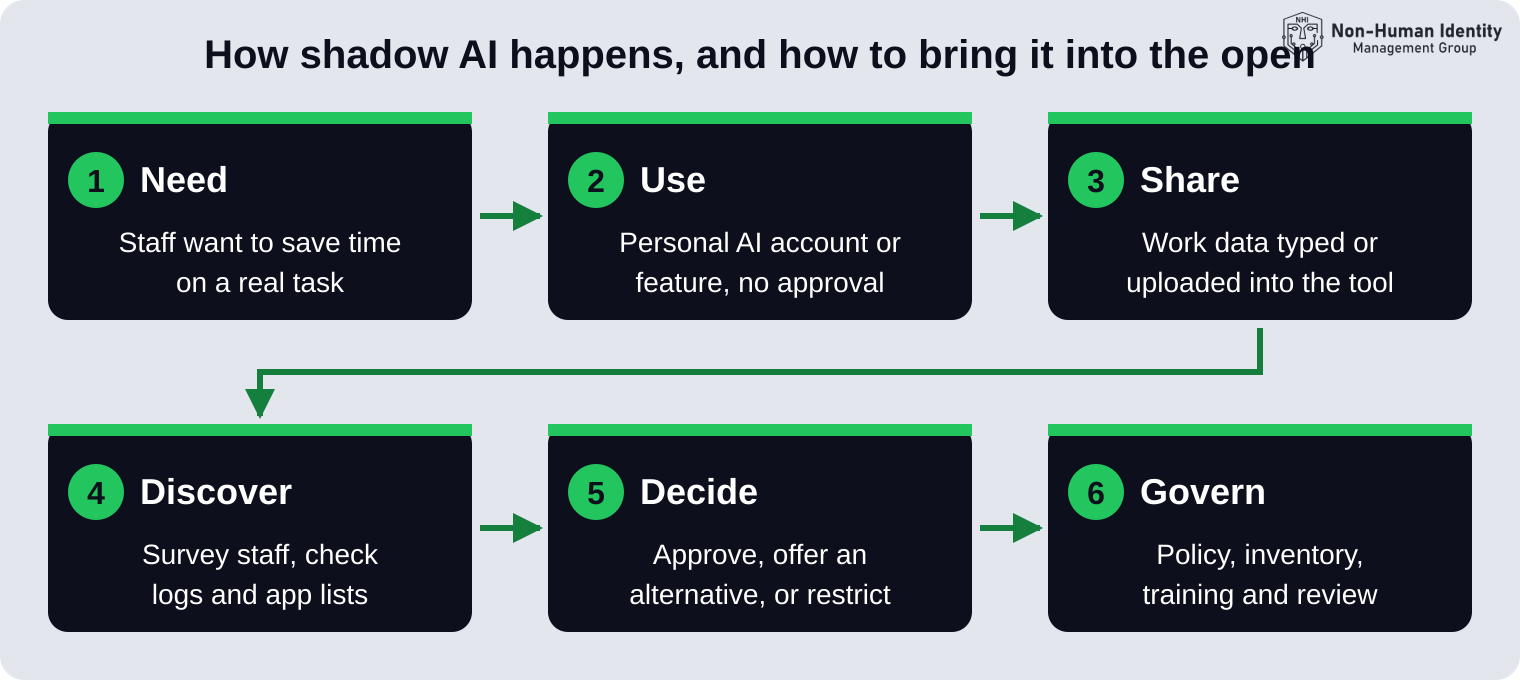
Shadow AI rarely starts with bad intent. It usually follows the same pattern, and so does bringing it under control.
- A need. Someone has a real task, such as summarising a long report, writing an email or tidying a spreadsheet, and wants to save time.
- Unapproved use. They sign up for a free AI tool with a personal account, install an AI browser extension, or switch on an AI feature in an app, without asking IT.
- Data is shared. To get a useful answer, they type in or upload work information: customer names, figures, code or internal documents.
- Discover. The organisation finds out what is in use. Common methods are asking staff in a short, no-blame survey, checking web and app logs, and reviewing which apps have been connected to company accounts.
- Decide. For each tool, the organisation chooses to approve it with rules, offer an approved alternative, or restrict it where the risk is too high.
- Govern. The organisation writes down the rules, keeps a list of approved AI tools, trains staff, and reviews the list regularly because new tools appear all the time.
Useful distinctions
- Shadow AI is not the same as "any AI use". Using an approved AI assistant under agreed rules is sanctioned AI. The problem is the lack of approval and visibility, not AI itself.
- Personal and business accounts can differ. Many AI providers offer business plans with different data handling terms from their free consumer plans. Check the terms of each plan rather than assuming; they vary by provider and change over time.
- AI features inside approved apps can still be shadow AI. A new AI button in software you already use may send data to a different service. It deserves the same review as a new tool.
- Blocking is one option, not the whole answer. We suggest pairing any restriction with an approved alternative, so people have a safe way to get the same benefit.
A worked example
Harbour Dental is a fictional practice with 25 staff. Lena, the practice manager, notices that reception emails to patients have become noticeably more polished. When she asks, two receptionists explain they paste patient questions into a free chatbot to draft replies. One has also used it to summarise a treatment complaint, including the patient's name and health details.
Lena does not discipline anyone. Instead she makes four changes:
- A quick, no-blame survey: every staff member lists the AI tools and features they use. The list has seven items, including a transcription app on a dentist's phone.
- Clear data rules: no patient names, health details or payment information go into any AI tool unless it has been approved for that use.
- An approved option: the practice already pays for an office software suite with an AI assistant. After checking its data terms with the supplier, Lena approves it for drafting replies, with patient details removed.
- A simple register: a shared sheet lists each approved AI tool, who owns it, what data it may handle and when it was last reviewed.
Lena also asks the practice's data protection adviser whether the earlier complaint summary needs further action. The changes do not undo what was already shared, and they do not mean every future use will follow the rules. But staff now have a safe route, the practice knows which tools are in use, and the riskiest habit, pasting patient details into a free tool, has a clear rule against it.
Myths and misunderstandings
| What people think | What is true |
|---|---|
| We have banned AI, so we do not have shadow AI. | Surveys suggest many people bring their own AI tools to work.[1] A ban without a safe alternative can push use onto personal phones, where it is even harder to see. |
| Shadow AI is only about chatbots. | It also includes browser extensions, AI features inside existing apps, meeting transcription tools and downloaded AI models. |
| If a tool is free and popular, it must be safe for work data. | Popularity says nothing about how a tool stores or uses what you type. The NCSC advises against putting sensitive information into public tools.[3] |
| Staff using shadow AI are being careless or sneaky. | Most are trying to do their job better. Treating it as a learning opportunity tends to get more honest answers than blame. |
| Once we have an AI policy, the job is done. | New tools and features appear constantly. The list of approved tools and the policy need regular review. |
Key terms
- Shadow AI
- The use of AI tools, features or models inside an organisation without approval or visibility from IT, security or governance.
- Shadow IT
- Any app or service used at work outside formal approval or visibility.
- Sanctioned AI
- An AI tool that has been through procurement, legal and security review and is used under defined controls.
- Unsanctioned AI
- Any AI tool, model or agent used outside approved governance, security and procurement controls.
- Generative AI
- AI designed to create text, code, images or other content in response to a prompt.
- Acceptable use policy
- A written set of rules on which tools, data and actions are allowed.
- AI inventory
- A kept-up-to-date record of the AI tools and systems in use, with an owner, purpose and risk notes for each.
- Data leakage
- The unintended exposure of sensitive information to people, systems or places that should not receive it.
- Data loss prevention (DLP)
- Controls that detect, block and report sensitive data moving in ways the organisation does not allow.
- Cloud access security broker (CASB)
- A control layer that monitors and governs how people and services use cloud apps and data, often used to spot shadow IT.
Common questions
What is shadow AI in simple terms?
It is people at work using AI tools that the organisation has not approved or does not know about, such as a personal chatbot account or an AI browser add-on.
Is using ChatGPT or another chatbot at work shadow AI?
It depends on whether your organisation has approved it and on what terms. The same tool can be sanctioned under a business agreement and shadow AI when used through a personal account.
Why is shadow AI risky if the tool is helpful?
Because work data typed into the tool leaves your control and may be stored by the provider.[3] Nobody can check the tool's security, contract terms or accuracy if they do not know it is being used.
How do organisations find shadow AI?
Common starting points are asking staff, reviewing web traffic and app logs, and checking which apps are connected to company accounts. Larger organisations may use tools such as a CASB or browser controls to spot AI services.
Should we just block all AI tools?
Blocking can reduce some risk, but on its own it often drives use out of sight. A sensible start is to approve at least one safe option and restrict only the riskiest tools or data.
Who is responsible for shadow AI?
It is shared. Staff follow the rules, managers make sure their teams know them, and IT or security keep the list of approved tools and check for new ones.
First steps
Three things you can do this week:
- Ask, without blame. Send a two-question survey: which AI tools or features do you use for work, and what do you use them for?
- Set one clear data rule. For example: no customer personal data, passwords or confidential figures go into any AI tool that is not on the approved list.
- Name an approved option. Check whether software you already pay for includes an AI assistant with business data terms, confirm those terms, and tell staff they may use it within the data rule.
If a tool is approved as a temporary exception while it is reviewed, treat it as a controlled, time-limited exception: have it agreed by the right person, write it down, and set a review date so it does not quietly become permanent.
Checklist
- We have asked staff which AI tools and features they use for work.
- We keep a list of approved AI tools, each with an owner and a review date.
- Staff know which kinds of data must never go into an unapproved AI tool.
- At least one approved AI option is available for common tasks.
- We check the data terms of each AI tool before approving it.
- New AI features in existing software are reviewed before being switched on.
- Our acceptable use policy mentions AI tools in plain language.
- Staff know who to ask, and how to report a mistake, without fear of blame.
Simple measures that show progress: the number of AI tools on your approved list, the number found in use that are not on it, and how many staff have completed a short briefing on the rules.
Check your understanding
1. What makes an AI tool "shadow AI"?
Answer: it is used for work without the approval or knowledge of the people responsible for IT, security or data. The tool itself may be perfectly reputable.
2. Why is typing customer details into a free public chatbot a risk?
Answer: the information is visible to the provider and may be stored and used to develop the service, so it leaves your control.
3. Why is a total ban often not enough on its own?
Answer: people still want the time savings, so they may use AI on personal devices where it is even harder to see. An approved alternative gives them a safe route.
4. Can an AI feature in software you already use be shadow AI?
Answer: yes, if it was switched on without review. It may send data to a different service, so it deserves the same checks as a new tool.
Suggested learning pathway
- AI Copilots at Work for Beginners: a related beginner guide to read next.
- AI Governance for Beginners: a related beginner guide to read next.
- AI Literacy for Beginners: a related beginner guide to read next.
- For the basics of the technology itself, start with Generative AI for Beginners.
- For the wider picture of keeping AI systems safe, read AI Security for Beginners.
- For everyday personal habits, see the Safe Use of AI Chatbots Guide.
- For how shadow AI differs from older shadow IT problems, see Shadow AI vs Shadow IT.
- For the main risks in more depth, see Top 10 Shadow AI Risks.
- To write your own rules, adapt the Shadow AI Policy Template.
- For practitioner discovery methods, see the Shadow AI Discovery Guide.
Standards and references
- AI at Work Is Here. Now Comes the Hard Part (2024 Work Trend Index Annual Report). Microsoft WorkLab and LinkedIn, 8 May 2024. https://www.microsoft.com/en-us/worklab/work-trend-index/ai-at-work-is-here-now-comes-the-hard-part, accessed 27 Nov 2026.
- IBM Report: 13% of Organizations Reported Breaches of AI Models or Applications, 97% of Which Reported Lacking Proper AI Access Controls (Cost of a Data Breach Report 2025). IBM Newsroom, 30 July 2025. https://newsroom.ibm.com/2025-07-30-ibm-report-13-of-organizations-reported-breaches-of-ai-models-or-applications,-97-of-which-reported-lacking-proper-ai-access-controls, accessed 27 Nov 2026.
- ChatGPT and large language models: what's the risk? National Cyber Security Centre (NCSC), 14 March 2023. https://www.ncsc.gov.uk/blog-post/chatgpt-and-large-language-models-whats-the-risk, accessed 27 Nov 2026.
- NIST AI 600-1, Artificial Intelligence Risk Management Framework: Generative Artificial Intelligence Profile. National Institute of Standards and Technology (NIST), July 2024. https://nvlpubs.nist.gov/nistpubs/ai/NIST.AI.600-1.pdf.
Related NHI Mgmt Group resources: AI Acceptable Use Policy Template · Block vs Sanction vs Coach · Shadow AI Executive Briefing