Access and refresh tokens are digital passes that let an app use your account without asking for your password again.
This guide is for anyone who has wondered why an app stays signed in for weeks. You do not need to write code to be affected: every app you connect to your email, files or calendar is likely to hold these tokens.
In short
- An access token is a short-lived pass an app shows each time it asks for your data.
- A refresh token is a longer-lived pass the app uses to get a new access token when the old one runs out.
- Whoever holds a valid token may be able to use it, so a leaked token can matter as much as a leaked password.
- Removing an app's access, or signing out everywhere, can cancel its tokens. Short lifetimes and token swapping limit the harm of a leak.
What you will learn
- Explain the difference between an access token and a refresh token.
- Explain why an app can stay signed in after you change some passwords.
- Check which apps hold access to your accounts.
- Ask the right questions after a token leak.
- Short-lived pass (access token)
- a digital pass an app shows to get your data, which runs out after a set time.
- Renewal pass (refresh token)
- a longer-lived pass the app uses to get a fresh access token without asking you again.
- Sign-in service (authorisation server)
- the service that checks who you are and hands out the tokens.
What are access and refresh tokens?
Think of a gym with day passes. Each day you show your membership card at the front desk and get a day pass. The day pass gets you into the gym. At the end of the day it runs out, and you go back to the desk with your card.
An access token is the day pass. The app shows it every time it asks a service, such as your email, for data. It usually lasts a short time and only covers certain things, like reading your calendar.[1]
A refresh token is the membership card. The app only shows it to the sign-in service, never to the email or files service itself. It uses it to get a new access token when the old one runs out.[1] That is why you are not asked to sign in again every hour.
Where the comparison stops working: a gym checks your face against your card. Many tokens are bearer tokens, which means whoever holds a valid token may be able to use it, with no face check.
Why does it matter?
If someone copies a token, they may not need your password at all. A refresh token is the bigger prize, because it can keep producing fresh access tokens. One standard calls refresh tokens an attractive target for this reason.[2]
If you use connected apps at home
What could happen: an old app you forgot about still holds a refresh token to your email.
Check this: open your account's list of connected apps and remove the ones you no longer use.
If you are learning to build apps
What could happen: you print a token into a log file to debug, and anyone who reads the log can reuse it.
Check this: keep tokens out of logs, chat messages and code.
Next: OAuth 2.0 for Beginners
If you look after company systems
What could happen: a staff member leaves, but an app connected to their account keeps working with its tokens.
Check this: when someone leaves, cancel their tokens as well as their password.
What does it look like?
When an app first connects, the sign-in service sends back a small reply. Here is a made-up, simplified one.
Example only. All values are made up.
{
  "access_token": "FAKE-ACCESS-0000-EXAMPLE",     (1)
  "token_type": "Bearer",                          (2)
  "expires_in": 3600,                              (3)
  "refresh_token": "FAKE-REFRESH-0000-EXAMPLE",   (4)
  "scope": "calendar.read"                         (5)
}
- In a real file, this line would contain the access token, the short-lived pass.
- Bearer means whoever holds the token may be able to use it.
- The access token runs out after 3,600 seconds, which is one hour.
- In a real file, this line would contain the refresh token, the longer-lived renewal pass.
- What the app may do. Here it may only read the calendar.
Why this is risky: if this reply is copied into a log, a ticket or a chat, anyone who reads it holds both passes.
The safer way: the app keeps tokens in secure storage, asks only for the access it needs, and never writes tokens into logs.[3]
How does it work?
Here is the life of the two tokens, step by step.
- You agree. You sign in and agree to let the app use part of your account.
- Two passes. The sign-in service gives the app an access token. It may also give a refresh token, but it does not have to.[1]
- Using the day pass. The app shows the access token each time it asks for your data.
- Getting a new one. When the access token runs out, the app quietly sends the refresh token to the sign-in service and gets a new access token.
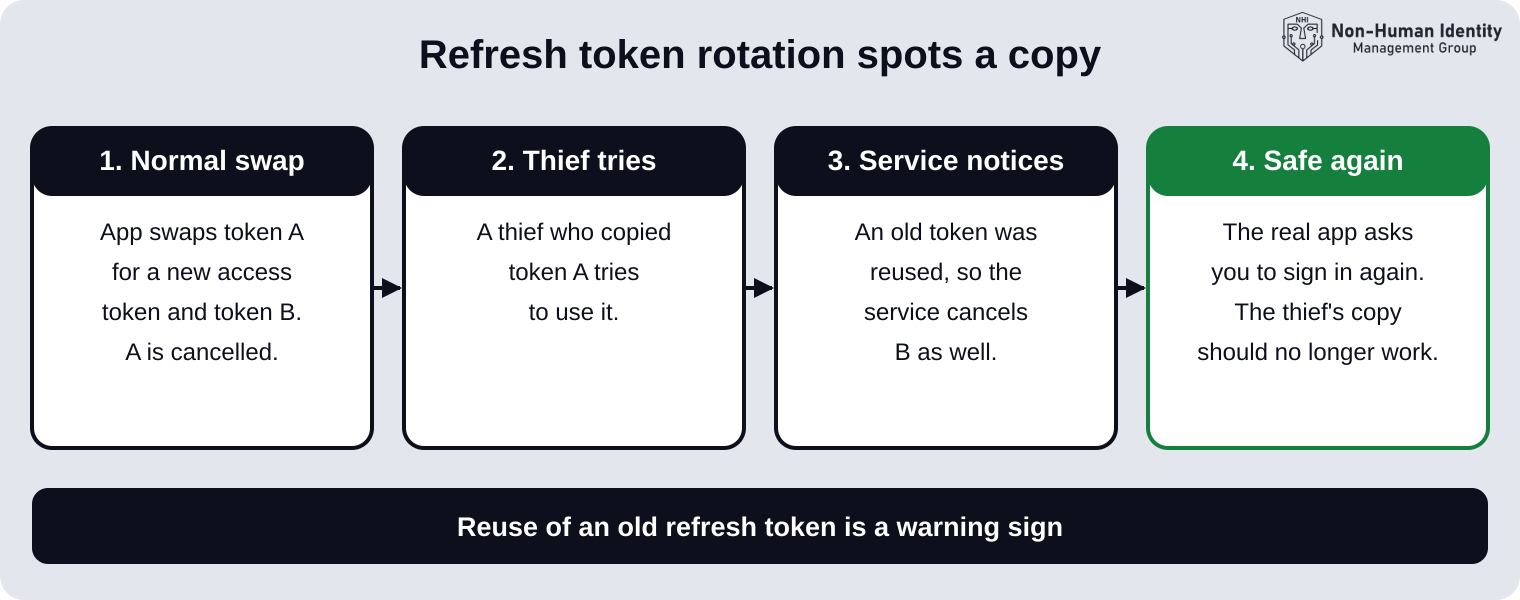
- Swapping the card. Many services also hand out a new refresh token each time, and cancel the old one. This is called refresh token rotation.[2]
- The end. The tokens are no longer accepted once they run out, or once you or an admin cancel them.[4]
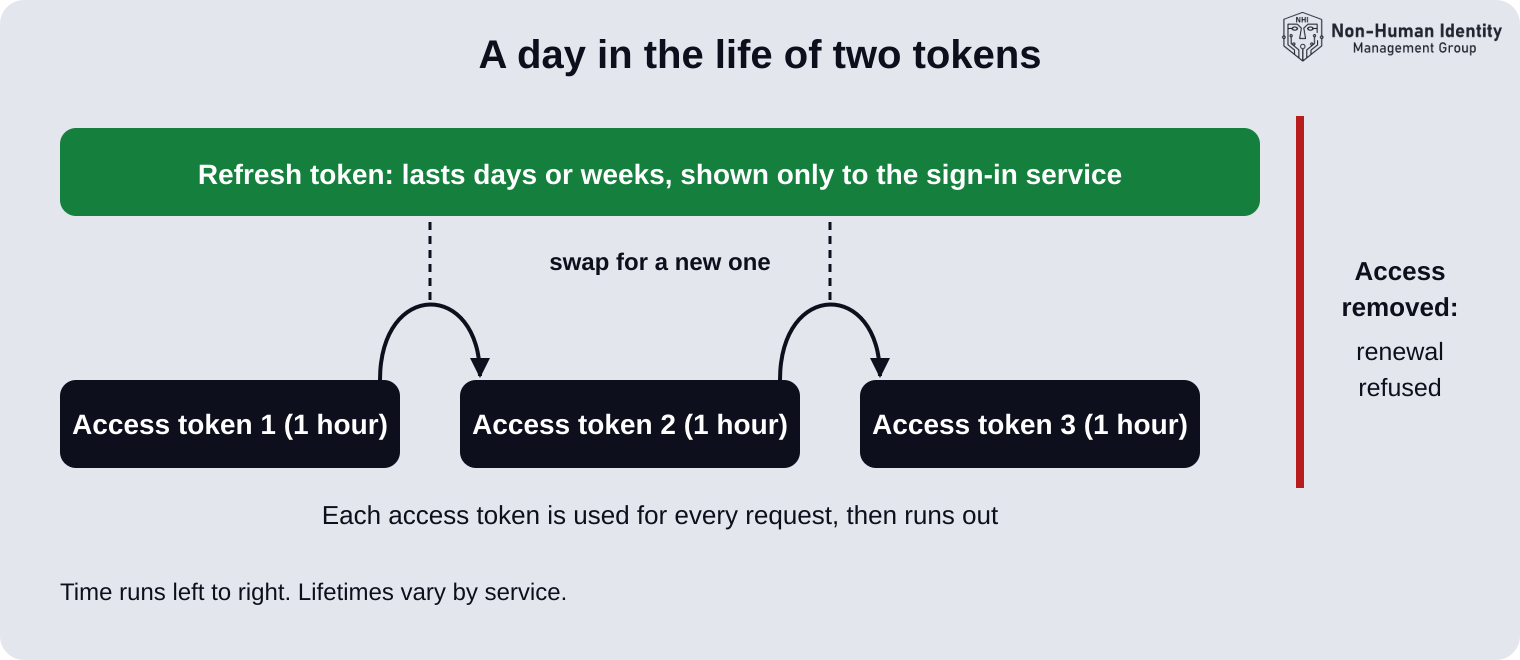
How long tokens last depends on the service. For example, Microsoft's sign-in service gives access tokens a default life of 60 to 90 minutes. Its refresh tokens last 90 days by default in most cases.[5][6]
Rotation also helps spot theft. If an old refresh token is ever used again, the service cannot tell whether the app or a thief sent it. So it can cancel the current one too, and the app has to ask you to sign in again.[2]
A worked example
Zane Rosen is a freelance designer. Two years ago he connected a free calendar tool to his work email. He stopped using it after a month.
One day he reads that the calendar tool's company had a breach. He is not sure it matters, because he changed his email password last year.
He thinks of the gym. Changing your password is like changing the lock code on your locker. It does not always take away the membership cards already handed out.
His friend Zane Haddad works in IT and explains more. "Some services cancel tokens when you change your password, but not all of them, and not in every case," he says. Microsoft's documentation, for example, shows that this depends on how the app signed in.[6]
So Zane Rosen opens his account's page of connected apps.[7] He finds the calendar tool still listed, with access to read his email. He removes it. Once the change takes effect, the tool's tokens should no longer give access.
He also finds two other apps he does not recognise, and removes those too. Then he signs out of all other sessions, to be safe.
Last, he checks his account's recent activity. In the records available to him, he finds no unknown access. He sets a reminder to review his connected apps every few months.
Myths and mistakes
| What people think | What is true |
|---|---|
| Changing my password signs out every app. | Not always. Some tokens survive a password change. Remove the app's access or sign out everywhere too.[6] |
| A token is not a password, so it is fine to share. | A valid token may work for whoever holds it. Treat it like a password. |
| Access tokens last as long as the app is installed. | Access tokens are usually short-lived. It is the refresh token that keeps the app signed in. |
| Cancelling the refresh token cancels everything at once. | It stops new access tokens. An access token already handed out may still work until it runs out, depending on the service.[4] |
| Deleting the app from my phone removes its access. | The app's access is held on the service. Remove it in your account's connected apps page.[7] |
What can I do this week?
- Open the connected apps page for your main email account and remove apps you no longer use.
- Do the same for your file storage and work accounts.
- If you think a token leaked, remove the app's access and sign out of all sessions, as well as changing your password.
- If you build apps, check that tokens never appear in logs, error messages or screenshots.
- Ask your IT team how they cancel a leaver's tokens, not just their password.
Checklist
- You know which apps hold access to your main accounts.
- Apps you no longer use have had their access removed.
- Apps ask only for the access they need, such as read-only.
- Tokens are kept out of code, logs, chat and support tickets.
- Access tokens are short-lived, and refresh tokens are swapped on each use where the service supports it.
- Leavers have their tokens cancelled as well as their passwords.
- There is a plan for a token leak: cancel, check the records, then reconnect safely.
Common questions
Why do I stay signed in to some apps for weeks?
Because the app holds a refresh token. When its short-lived access token runs out, it quietly uses the refresh token to get a new one. You only sign in again when the refresh token runs out or is cancelled.
Is a token the same as a password?
No, but it needs the same care. A password proves who you are when you sign in. A token is handed out after you sign in and lets an app act for you. Many tokens work for whoever holds them.
How do I cancel an app's tokens?
Remove the app from your account's connected apps or security page. Once the change takes effect, the app should no longer be able to get new access. The app may still hold data it copied earlier, so ask the developer to delete it.[7]
How long does an access token last?
Often about an hour, but it varies by service. Microsoft's default is a random time between 60 and 90 minutes. Refresh tokens usually last much longer, from a day to several months.[5][6]
Do software programs use tokens too?
Yes. Many programs, services and AI agents are non-human identities (NHIs). They use access and refresh tokens to call other services without a person present. These tokens need owners, short lifetimes and regular checks, just like people's.
Where next?
Ready for the detail? Read the practitioner guide: OAuth Token Introspection and Revocation Guide. It goes further into how services check whether a token is still valid, how cancelling works at scale and how to design for fast revocation.
Also useful:
- Access Tokens vs Refresh Tokens
- OAuth 2.0 for Beginners
- Session Tokens and Cookies for Beginners
- JSON Web Tokens for Beginners
- Non-Human Identities for Beginners
Related NHI Mgmt Group resources: How to detect use of a stolen OAuth refresh token · Global Token Revocation Guide · Browser Storage Security Guide
Key terms
- Access token
- A credential that lets an app call a service for a limited time and scope.
- Refresh token
- A longer-lived credential that lets an app get new access tokens without asking the user again.
- Bearer token
- A token that may work for whoever holds it, with no extra proof of who they are.
- Scope
- The list of things a token lets an app do, such as read your calendar.
- Refresh token rotation
- Swapping a refresh token for a new one each time it is used, and cancelling the old one.
- Token revocation
- Cancelling a token before it would normally run out.
Sources and further reading
- RFC 6749, The OAuth 2.0 Authorization Framework, sections 1.4 and 1.5. IETF, October 2012. https://www.rfc-editor.org/rfc/rfc6749.html, accessed 28 Nov 2026.
- RFC 9700, Best Current Practice for OAuth 2.0 Security, section 4.14. IETF, January 2025. https://www.rfc-editor.org/rfc/rfc9700.html, accessed 28 Nov 2026.
- RFC 9700, Best Current Practice for OAuth 2.0 Security, section 2.3 (privilege restriction). IETF, January 2025. https://www.rfc-editor.org/rfc/rfc9700.html, accessed 28 Nov 2026.
- RFC 7009, OAuth 2.0 Token Revocation. IETF, August 2013. https://www.rfc-editor.org/rfc/rfc7009.html, accessed 28 Nov 2026.
- Access tokens in the Microsoft identity platform. Microsoft Learn, Microsoft. https://learn.microsoft.com/en-us/entra/identity-platform/access-tokens, accessed 28 Nov 2026.
- Refresh tokens in the Microsoft identity platform. Microsoft Learn, Microsoft. https://learn.microsoft.com/en-us/entra/identity-platform/refresh-tokens, accessed 28 Nov 2026.
- Share some access to your Google Account data with apps from other developers. Google Account Help, Google. https://support.google.com/accounts/answer/3466521, accessed 28 Nov 2026.