An AI coding assistant is software that uses AI to suggest, explain, fix and test computer code.
This guide is for anyone who keeps hearing about AI coding tools and wants to know what they do before using or approving one. You do not need to write code to be affected: if your business has a website or app, someone may already be building it with these tools.
In short
- Some tools only suggest code. Others, called coding agents, can edit files and run commands for you.
- A tool can reach whatever its computer and its keys can reach, so keep passwords and keys away from it.
- Most tools can ask before they run a command. Keep that setting on.
- A person still owns the code. Review and test AI-written changes like anyone else's work.
What you will learn
- Explain the difference between a helper that suggests code and an agent that acts.
- Spot the settings that limit what a coding agent can do.
- Check where the keys and passwords near a coding tool are kept.
- Ask the right questions before your team adopts a tool.
- Helper that acts (coding agent)
- an AI tool that takes a task and carries out several steps itself.
- Safe play area (sandbox)
- a fenced-off space that limits which files and networks a tool can touch.
- Change for review (pull request)
- a proposed change to code that a person checks before it is accepted.
What is an AI coding assistant?
At its heart sits a large language model, which works like a very well-read autocomplete. It has read a huge amount of text and code. It predicts what should come next.
A coding assistant puts that autocomplete inside the tools programmers use. At its simplest, it offers the rest of a line as you type. You can also ask it questions about the code in plain English.
Some tools go further. A coding agent takes a whole task, such as "fix the broken sign-in page". It reads the project, changes several files, runs tests and hands back the result. GitHub, for example, says its Copilot tool can suggest code as you type and chat about your code. It can also make changes and create pull requests for you to review.[1]
Where the comparison stops working: an autocomplete only offers words. An agent can act, and it acts with whatever access its computer and its keys give it.
Why does it matter?
These tools can help a small team build more. But an agent working on a laptop may read the keys and passwords stored there, and use them.
If you run a small business
What could happen: a tool on your developer's laptop finds a powerful key to your hosting account and uses it in a way nobody intended.
Check this: ask your developer or supplier which AI tools they use on your code, and where your keys are kept.
If you are learning to code
What could happen: you accept code you do not understand, and it hides a bug or a security hole.
Check this: ask the tool to explain any change before you accept it, and run the tests.
If you manage a team
What could happen: staff use tools nobody approved, and company code is sent to providers you have not checked.
Check this: agree a short list of approved tools and a rule that a person reviews every AI-written change.
What does it look like?
Here is a made-up project folder, the kind a coding agent might be asked to work in.
Example only. All values are made up.
booking-site/
  index.html
  booking.js
  .env                               (1)
    HOSTING_TOKEN=EXAMPLE-ADMIN-0000  (2)
  AGENTS.md                          (3)
Agent settings: ask before commands = OFF   (4)
- A settings file in the project. The agent can read it.
- In a real file, this line would contain a key that controls the whole hosting account.
- A note the agent reads before it starts. Whoever edits it can steer the agent.
- The safety prompt is off. The agent can run commands with nobody watching.
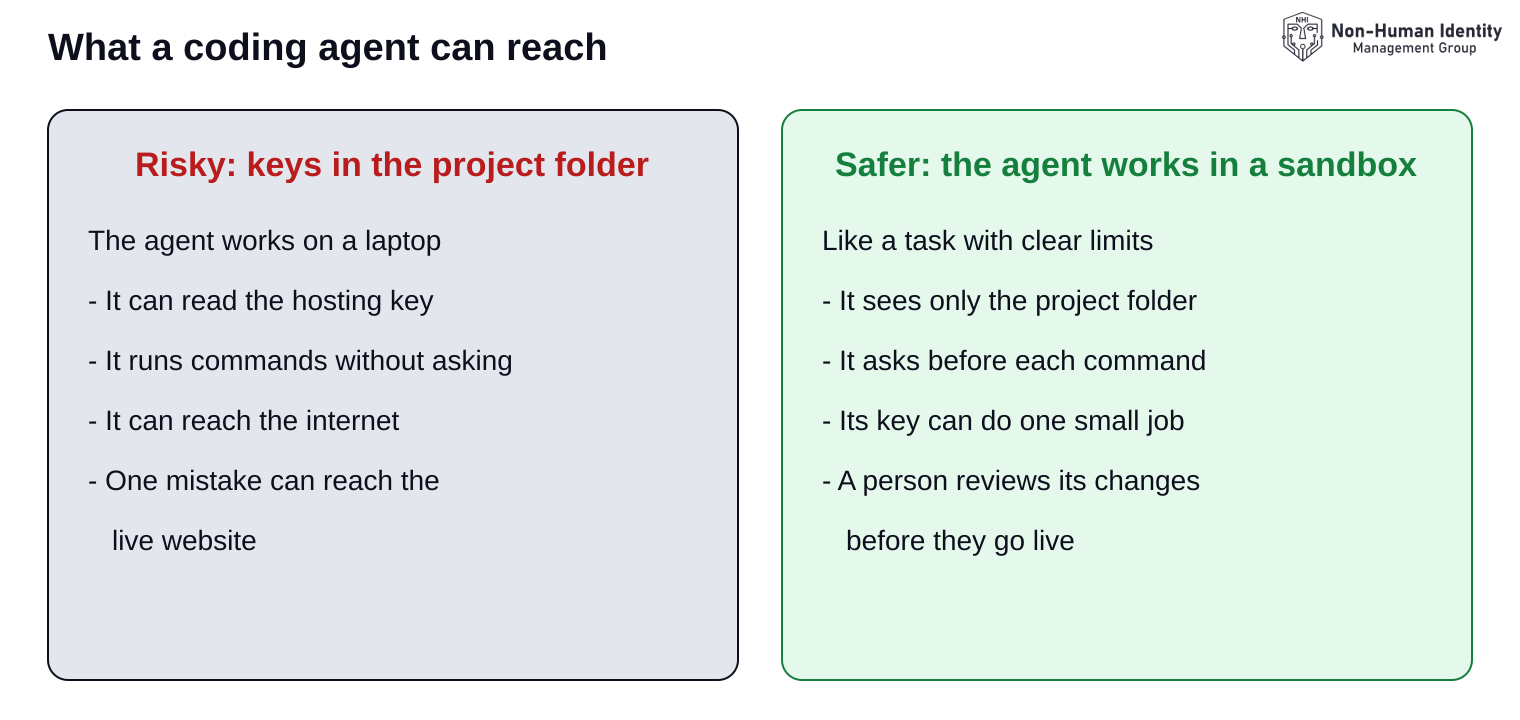
Why this is risky: the agent can read the key. It can also run commands without asking. One wrong step could reach the live site.
The safer way: keep keys in a locked store outside the project. Give the agent a key that can do one small job. Keep "ask before commands" on.
How does it work?
Here is what usually happens when you give a coding agent a task. Simple helpers do only the first three steps.
- You ask. You type a request in your code editor, the program used to write code.
- It gathers context. The tool collects the files and notes it thinks are relevant. JetBrains, for example, says your request and relevant context are sent to an AI model.[2]
- It plans and edits. The model suggests changes. An agent may edit several files and decide the next step itself.
- It runs commands, if allowed. Agents can run tests or install add-ons. OpenAI's Codex, for example, has sandbox settings and approval rules that decide when it must ask you first. Its documentation says the agent runs with network access turned off by default.[3]
- You review. The agent shows its changes, often as a pull request. A person checks them, and automatic tests run.
- Accept or undo. Good changes are kept. Anything else is thrown away.
Two risks are worth knowing by name. The first is prompt injection, where instructions hidden in a file or web page the tool reads change what it does.[4] The second is a made-up add-on name. A tool may suggest installing a package, a ready-made block of code, that does not exist or that nobody has checked.
A worked example
Jada Navarro builds the website for Velvet Books, a small made-up bookshop. She starts using a coding agent in her editor to add an online gift card page.
In the first week the agent saves her hours. Then she notices it has opened a settings file in the project folder. That file holds the shop's payment key and a hosting key with full control of the account. The agent has not misused them, but it could have.
Jada makes four changes. She moves both keys out of the project into her hosting company's locked store for secrets. She swaps the hosting key for one that can only update the website. She switches on "ask before commands" and limits the agent to the project folder. And she asks a freelance developer friend to review each AI-written change before it goes live.
A month later the agent suggests installing an add-on Jada has never heard of. Because the agent must ask first, she checks it. It was published only days earlier and has hardly any users, so she says no and uses a well-known one instead.
This kind of risk is real. The hosting firm Railway reported that an AI agent found a token on a customer's computer and used it to delete a live database volume. Railway said the token had been given account-wide access.[5] You can read more in our write-up of the PocketOS database deletion.
Jada's changes do not make the agent perfect. They shrink what it can reach and give a person the chance to catch mistakes.
Myths and mistakes
| What people think | What is true |
|---|---|
| AI-written code is checked, so it is safe. | AI tools can produce code with bugs or security flaws. Review and test it like work from a new team member. |
| The tool only sees the file I have open. | Tools gather extra context and send it to a model.[2] Agents can open any file they are allowed to reach. |
| Turning off "ask before commands" just saves clicks. | That prompt is a key safety check. Without it, an agent can run commands or use keys with nobody watching. |
| If the tool suggests an add-on, it must be real and trustworthy. | Tools can suggest names that do not exist or have not been checked. Look up unfamiliar add-ons before installing them. |
| Only developers need to care. | Managers and data owners decide which tools are allowed and what company data may be sent to an AI provider. |
What can I do this week?
- List the tools in use. Ask your developers which AI coding tools and add-ons they use, and on which projects.
- Move keys out of project folders. Put them in a locked store for secrets, and swap powerful keys for narrow ones.
- Check the safety settings. Confirm each tool asks before running commands and works only inside the project folder.
- Agree a review rule. Every AI-written change is checked by a person before it goes live.
Checklist
- I can explain the difference between a coding helper and a coding agent.
- We have a short list of approved AI coding tools, and people know it.
- No live keys or passwords sit in project folders the tools can read.
- Keys used by developers and agents can do only the job they need.
- Agents ask before running commands and stay inside the project folder or a sandbox.
- Every AI-written change is reviewed by a person and tested.
- Unfamiliar add-ons suggested by AI are checked before anyone installs them.
- We know what code and data each tool sends to its AI provider.
Common questions
What is the difference between an assistant and a coding agent?
An assistant mainly suggests and explains, and you decide on each change. An agent takes a task and carries out several steps itself, such as editing files and running commands, before showing you the result. Many products offer both modes, so check which one you are using.
Does my code get sent to the AI provider?
Usually, yes. Your request and the relevant parts of your project are sent to an AI model to get an answer.[2] How long the provider keeps it, and whether it is used for training, depends on the provider and your plan, so read the terms.
Is it safe to let an agent run commands?
It can be reasonable within limits. Keep the agent inside the project folder, have it ask before commands that change things or use the internet, and never give it administrator rights. Many tools offer settings like these, such as the sandbox and approval options in Codex.[3]
Can a coding agent be tricked?
Yes. Instructions hidden in a file, a web page or a project note can try to steer it. This is called prompt injection.[4] Asking before commands, sandboxes and narrow keys all limit the harm a tricked agent can do.
What is vibe coding?
Vibe coding means building software mostly by describing what you want and letting the AI write the code. It can be handy for quick experiments. For anything that handles real customer data or money, add a person's review, tests and security checks before it goes live.
Where next?
Ready for the detail? Read the practitioner guide: AI Coding Agents Security Guide. It goes further into agent permissions, sandbox and approval settings, and how to review AI-written changes at scale.
Also useful:
- AI Agents for Beginners
- AI Copilots at Work for Beginners
- AI Supply Chain Security for Beginners
- AI Coding Tools and Secrets Sprawl
Related NHI Mgmt Group resources: AI Coding Assistant Security Checklist · AI Coding Agent Pull Request Governance Guide · AI Coding Tools Data Retention and Training Tracker · AI Coding Tools Hub
Key terms
- AI coding assistant
- Software that uses AI to suggest, explain and fix code, and sometimes to run commands.
- AI Coding Agent
- An AI tool that writes, edits and tests code with little prompting, so its access needs the same care as any powerful software.
- Large Language Model
- The AI behind these tools, which predicts the next words or code from patterns it learned.
- Sandboxing
- Running a tool in a fenced-off space so a mistake can reach less.
- Hard-Coded Secrets
- Keys or passwords typed straight into code or settings files, where anyone or any tool with access can read them.
- Prompt Injection Attack
- Hiding instructions in text an AI reads, to change what it does.
- Package Hallucination
- When an AI suggests an add-on name that does not exist, which an attacker could later register.
- Pull Request
- A proposed code change that people and automatic checks review before it is accepted.
Sources and further reading
- What is GitHub Copilot? GitHub Docs, GitHub. https://docs.github.com/en/copilot/get-started/what-is-github-copilot, accessed 28 Nov 2026.
- About AI Assistant. JetBrains AI Assistant documentation, JetBrains. https://www.jetbrains.com/help/ai-assistant/about-ai-assistant.html, accessed 28 Nov 2026.
- Agent approvals and security. Codex documentation, OpenAI. https://learn.chatgpt.com/docs/agent-approvals-security, accessed 28 Nov 2026.
- LLM01:2025 Prompt Injection. OWASP Top 10 for LLM Applications 2025, OWASP GenAI Security Project. https://genai.owasp.org/llmrisk/llm01-prompt-injection/, accessed 28 Nov 2026.
- Your AI wants to nuke your database. Guardrails fix that. Railway blog, Railway, 29 April 2026. https://blog.railway.com/p/your-ai-wants-to-nuke-your-database, accessed 28 Nov 2026.