Backup security means protecting your backup copies so that an attacker, a mistake or a faulty system cannot delete, change or encrypt them, and so you can still restore your data when something goes wrong.
Having backups is not enough on its own. Many ransomware attacks try to destroy backups first, so the victim has no way back except paying. This guide is for newcomers, students, career changers and managers who are not specialists. It explains, in plain English, how backups are protected: immutable copies that cannot be changed for a set time, copies kept offline or separate, alerts and restore tests. It does not cover business continuity planning, which has its own beginner guide.
By the end of this guide you will be able to:
- Explain why attackers target backups.
- Understand what an immutable backup is and how it differs from an offline backup.
- Describe the main steps that protect a backup and prove it works.
- Identify three first steps to check your own backups this week.
Key takeaways
- Attackers go after backups. CISA warns that many ransomware variants try to find and delete or encrypt backups they can reach.
- Immutable means locked for a set time. An immutable backup cannot be altered or deleted during its retention period, even by an administrator in the strictest settings.
- Keep at least one copy out of reach. An offline or separately controlled copy means one stolen account cannot reach every copy at once.
- A backup you have not restored is a hope, not a plan. Regular restore tests show whether you can actually recover, and how long it takes.
- Protect who can change backups. Separate backup admin accounts, multi-factor authentication and alerts on deletions make attacks on backups harder and easier to spot.
What it is, in plain English
A backup is a copy of your data, kept so you can get it back if the original is lost, damaged or locked. Ransomware is malicious software, or an attack campaign, that blocks access to systems or data and then pressures the victim to pay. Good backups are one of the main ways to recover from it without paying.
Attackers know this. Once inside a network, they often look for backup servers and storage and try to delete or encrypt them before launching the main attack. MITRE ATT&CK, a public catalogue of attacker behaviour, records this as T1490 Inhibit System Recovery.[9] CISA's #StopRansomware Guide says that many ransomware variants attempt to find and delete or encrypt accessible backups, and advises keeping offline, encrypted backups of critical data and regularly testing them.[1]
Backup security is about making sure at least one good copy survives. The two main ideas are:
- Immutable backup: a copy that cannot be altered or deleted during its retention period. Storage that works this way is often called WORM, short for write once, read many.
- Offline backup: a copy that is not directly reachable from your live network, so an attacker using the same accounts and connections cannot touch it.
A helpful comparison is a bank safe deposit box with a time lock. You can put things in and look at them, but nobody, not even the bank manager, can open it to remove them until the timer runs out. An immutable backup works the same way. Where the analogy breaks down: a time-locked box does not tell you whether what is inside still works. A backup can be locked safely and still be incomplete or corrupt, which is why restore tests matter.
Why it matters to you
- If you run a small business: your customer records, invoices and email may live in one cloud service. If an attacker or a mistake deletes them and your only backup is in the same account, both can disappear together.
- If you are new to a security job: "Can we restore, and how fast?" is one of the first questions asked during a ransomware incident. Knowing where backups are and how they are protected is basic, valuable knowledge.
- If you are a manager: backups decide how long the business is down. Two useful targets are the recovery point objective (RPO), how much data loss you can accept, measured in time, and the recovery time objective (RTO), how long you can accept a service being unavailable.
The UK National Cyber Security Centre (NCSC) suggests rules that fit together. Keep at least one backup disconnected so one incident cannot reach every copy. Follow the 3-2-1 rule: at least three copies, on two different devices, with one offsite. Back up often, and check that you can restore.[3] The NCSC also notes that the 3-2-1 rule does not on its own require any copy to be offline, which is why the offline rule is still needed.[3]
How it works, step by step
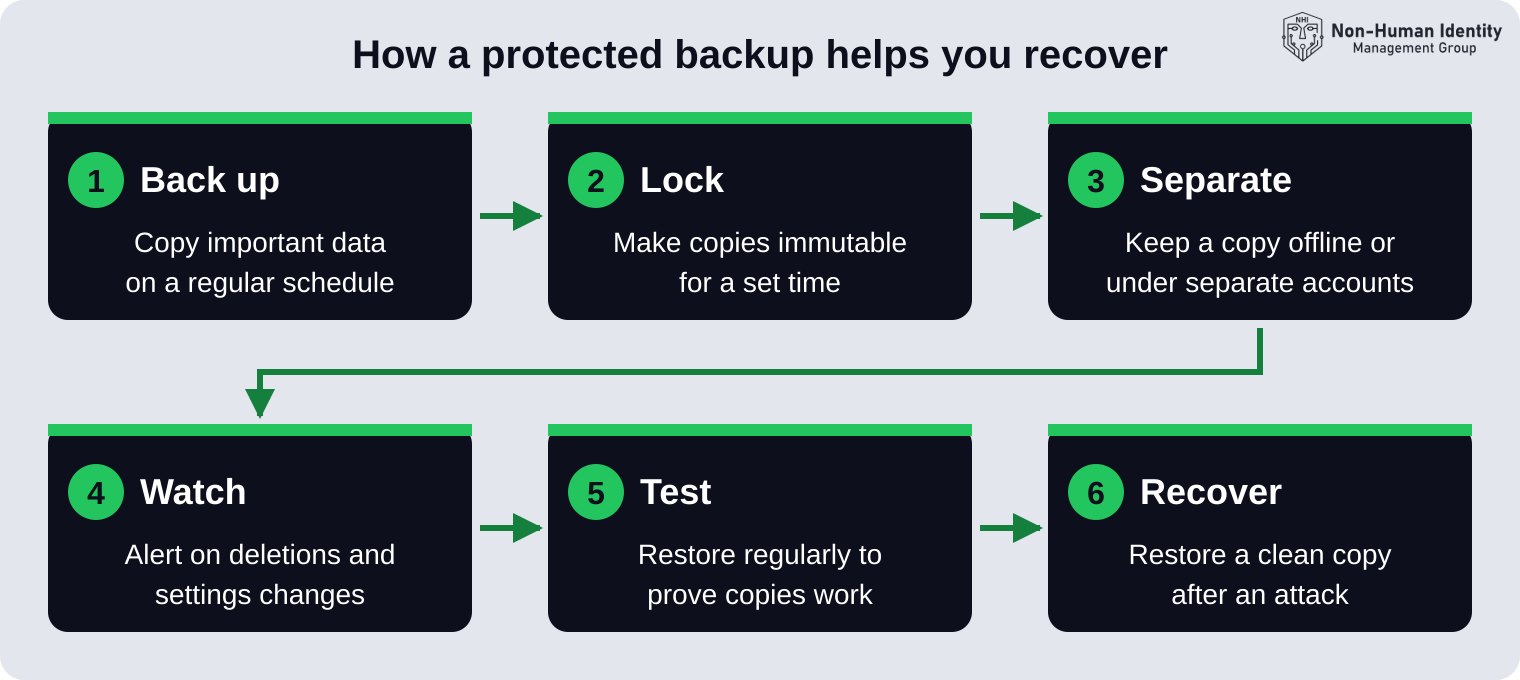
Products differ, but protecting backups usually follows these steps.
- Back up the right things, often enough. List your important data and systems, and decide how often each needs copying. More frequent backups mean less data lost.[3]
- Lock the copies. Turn on immutability so each backup cannot be changed or deleted for a set retention period. The NCSC recommends that backups be resilient to destructive actions, and that retention be based on time periods rather than a fixed number of copies, so a flood of new, bad backups cannot push out the good ones.[2]
- Separate at least one copy. Keep one copy offline, or in a separate account or vault with its own sign-in. For cloud storage, which cannot be unplugged, the NCSC suggests cutting access digitally: protect the account with multi-factor authentication, remove backup credentials from devices when not in use and limit which devices can reach the backups.[3]
- Protect the keys and the admins. Encrypt backups and keep the encryption keys apart from the data, with a secure copy of the keys stored out of band.[2] Give backup administration to separate accounts, not everyday staff accounts.
- Watch for warning signs. Set alerts for deletions, retention changes and privileged actions. The NCSC advises alerts through more than one channel, and notes that alerts only help if someone acts on them.[2]
- Test restores. Regularly restore files and whole systems to check that the copies are complete and that you can meet your recovery targets. CISA advises testing backup procedures on a regular basis.[1]
- Recover cleanly. After an attack, pick a backup from before the attacker got in, check it for malware and restore into a cleaned environment, so you do not bring the problem back.
The table below compares the main ways of protecting a backup copy.
| Approach | What it protects against | Things to watch |
|---|---|---|
| Immutable (WORM) storage | Deletion or changes during the retention period, including by a stolen admin account in the strictest modes | Retention must be long enough; some modes allow special users to remove the lock |
| Offline backup (disconnected media) | Attacks that travel over the network or use live accounts | Slower to restore; must be reconnected safely and tested |
| Separate account, tenant or vault | One compromised account reaching every copy | Separate sign-ins and admins are needed, or the separation is only on paper |
| Snapshots on the same system | Quick rollback after small mistakes | Often deleted by anyone who controls the system, so not enough on their own |
How three cloud storage services describe immutability
Many backup tools store copies in cloud storage. The table lists three well-known services alphabetically, as examples only; the order is not a ranking. Each uses its own wording.
| Service | Feature name | How its documentation describes it |
|---|---|---|
| Amazon S3 | S3 Object Lock | A WORM model that stops object versions being deleted or overwritten for a set time. In compliance mode, no user, including the account's root user, can overwrite or delete a protected version or shorten its retention. Governance mode can be bypassed by users with a special permission, and AWS notes it can be used to test settings first.[4] |
| Azure Blob Storage | Immutable storage (time-based retention, legal hold) | Stores data in a WORM state for a set interval. A policy starts unlocked for testing; once locked it cannot be deleted and the retention period can only be extended. Microsoft states that unlocked policies should be used only for short-term testing.[5] |
| Google Cloud Storage | Bucket Lock (retention policy) | A retention policy sets a minimum time objects must be kept before they can be deleted or replaced. Locking the policy is permanent: it cannot be removed and its period cannot be reduced, only increased.[6] |
Useful distinctions
- Immutable is not the same as offline. An immutable copy can be online but locked; an offline copy is unreachable but not necessarily locked. Many organisations use both. See Immutable Backups vs Offline Backups.
- "Test" or "governance" modes are not full immutability. Settings meant for testing, or that special users can bypass, give weaker protection than locked or compliance settings. Check which one you are using.
- Backup security is not business continuity. Business continuity is the wider plan for keeping the organisation running. Backups are one part of it. See Business Continuity and Disaster Recovery for Beginners.
- Backup accounts are powerful identities. The admin accounts and software accounts that run backups can delete every copy, so they need the same care as top admin accounts, with multi-factor authentication and few people holding them.
A worked example
Northgate Dental is a fictional group of three dental practices with 50 staff. Its patient records system was backed up every night to a storage device on the same network, managed with the same administrator account as everything else. Leah, the practice manager, works with the group's IT provider to improve this.
- A locked cloud copy: nightly backups are also sent to cloud storage with a locked 30-day retention period, so each copy cannot be deleted for 30 days.
- Separate admin: the cloud backup account has its own administrator sign-in with multi-factor authentication, held by two named people at the IT provider and not used for anything else.
- Alerts: any attempt to delete backups or change retention sends an alert by email and text message to Leah and the IT provider.
- Monthly restore test: the IT provider restores a copy of the records system to a test machine each month and notes how long it took.
Six months later, an attacker gets into the network through a stolen remote access password and encrypts the main server and the local backup device. The cloud copies are locked, so the attacker cannot delete them with the stolen account. The IT provider first finds and closes the way the attacker got in, then restores from a cloud copy taken two days before the first sign of the attacker, after checking it for malware. Because they have practised, they know restoring takes about a day.
The recovery is not painless. The practices still lose some records entered between that backup and the attack, have to re-enter them from paper notes, and still need to investigate what data the attacker may have viewed or copied. Immutable backups help you recover; they do not undo data theft. But the group can recover without relying on the attacker.
Myths and misunderstandings
| What people think | What is true |
|---|---|
| We have backups, so ransomware is not a big worry. | Backups the attacker can reach may be deleted or encrypted first. At least one copy needs to be locked or out of reach. |
| Cloud storage is automatically a safe backup. | If the same account can delete both the live data and the copy, one stolen account can remove both. Locks and separate accounts are what make it safer. |
| Immutable means the data is safe forever. | It is locked only for the retention period you set. After that, copies can be deleted. Retention should cover the time an attacker might go unnoticed. |
| If the backup job says "success", we can restore. | A successful job only shows that something was copied. Only a restore test shows that the data is complete and usable within your RTO. |
| Restoring a backup ends the incident. | You must also remove the attacker's access and check whether data was stolen, or the attack may simply happen again. |
Key terms
- Ransomware
- Malicious software or an attack campaign that blocks access to systems or data and pressures the victim for payment, often combined with data theft.
- Immutable backup
- A backup copy that cannot be altered or deleted during its retention period.
- Write once, read many (WORM)
- A storage control that lets data be written once and then read, but not changed.
- Object Lock
- An Amazon S3 capability that stops objects being overwritten or deleted for a set retention period.
- Offline backup
- A backup copy that is not directly reachable from the live network.
- Air-gapped backup
- A backup kept isolated from live systems, physically or logically, so a compromise of those systems does not automatically reach it.
- 3-2-1 backup rule
- Keeping three copies of data, on two different media, with one copy offsite.
- Retention policy
- A rule that sets how long records or copies are kept before they can be deleted.
- Restore testing
- Proving that a backup can actually recreate a working system, not just that files exist.
- Recovery point objective (RPO)
- The maximum acceptable amount of data loss, measured in time.
- Recovery time objective (RTO)
- The maximum acceptable time to restore a service after disruption.
Common questions
What is an immutable backup?
It is a backup copy that cannot be changed or deleted until its retention period ends. Cloud storage services offer this through features such as Amazon S3 Object Lock, Azure immutable storage and Google Cloud Bucket Lock.[4][5][6]
Do I need both immutable and offline backups?
Not always, but many organisations use both because they protect against different things. We suggest at least one copy that a single stolen account cannot delete, whether by locking it, keeping it offline or both.
How long should backups be kept?
There is no single right answer. Retention should cover how long an attacker might go unnoticed, plus any legal or contractual record-keeping needs. The NCSC recommends retention based on time periods rather than a fixed number of copies.[2]
How often should we test restores?
No single standard fixes one interval for everyone. We suggest testing at least some restores regularly, for example monthly, and a full system restore at least once a year, then after any big change.
Should backups be encrypted?
Yes, in most cases. CISA advises offline, encrypted backups of critical data.[1] Keep the keys separate from the backups and stored securely, or the backups may be unreadable when you need them.[2]
Which frameworks cover backup security?
NIST SP 800-53 control CP-9 System Backup covers backups, with an enhancement for cryptographic protection, CP-9(8).[8] The NIST Cybersecurity Framework 2.0 says backups of data are created, protected, maintained and tested (PR.DS-11).[10] CIS Control 11 Data Recovery asks organisations to establish and maintain data recovery practices sufficient to restore in-scope assets.[7]
First steps
Three things you can do this week:
- Find your backups. List what is backed up, where each copy is stored and which accounts can delete it. If one account can delete both the live data and every copy, note it as your first fix.
- Turn on a lock. Ask your IT provider or backup tool whether immutability is available and switched on. Start in a test or unlocked mode on a small set of data, then move to a locked setting once you are happy with the retention period. Treat any decision to shorten or remove a lock as a controlled exception: approved, written down and time-limited.
- Do one restore test. Restore one important file or folder to a separate location, check it opens and note how long it took.
Checklist
- We know what is backed up, how often and where every copy is stored.
- At least one copy is immutable or offline, so one stolen account cannot delete every copy.
- Retention is long enough to cover an attacker going unnoticed for weeks.
- Backup admin accounts are separate from everyday accounts and use multi-factor authentication.
- Backups are encrypted and the keys are stored separately, with a secure out-of-band copy.
- Alerts go to more than one person when backups are deleted or retention is changed.
- We restore from backup regularly and record how long it takes against our RTO.
- We have a written plan for restoring a clean copy after a ransomware attack.
Simple measures that show progress: the percentage of critical systems with an immutable or offline copy, the date and result of the last successful restore test, the measured restore time compared with your RTO, and the number of accounts that can delete backups.
Check your understanding
1. Why do ransomware attackers try to delete backups?
Answer: if the victim cannot restore, they are more likely to feel they must pay.
2. What is the difference between an immutable backup and an offline backup?
Answer: an immutable backup can be online but cannot be changed or deleted during its retention period; an offline backup is not reachable from the live network.
3. Why is a "successful" backup job not proof that you can recover?
Answer: it only shows that something was copied. A restore test shows whether the data is complete and can be restored in time.
4. Why should backup admin accounts be kept separate?
Answer: they can delete every copy, so if they are the same as everyday accounts, one stolen password could remove your way back.
Suggested learning pathway
- Start with Ransomware for Beginners to understand the threat backups protect against.
- Then read Business Continuity and Disaster Recovery for Beginners for the wider recovery plan.
- For what to do during an attack, see Incident Response for Beginners.
- For the full practitioner design, see the Backup Security and Immutable Backup Guide.
- To choose between locked and disconnected copies, see Immutable Backups vs Offline Backups.
- For the extended copy rule, see The 3-2-1-1-0 Backup Rule Explained.
- For planning restore tests, see the Backup and Recovery Testing Checklist.
Standards and references
- #StopRansomware Guide. Cybersecurity and Infrastructure Security Agency (CISA), September 2023. https://www.cisa.gov/stopransomware/ransomware-guide, accessed 27 Nov 2026.
- Principles for ransomware-resistant cloud backups. National Cyber Security Centre (NCSC), 22 November 2024. https://www.ncsc.gov.uk/guidance/principles-for-ransomware-resistant-cloud-backups, accessed 27 Nov 2026.
- Offline backups in an online world. National Cyber Security Centre (NCSC) blog, 13 August 2019. https://www.ncsc.gov.uk/blog-post/offline-backups-in-an-online-world, accessed 27 Nov 2026.
- Locking objects with Object Lock. Amazon S3 User Guide, Amazon Web Services. https://docs.aws.amazon.com/AmazonS3/latest/userguide/object-lock.html, accessed 27 Nov 2026.
- Overview of immutable storage for blob data. Microsoft Learn, Microsoft. https://learn.microsoft.com/en-us/azure/storage/blobs/immutable-storage-overview, accessed 27 Nov 2026.
- Bucket Lock. Google Cloud Storage documentation, Google. https://docs.cloud.google.com/storage/docs/bucket-lock, accessed 27 Nov 2026.
- CIS Critical Security Control 11: Data Recovery. Center for Internet Security (CIS). https://www.cisecurity.org/controls/data-recovery, accessed 27 Nov 2026.
- SP 800-53 Rev. 5, Security and Privacy Controls for Information Systems and Organizations. National Institute of Standards and Technology (NIST). https://csrc.nist.gov/pubs/sp/800/53/r5/upd1/final.
- T1490 Inhibit System Recovery. MITRE ATT&CK. https://attack.mitre.org/techniques/T1490/, accessed 27 Nov 2026.
- The NIST Cybersecurity Framework (CSF) 2.0. National Institute of Standards and Technology (NIST), February 2024. https://www.nist.gov/cyberframework.
Related NHI Mgmt Group resources: Backup Identity Isolation Guide · Ransomware Prevention Guide · Backup and Recovery Policy Template