Biometrics means using a part of your body, like your face or fingerprint, to prove who you are.
This guide is for anyone who unlocks a phone or laptop with their face or finger and wonders how safe that is. You do not need any technical knowledge: if your phone, bank app or work laptop offers face or fingerprint login, this applies to you.
In short
- A face or fingerprint login checks whether your body matches a pattern your device saved earlier. It looks for a close match, not a perfect one.
- On most modern phones, the check happens on the device, and your face or fingerprint data is not sent to the website.
- Your face and fingerprints are not secret, so good systems pair them with something you have, like your phone.
- Your PIN or passcode is the back door, so make it a strong one.
What you will learn
- Explain how a face or fingerprint login works in plain words.
- Spot where your biometric data is kept and who can see it.
- Check the backup PIN and settings on your own devices.
- Ask a company how it stores the face or fingerprint data it collects.
- Body-based login (biometrics)
- proving who you are with your face, fingerprint, voice or another body feature.
- Saved pattern (template)
- a set of measurements a device keeps instead of a full photo, used to check for a match.
What are biometrics?
Think of a friend spotting your face in a busy station. They do not measure you. They compare what they see with what they remember, and decide it is close enough.
A face or fingerprint login works the same way. When you set it up, the device measures your face or finger. It saves a template, which is a set of measurements rather than a full photo. Each time you log in, it takes a new reading and compares the two. If they are close enough, you are let in.
That is why a US government guide says biometric matching works on likelihood, while a password check is a plain yes or no.[2] There is always a small chance of letting in the wrong person or turning away the right one.
Where the comparison stops working: a friend can tell a photo of you from the real you. A device needs extra checks to do that, called liveness detection, which test that a real, present person is in front of the sensor.[2]
Why does it matter?
Face and fingerprint logins are quick and hard to watch over your shoulder. But your face and fingerprints are not secrets. You leave fingerprints on glasses, and your face is in photos.[2] So the safety depends on how the system is built.
If you use face or fingerprint login on your phone
What could happen: someone who looks a lot like you, or who knows your simple PIN, gets into your phone.
Check this: set a longer passcode, because it is the backup for your face or fingerprint.
Next: Passkeys for Beginners
If your employer asks for your fingerprint
What could happen: your fingerprint data is kept on a central system that could be breached.
Check this: ask where the data is stored, who can see it, and when it is deleted.
If you run a business that wants to use biometrics
What could happen: you collect sensitive data that the law treats with extra care.
Check this: prefer systems that keep the check on the user's own device.
What does it look like?
Here is a made-up phone settings screen. It shows the settings that matter most for a face login.
Example only. All values are made up.
Face and passcode settings (EXAMPLE phone)
Face unlock .................. On
Require eyes open ............ Off     (1)
Alternate appearance ......... Added   (2)
Passcode ..................... 4 digits, 0000   (3)
Use face for: banking app .... On
- The phone does not check that the person is looking at it, so it may unlock while the owner is asleep.
- In a real screen, this line would show that a second face has been added, so someone else can also unlock the phone.
- In a real screen, this line would show a short passcode that is easy to guess or watch someone type.
Why this is risky: the face login is only as strong as its weakest setting. A short passcode is the easiest way round it, and an extra face gives another person full access.
The safer way: leave the attention check on, so the phone needs your eyes open and looking at it.[1] Remove any face or finger you do not recognise, and use a longer passcode.
How does it work?
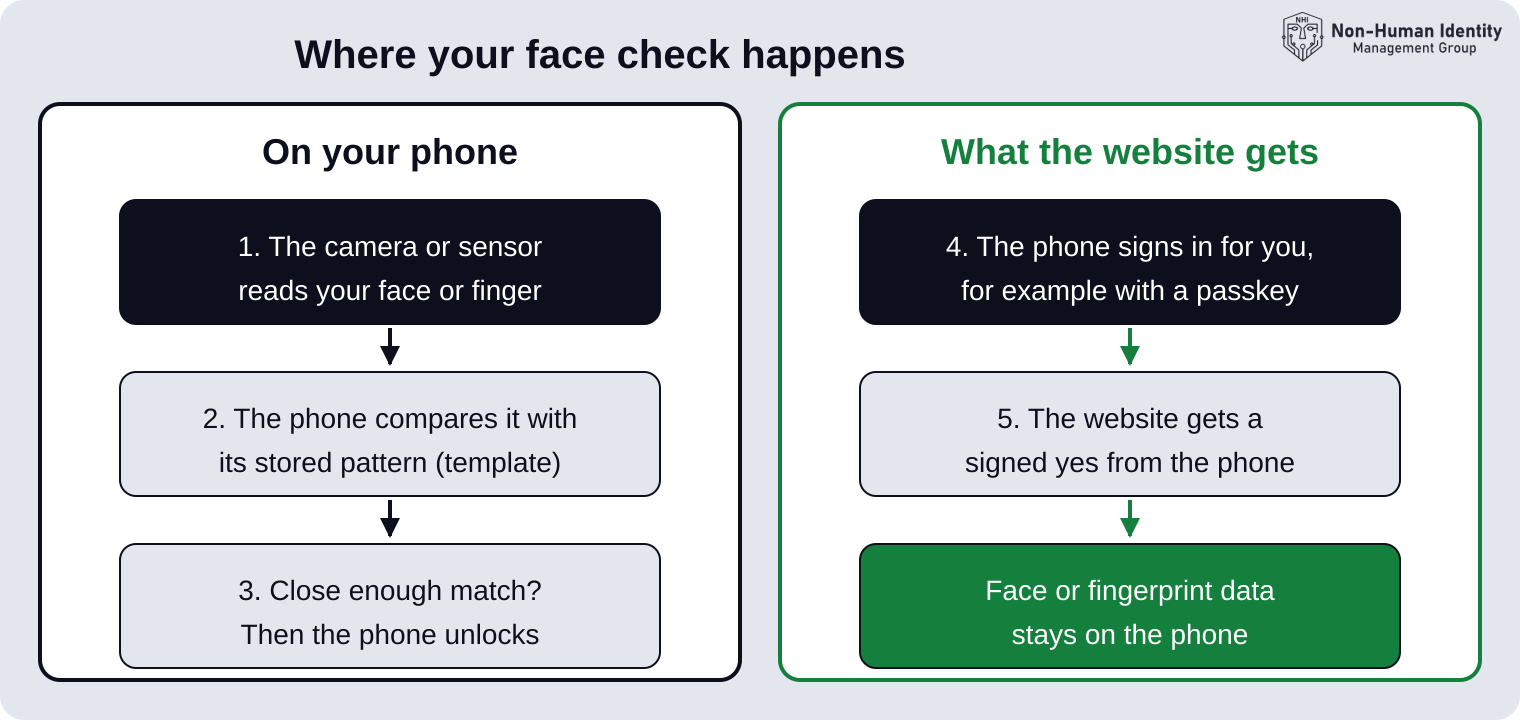
Here is what usually happens when you log in to an app with your face on a modern phone.
- Set up. The phone measures your face or finger and saves a template on the device, protected by a secure chip inside it.[1]
- The reading. When you log in, the camera or sensor takes a fresh reading.
- The match. The phone compares the new reading with the template and checks it is close enough.
- The sign-in. If it matches, the phone signs in for you, for example with a passkey. A passkey is a login that swaps your password for a secret kept on your device.[3]
- What the website sees. The website gets a signed message saying the check passed. Your face or fingerprint data stays on your device.[3]
How close is close enough? Apple says the chance that a random person could unlock an iPhone with Face ID is less than 1 in 1,000,000.[1] Apple also says the chance is higher for twins and siblings who look alike.[1] Other makers publish their own figures.
Some systems work differently. A company may keep fingerprint templates on its own server, for example for a staff clock-in machine. Then the company must protect that data. The UK data protection regulator says templates should be hard to turn back into a picture of someone. It adds that a good system can cancel a template and replace it.[4]
A worked example
Ingrid Solberg has just bought a new phone. She sets up face unlock because typing her passcode on the bus feels risky.
A week later, her twin sister picks up the phone by mistake, and it unlocks. Ingrid is surprised. She looks it up and finds that the phone maker says this is more likely with twins.
She thinks of the friend in the busy station. If two people look very alike, even a good friend can mix them up. So she decides the face login is fine for the bus, but not for everything.
Ingrid opens her settings. She keeps face unlock on for the phone, but sets her banking app to ask for her passcode instead. She checks that the phone needs her eyes open and looking at it. She also sees an old fingerprint from her last phone setup that she no longer uses, and removes it.
Next, she looks at her passcode. It is four digits, and her sister knows it. She changes it to a longer one that nobody else knows, because the passcode can unlock the phone when the face check fails.
At work, her manager asks staff to register fingerprints for a new door system. Ingrid asks where the fingerprint data will be kept and when it will be deleted. Her manager checks with the supplier and sends round a short note with the answers.
Ingrid still uses her face every day. She now knows what it protects, and where the weak spots are.
Myths and mistakes
| What people think | What is true |
|---|---|
| My phone sends my face to every app I log in to. | On most modern phones the check happens on the device. With passkeys, the website gets only a yes.[3] |
| My fingerprint is a secret, like a password. | It is not secret. You leave fingerprints on things, and your face is in photos.[2] Good systems pair them with a device you hold. |
| Face login is a perfect match every time. | It looks for a close enough match, so lookalikes have a higher chance of getting in.[1] |
| Once I use my face, my passcode does not matter. | The passcode is the backup way in. A weak one undoes a strong face login. |
| A photo of my face can unlock any face login. | Better systems check that a real person is present. Simpler cameras may be easier to fool, so check what your device uses. |
What can I do this week?
- Open your phone's face or fingerprint settings and remove any face or finger you do not recognise.
- Change a short passcode to a longer one that nobody else knows.
- Turn on the setting that needs your eyes open and looking at the screen, if your phone has one.
- Choose which apps, such as banking, should ask for your passcode instead of your face.
- If a company asks for your fingerprint or face, ask where it is stored and when it is deleted.
Checklist
- I know which of my devices and apps use my face or fingerprint.
- Only my own faces and fingerprints are registered on my devices.
- My passcode is longer than four digits and nobody else knows it.
- Any attention or eyes-open setting on my phone is switched on.
- My most sensitive apps ask for a passcode or a second check.
- I know where any employer or company keeps my biometric data.
Common questions
Is face unlock safer than a passcode?
Often, yes, against someone watching you type in public. A face login is hard to copy by looking over your shoulder. But it is only as strong as its backup passcode, and lookalikes have a higher chance of getting in. Use both well: a good face login and a long passcode.
Can someone use a photo of my face to unlock my phone?
Sometimes, on simpler systems. Better systems check that a real person is present. Phones with depth sensors and attention checks are harder to fool than simple camera checks. If you are unsure what your device uses, set a strong passcode and use it for your most sensitive apps.
Where is my fingerprint stored?
On most modern phones and laptops, it is stored on the device as a template, not a picture. Apple says Face ID data does not leave the device and is not backed up to iCloud.[1] Systems at work may store templates centrally, so ask your employer.
What happens if my biometric data is stolen?
You cannot change your face or fingerprint like a password. That is why good systems store templates that are hard to reverse, and can cancel and replace them.[4] If a company tells you of a breach, follow its advice and keep strong passcodes on your devices.
Are biometrics the same as passkeys?
No, but they often work together. A passkey is a login secret kept on your device. Your face or fingerprint unlocks that passkey on the device, and the passkey signs you in. The website does not receive your face or fingerprint.[3]
Where next?
Ready for the detail? Read the practitioner guide: Biometrics Guide. It goes further into accuracy and error rates, how biometric systems are attacked and the privacy rules that apply.
Also useful:
- Passkeys for Beginners
- Multi-Factor Authentication for Beginners
- Biometric Liveness and PAD Guide
- Biometric Data in the Workplace
Related NHI Mgmt Group resources: Passwordless and Passkeys Guide · Biometric Privacy Laws Map · Deepfake and AI Impersonation Guide
Key terms
- Biometrics
- Checks that use body features, such as a face or fingerprint, to confirm who someone is.
- Biometric template
- A set of measurements used for matching, kept instead of the full face or fingerprint image.
- Liveness detection
- A check that the reading comes from a real, present person, not a photo, screen or mask.
- False acceptance rate
- How often a system wrongly lets in the wrong person.
- False rejection rate
- How often a system wrongly turns away the right person.
- Passkey
- A login that replaces a password with a secret key kept on your device.
- Multi-factor authentication
- Logging in with two or more different kinds of proof, such as your phone plus your face.
Sources and further reading
- About Face ID advanced technology. Apple Support, Apple. https://support.apple.com/en-us/102381, accessed 28 Nov 2026.
- NIST SP 800-63B-4, Digital Identity Guidelines: Authentication and Authenticator Management (biometrics section). National Institute of Standards and Technology. https://pages.nist.gov/800-63-4/sp800-63b.html, accessed 28 Nov 2026.
- Passkeys. FIDO Alliance. https://fidoalliance.org/passkeys/, accessed 28 Nov 2026.
- How do we keep biometric data secure? Biometric data guidance, Information Commissioner's Office (UK). https://ico.org.uk/for-organisations/uk-gdpr-guidance-and-resources/lawful-basis/biometric-data-guidance-biometric-recognition/how-do-we-keep-biometric-data-secure/, accessed 28 Nov 2026.