A bot is a computer program that visits websites and apps on its own, without a person clicking.
This guide is for anyone who runs, edits or simply uses a website and wants to know what bots are. You do not need to be technical to be affected: if your business has a website, bots are already visiting it.
In short
- A large share of web traffic comes from programs, not people. One industry report puts it at about half.[5]
- Some bots help, like search engines that list your pages. Others guess passwords, grab stock or copy content.
- AI companies also send bots, called AI crawlers, to read pages. Many let site owners say no.
- Websites use bot checks to allow, challenge or block visitors. The checks give a best guess, not a certain answer.
What you will learn
- Explain the difference between a good bot and a bad bot.
- Spot signs that bots are visiting a site you look after.
- Check what your website does about bots and AI crawlers.
- Ask your web supplier the right questions.
- Automatic visitor (bot)
- a program that visits web pages or uses an app by itself.
- Page reader (crawler)
- a bot that moves from page to page, reading and saving what it finds.
- Door list for bots (robots.txt)
- a small file on a website that tells bots which pages they are asked not to visit.
What are bots?
Think of a busy shop. Most visitors are people. But some are sent on errands by someone else. One is a stock checker from head office, which is welcome. Another is a ticket tout buying up every bargain to sell on.
A bot is a program that does the same on the web. It loads pages, fills in forms and clicks buttons, much faster than a person can.[1]
Good bots do useful jobs. A search engine sends a crawler, a bot that reads pages so they can show up in search results. Other bots check that a site is still working.
A bad bot works against the site owner. It may try stolen passwords, buy up limited stock, copy prices or flood the site with traffic.[1]
A newer kind is the AI crawler. AI companies use these bots to read web pages, for example to train their models or to answer questions. Some of these companies let site owners choose which of their bots may visit.[4]
Where the comparison stops working: in a shop you can see each visitor. On a website, a bad bot can pretend to be a person or a good bot, so it is harder to tell them apart.
Why does it matter?
Bots are a big part of what happens online. One security company reported that bots made up just over half of web traffic in its latest data.[5]
If you run an online shop
What could happen: bots buy up limited stock before customers can, or test stolen passwords on your customers' accounts.
Check this: ask your web host or shop platform what bot protection is switched on.
If you write or publish for a website
What could happen: crawlers copy your articles, and AI tools may reuse them without asking.
Check this: look at your robots.txt file to see which bots it asks to stay away.
If you are new to IT work
What could happen: a sudden rise in visitors looks like good news, but it is bots slowing the site down.
Check this: compare visitor numbers with sales or sign-ups. A big gap is worth asking about.
What does it look like?
Websites keep a list of visits, called a log. Here is a made-up page from one.
Example only. All values are made up.
# visit log for shop.example.com
10:00:01  ExampleSearchBot   /products   page read          (1)
10:00:02  203.0.113.5        /login      wrong password     (2)
10:00:02  203.0.113.5        /login      wrong password
10:00:03  203.0.113.5        /login      wrong password
10:00:05  FakeAICrawler/0.0  /blog/all   page read          (3)
10:00:09  198.51.100.7       /checkout   40 items in 3 sec  (4)
- A search engine reading a product page. This is usually welcome.
- Many wrong passwords from one address in a few seconds. A person does not type this fast.
- An AI crawler reading every blog post. Whether this is welcome is the owner's choice.
- Forty items bought in three seconds. This looks like a bot buying stock to sell on.
Why this is risky: the visits marked (2), (3) and (4) each cost the owner something: customer accounts, content or stock.
The safer way: a bot check spots the speed and pattern, then slows down, challenges or blocks those visitors.
How does it work?
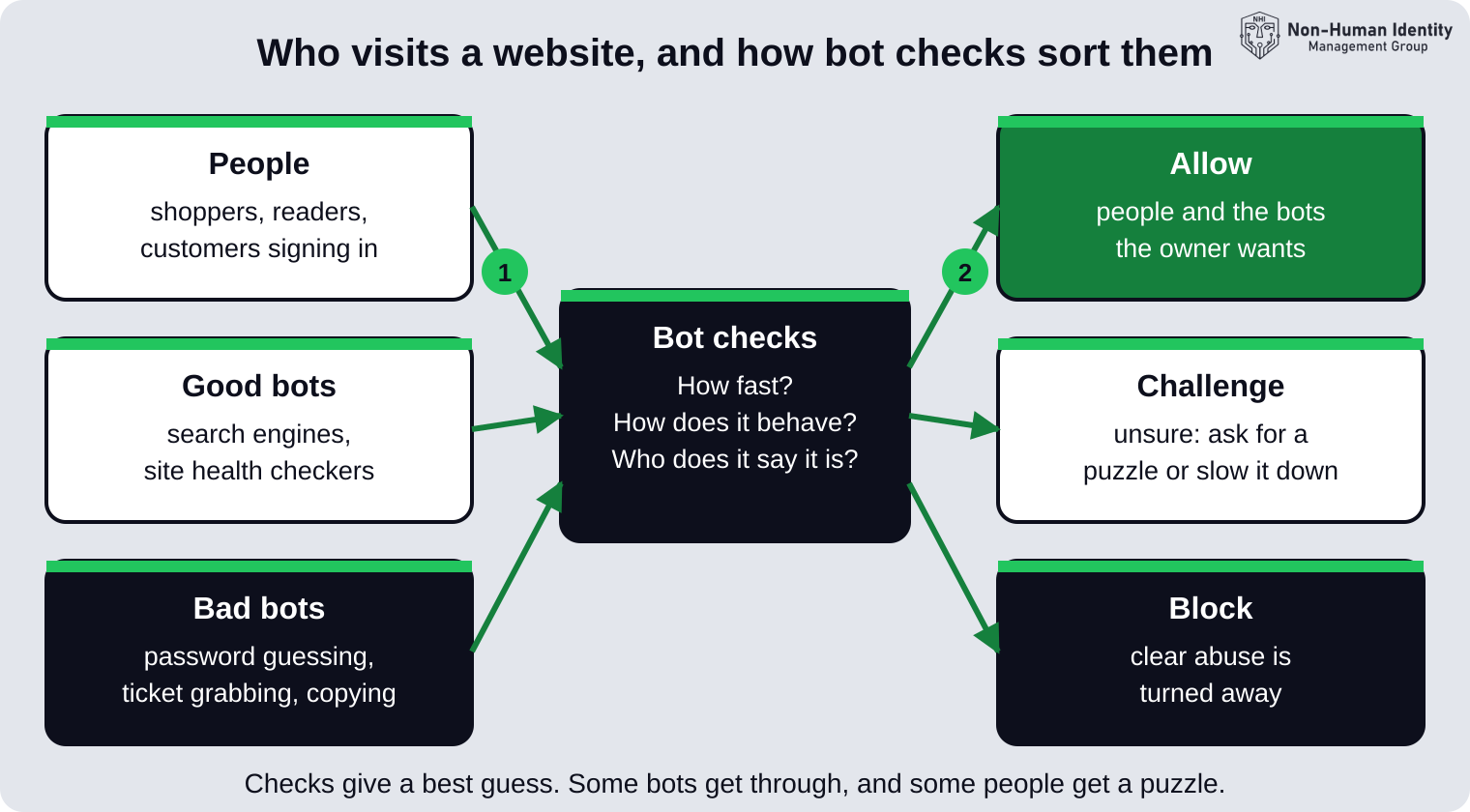
Here is how a website sorts its visitors, in simple steps.
- A visitor arrives. It may be a person, a good bot or a bad bot, and each one sends a short label saying what it claims to be.
- The site checks the rules file. Polite bots read robots.txt first and skip pages they are asked to avoid. The file is a request, not a lock, so bad bots can ignore it.[2][3]
- A bot check looks at behaviour. It looks at how fast the visitor moves, the patterns it follows and the device it uses. A tool that does this is called bot management.[1]
- The site decides. It allows people and wanted bots. It may ask an unsure visitor to solve a puzzle, called a CAPTCHA, or slow it down. Clear abuse is blocked.
- The owner reviews. Someone on the team checks what was blocked or challenged, so that genuine customers are not turned away by mistake.
A worked example
This story is made up to show how it can happen.
Nikos Papadopoulos looks after the website for Sole Verde Farms, a family olive farm in Italy. Each autumn the farm sells a small batch of fresh oil online. Loyal customers wait all year for it.
This year the batch sells out in under two minutes. Within a day, bottles appear on an auction site at three times the price. Regular customers email to complain that they never had a chance.
Nikos opens the shop's visit log. He sees a handful of addresses that added items to the basket and paid within seconds. He also sees hundreds of failed logins overnight, all from a few addresses.
He calls the farm's web host. They explain that the site has bot protection, but it is switched off. Together they turn it on for the checkout and login pages.
Nikos also limits each customer to two bottles. He asks customers to sign in before the sale opens, so new accounts made at the last minute stand out.
Then he looks at the robots.txt file. The farm is happy for search engines to list its pages. After talking to the owners, he adds a line asking one AI company's training crawler to stay away.
At the next release, the oil takes several hours to sell. Most orders come from names the farm knows. A few people are asked to solve a puzzle, and one writes in to say it was annoying, so Nikos keeps an eye on it.
What made the difference: Nikos treated the fast sell-out as a warning sign, not a success, and checked the log.
Myths and mistakes
| What people think | What is true |
|---|---|
| All bots are bad. | Many bots are useful. Without search engine crawlers, people could not find your site.[1] |
| robots.txt keeps bots out. | It is a polite request. Well-behaved bots follow it, but others can ignore it. It is not a security lock.[2][3] |
| More visitors always means more customers. | A jump in visits with no rise in sales can be bots. Compare the two. |
| A puzzle on the page stops every bot. | Puzzles slow simple bots down. Some bots, or people paid to solve puzzles, still get through. Use them as one layer. |
| My site is too small for bots to bother with. | Many bots visit sites automatically, whatever their size. Small shops and blogs get bot visits too. |
What can I do this week?
- Ask your web host or platform whether bot protection is available and switched on.
- Open your robots.txt file (add /robots.txt to your web address) and read what it asks.
- Decide with the site owner which AI crawlers, if any, you are happy to let in.
- Compare last month's visits with sales or sign-ups, and ask about any big gap.
- Turn on extra sign-in checks for your website's admin accounts.
Checklist
- I know the difference between a good bot and a bad bot.
- I know who looks after bot protection for our website.
- Our login and checkout pages have some form of bot check.
- Our robots.txt file says what we want it to say about search engines and AI crawlers.
- I know robots.txt is a request, not a lock.
- Someone reviews what the bot check blocks, so real customers are not turned away.
Common questions
Is all bot traffic bad?
No. Search engines, website health checks and many helpful tools are bots. The problem is bots that act against the owner's wishes, such as guessing passwords, grabbing stock or copying content. The aim of bot management is to sort the two, not to block every bot.
What is an AI crawler?
An AI crawler is a bot that an AI company sends to read web pages. Some gather pages to train AI models. Others fetch pages to answer a user's question. Some companies publish their crawler names, so site owners can allow or refuse each one.[4]
Can I block AI crawlers?
Often, yes. You can add a line to robots.txt naming a crawler you want to keep out, and companies that follow the rules should respect it. Bots that ignore the file need a bot check from your web host or a security service instead.[2][4]
Why do websites ask me to prove I am not a robot?
The site is unsure whether you are a person or a bot. A short puzzle or a tick box gives it more clues. It is annoying, but it helps protect logins and stock from bots. If it happens a lot, tell the site owner.
Where next?
Ready for the detail? Read the practitioner guide: Bot Management Guide. It goes further into how bot detection works, protecting login and checkout flows, and choosing and measuring a bot management approach.
Also useful:
- Botnets for Beginners
- DDoS Attacks for Beginners
- Account Takeover for Beginners
- AI Crawler and Scraper Controls
- CAPTCHA and bot challenges
Related NHI Mgmt Group resources: Web Scraping Defence Guide · Bot Management vs WAF · Bot Management Buyer's Guide
Key terms
- Bot traffic
- Requests to a website or app that come from software rather than from a person.
- Bad bot
- A program built to look like a normal visitor while it misuses a website at scale.
- Bot management
- The set of checks a website uses to spot automated visitors and decide whether to allow, challenge or block them.
- Robots.txt
- A file on a website that asks crawlers to avoid certain pages. Polite bots follow it, but it is not a lock.
- CAPTCHA
- A short puzzle or test that helps a website tell likely people from bots. It adds friction, not proof of who you are.
- Credential stuffing
- When bots try usernames and passwords stolen from one site on many other sites, hoping people reused them.
- Botnet
- A group of hacked devices that a criminal controls together, for example to flood a website.
Sources and further reading
- What is a bot? Cloudflare Learning Center. https://www.cloudflare.com/learning/bots/what-is-a-bot/, accessed 28 Nov 2026.
- Introduction to robots.txt. Google Search Central documentation. https://developers.google.com/search/docs/crawling-indexing/robots/intro, accessed 28 Nov 2026.
- RFC 9309: Robots Exclusion Protocol. Internet Engineering Task Force (IETF), September 2022 ("These rules are not a form of access authorization"). https://www.rfc-editor.org/rfc/rfc9309.html, accessed 28 Nov 2026.
- Overview of OpenAI crawlers. OpenAI developer documentation. https://developers.openai.com/api/docs/bots, accessed 28 Nov 2026.
- 2025 Bad Bot Report. Imperva (a Thales company), 2025 (automated traffic 51% of all web traffic; bad bots 37%). https://www.imperva.com/resources/resource-library/reports/2025-bad-bot-report/, accessed 28 Nov 2026.