A distributed denial-of-service (DDoS) attack is a deliberate attempt to make a website or online service unusable by flooding it, or the network around it, with more traffic than it can handle, sent from many machines at once.
This guide is for newcomers, students, career changers and managers who are not security specialists. It explains what a DDoS attack is, why it matters even to small organisations, how an attack unfolds, what defenders do about it and the simple steps you can take this week. It stays at concept level: it explains how to spot, reduce and respond to attacks, not how to run one.
By the end of this guide you will be able to:
- Explain what a DDoS attack is and how it differs from a data breach.
- Describe the three main families of DDoS attack in plain words.
- Understand why most defence happens upstream, at your provider.
- Identify three practical steps to get ready before an attack.
Key takeaways
- DDoS is about disruption, not theft. The aim is to stop real customers getting through, which can cost money and trust even when no data is stolen.
- The traffic comes from many places. Attackers usually use a botnet, a crowd of hijacked computers and devices, so blocking one address rarely helps.
- Most organisations cannot absorb a large flood alone. Internet providers, content delivery networks and specialist mitigation services do much of the heavy lifting.
- Preparation decides the outcome. Knowing what matters most, what your providers already offer and who to call shortens an outage far more than improvising on the day.
- Not every slowdown is an attack. A popular sale or a software fault can look the same, so confirm the cause before you react.
What it is, in plain English
A denial-of-service (DoS) attack tries to stop a service working for the people who should be able to use it. When the traffic comes from many sources at the same time, it is called a distributed denial-of-service attack, or DDoS. Cloudflare's learning centre defines a DDoS attack as a malicious attempt to disrupt normal traffic to a server, service or network by overwhelming it, or its surrounding infrastructure, with internet traffic from multiple compromised systems.[1]
MITRE ATT&CK, a public catalogue of attacker behaviour, describes two broad routes. Network Denial of Service (technique T1498) uses up the bandwidth a service depends on, and lists motives such as political aims, hacktivism, extortion and distraction.[6] Endpoint Denial of Service (T1499) exhausts the resources of the systems that host the service, such as the operating system, web server or database, without needing to fill the network pipe.[7]
A helpful comparison is a shop on a busy high street. Imagine thousands of people, hired by a rival, crowding the doorway and asking staff pointless questions. Nobody steals anything, but genuine customers cannot get in, so the shop loses a day of trade. Where the analogy breaks down: online, the "crowd" is usually made of hijacked computers whose owners have no idea they are taking part, and the flood can arrive from every country at once and stop within minutes.
Why it matters to you
- If you run a small business: your online shop, booking page or email may sit with a hosting company. Knowing what protection your plan includes, and how to reach support quickly, matters more than buying extra tools.
- If you are new to a security job: you may be the first person to see an alert or a flood of helpdesk calls. Being able to tell a real attack from a busy day, and knowing who to escalate to, is a core skill.
- If you are a manager: a DDoS attack is a business continuity problem as much as a technical one. Decisions about how much to spend on scaling, when to accept a reduced service and how to talk to customers belong to you.
The UK National Cyber Security Centre (NCSC) notes that a determined attacker can usually send more traffic than most organisations can handle on their own, which is why its guidance puts so much weight on protection provided upstream by internet service providers and other services.[3] It also warns that a DoS attack may be a diversion from another attack or come in waves, so the response should keep watching the rest of the system.[5]
How it works, step by step
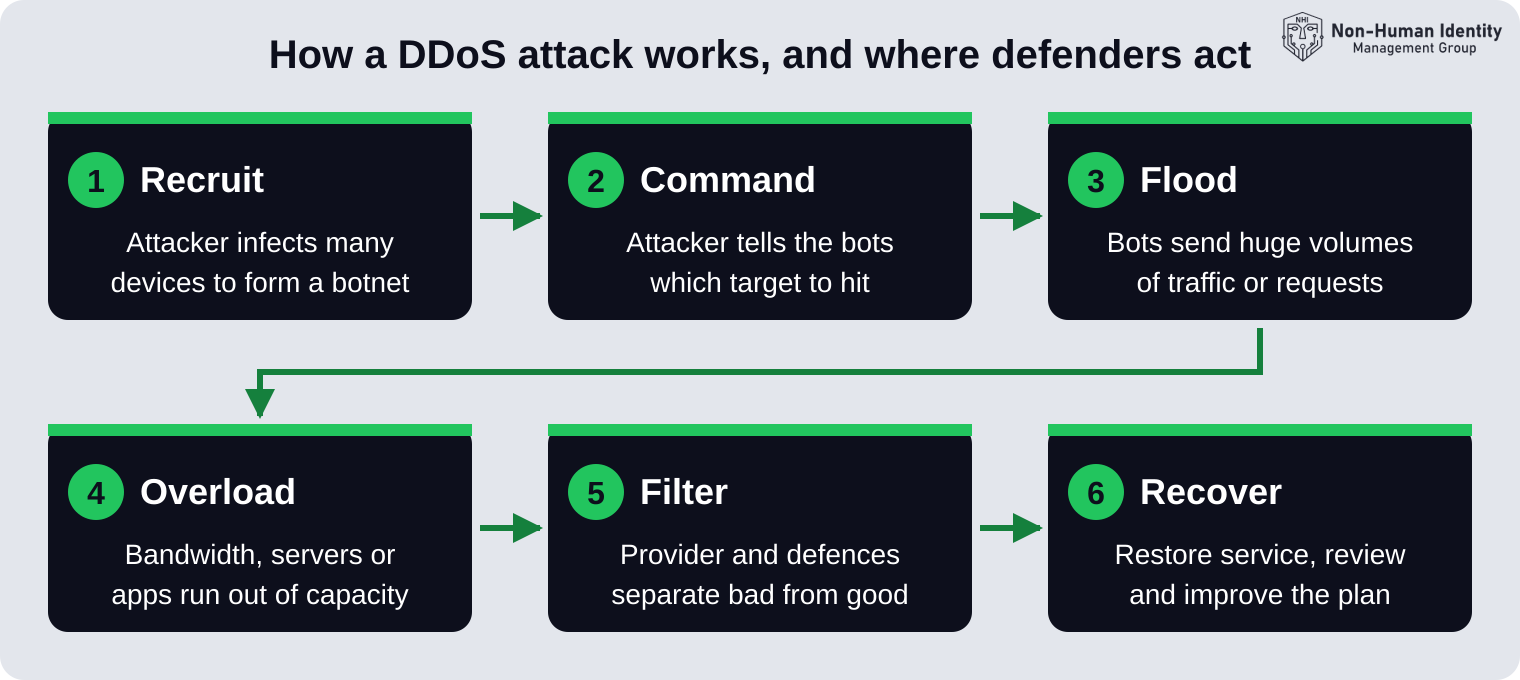
Attacks differ in detail, but most follow the same broad pattern. The steps below explain the idea, not how to carry one out.
- Recruit. The attacker builds or rents a botnet: computers, routers, cameras and other internet-connected devices infected with malware so they can be controlled remotely. Each one is a real device on the internet, which makes its traffic hard to separate from normal visitors.[1]
- Command. The attacker tells the bots which target to hit and what kind of traffic to send.
- Flood. The bots send large volumes of traffic or requests. Some attacks also spoof (fake) the sender's address, to hide where traffic comes from or to bounce it off other servers.[6]
- Overload. Something runs out of capacity: the internet connection, a firewall or load balancer that has to track connections, or the web application itself.
- Disruption. Real users see slow pages, errors or nothing at all. NCSC guidance says the first job is to clarify what is happening, using monitoring data and non-technical clues such as helpdesk tickets and social media.[5]
- Filter and recover. Defences and providers separate attack traffic from real traffic, the service is restored, temporary measures are removed and the team reviews what happened.[5]
The three main families
Security teams usually group attacks by what they use up. A joint guide from the US Cybersecurity and Infrastructure Security Agency (CISA), the FBI and MS-ISAC uses the same three groups.[8]
| Family | What it uses up | Everyday picture | Typical defence |
|---|---|---|---|
| Volumetric | The bandwidth between you and the internet[8] | So many lorries on the road that nothing else reaches the shop | Upstream filtering ("scrubbing") by your provider or a mitigation service[3] |
| Protocol (state exhaustion) | Connection tracking in servers, firewalls and load balancers[1] | Phone lines held open by callers who never speak | Provider filtering and equipment tuned to cope with half-open connections |
| Application layer | The web application, its pages and database[1] | Everyone pressing "refresh" on the same page at once | Content delivery network, web application firewall, rate limiting[5] |
Two words come up often. Reflection means the attacker sends requests that appear to come from the victim, so other servers send their replies to the victim. Amplification means each small request triggers a much larger reply. MITRE groups these together as Reflection Amplification (T1498.002).[6] A long-standing internet practice called ingress filtering, published as BCP 38 (RFC 2827) in May 2000, asks network providers to drop traffic that carries addresses their customers do not own, which makes this kind of spoofing harder.[9]
Where the defences sit
- Your internet or hosting provider: NCSC suggests finding out which DoS protections are already included in your account, which cost extra, and how quickly extra protection can be switched on.[3]
- A content delivery network (CDN): a spread-out network of servers that delivers your website from many locations, making it much harder to overwhelm, and able to rate-limit busy pages.[3]
- Scaling: cloud services can add capacity automatically, but NCSC points out that cloud capacity is finite and scaling can be costly, so decide in advance when you would accept a reduced service instead.[4]
- Your own settings: rate limiting, allow and deny lists, geo-blocking and the ability to switch off heavy features, such as site search, during an attack.[5]
A worked example
Harbour Ferries is a fictional company with 60 staff that sells tickets online. Its website runs on a cloud platform. Leila is the IT lead and Tom runs customer service.
Earlier in the year, Leila spent an afternoon on preparation. She listed the ticket site and the booking database as the services that matter most. She checked the cloud provider's documentation and support plan to see what DoS protection was included, put the site behind a CDN, and wrote a one-page plan: who to call, how to reach the provider's support, and which features could be switched off to save capacity. Tom agreed the wording for a customer notice.
On a Friday evening before a bank holiday, the site slows to a crawl. Tom's team reports a spike in complaints. Leila checks the monitoring: page requests are many times higher than normal, coming from thousands of addresses in many countries, and they all hit the search page. Ticket sales are not rising. It does not look like a busy holiday rush.
Leila follows the plan. She raises a priority ticket with the provider, turns on the CDN's stricter rate limit for the search page and temporarily disables search, so people can still buy tickets from the timetable page. Tom posts the agreed notice on social media. Within the hour the site is slow but usable. The provider's filtering catches most of the flood later that evening.
The next week, Leila removes the temporary limits, re-enables search and holds a short review. They decide to test the plan twice a year and to ask the provider in writing how quickly extra protection can be switched on. The attack still cost them an evening of reduced sales, but preparation kept it from becoming a full outage.
Myths and misunderstandings
| What people think | What is true |
|---|---|
| Only big companies get DDoS attacks. | Attacks are cheap to launch and are used for extortion, protest and distraction, so smaller organisations and public services are targeted too. |
| A firewall will stop it. | A large flood can fill your internet connection before it reaches your firewall. Upstream protection from providers matters most for big attacks. |
| A DDoS attack means data was stolen. | DDoS is about availability. It can, though, be used as a distraction, so check for other suspicious activity during and after an attack. |
| Cloud hosting makes you immune. | Cloud helps you scale, but capacity and budgets are finite and providers may throttle a service to protect other customers. |
| Blocking the attacker's address ends it. | Traffic comes from thousands of devices and the addresses may be faked, so blocking single addresses rarely helps on its own. |
Key terms
- Distributed denial-of-service (DDoS)
- An attack that uses many sources to send enough traffic to a target that legitimate users can no longer get through. The aim is disruption, not theft.
- Botnet
- A collection of compromised devices that an attacker can control remotely, often used as distributed traffic generators in DDoS attacks.
- Amplification
- An attack pattern where a small request triggers a much larger response from another system, multiplying the traffic aimed at the victim.
- SYN flood
- A protocol attack that overwhelms a server with connection requests that are never completed, so it runs out of room for real connections.
- HTTP flood
- An application layer attack that sends many normal-looking web requests to exhaust a web application or server.
- Content delivery network (CDN)
- A distributed set of servers that delivers web content from locations closer to users, which also helps absorb traffic spikes.
- Rate limiting
- A control that restricts how many requests a caller can make within a set period.
- DDoS mitigation
- The set of controls, such as filtering, redundancy, routing and monitoring, used to keep services reachable when they are flooded with malicious traffic.
- Anycast
- A routing method where many servers share the same address and traffic goes to the nearest or healthiest one, spreading load across locations.
Common questions
What is the difference between DoS and DDoS?
A DoS attack can come from a single source. A DDoS attack comes from many sources at once, which makes it larger and harder to block.[6]
How can I tell if it is an attack or just a busy day?
Look at the pattern. A real rush usually brings more sales or sign-ups; an attack often hammers one page or comes from unusual places without any business result. NCSC suggests checking monitoring data alongside helpdesk tickets and social media before deciding.[5]
Who should I call first?
Usually your internet, hosting or cloud provider, because they can filter traffic before it reaches you. Have their support route written down in advance.
Does DDoS protection come with my hosting?
Often some basic protection does, but the level varies by provider and plan. Ask what is included, what costs extra and how quickly extra protection can be turned on.[3]
Should we pay if attackers demand money to stop?
We suggest you do not engage alone: contact your provider and report the incident through your national reporting route. Paying gives no assurance the attack will stop.
Is there a formal control for this?
Yes. NIST SP 800-53, a widely used US security control catalogue, includes control SC-5, Denial-of-service Protection.[10]
First steps
Three things you can do this week:
- List what matters most. Write down the two or three online services that would hurt most if they went down, and what each depends on (hosting, DNS, payment provider). NCSC guidance starts with exactly this: understand your service, then your defences, then plan and test your response.[2]
- Ask your providers. Find out what DoS protection your internet, hosting or cloud provider already includes, what costs extra, how to reach urgent support and whether they will tell you when they act.
- Write a one-page plan. Who decides, who calls the provider, which features can be switched off temporarily and how you will update customers. Any emergency change, such as blocking a country or disabling a feature, should be approved, recorded and removed once the attack ends.
Checklist
- We know which services are most critical and what they depend on.
- We know what DDoS protection our providers include, and how to switch on more.
- Our public website sits behind a CDN or a provider with DDoS mitigation.
- Our origin server address is not published where attackers can easily find it.
- We have contact details for urgent provider support stored outside our main systems.
- We have monitoring that shows normal traffic levels, so we can spot a spike.
- We have a short response plan, with temporary measures that are approved and time-limited.
- We have agreed in advance how much we will spend on scaling during an attack.
- We test or walk through the plan at least once a year.
Simple measures that show progress: time to detect a traffic spike, time to reach the provider, how long the service was degraded, and whether the plan was tested this year.
Check your understanding
1. Why is a DDoS attack hard to stop by blocking addresses?
Answer: the traffic comes from thousands of hijacked devices, and some attacks fake the sender's address, so there is no single source to block.
2. Which family of attack fills your internet connection, and where is it best handled?
Answer: a volumetric attack. It is best handled upstream, by your provider or a mitigation service, before it reaches your network.
3. Why should you confirm the cause before reacting to a slowdown?
Answer: a genuine rush of customers or a software fault can look like an attack, and blocking real users would make things worse.
4. Why keep watching other systems during a DDoS attack?
Answer: the attack may be a distraction from another intrusion, or come in waves.
Suggested learning pathway
- Start with how traffic moves in Networking Fundamentals for Beginners.
- Learn how attackers build their crowds in Botnets for Beginners.
- See the wider picture in Network Security for Beginners.
- For application layer protection, read Web Application Firewalls for Beginners.
- For keeping the business running, read Business Continuity and Disaster Recovery for Beginners.
- For the full practitioner design, see the DDoS Protection Guide.
- For web request floods in depth, see the HTTP Flood and Layer 7 DDoS Guide.
- For a step-by-step response, use the DDoS Response Playbook.
Standards and references
- What is a DDoS attack? Cloudflare Learning Center, Cloudflare. https://www.cloudflare.com/learning/ddos/what-is-a-ddos-attack/, accessed 27 Nov 2026.
- Denial of Service (DoS) guidance. National Cyber Security Centre (NCSC). https://www.ncsc.gov.uk/collection/denial-service-dos-guidance-collection, accessed 27 Nov 2026.
- Preparing for denial of service (DoS) attacks: Upstream defences. National Cyber Security Centre (NCSC). https://www.ncsc.gov.uk/collection/denial-service-dos-guidance-collection/preparing-denial-service-dos-attacks1/upstream-defences, accessed 27 Nov 2026.
- Preparing for denial of service (DoS) attacks: Scaling. National Cyber Security Centre (NCSC). https://www.ncsc.gov.uk/collection/denial-service-dos-guidance-collection/preparing-denial-service-dos-attacks1/scaling, accessed 27 Nov 2026.
- Responding to a denial of service (DoS) attack. National Cyber Security Centre (NCSC). https://www.ncsc.gov.uk/collection/denial-service-dos-guidance-collection/a-minimal-denial-of-service-response-plan, accessed 27 Nov 2026.
- Network Denial of Service, Technique T1498. MITRE ATT&CK Enterprise, v20. https://attack.mitre.org/techniques/T1498/, accessed 27 Nov 2026.
- Endpoint Denial of Service, Technique T1499. MITRE ATT&CK Enterprise, v20. https://attack.mitre.org/techniques/T1499/, accessed 27 Nov 2026.
- Understanding and Responding to Distributed Denial-of-Service Attacks. CISA, FBI and MS-ISAC. https://www.cisa.gov/resources-tools/resources/understanding-and-responding-distributed-denial-service-attacks, accessed 27 Nov 2026.
- RFC 2827 (BCP 38): Network Ingress Filtering: Defeating Denial of Service Attacks which employ IP Source Address Spoofing. IETF, May 2000. https://www.rfc-editor.org/rfc/rfc2827.
- SP 800-53 Rev. 5, Security and Privacy Controls for Information Systems and Organizations (control SC-5). National Institute of Standards and Technology (NIST). https://csrc.nist.gov/pubs/sp/800/53/r5/upd1/final.
Related NHI Mgmt Group resources: DDoS Readiness Checklist, DNS Amplification Attack Guide and Incident Response for Beginners.