Account takeover (ATO) is when someone who should not have access gets into a real, legitimate account, such as a staff email, a cloud login or a customer account, and then uses it as if they were the owner.
This guide is for newcomers, students, career changers and managers who are not security specialists. It is the umbrella page for the different ways accounts get taken over, including phishing, credential stuffing, password spraying, infostealer malware and session theft. Each of those has its own beginner guide, linked below; here you will see how they fit together, what happens after an attacker gets in, and what an organisation can do to make takeovers harder, spot them sooner and recover well.
By the end of this guide you will be able to:
- Explain what account takeover means and why it is hard to spot.
- Describe the main ways attackers get into accounts.
- Understand what attackers do after they get in.
- Identify practical steps to reduce, detect and respond to takeovers.
Key takeaways
- The attacker looks like the real user. Because they use a genuine account, many security tools see a normal sign-in, not an attack.
- There are a few common ways in. Stolen or guessed passwords, tricked sign-ins, malware that copies saved logins, and stolen session cookies cover most cases.
- Software accounts get taken over too. API keys, tokens and service accounts are identities, and a stolen one gives an attacker the same access.
- Strong sign-in methods make takeovers much harder. Multi-factor authentication helps, and phishing-resistant methods such as passkeys help most.
- Recovery is more than a password reset. You also need to end active sessions and remove anything the attacker added, such as a new device or mail rule.
What it is, in plain English
Every account has a way to prove who is signing in, usually a username and password, and often a second check. In account takeover, an attacker gets hold of whatever proves "I am the owner", signs in, and then acts with the owner's access. The account is real; only the person using it is wrong.
This matters because most security is built around the idea that a successful sign-in means the right person is there. MITRE ATT&CK, a public catalogue of attacker behaviour, lists the use of legitimate accounts as technique T1078 Valid Accounts, and notes it can be used to get in, stay in and gain more access.[5]
Accounts do not only belong to people. A non-human identity (NHI) is an identity with an account and credentials that represents a machine, device or software workload, such as an application, a script or an AI agent. NHIs use credentials such as API keys and tokens. If one is stolen, the attacker can take over that software identity in the same way, often with no second check at all.
A helpful comparison is a stolen house key. A burglar with your key does not need to break a window, so neighbours see nothing unusual: someone simply opens the front door. Where the analogy breaks down: a burglar has to be physically there, while an attacker can try thousands of stolen online "keys" from anywhere in the world, automatically, in minutes.
Why it matters to you
- If you run a small business: a taken-over email account can be used to send fake invoices to your customers, reset your other passwords and read sensitive files.
- If you are new to a security job: suspicious sign-ins and compromised accounts are among the most common alerts you will handle, so knowing the pattern helps from day one.
- If you are a manager: a single taken-over account can lead to a data breach, fraud and regulatory reporting. Investment in stronger sign-in and quick response pays off across the whole organisation.
A real example shows the scale. In 2024, Mandiant reported that a group it tracks as UNC5537 used stolen customer credentials to access accounts on the Snowflake cloud data platform, and that Mandiant and Snowflake had notified about 165 potentially exposed organisations.[1] The credentials had been captured earlier by infostealer malware on computers that Snowflake did not own, the affected accounts did not have multi-factor authentication turned on, and some credentials had not been changed for as long as four years.[1] Mandiant found that at least 79.7% of the accounts the group used had earlier credential exposure.[1] Our Snowflake Breach 2024 page covers the lessons in more detail.[1]
How it works, step by step
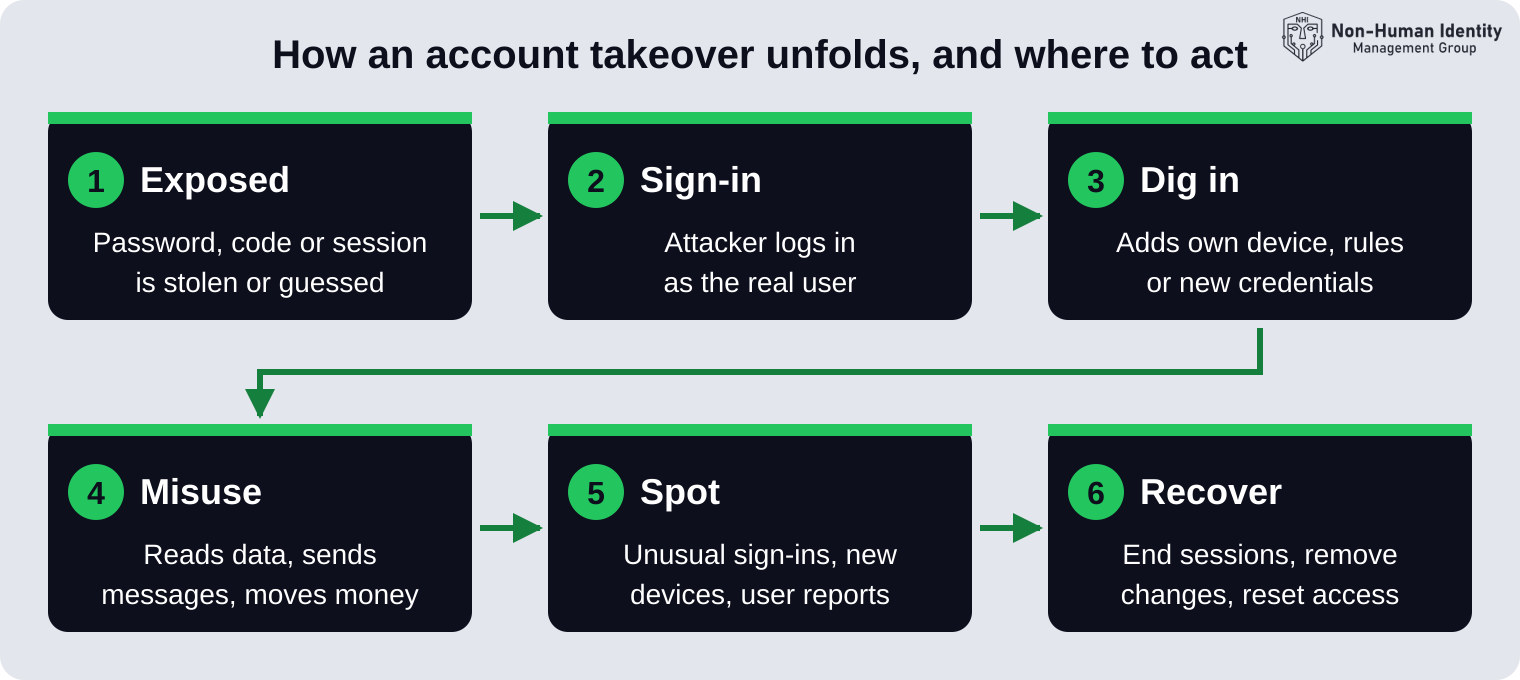
Takeovers vary, but most follow a similar pattern. Knowing it helps you see where defences fit. This is a concept-level overview for defenders.
- Credentials are exposed. The attacker obtains something that proves identity. Common routes are:
- Phishing: a fake message or website tricks someone into typing their password or approving a sign-in (ATT&CK T1566).[5]
- Credential stuffing: username and password pairs leaked from one site are tried on other sites, which works when people reuse passwords (ATT&CK T1110.004).[4][5]
- Password spraying: one common, weak password is tried against many accounts (ATT&CK T1110.003).[4][5]
- Infostealer malware: malicious software on a device copies saved passwords and browser data and sends them to criminals.[1]
- Session theft: the attacker steals a session cookie, the small token a website uses to remember that you have already signed in, and uses it without needing the password (ATT&CK T1539).[5]
- The attacker signs in. They log in as the real user. If there is a second check, they may try to get past it, for example by tricking the user into reading out a code, or by sending repeated approval prompts until the user taps "approve", known as MFA fatigue (ATT&CK T1621).[2][5]
- The attacker digs in. To keep access, they may register their own MFA device, create mail forwarding rules, grant access to a connected app or create new credentials.
- The attacker misuses the account. They read or download data, send messages that look trusted, change payment details or use the account to reach other systems.
- The organisation spots it. Signs include sign-ins from unusual places or devices, a new MFA method being added, new forwarding rules, or the real user reporting something odd.
- The organisation recovers. It ends active sessions, removes anything the attacker added, resets credentials and checks what was accessed.
Which defence helps where
| Way in | Defences that make it harder |
|---|---|
| Phishing | Phishing-resistant MFA such as passkeys and security keys; user awareness; reporting buttons.[2] |
| Credential stuffing | MFA; checking passwords against lists of breached passwords; limits on repeated attempts.[3][4] |
| Password spraying | Blocking common passwords; MFA; watching for many accounts failing from one source.[3][4] |
| Infostealer malware | Endpoint protection; not saving work passwords in unmanaged browsers; MFA; changing exposed credentials quickly.[1] |
| Session theft | Short session lifetimes; letting users and admins end sessions; re-checking identity for sensitive actions.[4] |
| MFA fatigue | Phishing-resistant MFA, or number matching where that is not yet possible.[2] |
Useful distinctions
- Not all MFA is equal. The US Cybersecurity and Infrastructure Security Agency (CISA) calls phishing-resistant MFA the "gold standard" and says FIDO/WebAuthn is the only widely available form. It describes SMS and voice codes as vulnerable to phishing and SIM swap attacks.[2]
- Credential theft and session theft are different. Stealing a password lets an attacker sign in; stealing a session cookie lets them skip sign-in, and with it any MFA check that already happened.
- Account takeover is not the same as a fake new account. Takeover uses an existing, trusted account. Creating fraudulent new accounts is a separate problem.
- Software identities need different controls. A static API key stays valid until someone changes it, so it should be stored securely, rotated and removed when no longer needed. Short-lived credentials expire on their own, so the focus is on who can obtain them and how much access they give.
A worked example
Greenfield Accountants is a fictional practice with 25 staff using a cloud email and file service. Staff sign in with a password and a code from a phone app.
On Monday, Tom, a junior accountant, receives an email that looks like a shared-document notice. He clicks the link and signs in on a convincing fake page, including typing his app code. The page passes his details to the attacker, who signs in as Tom within minutes.
The attacker creates a mail rule that moves any email containing the word "invoice" into a hidden folder, then starts reading Tom's messages to clients.
On Tuesday morning the practice's IT provider, Aisha, gets an alert: Tom's account signed in from another country an hour after signing in from the office. She also sees the new mail rule. She calls Tom, who confirms he is at his desk and did not travel.
Aisha follows the practice's account takeover checklist. She ends all of Tom's active sessions, resets his password, removes the mail rule, checks that no new MFA method or connected app was added, and reviews which files and emails were opened. Two clients had received a message from Tom's account asking them to "use new bank details"; the practice phones both clients to warn them before any money moves.
Afterwards, the practice moves its staff from app codes to passkeys, starting with partners and the finance team. That change makes fake sign-in pages much less useful in future, but it does not end the need for alerts and a response plan, because other routes, such as stolen session cookies, still exist.
Myths and misunderstandings
| What people think | What is true |
|---|---|
| If we have MFA, accounts cannot be taken over. | MFA makes takeover much harder, but codes can be phished, prompts can be approved by mistake and session cookies can be stolen. Phishing-resistant MFA closes more of these gaps. |
| Resetting the password fixes a taken-over account. | The attacker may still have an active session, a registered device, a mail rule or an app connected to the account. All of these need removing. |
| Only careless people get phished. | Good phishing is convincing and well timed. Strong sign-in methods and easy reporting matter more than blaming people. |
| Account takeover only affects people. | API keys, tokens and service accounts can be stolen and used in the same way, often with no MFA at all. |
| Small organisations are not targets. | Much credential stuffing and spraying is automated and untargeted, so any account with a reused or weak password can be tried. |
Key terms
- Account takeover
- Unauthorised use of a legitimate account after an attacker obtains valid access through stolen credentials, tokens or trusted integrations.
- Phishing
- Using deceptive messages or websites to trick people into revealing credentials, running malware, approving access or sending money.
- Credential stuffing
- Trying stolen username and password pairs from earlier breaches on other services, which works because many people reuse passwords.
- Password spraying
- Trying a small set of common passwords against many accounts to avoid lockouts and detection.
- Infostealer
- Malware that collects saved passwords, browser session cookies and other files, then uploads them to the attacker.
- Session hijacking
- Taking over a session after the real user has signed in, by using their session token instead of their password.
- Multi-factor authentication (MFA)
- Requiring two or more independent proofs of identity before access is granted, which reduces the chance that a stolen password alone opens an account.
- Phishing-resistant MFA
- MFA that cannot easily be replayed, intercepted or socially engineered, usually device-bound or cryptographic methods such as passkeys and security keys.
- MFA fatigue
- Repeated sign-in prompts that pressure a person into approving access without checking carefully.
- Passkey
- A passwordless credential based on public key cryptography, where the private key stays on the user's device.
Common questions
What is the most common way accounts are taken over?
It varies by organisation and year, but stolen or reused passwords, phishing and infostealer malware are all frequent routes. The Snowflake incident, for example, relied on credentials captured by infostealers.[1]
Does MFA stop account takeover?
It makes it much harder, and OWASP describes MFA as the best defence against most password attacks.[4] Some types can still be phished, so CISA urges organisations to move to phishing-resistant MFA.[2]
What should I do first if I think an account is taken over?
Follow your organisation's incident process. Typically that means ending the account's active sessions, resetting its credentials, removing anything the attacker added and checking what they accessed. Tell your security or IT team straight away.
Can an API key or service account be taken over?
Yes. A stolen key or token gives the attacker the same access as the software that owns it. Keep these credentials out of code, give them only the access they need and remove them when unused.
Are long passwords still worth it?
Yes, alongside MFA. NIST's SP 800-63B-4 guidance requires services to check new passwords against a blocklist of commonly used and compromised passwords.[3] A unique password for each service limits the damage from credential stuffing.
How do services slow down password guessing?
By limiting repeated failed attempts. NIST SP 800-63B-4 sets an upper bound of 100 consecutive failed attempts on an authenticator before it is disabled, and services may set lower limits.[3]
First steps
Three things you can do this week:
- Turn on MFA for every email, cloud and admin account, starting with administrators and finance staff, and plan a move to passkeys or security keys where your services support them.
- Write a one-page takeover checklist covering who to call, how to end sessions, how to reset credentials and what to check for (new devices, mail rules, connected apps).
- Check alerts are switched on for sign-ins from new countries or devices and for new MFA methods being registered, and make sure someone reads them.
Checklist
- MFA is on for every staff account, with no exceptions left open by accident.
- Administrators and finance staff use phishing-resistant MFA, or have a plan to.
- New passwords are checked against lists of breached and common passwords.
- Repeated failed sign-ins are limited and alerted on.
- Staff know how to report a suspicious email or sign-in prompt quickly.
- We can end all active sessions for an account in minutes.
- Our takeover checklist includes removing mail rules, new devices and connected apps.
- API keys and service account credentials are stored securely, scoped tightly and removed when unused.
Simple measures that show progress: the percentage of accounts with MFA, the percentage using phishing-resistant MFA, the time from alert to ending an attacker's sessions, and the number of confirmed takeovers each quarter.
Check your understanding
1. Why is account takeover hard to spot?
Answer: because the attacker uses a real account, so the sign-in can look normal to security tools.
2. What is the difference between credential stuffing and password spraying?
Answer: credential stuffing tries leaked username and password pairs from other sites; password spraying tries one common password across many accounts.
3. Why is a password reset not enough after a takeover?
Answer: the attacker may still have an active session, a registered device, a mail rule or a connected app, all of which must be removed.
4. Can software identities be taken over?
Answer: yes. Stolen API keys, tokens and service account credentials give an attacker the same access as the software they belong to.
Suggested learning pathway
- The most common way in: Phishing for Beginners.
- Reused passwords tried at scale: Credential Stuffing for Beginners.
- One password against many accounts: Password Spraying for Beginners.
- Malware that copies saved logins: Infostealers for Beginners.
- How session theft works: Session Tokens and Cookies for Beginners.
- The main defence explained: Multi-Factor Authentication for Beginners.
- Software accounts that can be taken over too: Non-Human Identities for Beginners.
- Practitioner depth on defences: Account Takeover Prevention Guide.
- Step-by-step response for practitioners: Account Takeover Response Playbook.
Standards and references
- UNC5537 Targets Snowflake Customer Instances for Data Theft and Extortion. Mandiant, Google Cloud Threat Intelligence blog, 10 June 2024. https://cloud.google.com/blog/topics/threat-intelligence/unc5537-snowflake-data-theft-extortion, accessed 27 Nov 2026.
- Implementing Phishing-Resistant MFA (fact sheet). Cybersecurity and Infrastructure Security Agency (CISA). https://www.cisa.gov/sites/default/files/publications/fact-sheet-implementing-phishing-resistant-mfa-508c.pdf, accessed 27 Nov 2026.
- SP 800-63B-4, Digital Identity Guidelines: Authentication and Authenticator Management. National Institute of Standards and Technology (NIST), August 2025. https://pages.nist.gov/800-63-4/sp800-63b.html, accessed 27 Nov 2026.
- Credential Stuffing Prevention Cheat Sheet. OWASP Cheat Sheet Series, OWASP Foundation. https://cheatsheetseries.owasp.org/cheatsheets/Credential_Stuffing_Prevention_Cheat_Sheet.html, accessed 27 Nov 2026.
- MITRE ATT&CK Enterprise techniques T1078 Valid Accounts, T1110.003 Password Spraying, T1110.004 Credential Stuffing, T1539 Steal Web Session Cookie, T1566 Phishing and T1621 Multi-Factor Authentication Request Generation. The MITRE Corporation. https://attack.mitre.org/techniques/T1078/, accessed 27 Nov 2026.
Related NHI Mgmt Group resources: Credential Theft vs Session Hijacking · How to check a recovered account for leftover persistence · Account Takeover Statistics