Business text messaging means a company sending texts to customers from software, not from a person's phone.
This guide is for small business owners, marketers and anyone new to sending texts for work. You do not need to be technical to be affected: if your appointment reminders or offers stop arriving, or a scammer copies your name, it is your customers who notice first.
In short
- Phone networks treat texts sent by software differently from texts between friends, and they want to know who is sending them.
- In the US, firms texting from ordinary ten-digit numbers register their business and the purpose of their texts through their messaging provider.
- Registered senders tend to have fewer texts filtered. Unregistered texts can face extra fees and more filtering.
- Get clear permission, name yourself in every text, honour STOP, and never ask customers for passwords or codes by text.
What you will learn
- Explain what sender registration is and why phone networks ask for it.
- Spot the details a registration form will ask you for.
- Check that your texts are easy for customers to trust and to stop.
- Ask your messaging provider the right questions.
- Business texts (A2P messaging)
- texts sent from an app or system to a person, short for application to person.
- Sender name or number (sender ID)
- what the customer sees as the sender at the top of the text.
- Texting company (messaging provider)
- the service your business uses to send texts in bulk.
What is business text messaging?
Think of a market where every stall needs a pitch licence. The organiser checks who you are and what you sell before you get a pitch. Shoppers then know that someone has looked at each stall.
Business texting works in a similar way. Phone numbers were first built for people texting people. When a company sends texts from software, phone networks want to know who the company is and what kind of texts it sends. In the US, this check is called 10DLC registration, short for ten-digit long code, which just means an ordinary-looking phone number.[1]
You register two things. The brand is the business the customer thinks is texting them. The campaign is the kind of texts you send, such as reminders or offers.[1] Most firms do this through their messaging provider, not directly.
Other countries use other systems. In the UK, banks and public bodies can protect the sender names they use, and copycat versions of those names can be blocked.[5] Messaging providers then ask for proof before they let anyone send under a protected name.[6]
Where the comparison stops working: a licence covers the stall, not every item on it. Registration tells networks who you say you are. It does not prove that each single text is genuine, so customers still need to stay alert.
Why does it matter?
Texts are a favourite tool for scammers, because a text looks personal and short. Registration helps phone networks see who is sending what, which helps genuine texts get through.[1]
If you run a small business
What could happen: your reminders are filtered, customers miss bookings and you pay extra fees for unregistered texts.
Check this: ask your messaging provider whether your brand and campaign are registered and approved.
Next: A2P SMS Security Guide
If you work in marketing
What could happen: you text people who never agreed, they report it as spam, and your sending gets restricted.
Check this: keep a record of how and when each person agreed to receive texts.
Next: CAN-SPAM and TCPA Guide
If you look after the texting account
What could happen: someone logs in to the account with a stolen password and sends scam texts in your name.
Check this: turn on two-step login and keep the list of people with access short.
What does it look like?
Here is a made-up summary of what a business might send to its messaging provider, plus one sample text.
Example only. All values are made up.
BRAND
Legal name:   Fern Pharmacy EXAMPLE Ltd         (1)
Tax number:   00-0000000-FAKE                    (2)
Website:      fern-pharmacy.example.com
CAMPAIGN
Use:          Prescription ready reminders      (3)
How people agree: tick box at the counter tablet (4)
Sample text:  "Fern Pharmacy: your prescription is ready
               to collect. Reply STOP to opt out."  (5)
- In a real file, this line would contain the business's exact legal name, matching official records.
- In a real file, this line would contain the business tax number, which helps networks check the firm exists.
- The kind of texts the firm will send. Offers would be a different use.
- How customers agree to get texts. Networks want this written down.
- A sample text: it names the sender and says how to stop.
Why this is risky: details that do not match can delay or sink the registration. So can sample texts without the firm's name or an opt-out. Texts sent while unregistered may cost more and face more filtering.[3]
The safer way: fill in the form with details that match your official records and your website. Write sample texts that look like the real ones you will send. Keep proof of how each person agreed.
How does it work?
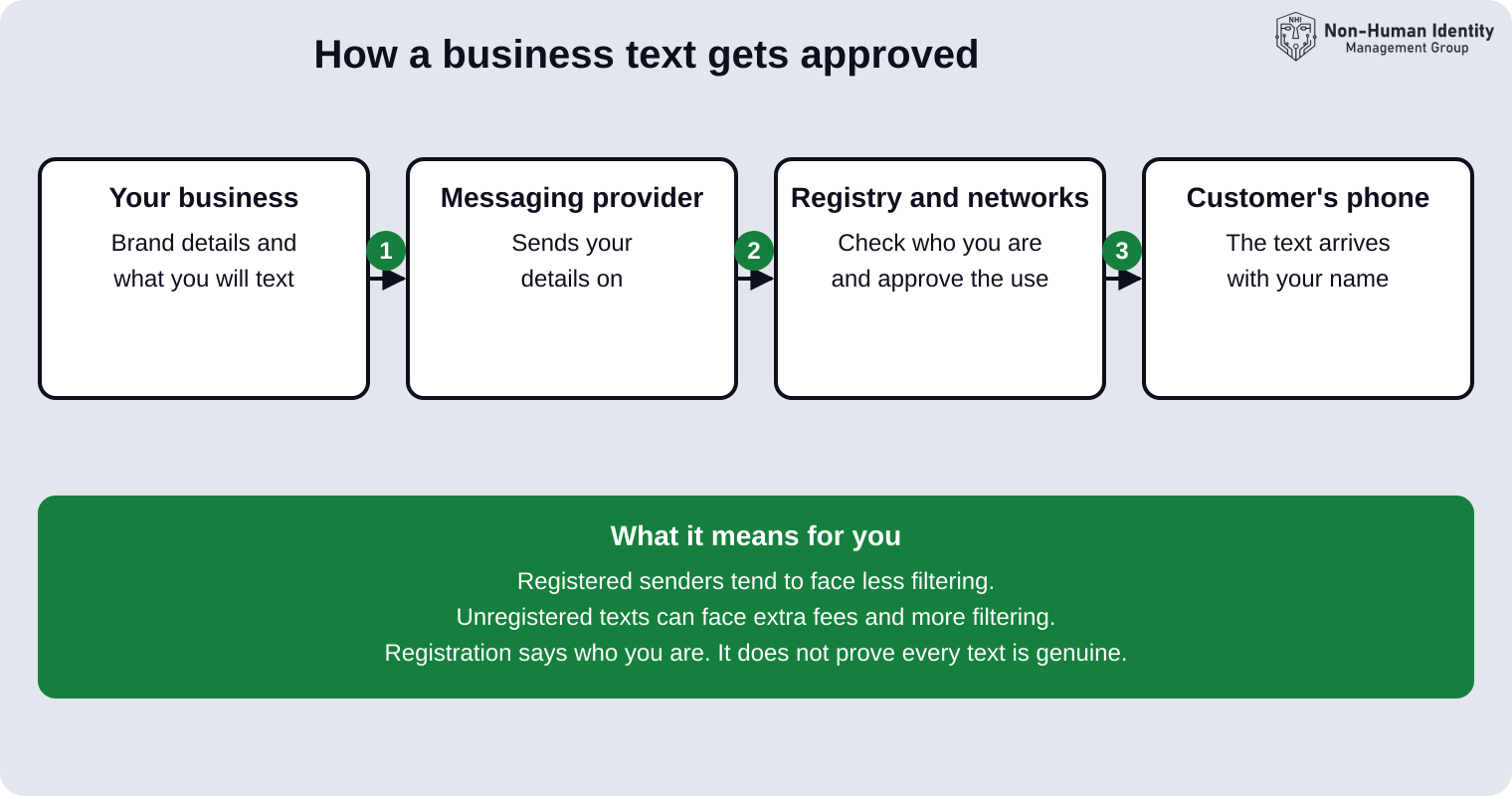
Here is the usual path, using the US system as the example.
- Choose a provider. You sign up with a messaging provider, which sends texts for you.
- Register the brand. You give your business details so the networks know you are a real sender. Many types of business give a tax number at this step.[3]
- Confirm who you are. Some brands must also confirm by email. A named person at the firm clicks a link and gives their name and job title.[2]
- Register the campaign. You describe what you will send, how people opt in and out, and how they get help.[3]
- Review. Companies further along the chain approve or reject the campaign. The registry itself does not decide.[1]
- Send and look after it. You send texts, honour opt-outs and keep the details up to date.
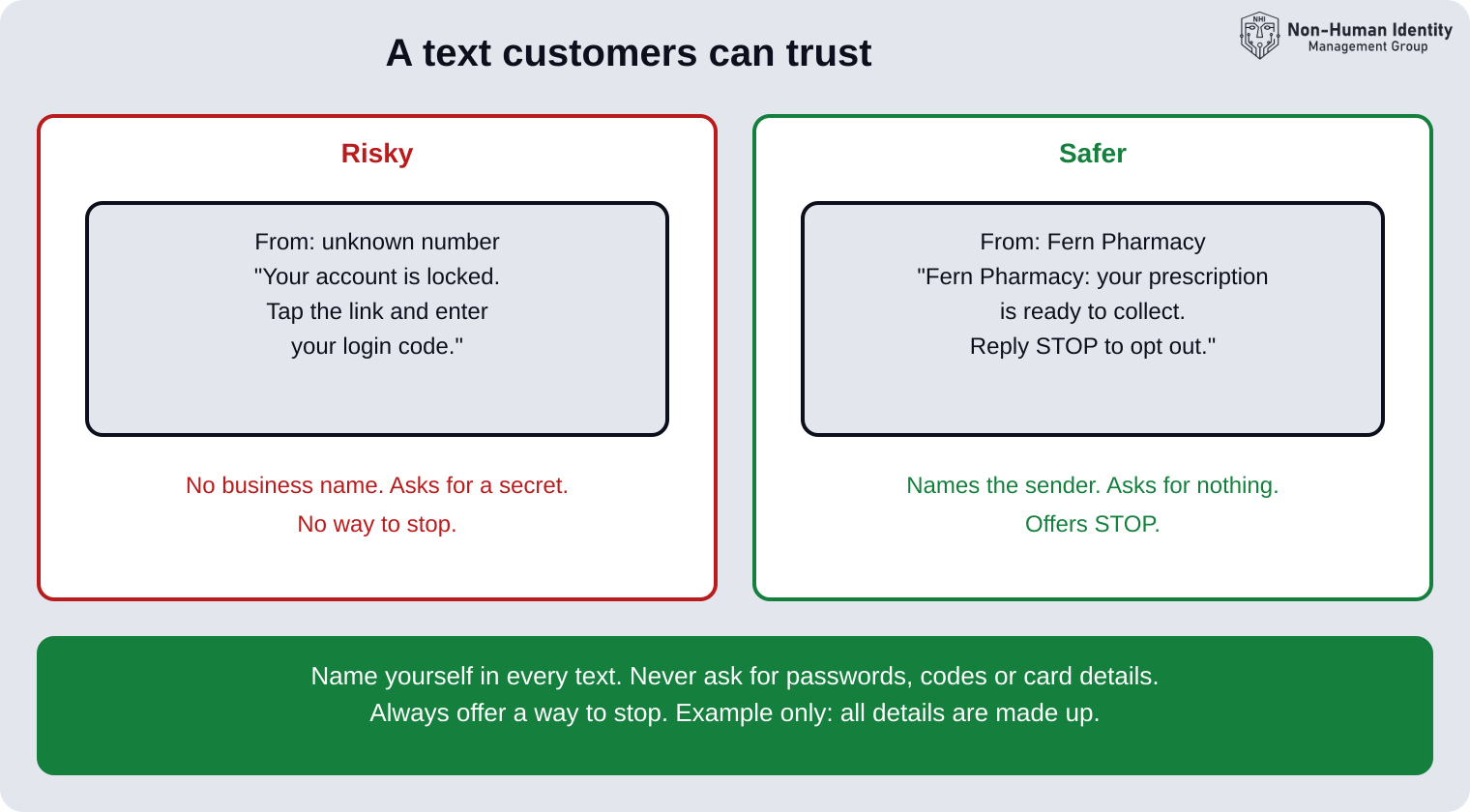
Good habits matter as much as the form. A US phone industry body asks senders to get permission first and to use the standard word STOP for opt-out instructions. It also asks senders to act on everyday words such as "unsubscribe" or "cancel".[4] In the UK, the data protection regulator says marketing texts must not hide who sent them. Every message must also offer a simple way to opt out.[7]
A worked example
Uma Tanaka runs Fern Pharmacy, a fictional pharmacy in Ohio with two branches. She wants to text customers when their prescriptions are ready.
Her messaging provider sends her a form. It asks for the pharmacy's legal name, tax number, website and the kind of texts she plans to send. Uma copies the name straight from her business papers, so it matches the official records.
For the campaign, she picks reminders, not offers. She writes how people agree: a tick box on the tablet at the counter. Her sample text starts with "Fern Pharmacy:" and ends with "Reply STOP to opt out."
A week later her first try is rejected. Bodhi Whitlock, her contact at the provider, points to the likely cause. Her sample text had a shortened web link, which hid where the link went. Uma takes the link out, since customers only need to know their prescription is ready. The campaign is approved soon after.
Uma remembers the market licence. Approval means the networks know who she is. It does not stop a scammer copying her name. So she adds a line to the website and a sign at the counter. It says: "We will never ask for your card details or a login code by text."
She also turns on two-step login for the texting account and removes a former employee who still had access. When a customer replies "please stop", the system treats it like STOP and sends no more reminders.
Myths and mistakes
| What people think | What is true |
|---|---|
| Registration is only for big companies. | In the US, any business texting from an ordinary ten-digit number is expected to register.[1] |
| Once I am registered, my texts will always arrive. | Registration tends to reduce filtering. Networks can still filter texts that look like spam or that people report.[3] |
| A registered sender name proves a text is genuine. | It helps, but it is not proof. Scammers copy names, so never ask customers for secrets by text. |
| Customers can only opt out by typing STOP. | Industry guidance asks senders to act on everyday words too, such as "unsubscribe" or "cancel".[4] |
| The texting account is just a marketing tool. | It can send texts in your name to every customer. Protect it like your bank login. |
What can I do this week?
- Ask your messaging provider what is registered for your business and in which countries.
- Check that your business name in the registration matches your official records and website.
- Read your last five texts and make sure each one names you and offers a way to stop.
- Turn on two-step login for the texting account and remove people who no longer need it.
- Tell customers what you will never ask for by text.
Checklist
- Our brand and each type of text are registered where the networks require it.
- Registration details match our legal name, tax number and website.
- We keep a record of how and when each person agreed to receive texts.
- Every text names our business.
- Every marketing text offers a simple way to opt out, and opt-outs are acted on.
- We never ask for passwords, login codes or card details by text.
- The texting account has two-step login and a short, reviewed list of users.
- Someone is named to keep the registration up to date when details change.
Common questions
Do I need 10DLC registration for a small business?
Yes, if you send business texts to US phones from an ordinary ten-digit number. Registration applies to small firms and even hobby projects, not only big brands. Your messaging provider usually handles the paperwork, but you supply accurate business details and sample texts.
Why was my campaign registration rejected?
Usually because something did not match or was unclear. The name may differ from your official records. The sample texts may lack your name or the STOP wording. Or the way people agree may be vague. Ask your provider why, fix it and try again.
What happens if I send texts without registering?
Your texts may cost more and are more likely to be filtered. One large messaging provider says unregistered traffic attracts extra carrier fees, and that registering leads to less filtering. In practice, customers may simply stop receiving your reminders.
Does registration stop scammers copying my business name?
Not fully. Registration tells networks who the real sender is. Some countries also block copycat names for protected brands. Scammers still try other numbers and names. Tell customers what you will never ask for by text, and give them a safe way to check.
Is texting customers in the UK different?
Yes. The UK does not use the US registration system. Marketing texts need consent or a narrow exception, must not hide who sent them, and must offer an easy opt-out in every message. Banks and public bodies can also protect their sender names through an industry registry.
Where next?
Ready for the detail? Read the practitioner guide: A2P SMS Security Guide. It goes further into each number type, sender ID registers outside the US, and how to secure the messaging platform account.
Also useful:
- Text Message Scams for Beginners
- Vishing and Smishing Guide
- SMS Pumping and IRSF Guide
- Email Deliverability for Beginners
Related NHI Mgmt Group resources: CAN-SPAM and TCPA Guide · Security for Marketing Teams Guide · Parcel Delivery and Toll Text Scams Guide
Key terms
- A2P messaging
- Texts sent from an application or system to a person, such as reminders, alerts and offers.
- 10DLC
- An ordinary ten-digit US phone number used for business texts, which must be registered.
- Brand and campaign
- The brand is the business customers think is texting them; the campaign is the kind of texts it sends.
- Sender ID
- The name or number shown as the sender of a text.
- Opt-out
- A customer's request to stop receiving texts, often by replying STOP.
- Smishing
- Phishing by text message: a scam text that pretends to be from someone trusted.
- Spoofing
- Faking a sender's name or number so a message seems to come from someone else.
Sources and further reading
- Introduction to The Campaign Registry and A2P 10DLC. The Campaign Registry. https://www.campaignregistry.com/Assets%2FTCR-Intro_V4.pdf, accessed 28 Nov 2026.
- Authentication+ enhances A2P 10DLC security. The Campaign Registry, 25 October 2024. https://www.campaignregistry.com/authentication-enhances-a2p-10dlc-security/, accessed 28 Nov 2026.
- A2P 10DLC. Twilio Docs, Twilio. https://www.twilio.com/docs/messaging/compliance/a2p-10dlc, accessed 28 Nov 2026.
- Messaging Principles and Best Practices. CTIA, May 2023. https://api.ctia.org/wp-content/uploads/2023/05/230523-CTIA-Messaging-Principles-and-Best-Practices-FINAL.pdf, accessed 28 Nov 2026.
- SMS SenderID Protection Registry. Mobile Ecosystem Forum. https://mobileecosystemforum.com/initiatives/sms-senderid-protection-registry/, accessed 28 Nov 2026.
- United Kingdom sender ID registration process. AWS End User Messaging SMS User Guide, Amazon Web Services. https://docs.aws.amazon.com/sms-voice/latest/userguide/registrations-uk.html, accessed 28 Nov 2026.
- How do we comply with the PECR electronic mail marketing rules? Information Commissioner's Office. https://ico.org.uk/for-organisations/direct-marketing-and-privacy-and-electronic-communications/guidance-on-direct-marketing-using-electronic-mail/how-do-we-comply-with-the-pecr-electronic-mail-marketing-rules/, accessed 28 Nov 2026.