Email deliverability is how likely your emails are to reach the inbox, not the spam folder.
This guide is for small business owners, marketers and anyone who sends newsletters or offers by email. You do not need to be technical to be affected: if your newsletter starts landing in spam, or your mailing account is taken over, your customers stop hearing from you.
In short
- Gmail, Yahoo and Outlook have written rules for senders, with stricter rules for anyone sending about 5,000 or more emails a day.
- Bulk senders are expected to prove who they are with SPF, DKIM and DMARC, three records published for their web address.
- Marketing emails need a one-click unsubscribe, and unsubscribe requests should be acted on within two days.
- Keep complaints low, send only to people who asked, and protect the account you send from.
What you will learn
- Explain what deliverability means and why mailbox providers set rules.
- Spot the three checks and the unsubscribe setting in an email.
- Check whether you count as a bulk sender.
- Ask your email platform the right questions.
- Email inbox company (mailbox provider)
- a company such as Gmail, Yahoo or Outlook that runs people's inboxes.
- Large-volume sender (bulk sender)
- someone who sends a lot of email to one provider, about 5,000 or more messages a day.
- Spam complaint
- when a reader clicks "report spam" on your email.
What is email deliverability?
Think of the post room in a big block of flats. The person on the desk decides which parcels go straight up, which go to a side room, and which go back. They judge each sender by what they know about them.
Mailbox providers do the same with email. Each provider looks at who sent a message, whether the sender can prove it, and how readers reacted to earlier emails. Then it decides: inbox, spam folder or rejected.
Deliverability is how often your emails make it to the inbox. It depends on proof of identity, on your past behaviour and on whether people want your mail.
Gmail's written rules for senders started in February 2024. Yahoo has similar rules, and Outlook added its own for high-volume senders in 2025.[1][3][4] These rules turned good habits into requirements.
Where the comparison stops working: a post room has one person who gets to know you. Email providers each run their own checks, with their own limits, mostly by machine. Passing at one provider does not mean you will pass at another.
Why does it matter?
If your emails miss the inbox, people do not see your offers, receipts or password reset links. Mail that fails the checks may also be rejected outright rather than sent to spam.[4]
If you run a small business
What could happen: your newsletter and order emails start landing in spam, and sales drop without any obvious reason.
Check this: ask whoever set up your email whether SPF, DKIM and DMARC are in place for your web address.
If you send newsletters or offers
What could happen: people who cannot find the unsubscribe link press "report spam" instead, and your complaint rate rises.
Check this: make sure every marketing email has a clear unsubscribe link and the one-click option.
If you manage the email platform account
What could happen: someone logs in with a stolen password, or finds a leaked platform key, and sends scam emails to your whole list.
Check this: turn on two-step login, remove old users and keep platform keys out of shared files.
What does it look like?
Every email carries hidden lines called headers, like the writing on the outside of an envelope. Here are a few made-up header lines from a newsletter, as a mailbox provider might see them.
Example only. All values are made up.
From: Ochre Printers <[email protected]>
Authentication-Results: mx.example.invalid;
  spf=pass smtp.mailfrom=ochre-printers.example.com    (1)
  dkim=pass header.d=ochre-printers.example.com        (2)
  dmarc=pass header.from=ochre-printers.example.com    (3)
List-Unsubscribe: <https://unsub.example.com/FAKE-0000>  (4)
List-Unsubscribe-Post: List-Unsubscribe=One-Click     (5)
- SPF passed: the email came from a server the domain allows.
- DKIM passed: the email carries a valid digital seal for the domain.
- DMARC passed: the checks match the address people see in the From line.
- In a real email, this line would contain the address that handles unsubscribe requests.
- This line tells the mailbox provider that one click is enough to unsubscribe.
Why this is risky: lines 1 to 3 may say "fail" or be missing. Then a large provider may send the email to spam or reject it. Without lines 4 and 5, readers who want to leave may press "report spam" instead.
The safer way: ask your email platform to set up all three checks for your own web address. Turn on one-click unsubscribe for every marketing email, and act on requests within two days.[2]
How does it work?
Here is what happens to each email you send.
- Your platform sends it. Your newsletter tool or mail service passes the email to the reader's mailbox provider.
- The provider checks who sent it. It looks for SPF, DKIM and DMARC results. Gmail asks every sender for at least SPF or DKIM, and bulk senders for all three.[1]
- It checks the address matches. For bulk senders, the From address must match the domain that passed SPF or DKIM. This is called alignment.[1]
- It looks at your history. Providers watch how many readers report your mail as spam. Gmail says to keep that rate below 0.1% and to avoid ever reaching 0.3%.[1]
- It decides. The email goes to the inbox, the spam folder or is rejected. Outlook rejects mail from high-volume senders that fail its checks.[4]
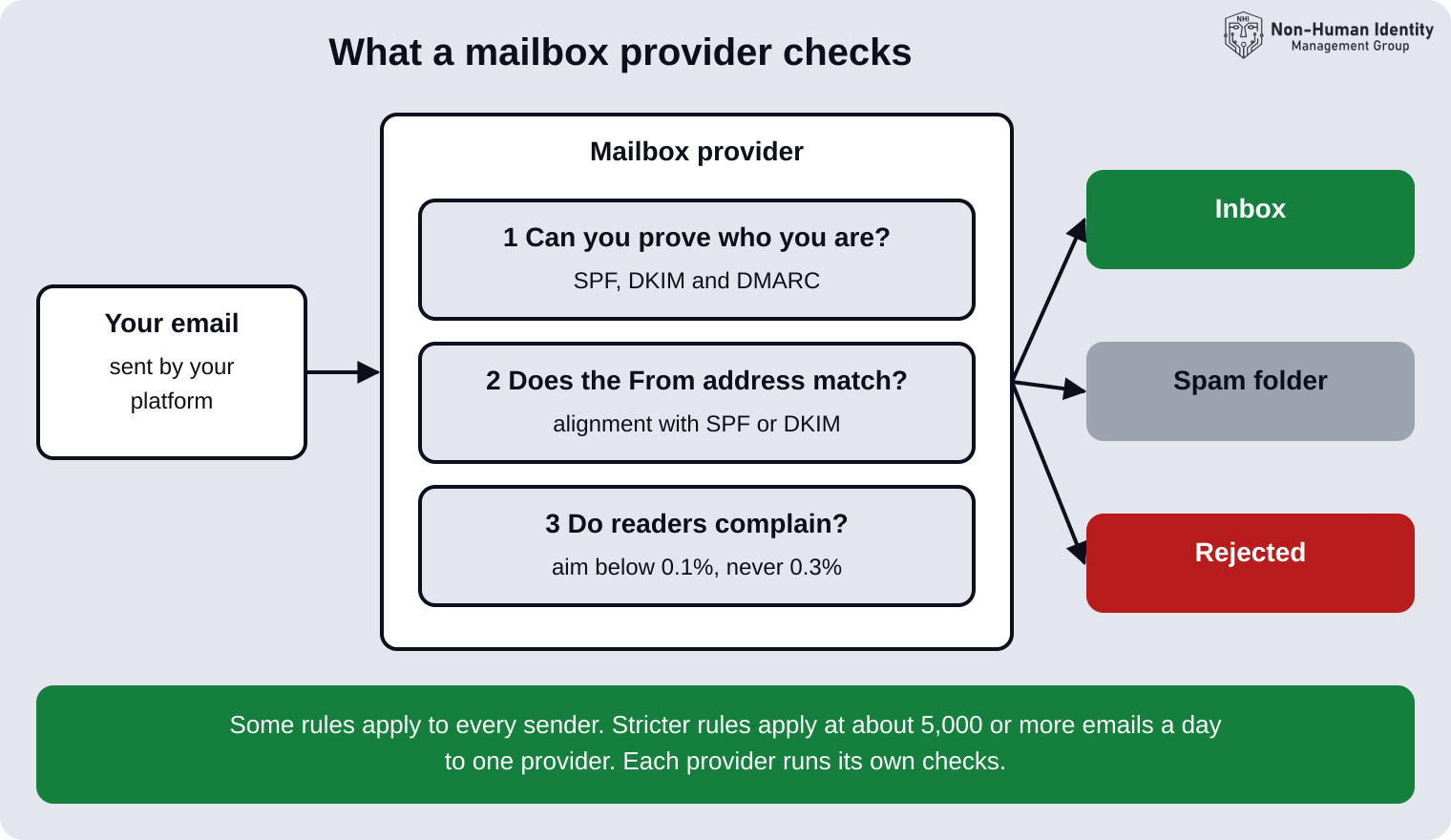
Who counts as a bulk sender? Gmail uses about 5,000 messages a day to personal Gmail accounts. A sender who reaches that level once is treated as a bulk sender from then on.[2] Yahoo and Outlook also set stricter rules for bulk or high-volume senders.[3][4]
The one-click unsubscribe uses a shared internet standard. It lets the mailbox show its own unsubscribe button, which tells your platform straight away.[5]
A worked example
Ivo Achterberg runs Ochre Printers, a fictional print shop. Every month he sends a newsletter to about 8,000 customers, many of them on Gmail.
In spring, sales from the newsletter fall sharply. A customer mentions that it now lands in her spam folder. Ivo asks Jana Quist, a freelance marketer, to take a look.
Jana opens a test copy and reads the headers. SPF passes, but DKIM and DMARC are missing for Ochre's own web address. The newsletter tool was signing mail with its own domain instead. So the From address does not match.
Ivo remembers the post room. The desk has never seen proof that these parcels really come from Ochre. Jana sets up DKIM for Ochre's domain in the newsletter tool. Ivo's web host adds a DMARC record set to "none", which asks providers to report results without blocking anything yet.
Next, Jana checks the unsubscribe. The link is there, but tiny, and one-click is switched off. She turns it on and moves the link to the top of the footer.
She also notices that three former staff can still log in to the newsletter tool. She removes them and turns on two-step login for everyone left.
A month later the test copies land in the inbox again. Jana sets up Google's free sender dashboard so Ivo can watch the spam complaint rate each month.
Myths and mistakes
| What people think | What is true |
|---|---|
| These rules are only for huge companies. | Some rules apply to every sender. The stricter ones start at about 5,000 emails a day to one provider.[1] |
| My platform handles all of this for me. | The platform sends the mail, but records for your own web address are often yours to add. |
| Hiding the unsubscribe link keeps more readers. | Readers who cannot leave tend to press "report spam", which hurts every later email. |
| A DMARC record set to "none" does nothing. | It meets the minimum the big providers ask for, and it can ask for reports on who sends as you.[3] |
| Buying a list is a quick way to grow. | People who never asked for your mail are more likely to complain, which pushes you towards spam. |
What can I do this week?
- Send a test email to a Gmail address and check the headers for SPF, DKIM and DMARC "pass".
- Ask your email platform how to sign mail with your own web address.
- Turn on one-click unsubscribe and check that the link is easy to find.
- Remove old users from your email platform and turn on two-step login.
- Set up the free sender dashboards from the big providers to watch complaints.
Checklist
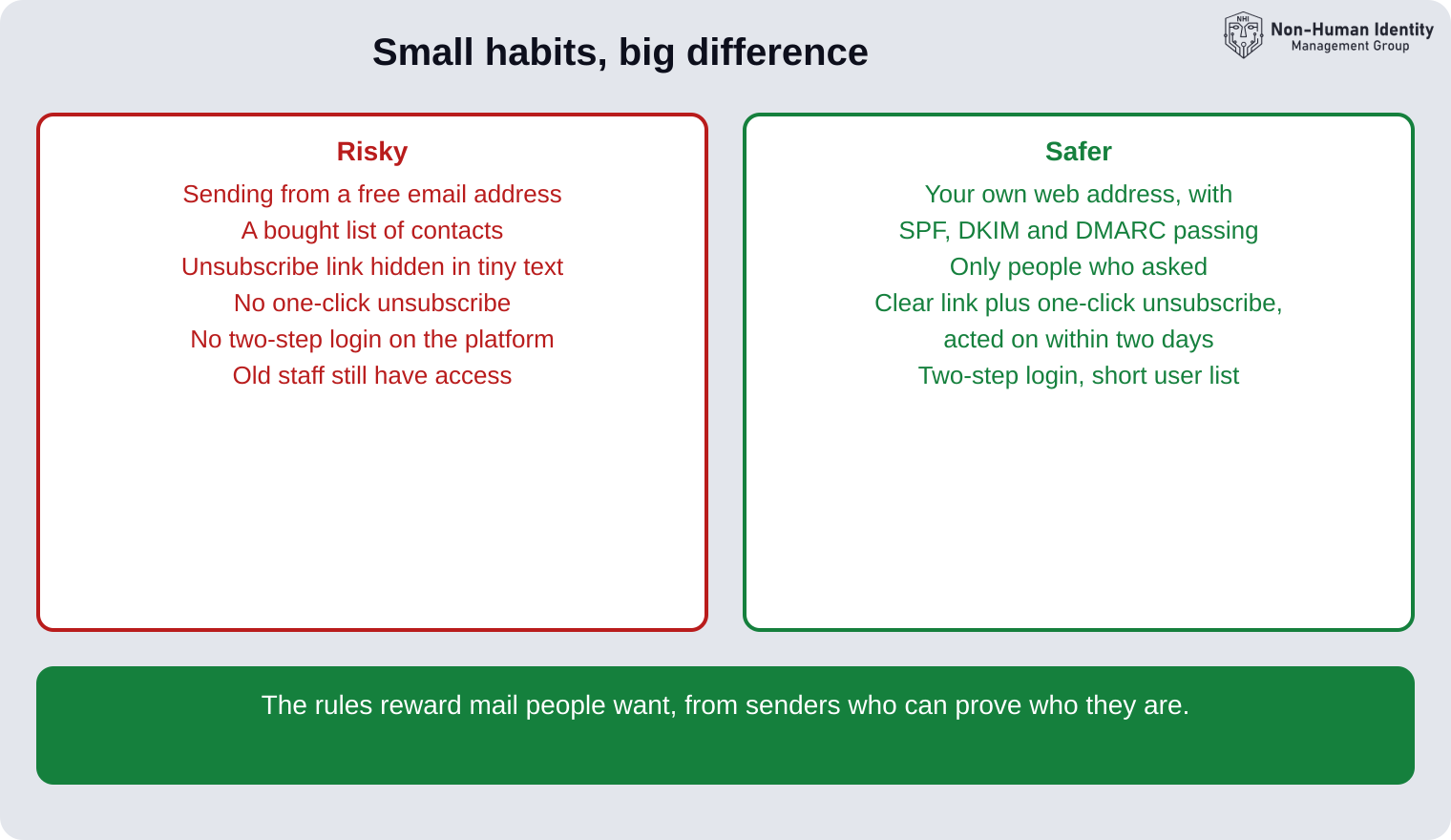
- We send from our own web address, not a free email address.
- SPF, DKIM and DMARC are set up and passing for that address.
- The From address matches the domain that passes SPF or DKIM.
- Every marketing email has a visible unsubscribe link and one-click unsubscribe.
- Unsubscribe requests are acted on within two days.
- We send only to people who asked, and we never buy lists.
- Someone checks the spam complaint rate every month.
- The email platform account has two-step login, a short user list and no keys in shared files.
Common questions
Why are my emails going to spam?
Usually because a provider cannot confirm who sent them, or readers have been complaining. Check that SPF, DKIM and DMARC pass for your own web address. Then look at your complaint rate, your unsubscribe link and whether everyone on your list asked to hear from you.
Do the bulk sender rules apply to me?
Some rules apply to everyone, such as SPF or DKIM and a low complaint rate. The stricter rules apply at about 5,000 messages a day to one provider. With Gmail, reaching that level even once means you count as a bulk sender from then on.
What spam complaint rate is too high?
Gmail asks senders to stay below 0.1% and never reach 0.3%.[1] Yahoo asks for below 0.3%.[3] As a rough picture, 0.3% is three complaints for every thousand emails delivered. Use the providers' free sender dashboards to see your real figure.
What is one-click unsubscribe?
It is a setting that lets readers leave your list with a single click on a button the mailbox itself shows. Your email platform switches it on with two hidden header lines. Big providers expect it on marketing emails, alongside a visible link in the email.
Why does the email platform account matter?
Because whoever controls it can email your whole list in your name. A stolen password or a leaked platform key can turn your trusted sender into a scam sender. Use two-step login, remove old users and store platform keys in a safe place.
Where next?
Ready for the detail? Read the practitioner guide: Bulk Sender Requirements Guide. It goes further into each provider's exact rules, alignment across several sending services, and how to measure spam rates and reputation.
Also useful:
- Email Authentication for Beginners
- Email Headers for Beginners
- How to read DMARC aggregate reports and act on them
- Business Text Messaging for Beginners
Related NHI Mgmt Group resources: DMARC, SPF and DKIM Guide · Email Delivery API Keys Security Guide · Security for Marketing Teams Guide
Key terms
- Deliverability
- How often your emails reach the inbox rather than spam or rejection.
- Bulk sender
- A sender of a large volume of email to one mailbox provider, about 5,000 or more messages a day.
- SPF
- A public record that lists the mail servers allowed to send email for a domain.
- DKIM
- A digital seal added to each email so the receiver can check which domain sent it and that it was not changed.
- DMARC
- A public record that tells receivers what to do when SPF and DKIM checks do not match the From address, and where to send reports.
- One-click unsubscribe
- A standard way for readers to leave a mailing list with a single click on a button the mailbox shows.
- Spam complaint rate
- The share of delivered emails that readers report as spam.
Sources and further reading
- Email sender guidelines. Gmail Help, Google. https://support.google.com/mail/answer/81126?hl=en, accessed 28 Nov 2026.
- Email sender guidelines FAQ. Google Workspace Admin Help, Google. https://support.google.com/a/answer/14229414, accessed 28 Nov 2026.
- Sender Best Practices. Yahoo Sender Hub, Yahoo. https://senders.yahooinc.com/best-practices/, accessed 28 Nov 2026.
- Strengthening Email Ecosystem: Outlook's New Requirements for High-Volume Senders. Microsoft Defender for Office 365 Blog, Microsoft, April 2025 (updated 29 April 2025). https://techcommunity.microsoft.com/blog/microsoftdefenderforoffice365blog/strengthening-email-ecosystem-outlook%E2%80%99s-new-requirements-for-high%E2%80%90volume-senders/4399730, accessed 28 Nov 2026.
- RFC 8058: Signaling One-Click Functionality for List Email Headers. Internet Engineering Task Force (IETF), January 2017. https://www.rfc-editor.org/rfc/rfc8058.html, accessed 28 Nov 2026.