A text message scam is a fake text that tricks you into paying, clicking a link or sharing a code.
This guide is for anyone with a mobile phone who wants to spot fake texts and keep their sign-in codes safe. You do not need any technical knowledge: the signs are the same whatever phone you use.
In short
- Scam texts pretend to be a parcel firm, bank, tax office or someone you know.
- Watch for a hurry, a small fee you did not expect and a link to an odd address.
- Do not share a code that was texted to you with anyone who contacts you. It is how criminals get into your accounts.
- In the UK, forward scam texts to 7726 for free, then delete them.
What you will learn
- Spot the five common signs of a scam text.
- Explain why criminals ask for the codes sent to your phone.
- Check a message safely without tapping its link.
- Report a scam text and know what to do if you replied.
- Scam text (smishing)
- a fake text message that pretends to come from someone you trust.
- Text code (one-time passcode)
- a short code a bank or app texts you to prove it is really you signing in or paying.
What are text message scams?
Think of a fake parking ticket tucked under your windscreen wiper. It looks official, it says you must pay fast, and it gives a web address to pay at. Text message scams work the same way, only on your phone.
The scam text pretends to come from a company or person you trust. It might be a parcel firm, your bank, a tax office or a family member with a "new number". The aim is to get you to tap a link, pay a fee, or share personal details. This is often called smishing.
Some scams go further and ask for your codes. When you sign in or pay, your bank may text you a one-time passcode. A criminal who already has your password may trigger that code, then text or call you pretending to be the bank. If you pass the code on, they can get in as you.
Where the comparison stops working: a parking ticket only asks for money. A scam text can also be after the key to your accounts, which is the code your bank sends you.
Why does it matter?
These scams are common and costly. People in the US reported losing $470 million to scams that started with a text in 2024, according to the US consumer protection agency.[5]
If you shop online and get parcels
What could happen: a fake delivery text asks for a small fee, and the payment page captures your card details.
Check this: track parcels only in the shop's or courier's own app or website.
If you bank on your phone
What could happen: someone posing as your bank asks you to read out a code, then uses it to move your money.
Check this: your bank's own words in each code text, which usually tell you not to share it.
If you look out for older relatives
What could happen: a "Hi Mum, new number" text asks them to pay an urgent bill for you.
Check this: agree a habit of calling the old number before sending any money.
What does it look like?
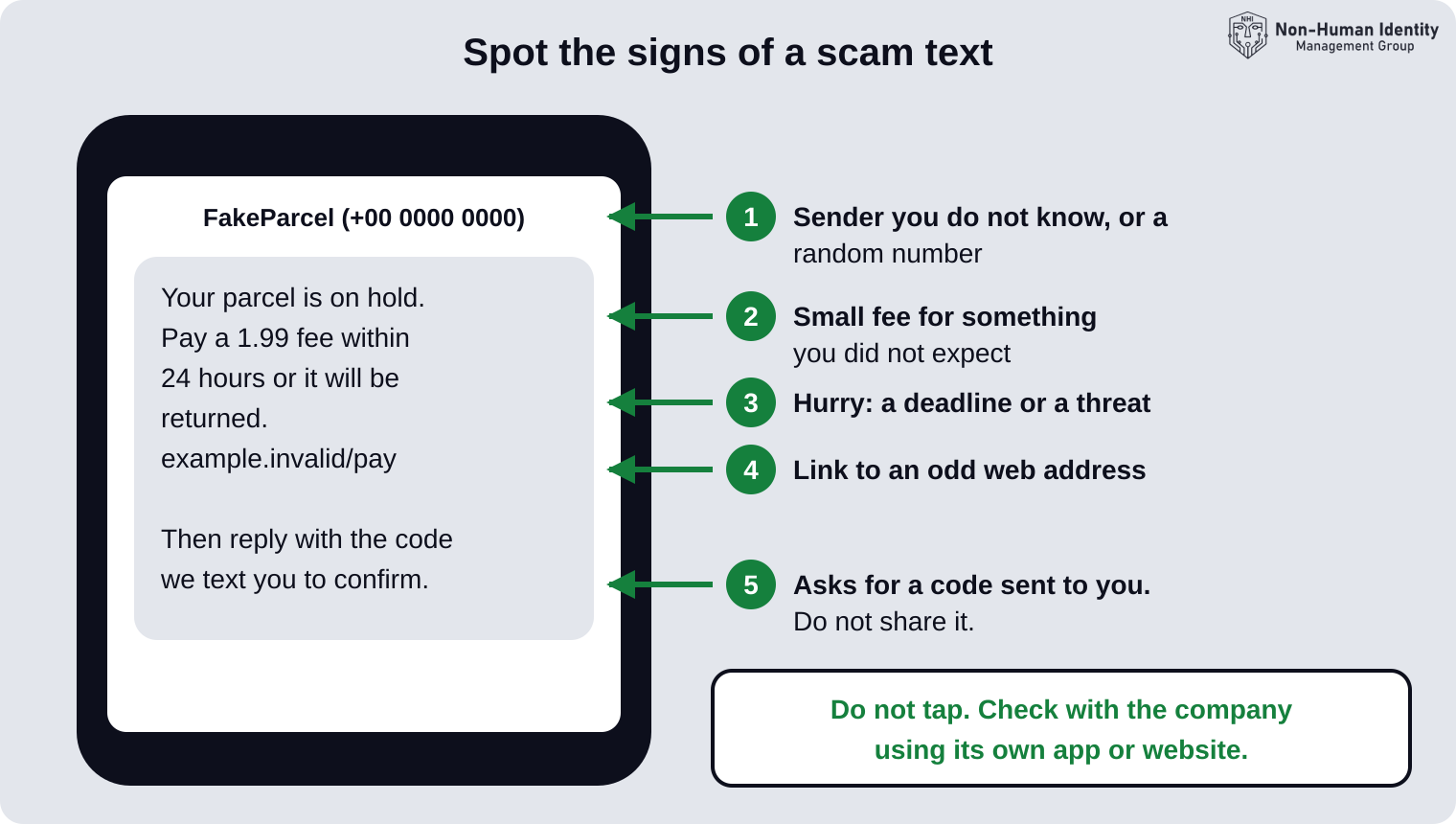
Here are two made-up scam texts: the first wants a payment, and the second wants your code.
Example only. All values are made up.
From: +00 0000 000000                               (1)
FakeParcel: your parcel is held. Pay 1.99 within
24 hrs or it will be returned: example.invalid/pay   (2)

From: FakeBank                                      (3)
FakeBank: we stopped a payment of 950.00. To cancel
it, reply with the code we just sent you: 000000    (4)
- A random number for a firm that would normally use its own name.
- A deadline, a small fee and a link to an address that is not the firm's own.
- A sender name can be faked, so this can look like your bank's usual texts.
- In a real message from a bank, a code is for you to type in yourself, not to send back to anyone.
Why this is risky: the first leads to a fake payment page. The second uses fear about your money to get the code that lets a criminal in.
The safer way: do not tap or reply, but open the firm's own app, or call the number on your card or its website.
How does it work?
This is a simple view so you can spot it. It is not a guide to doing it.
- The text arrives. Criminals send huge numbers of texts, and they can fake the sender name so it looks familiar.
- It pushes your buttons. The UK cyber security centre lists the usual tricks: posing as an authority, urgency, strong emotion, a scarce offer and current events.[1]
- You are asked to act. You may be asked to tap a link to a lookalike site, pay a fee, enter card details or reply with a code.
- The criminal uses what you give. Card details are used or sold. A code lets them finish signing in or approve a payment as you.
- More messages may follow. Once you reply, you may get calls "from the bank" or "from the police" to keep the scam going.
The US consumer protection agency is clear about codes: do not share a verification code with someone who contacted you first. It calls that "a scam, every time".[4]
A worked example
This story is made up to show how it can happen.
Kwame Mensah is a hospital porter in Leicester. He is waiting for a parcel, so a delivery text does not surprise him.
The text says his parcel is held and asks for a 1.99 fee. He taps the link and types in his card details. The page then says "Payment failed, please try again". Something feels off.
Ten minutes later his phone buzzes again. This time the text seems to come from his bank, and it sits in the same thread as his real bank texts. It says a payment of 950 pounds has been stopped. To cancel it, he must reply with the code the bank has just sent.
A code does arrive. Kwame reads the full message. It says: "Do not share this code with anyone. Our staff will not ask for it." He realises the criminal is trying to approve that payment with his own code.
He does not reply. He turns his bank card over and calls the number on the back. The bank cancels the card, stops the payment and sends a new card.
Then he forwards both texts to 7726, the free UK scam text service, and deletes them.[2] He also reports what happened to Report Fraud.[6]
What made the difference: Kwame read the code text in full, then used a number he already trusted instead of replying.
Myths and mistakes
| What people think | What is true |
|---|---|
| If it shows my bank's name, it is from my bank. | Sender names can be faked, so a scam can land in the same thread as real texts. Check by calling the number on your card. |
| My bank may ask me to read out a code to stop fraud. | Do not share a code with someone who contacted you first. The US consumer protection agency calls that a scam every time.[4] |
| It is only 1.99, so it does not matter. | The small fee is the bait. The goal is your full card details.[5] |
| Replying STOP will end the texts. | Replying to a scam text can show that your number is live. Report it and delete it instead. |
| Scam texts are full of spelling mistakes. | Some are, but many look neat and professional. Judge the request, not the spelling. |
What can I do this week?
- Save the help numbers for your bank and mobile provider somewhere you trust, such as from the back of your card.
- Turn on your phone's spam or unknown sender filter.[3]
- Track parcels only in the courier's or shop's own app or website.
- Switch important accounts from text codes to an app or passkey where they offer it.
- Tell family members the one rule: do not share a code that was texted to you with anyone who contacts you.
Checklist
- I do not tap links in texts I was not expecting.
- I check messages using the company's own app, website or a number I already trust.
- I do not share codes texted to me with anyone who contacts me.
- I read the full code text, including any warning, before I use the code.
- I forward scam texts to 7726, then delete them.
- If I tapped or paid, I call my bank straight away on the number on my card.
- My family knows to call the old number before paying a "new number" request.
Common questions
Can criminals steal my one-time codes?
Yes. The most common way is simply asking for them while pretending to be your bank or a company. Some criminals also move your phone number to their own phone. Not sharing codes, and using an app or passkey where offered, both help.
What should I do if I tapped a link or replied?
If you entered card or bank details, call your bank at once on the number on your card. If you entered a password, change it and turn on a second check. Then report the text by forwarding it to 7726.[2]
How do I report a scam text?
In the UK, forward it to 7726. It is free, and your provider can look into the sender and block it.[2] In the US, forward to 7726 and report to the FTC.[3] If you lost money, also report it to Report Fraud.[6]
Is it safe to just open a scam text?
Generally, reading a text is low risk. The danger comes from tapping the link, replying or calling a number in it. Keep your phone updated, then report the text and delete it without tapping anything.
Why does the scam ask for such a small amount?
A small fee feels too minor to worry about, so people pay without thinking. The real goal is your card number and other details, which can then be used for much larger payments.[5]
Where next?
Ready for the detail? Read the practitioner guide: OTP Fraud Prevention Guide. It goes further into how code fraud works, how firms design safer code messages and the alternatives to text codes.
Also useful:
- Vishing and Smishing Guide
- Phishing for Beginners
- SIM Swap Fraud for Beginners
- Social Engineering for Beginners
- Multi-Factor Authentication for Beginners
Related NHI Mgmt Group resources: Parcel Delivery and Toll Text Scams Guide · Authenticator Apps and OTP Guide · Passkeys for Everyone Guide
Key terms
- Smishing
- Phishing by text message: a fake text that tries to trick you into clicking, paying or sharing details.
- One-time password (OTP)
- A short code that works once, often sent by text, to prove it is really you.
- Sender ID spoofing
- Faking the name or number a text appears to come from, so it looks like a trusted sender.
- Phishing
- A message pretending to be from someone trusted, sent to trick you into giving away details or money.
- Tricking people, rather than breaking technology, to get access or money.
- Passkey
- A way to sign in without a password or text code, using a secret key that stays on your device.
Sources and further reading
- How to spot a scam email, text message or call. National Cyber Security Centre (NCSC), published 26 November 2021, reviewed 5 September 2022. https://www.ncsc.gov.uk/collection/phishing-scams/spot-scams, accessed 28 Nov 2026.
- Report a scam text message. National Cyber Security Centre (NCSC), published 26 November 2021, reviewed 5 September 2022. https://www.ncsc.gov.uk/collection/phishing-scams/report-scam-text-message, accessed 28 Nov 2026.
- How to Recognize and Report Spam Text Messages. US Federal Trade Commission (FTC), Consumer Advice. https://consumer.ftc.gov/articles/how-recognize-and-report-spam-text-messages, accessed 28 Nov 2026.
- The Google Voice scam: How this verification code scam works and how to avoid it. Alvaro Puig, US Federal Trade Commission (FTC), Consumer Alert, 29 October 2021. https://consumer.ftc.gov/consumer-alerts/2021/10/google-voice-scam-how-verification-code-scam-works-and-how-avoid-it, accessed 28 Nov 2026.
- Top text scams of 2024 (Data Spotlight). US Federal Trade Commission (FTC), 14 April 2025. https://www.ftc.gov/news-events/data-visualizations/data-spotlight/2025/04/top-text-scams-2024, accessed 28 Nov 2026.
- Report Fraud service goes live. Report Fraud (City of London Police), 4 December 2025. https://www.reportfraud.police.uk/news/report-fraud-service-goes-live/, accessed 28 Nov 2026.