CIEM is the work, and the tools, used to find cloud access that nobody uses and take it away.
This guide is for anyone who has heard the term and wants to know what it means. You do not need to be a cloud expert. If your business keeps files, websites or customer records in the cloud, someone has given out access to them, and some of it is probably never used.
In short
- Every person and program in a cloud account has a set of permissions: the things it is allowed to do.
- Permissions are often added to get work done and rarely taken away, so unused access tends to build up.
- Unused access can still be used by anyone who takes over the account or program that holds it.
- CIEM compares the access each one was given with the access it really used, so you can cut back the gap.
What you will learn
- Explain what cloud permissions and CIEM are in plain words.
- Spot the signs of access that is bigger than the job needs.
- Check who holds the most powerful access in your cloud accounts.
- Ask for a safe clean-up that does not break anything.
- Allowed actions (permissions)
- the rules that say what a person or program may do, such as "read these files".
- Program account (non-human identity)
- an account used by software, such as a backup job, rather than by a person.
- Access clean-up tool (CIEM)
- a tool that shows who and what can do things in the cloud, and what goes unused.
What are cloud permissions and CIEM?
Think of an office where keys have been handed out for years. Nobody keeps a list. Some people hold keys to rooms they visited once, and some keys belong to people who left.
A cloud account is like that office. Each person or program that can sign in has an account, and each account has permissions. A permission is a rule such as "read files in this folder" or "delete servers in this project".
CIEM stands for cloud infrastructure entitlement management. An entitlement is simply the full set of access an account holds. CIEM is like writing down every key, checking the door records to see which keys are used, and collecting the rest.
Not every account belongs to a person. Many belong to software, such as a website, a backup job or an AI agent. These are called non-human identities, and in many cloud accounts they outnumber people.
Where the comparison stops working: an office key opens one door. One cloud account can hold thousands of permissions across many systems, and a program can use all of them very quickly.
Why does it matter?
Access tends to pile up for ordinary reasons. People start with wide access to get a project working and never narrow it. People change teams and keep their old access. Test accounts are made and forgotten.
If an attacker takes over an account, they get all of its permissions. That includes the ones its owner never used. Amazon Web Services (AWS), a large cloud provider, advises giving only the access a task needs. It also advises removing unused accounts, roles and keys regularly.[2]
If you run a small business
What could happen: one stolen cloud login with wide access may be enough to read customer data or delete your backups.
Check this: ask your IT supplier who holds full admin access to your cloud accounts, and why.
If you are new to cloud or IT work
What could happen: you are given admin rights "just for now", and nobody takes them back.
Check this: ask for the access your task needs, and say when you no longer need it.
Next: AWS IAM for Beginners
If you manage a team
What could happen: an auditor or insurer asks who can change your cloud systems, and nobody can answer.
Check this: make sure every cloud account, including program accounts, has a named owner.
What does it look like?
Here is a made-up report. A cloud tool might show one like it after a few months of watching.
Example only. All values are made up.
Unused access report: example-shop-cloud (last 90 days)
Account                 Type      Given          Used
web-agency-admin        person    full admin     none seen   (1)
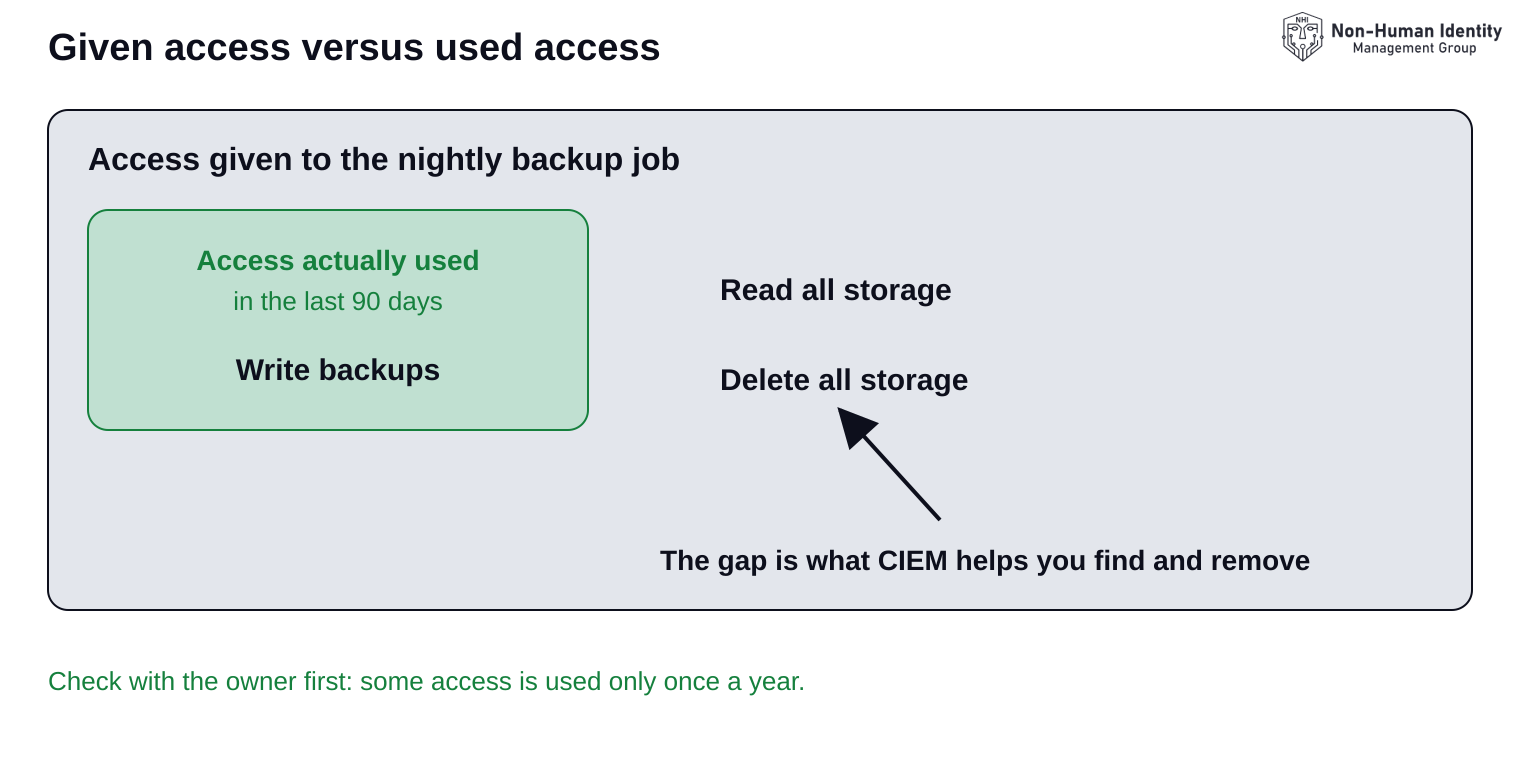
nightly-backup-job      program   read, write,   write only  (2)
                                  delete all
test-script-key-0000    key       read storage   not used    (3)
                                                 for 8 months
FAKE-reporting-role     program   read billing   used monthly (4)
- A supplier's account with full control. Nobody has used it lately.
- A backup program that may delete everything. It only writes.
- An old access key, which is a password for software. Nobody uses it.
- Access that is used and needed. Not every line is a problem.
Why this is risky: anyone who gets the first three gets far more power than the work needs.
The safer way: switch off the supplier account and remove the old key. Give the backup job less power. Test each change first.
How does it work?
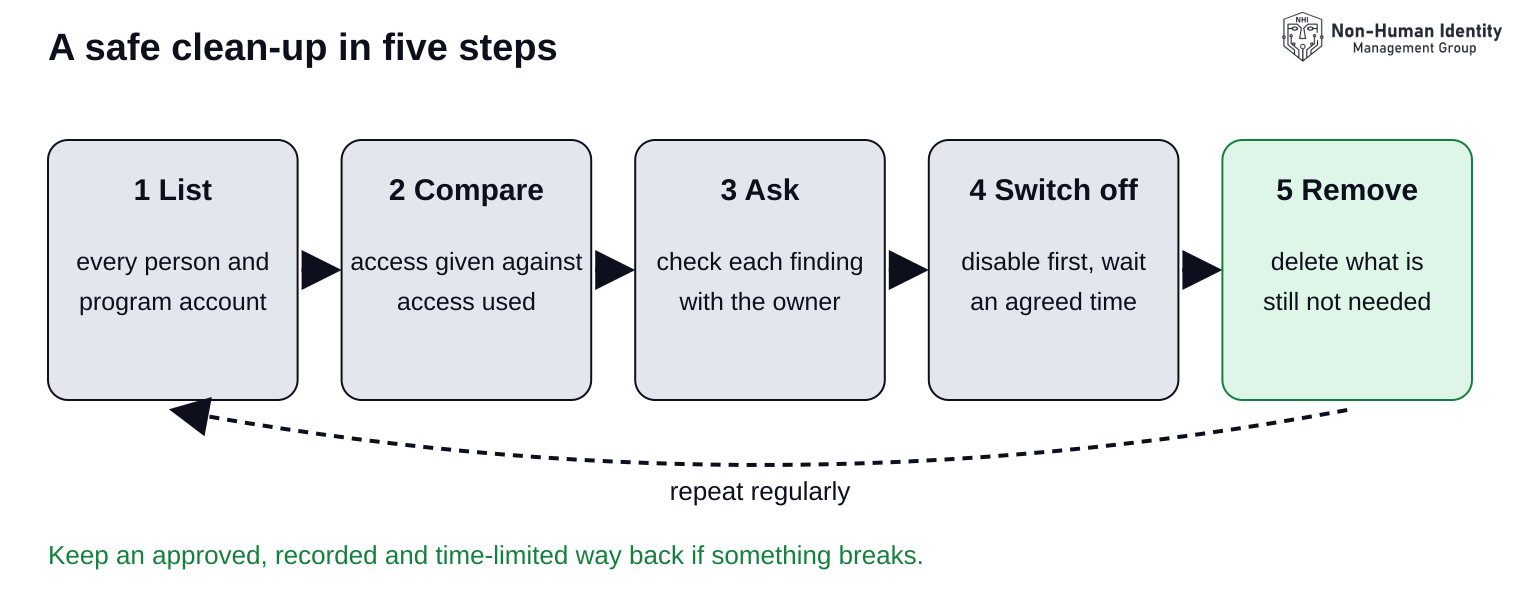
Products use different words, but a clean-up usually follows these steps.
- List every account. The tool gets read-only access to your cloud and lists every person and program account.
- Work out what each can really do. Access can come from several places, such as a group the account is in. The total is called the effective permissions.
- Compare given with used. The tool reads activity records for a set time and shows what was not used. AWS calls this time a usage window. It reports unused roles, keys, passwords and permissions.[1]
- Decide with the owner. A person checks each finding. Google Cloud, for example, says its role recommendations are not applied automatically.[3]
- Cut back safely. Test the change, switch access off before deleting it, and keep an approved, recorded and time-limited way back if something breaks.
- Repeat. New accounts and permissions appear all the time, so run the comparison regularly.
The large cloud platforms each describe built-in features for parts of this work. Google Cloud's role recommendations, for example, use up to 90 days of permission use.[3] Microsoft describes CIEM features in its Defender for Cloud product that cover people and program accounts across several clouds.[4]
A worked example
Jarrah Nwosu looks after IT at Crestfield Pharmacy, a made-up chain of four chemist shops. Its online ordering site runs in the cloud. The insurer asks Jarrah to show how cloud access is controlled.
Jarrah turns on the cloud platform's built-in unused access feature and lets it collect data for three months. The report surprises him.
The web agency that built the site two years ago still has full admin rights. It has not signed in for over a year. The backup job can delete any stored file, but it only ever writes new backups. And an old test key has not been used for eight months.
Jarrah works through them in order of risk. He switches off the agency's account rather than deleting it, and tells the agency. After a month with no problems, he deletes it.
Next, he gives the backup job a narrower role that can write backups but not delete them. He tests it on a copy first. One clean-up task fails, because the new role is missing one permission. Jarrah restores the old role for two days under a recorded change, adds the missing permission, and removes the old role again.
Finally, he switches off the old key, waits, and deletes it. He sends the insurer a short report and books a monthly review. The pharmacy is not risk-free, but a stolen backup login or agency account would now do far less damage.
Myths and mistakes
| What people think | What is true |
|---|---|
| If nobody uses a permission, it does no harm. | Anyone who takes over the account can use every permission it holds, used or not. |
| Only people need access reviews. | Program accounts often hold the widest access and are reviewed least. They need the same checks. |
| A CIEM tool fixes the problem by itself. | Most tools find and suggest. People still decide, test and make the changes. |
| Delete everything the report says is unused. | Some access is used rarely but matters, such as a yearly task. Switch it off first and check with the owner. |
| We are too small to need this. | Even a small cloud account can hold dozens of program accounts and old keys. Built-in features are a free place to start. |
What can I do this week?
- List your cloud admins. Write down every person and program with full admin access, and name an owner for each.
- Turn on a built-in unused access feature in your main cloud platform, so it starts collecting data.
- Remove one clear win, such as a former supplier's account. Switch it off, wait an agreed time, then delete it.
- Ask about old keys. Find out whether programs use long-lasting keys, and whether they could use short-lived access instead.
Checklist
- We have a list of every person and program account in our cloud.
- Every account has a named owner.
- We know which accounts hold full admin access, and the list is short.
- A built-in unused access feature is switched on.
- We review the findings at least monthly and deal with the riskiest first.
- We switch access off before we delete it, and test changes first.
- Old long-lasting keys are found and removed where we can.
- Any access we restore is approved, recorded and given an end date.
Common questions
What does CIEM stand for?
Cloud infrastructure entitlement management. An entitlement is the full set of access an account holds. CIEM means finding what each person and program can do in your cloud. Then you cut back what is unused.
Do I need to buy a CIEM product?
Not to start. AWS, Google Cloud and Microsoft each describe built-in features that find unused or excessive access.[1][3][4] Paid products can add one view across several clouds, which tends to matter more as you grow.
How long should I watch before removing access?
Long enough to see normal work, including monthly tasks. Google Cloud's role recommendations use up to 90 days of use.[3] For access that might be needed only once a year, such as a recovery test, ask the owner as well as reading the data.
Does CIEM cover programs as well as people?
Yes. The built-in features cover roles and other program accounts as well as people.[1][4] This matters because program accounts often hold wide access and have nobody who notices when it is misused.
What if removing access breaks something?
That is why changes are tested and staged. Switch access off before deleting it, so you can turn it back on quickly. Restore access only with approval, record it, and set an end date so the old access does not quietly stay.
Where next?
Ready for the detail? Read the practitioner guide: Cloud PAM and CIEM Guide. It goes further into how access is calculated across clouds, paths that let an account give itself more power, and how to right-size access safely.
Also useful:
- Least Privilege for Beginners
- Cloud Workload Identities for Beginners
- Just-in-Time Access for Beginners
- CIEM vs CSPM
- NHI Foundation Level Training
Related NHI Mgmt Group resources: IAM Access Analyzer Guide · How to Write Least-Privilege IAM Policies From Access Activity · CIEM Buyers Guide
Key terms
- Cloud infrastructure entitlement management (CIEM)
- Finding out who and what has access in the cloud, especially access that is too wide or unused.
- Entitlement
- The full set of things a person or program is allowed to do once signed in.
- Effective permissions
- The access an account can really use once every source of access is added together.
- Least privilege
- Each person and program gets only the access it needs, for only as long as it needs it.
- Dormant permissions
- Permissions that stay switched on even though they are rarely or never used.
- Privilege creep
- The slow build-up of access beyond what a person or program needs.
- Non-human identity (NHI)
- An account with credentials used by a machine or software rather than a person.
Sources and further reading
- IAM Access Analyzer findings. AWS Identity and Access Management User Guide, Amazon Web Services. https://docs.aws.amazon.com/IAM/latest/UserGuide/access-analyzer-findings.html, accessed 28 Nov 2026.
- Security best practices in IAM. AWS Identity and Access Management User Guide, Amazon Web Services. https://docs.aws.amazon.com/IAM/latest/UserGuide/best-practices.html, accessed 28 Nov 2026.
- Role recommendations overview. Google Cloud Policy Intelligence documentation, Google. https://docs.cloud.google.com/policy-intelligence/docs/role-recommendations-overview, accessed 28 Nov 2026.
- Cloud infrastructure entitlement management (CIEM) in Microsoft Defender for Cloud. Microsoft Learn, Microsoft. https://learn.microsoft.com/en-us/azure/defender-for-cloud/permissions-management, accessed 28 Nov 2026.