A cloud workload identity is an identity that a cloud platform gives to a piece of running software, such as a virtual machine, container or function, so it can use other cloud services with short-lived credentials from the platform instead of a stored password or key.
This guide is for newcomers, students, career changers and managers who meet terms such as "IAM role", "managed identity" and "service account" and want to know what they have in common. It explains the shared idea, how the three largest cloud platforms name and use it, a worked example and first steps. Platforms are listed alphabetically throughout; the order is not a ranking.
By the end of this guide you will be able to:
- Explain what a cloud workload identity is and why it beats a stored key.
- Describe how a workload gets a credential from its platform, step by step.
- Identify the names AWS, Google Cloud and Microsoft Azure use for the idea.
- Understand the main mistakes that make workload identities risky.
Key takeaways
- Software needs an identity too. Cloud workloads are non-human identities, and each needs its own identity and permissions.
- The platform hands out the credential. With a workload identity, the cloud platform gives the software short-lived credentials when it asks, so nobody has to store or copy a key.
- Different names, same idea. AWS uses IAM roles, Google Cloud uses service accounts attached to resources, and Microsoft Azure uses managed identities.
- Short-lived does not mean harmless. Any code running on the workload can usually use its identity, so permissions should be as narrow as the job needs.
- Remove stored keys where you can. All three platforms recommend platform identities over long-lived keys where they are supported.
What it is, in plain English
A non-human identity (NHI) is an identity with an account and credentials that represents software or a machine. NHIs come in two families: machines and devices, and software workloads. A workload is a running piece of software, such as a web application on a virtual machine, a container or a serverless function. See Non-Human Identities for Beginners for the full picture.
Workloads often need to reach other services: read files from storage, query a database, send messages. They must prove who they are to do that. The old way was to create a long-lived key, paste it into a configuration file and hope it never leaked. A cloud workload identity replaces that key. The platform knows which workload is running, gives it an identity, and issues it short-lived credentials on request. These expire by themselves and are renewed automatically.
An everyday comparison is a hotel guest and the front desk. Instead of carrying a master key that never changes, each guest shows they are staying in the hotel and is given a card that works for their own room for a limited time. Where the analogy breaks down: the hotel checks the guest, while in the cloud the platform recognises the workload by where it is running. Anyone who takes control of that workload can usually ask for the same credentials.
Because short-lived credentials expire by themselves, rotating them matters far less. The controls that matter are who or what can obtain them, how much access they grant, and whether their use is watched.
Why it matters to you
- If you run a small business: stored cloud keys are a common way for attackers to get into cloud accounts. Using platform identities means fewer keys to lose.
- If you are new to a security job: you will meet roles, managed identities and service accounts in almost every cloud review. Knowing they are the same idea in different clothes speeds up your work.
- If you are a manager: moving workloads off stored keys reduces the number of secrets your team must rotate and the chance of a key turning up in a public code repository.
The platforms themselves explain the benefit. AWS says that when you use a role for an application on EC2, you do not have to distribute long-term credentials such as access keys to the instance, and the temporary credentials update automatically before they expire.[1] AWS also lists using temporary credentials such as IAM roles, instead of long-term access keys, as a best practice.[5] Microsoft says manual handling of secrets and certificates is a known source of security issues and outages, and that with managed identities developers do not need to manage credentials.[2] Google recommends avoiding service account keys whenever possible.[4]
There is a catch. Google notes that, by default, any code executed on a compute resource with an attached service account can reach the metadata server and obtain an access token.[4] So if an attacker runs code on your workload, they can usually act with its identity. That is why least privilege, giving each identity only the access it needs, matters as much as removing keys. NIST SP 800-53 covers least privilege under control AC-6.[6]
How it works, step by step
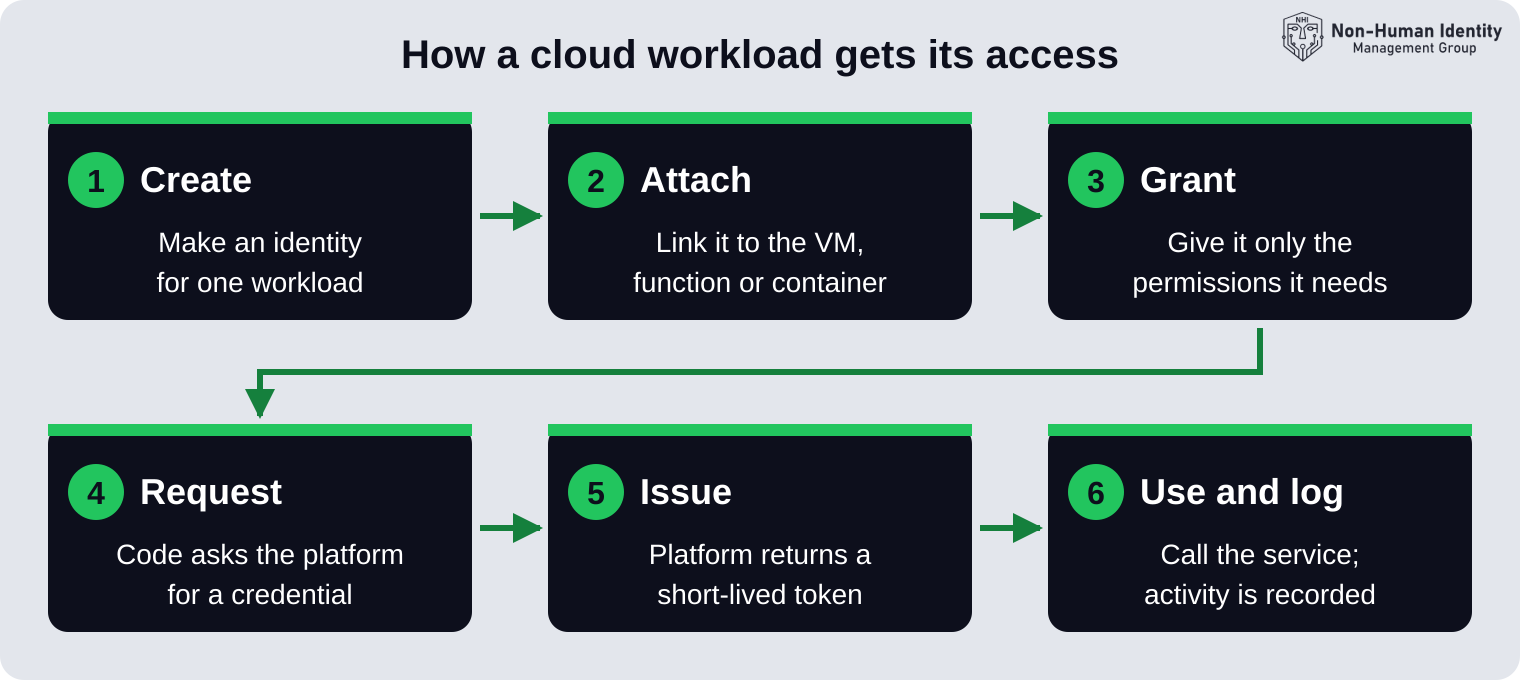
The names differ by platform, but the flow is similar.
- Create an identity. An administrator creates an identity for the workload, ideally one per application. Google recommends dedicated service accounts for each application rather than default service accounts.[4]
- Attach it to the workload. The identity is linked to the virtual machine, container, function or app service. On AWS EC2 this is done through an instance profile that contains the role.[1]
- Grant permissions. The identity is given only the permissions the workload needs, for example read access to one storage bucket.
- Request a credential. When the code needs to call a service, it asks the platform for a credential, usually through a cloud software development kit (SDK) that does this automatically. On virtual machines the request typically goes to a local instance metadata service.
- Receive a short-lived credential. The platform returns a token or temporary key that expires and is refreshed. Nobody sees or stores a long-lived secret.
- Use it and log it. The workload calls the service. The call is checked against the identity's permissions and recorded in the platform's logs.
The same idea on three platforms
The table gives each platform's own name for the idea and how its documentation describes it. Platforms are listed alphabetically.
| Platform | Name used | How its documentation describes it |
|---|---|---|
| Amazon Web Services (AWS) | IAM role (on EC2, through an instance profile) | The application gets temporary security credentials from EC2 instance metadata; they update automatically before they expire so a valid set is always available.[1] |
| Google Cloud | Service account attached to a resource | Applications on the resource authenticate as the attached service account and get short-lived credentials automatically, without creating or managing them.[3] |
| Microsoft Azure | Managed identity (system-assigned or user-assigned) | Applications obtain Microsoft Entra tokens without managing any credentials; Microsoft says the credentials are not even accessible to you.[2] |
Points to know for each platform
- AWS: only one role can be assigned to an EC2 instance at a time, and all applications on that instance share it. AWS points to Amazon ECS tasks when each application needs its own role.[1] Plan one workload per instance, or use per-task roles, to keep permissions separate.
- Google Cloud: default service accounts might be automatically granted the broad Editor role, depending on organisation policy. Google says this role is granted for convenience and is not essential, and recommends a policy constraint to stop automatic grants.[4] Create a dedicated service account per application instead.
- Microsoft Azure: a system-assigned managed identity is tied to one resource and deleted with it; a user-assigned managed identity is a separate resource that can be shared by several resources and must be deleted explicitly.[2] Track user-assigned identities so a shared one does not collect more permissions than any single workload needs.
A worked example
Meadow Analytics is a fictional data firm with 30 staff. Its reporting application runs on a cloud virtual machine and reads customer files from cloud storage. When it was built, a developer created a long-lived access key with full storage access and saved it in a configuration file on the machine. A copy of that file also sat in the team's code repository.
Ravi, the new cloud engineer, makes three changes:
- Give the app its own identity: he creates a workload identity just for the reporting application and attaches it to the virtual machine.
- Narrow its access: the identity can read from one storage bucket and nothing else.
- Remove the key: he updates the application to use the cloud SDK's default credential lookup, tests it, then revokes the old access key and removes it from the configuration file.
The reporting application now runs without any stored secret, and the old key found in the repository no longer works. The change does not make the machine safe from every attack: if someone ran code on it, they could still read that one bucket using the machine's identity. But they could no longer delete data elsewhere or use a copied key from their own laptop, and every call now appears in the logs under a clear, single-purpose identity.
Myths and misunderstandings
| What people think | What is true |
|---|---|
| No stored key means no risk. | Code running on the workload can usually obtain its credentials, so an attacker who controls the workload can act as it.[4] Narrow permissions still matter. |
| Roles, managed identities and service accounts are completely different things. | They are each platform's way of giving software an identity with platform-issued credentials. Details differ, the idea is shared. |
| Workload identity credentials need rotating like keys. | The platform issues short-lived credentials and renews them automatically.[1] Your job is controlling what the identity can do and who can attach or use it. |
| The default service account is fine to use. | Google recommends dedicated service accounts per application, and notes default accounts may receive the broad Editor role.[4] |
| One shared identity for all our apps keeps things simple. | It makes activity harder to trace to a single application and gives every app the combined permissions.[4] |
Key terms
- Workload identity
- The identity assigned to a software workload, such as a container, serverless function or microservice, so it can authenticate to other services without storing static credentials.
- IAM role
- An AWS identity that grants temporary credentials instead of permanent passwords or access keys, assumed through a trust policy and limited by a permissions policy.
- Managed identity
- A cloud-provider-managed identity assigned to a compute resource, so it can authenticate to cloud services without credentials in application code.
- Service account
- A special-purpose account used by applications, automated tools or services rather than a human user.
- Attached service account
- A cloud identity bound directly to a workload so it obtains credentials automatically without stored keys; any code running there inherits its permissions.
- Instance metadata service
- A local endpoint from which a virtual machine reads its own configuration and, where an identity is attached, temporary credentials.
- Service-account key
- A long-lived credential a workload can use to authenticate; stale or poorly stored keys are hard to govern and easy to overlook.
- Short-lived credentials
- Credentials that expire quickly, so a stolen copy is useful for only a short time before renewal is needed.
- Least privilege
- Giving each user, process and system only the access it needs, for only as long as needed.
Common questions
Is a cloud workload identity the same as workload identity federation?
They are related. A cloud workload identity is used by software running inside the cloud platform. Federation lets software running elsewhere, such as a build pipeline or another cloud, swap its own token for cloud credentials without a key. See Workload Identity Federation for Beginners.
Do I need to write code to fetch the credentials?
Usually not. Cloud SDKs find and refresh the credentials automatically. AWS notes that using an SDK's instance profile credential provider avoids writing refresh logic yourself.[1]
Which Azure managed identity type should I pick?
Microsoft describes system-assigned identities as suited to a single workload that should be deleted with its resource, and user-assigned identities as suited to several resources sharing one identity or resources that are often recreated.[2]
What if a service only accepts an API key?
Then you still have a static secret. Store it in a secrets manager, let the workload read it using its platform identity, and rotate it on a schedule. See Secrets Rotation for Beginners.
Can I see what a workload identity did?
Yes, through the platform's logs. For example, Microsoft says managed identity sign-ins appear in Microsoft Entra ID sign-in logs, and create, update and delete operations appear in Azure Activity logs.[2]
Are AI agents running in the cloud workloads too?
Yes. AI agents are NHIs, and an agent running on a cloud service can use a workload identity in the same way. Give each agent its own identity with narrow permissions.
First steps
Three things you can do this week:
- Find stored cloud keys. List the long-lived access keys or service account keys in your cloud accounts and note which workload uses each one.
- Move one workload. Pick one workload that runs inside the cloud, give it its own platform identity with narrow permissions, switch the code to use it, test, then revoke the old key. If something breaks, any return to the old key should be a controlled rollback: approved, recorded, monitored and time-limited.
- Check the defaults. Look for workloads using default or shared identities with broad roles, and plan dedicated identities for them.
Checklist
- Each cloud workload has its own identity, not a shared or default one.
- Each workload identity has only the permissions its job needs.
- Workloads inside the cloud use platform identities, not stored keys, where the platform supports it.
- Remaining long-lived keys are listed, owned, stored in a secrets manager and rotated.
- We know who can attach identities to workloads and who can create keys.
- Platform logs for workload identity activity are switched on and reviewed.
- Identities for retired workloads are removed.
Simple measures that show progress: the number of long-lived cloud keys still in use, the share of workloads with their own identity, the number of workload identities holding broad roles, and the number of identities with no recent activity.
Check your understanding
1. What does a cloud workload identity replace?
Answer: a long-lived key or password stored with the software. The platform issues short-lived credentials instead.
2. What do AWS, Google Cloud and Microsoft Azure call the idea?
Answer: an IAM role, an attached service account and a managed identity respectively.
3. Why do narrow permissions still matter when there is no stored key?
Answer: code running on the workload can usually use its identity, so an attacker who controls the workload gains whatever that identity can do.
4. Why should each application have its own identity?
Answer: so each has only the access it needs, and its activity can be traced to it.
Suggested learning pathway
- Start with Non-Human Identities for Beginners.
- Then read Service Accounts for Beginners for the wider idea of accounts for software.
- For AWS basics, see AWS IAM for Beginners.
- For workloads outside the cloud, see Workload Identity Federation for Beginners.
- For the practitioner view across platforms, see the Cloud Workload Identity Guide.
- For platform detail, see AWS IAM Roles vs IAM Users, the Azure Managed Identities Security Guide and the Google Cloud Service Account Keys Security Guide.
- NHI Foundation Level Training
Standards and references
- Use an IAM role to grant permissions to applications running on Amazon EC2 instances. AWS Identity and Access Management User Guide, Amazon Web Services. https://docs.aws.amazon.com/IAM/latest/UserGuide/id_roles_use_switch-role-ec2.html, accessed 27 Nov 2026.
- What are managed identities for Azure resources? Microsoft Entra documentation, Microsoft Learn. https://learn.microsoft.com/en-us/entra/identity/managed-identities-azure-resources/overview, accessed 27 Nov 2026.
- Service accounts overview. Google Cloud IAM documentation, Google. https://docs.cloud.google.com/iam/docs/service-account-overview, accessed 27 Nov 2026.
- Best practices for using service accounts securely. Google Cloud IAM documentation, Google. https://docs.cloud.google.com/iam/docs/best-practices-service-accounts, accessed 27 Nov 2026.
- Manage access keys for IAM users. AWS Identity and Access Management User Guide, Amazon Web Services. https://docs.aws.amazon.com/IAM/latest/UserGuide/id_credentials_access-keys.html, accessed 27 Nov 2026.
- SP 800-53 Rev. 5, Security and Privacy Controls for Information Systems and Organizations (AC-6). National Institute of Standards and Technology (NIST). https://csrc.nist.gov/pubs/sp/800/53/r5/upd1/final.
Related NHI Mgmt Group resources: Cloud Instance Metadata Services Compared Guide · Cloud Workload Identity Buyer's Guide · Secrets Management for Beginners