Context engineering means choosing what information an AI model sees each time it answers.
This guide is for students, newcomers and anyone who has moved past writing single prompts and wants to know why AI tools still go wrong. If your business is setting up an AI assistant or agent, what you feed it decides much of what it does.
In short
- An AI model only works with what is in front of it on each request: instructions, documents, tool details, notes and the chat so far.
- Context engineering is the job of choosing, ordering and trimming all of that, not just wording the question.
- More is not always better. Tests show answers can get less reliable as the input grows.
- Everything you put in can steer the AI, so keep out secrets and treat outside text with care.
What you will learn
- Explain how context engineering differs from writing a good prompt.
- Name the main things that go into an AI's working memory.
- Spot context that is too long, out of date or unsafe.
- Check what your AI tool is being given before you trust its answers.
- Working memory (context window)
- all the text an AI model can look at while it writes one answer.
- Setting up that memory (context engineering)
- choosing, ordering and trimming what goes into the context window each time.
- Standing instructions (system prompt)
- the rules a tool's builder gives the AI before any user types a question.
What is context engineering?
Think of briefing a temp worker who starts every morning with no memory of yesterday. Each day you hand them a folder. Whatever is in the folder is all they have to work with.
An AI model is in the same position. It does not carry memory from one request to the next. OpenAI's documentation says each request to its models is independent, so earlier messages have to be sent again.[1] The "folder" is the context window, the text the model can look at while it writes one answer.
Writing a good question, called prompting, is one page in that folder. Context engineering is packing the whole folder. Anthropic's engineers see it as the next step after prompt engineering. It means picking the best set of information for each turn.[2]
Where the comparison stops working: a temp worker can tell your instructions from a note a stranger slipped in. An AI model can mix them up, and may follow instructions hidden in a document you gave it.
Why does it matter?
Many AI mistakes come from what the model was given, not from how the question was worded. A research team at Chroma tested 18 models and found answers became less reliable as the input got longer, even on simple tasks.[3]
If you are learning to build with AI
What could happen: you paste in every document you have, and the AI misses the one fact that mattered.
Check this: give it only what the current task needs.
If your business is setting up an AI assistant
What could happen: the assistant reads an old policy file and gives customers the wrong answer.
Check this: ask which files and sources the assistant reads, and who keeps them up to date.
If you look after IT or security
What could happen: a web page the AI reads holds hidden instructions, or a pasted API key ends up in the AI's memory.
Check this: treat outside text as untrusted, and keep keys and passwords out of the context.
What does it look like?
Here is a made-up view of what one AI helpdesk assistant receives for a single customer question. Users normally see only the last line.
Example only. All values are made up.
[Standing instructions] You help customers of Example Ltd. Be brief.  (1)
[Tools] look_up_order(order_number)                                  (2)
[Documents] returns-policy-2019.pdf, returns-policy-2026.pdf         (3)
[Notes] Customer prefers email replies.                              (4)
[Chat so far] 46 earlier messages                                    (5)
[Settings] SUPPORT_KEY=EXAMPLE-KEY-0000-FAKE                         (6)
[Question] Can I return a jacket after 40 days?                      (7)
- The builder's standing rules, the system prompt.
- A description of a tool the AI may ask to use.
- Two versions of the same policy. The old one may win.
- A saved note from an earlier chat, a simple form of memory.
- A long history that may bury the useful parts.
- In a real file, this line would contain a working key. It should not be in the context.
- The customer's actual question.
Why this is risky: the old policy can lead to a wrong answer. The long history wastes space. And the AI could repeat the key to someone who asks the right way.
The safer way: include only the current policy and a short chat summary. Keep the key in the system that runs the tool, so the AI does not see it.
How does it work?
For each request, the tool builds a fresh folder for the model. Context engineering shapes each step.
- Set the rules. Clear standing instructions say what the AI is for and how to answer.
- Pick what is relevant. The tool finds only the documents or facts this task needs. Anthropic calls loading data at the moment it is needed "just in time" context.[2]
- Add memory with care. Notes saved outside the window can be read back later, so a long task can keep its progress.[2]
- Trim the history. When the chat gets long, older parts can be summarised. This is called compaction.[2]
- Put the question last. Google's guidance says models tend to do better with the question at the end, after the other material.[4]
- Check what went in. Look at what the model was actually given when an answer goes wrong.
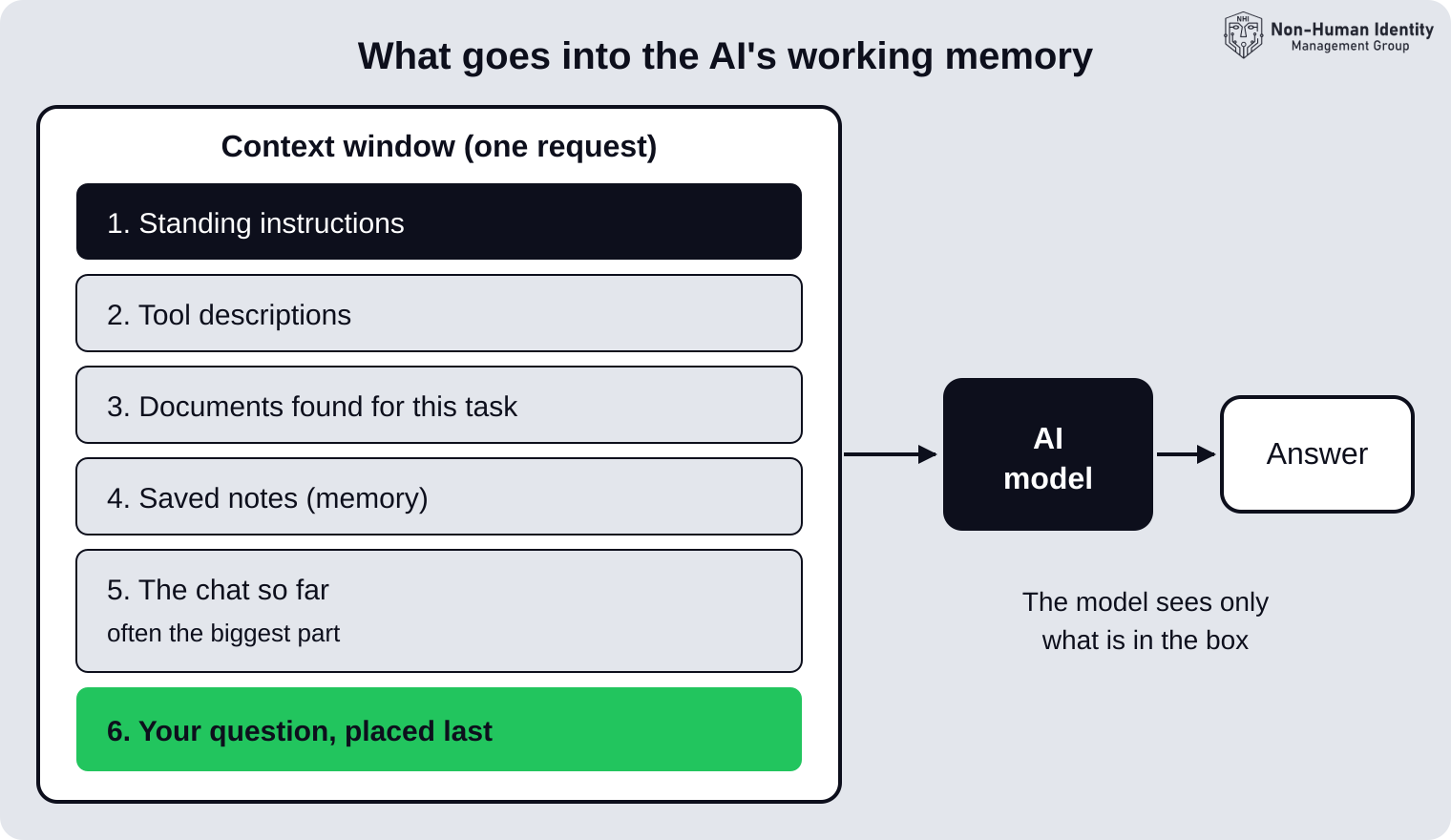
Bigger windows tempt people to send everything. Anthropic's engineers advise the opposite: aim for the smallest set of useful information that gets the job done.[2]
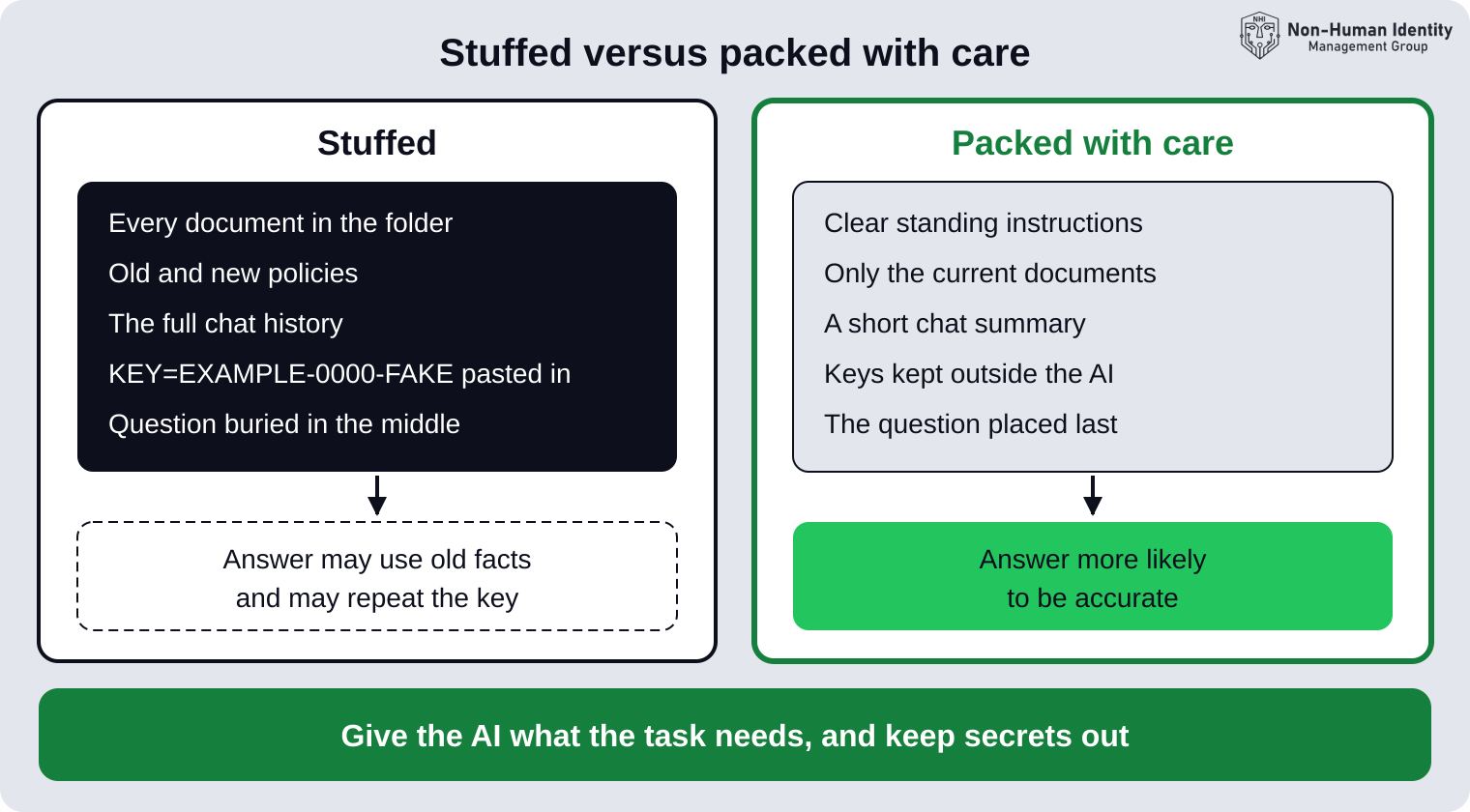
There is a safety side too. Anything in the context can steer the model. The OWASP Foundation, a security community, warns that text from websites or files can carry hidden instructions. This is called indirect prompt injection.[5] API keys are credentials for non-human identities (NHIs). An NHI is a digital identity that represents a machine, app, service or AI agent, so it can connect to other systems. Keep these keys out of the context, so the AI cannot repeat them.
A worked example
Xena Bergmann runs a small, fictional online plant shop. She sets up an AI assistant to answer customer emails, and connects it to a shared folder of shop documents.
After a week, a customer complains. The assistant said returns are allowed within 14 days, but Xena's policy changed to 30 days in the spring.
Her friend Juno Marlow is studying computing and offers to help. Juno remembers the temp worker's folder. "What is in the folder it gets?" she asks.
They look at the assistant's settings. The shared folder holds both the old and the new returns policy. It also holds a supplier price list, staff rotas and a note with the shop's payment service key in it.
First, Juno moves the payment key out of the folder. She asks Xena to change the key with the payment service, because the assistant could already read it.
Next, they make a small folder just for the assistant. It holds the current returns policy, delivery times and care tips. The old policy, rotas and price list stay out.
Then they tidy the standing instructions. The assistant must answer only from the folder, and must say "I'll pass this to Xena" when it is unsure.
They test it with ten past customer questions. It now gives the 30-day answer every time in their tests. Xena adds a monthly reminder to check the folder whenever a policy changes.
Myths and mistakes
| What people think | What is true |
|---|---|
| Context engineering is just a fancy name for prompting. | The prompt is one part. Context engineering covers everything the model sees: documents, tools, memory and history as well.[2] |
| A bigger context window means I can send everything. | Tests show answers can get less reliable as input grows.[3] Send what the task needs. |
| The AI remembers our last chat. | Each request starts fresh. Any memory comes from the tool sending saved notes or history again.[1] |
| Text in a document is just data, so it is safe. | The model may follow instructions hidden in documents or web pages.[5] Treat outside text as untrusted. |
| It is fine to paste a key in so the AI can use a service. | Keep keys in the system that runs the tool. A key in the context can be repeated or leaked. |
What can I do this week?
- List what your AI tool reads: instructions, files, tools, saved notes and history.
- Remove old or duplicate documents from any folder an AI assistant reads.
- Search those folders for passwords and keys, and move them somewhere safe.
- Try one task twice: once with everything, once with only what it needs. Compare the answers.
Checklist
- I know what goes into my AI tool's context window on each request.
- The standing instructions are short, clear and up to date.
- Only current, relevant documents are given to the AI.
- Long chats are summarised or restarted rather than left to grow.
- No passwords, API keys or other secrets are in the context.
- Text from websites, emails and uploads is treated as untrusted.
- Someone owns the documents the AI reads and updates them when things change.
Common questions
What is the difference between prompt engineering and context engineering?
Prompt engineering is about wording the instructions well. Context engineering covers everything the model sees on each request. That includes documents, tool details, memory and the chat so far. It matters most for AI agents that work in many steps, because what they see changes each time.
What is a context window?
It is the AI model's working memory for one answer. It holds all the text the model can look at at once. It has a size limit, counted in tokens, which are small bits of words. The model cannot see anything outside the window for that answer.
Do I need to code to use context engineering?
No. Picking which files an assistant may read is context engineering. So is writing clear standing instructions, or starting a fresh chat when one gets long. Developers go further, with automatic search, memory and summaries. But the ideas are the same.
Why does my AI assistant get worse in long chats?
Often because the context fills up with old messages. Useful details get buried, and some tools trim or summarise the history to fit. Starting a fresh chat with a short summary of what matters usually helps.
Is it safe to give an AI my company documents?
It can be, with care. Use a tool your organisation has approved. Give it only the documents the task needs, and remove passwords, keys and personal data first. People who can chat with the assistant may be able to draw out what it was given.
Where next?
Ready for the detail? Read the practitioner guide: Context Engineering Explained. It goes further into the parts of a context window, the write, select, compress and isolate techniques, the context features in the major AI platforms and how to measure what works.
Also useful:
- Prompting Basics for Beginners
- Retrieval-Augmented Generation for Beginners
- AI Agents for Beginners
- Prompt Injection for Beginners
- Context Windows Explained
Related NHI Mgmt Group resources: AI Agent Harness and Context Engineering Security · Context Window Data Exposure · Non-Human Identities for Beginners
Key terms
- Context engineering
- Choosing, ordering and trimming the information an AI model sees each time it answers.
- Context window
- All the text a model receives at one time, including instructions, documents and chat history.
- System prompt
- The standing instructions that set how an AI tool behaves before a user asks anything.
- Prompt engineering
- Designing and improving the instructions given to an AI model.
- Compaction
- Summarising a long chat history into a shorter version the model can still use.
- Indirect prompt injection
- An attack where instructions are hidden in content an AI reads, such as a web page or file.
- Non-human identity (NHI)
- A digital identity, or the credential behind it, that represents a machine, application, service or AI agent so it can connect to other systems.
Sources and further reading
- Conversation state. OpenAI API documentation, OpenAI. https://developers.openai.com/api/docs/guides/conversation-state, accessed 28 Nov 2026.
- Effective context engineering for AI agents. Anthropic Engineering, Anthropic, 29 September 2025. https://www.anthropic.com/engineering/effective-context-engineering-for-ai-agents, accessed 28 Nov 2026.
- Context Rot: How Increasing Input Tokens Impacts LLM Performance. Chroma Research, 14 July 2025. https://www.trychroma.com/research/context-rot, accessed 28 Nov 2026.
- Long context. Gemini documentation, Google AI Studio. https://aistudio.google.com/docs/long-context, accessed 28 Nov 2026.
- LLM01:2025 Prompt Injection. OWASP Gen AI Security Project, OWASP Foundation. https://genai.owasp.org/llmrisk/llm01-prompt-injection/, accessed 28 Nov 2026.