Creator account security means protecting the channels and accounts you publish from, to keep strangers out of them.
This guide is for YouTubers, streamers, podcasters and anyone who earns money or an audience online, plus the editors and managers who help them. If your channel pays bills or carries your name, it is a business asset, and criminals know it.
In short
- A common trick is a fake sponsorship offer with a file to "review". The file is harmful software that steals what your browser has saved.
- Stolen sign-in data can let a criminal use your channel without your password, then sell it or run scam streams on it.
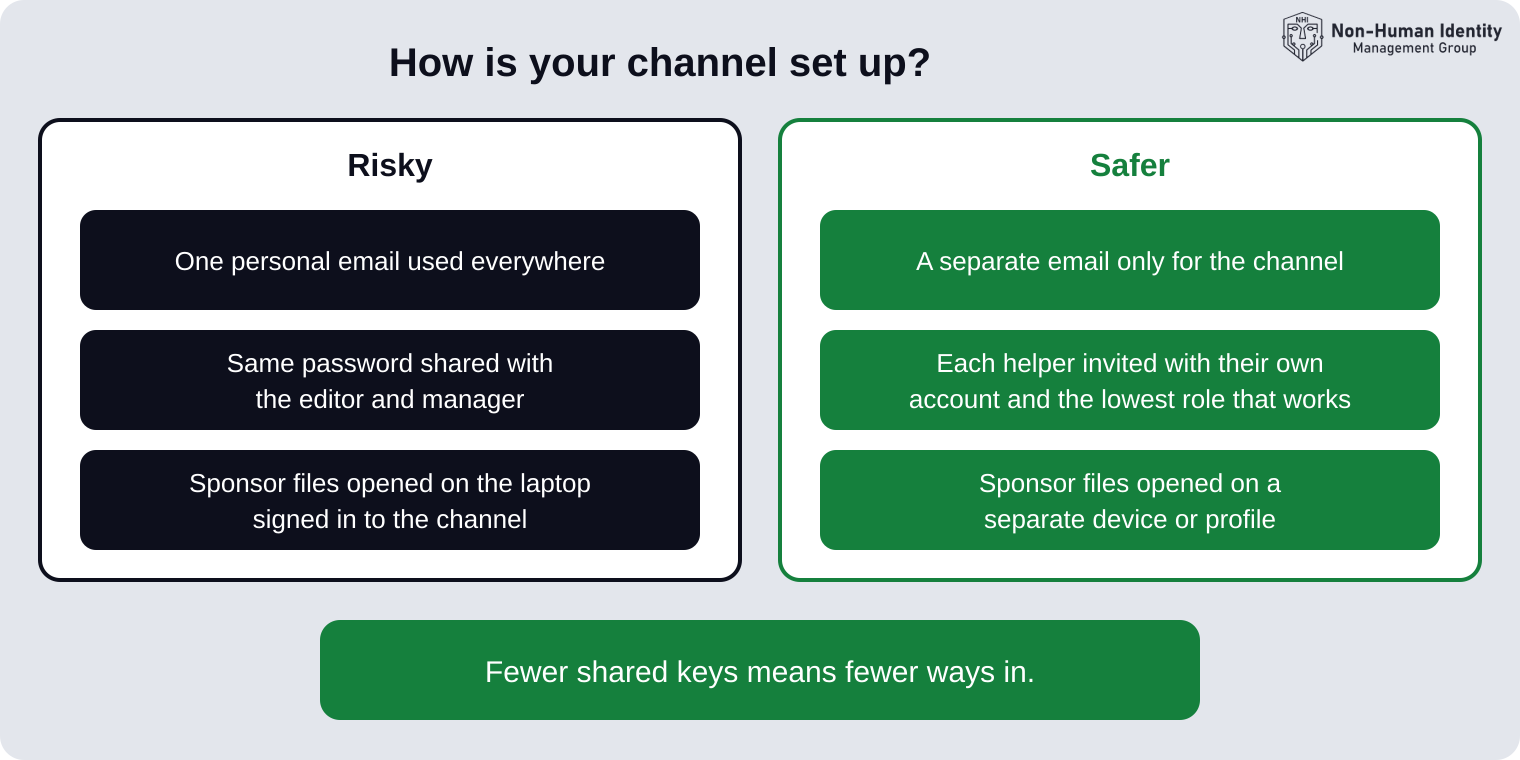
- Never share your password with your team. Give each person their own access with the lowest role that works.
- Use a separate email for the channel, a passkey or second check on sign-in, and a recovery plan you have written down before you need it.
What you will learn
- Spot a fake sponsorship email before you open its file.
- Explain how a channel can be taken over without your password.
- Check who has access to your channel and at what level.
- Know the first steps if your channel is hijacked.
- Stay-signed-in pass (session cookie)
- a small file your browser keeps so a site remembers you are already signed in.
- Password-stealing software (infostealer)
- harmful software that copies saved passwords and session cookies from a computer and sends them to criminals.
- Second check (two-step verification)
- an extra step after your password, such as a code or a tap on your phone.
What is creator account security?
Think of a burglar who has copied your front door key. They do not need to break anything. They just walk in, and to the house it looks like you came home.
Taking over a creator account works the same way. The criminal gets hold of something that proves "this is the owner", then uses it to get in. Once inside, they can change the email, rename the channel and lock you out.
Creator account security is the set of habits that make this hard. It covers how you sign in and the email behind the channel. It also covers the computer you work on, the people who help you, and your plan for getting back in.
Where the comparison stops working: a house key opens one door. Your email account can often reset many other accounts, so one copied "key" may open several doors at once.
Why does it matter?
A channel with a big audience is worth money to criminals. Google's threat researchers found hijacked YouTube channels being sold for between 3 and 4,000 US dollars, depending on subscriber numbers. Others were renamed and used to stream cryptocurrency scams to the creator's audience.[1]
If you are a solo creator
What could happen: you open a "demo" file from a brand deal and wake up to a renamed channel streaming a scam.
Check this: open sponsor files only on a device that is not signed in to your channel.
If you edit or manage for a creator
What could happen: your own account is the way in, because it has access to their channel.
Check this: turn on a second check for your own account and ask for your own invite, not their password.
If you run a small agency or media business
What could happen: a freelancer leaves but still has access to several channels you look after.
Check this: list who can reach each channel, and remove anyone who has finished their work.
What does it look like?
Here is a made-up sponsorship email of the kind creators report. The signs are the same across many versions.
Example only. All values are made up.
From: [email protected]       (1)
To: [email protected]                (2)
Subject: Paid collaboration for your channel

Hi! We love your videos and would pay 2,000 USD
for a 60-second review of our new photo editor.   (3)

Please install the demo before our call tomorrow: (4)
download.example.invalid/BrightLens_Demo.zip
Password for the file: 0000                       (5)
- A brand name you may know, sent from an address you have never used before.
- Sent to the business address shown on your channel, which anyone can find.
- A big fee for little work, to get you excited.
- A push to install something fast, before you check who they are.
- A locked file. In a real message, the password helps the file slip past virus scans.
Why this is risky: Google's researchers saw this exact pattern. Fake brands offered paid deals, often for photo apps, games or security tools. The download was software that steals passwords. They also warned that locked zip files often get past virus scans.[1]
The safer way: check the brand through its own website or a contact you trust, not the email. Do not install a sponsor's software on the computer that runs your channel. If you must open a file, use a spare device or browser profile. It should not be signed in to anything important.
How does it work?
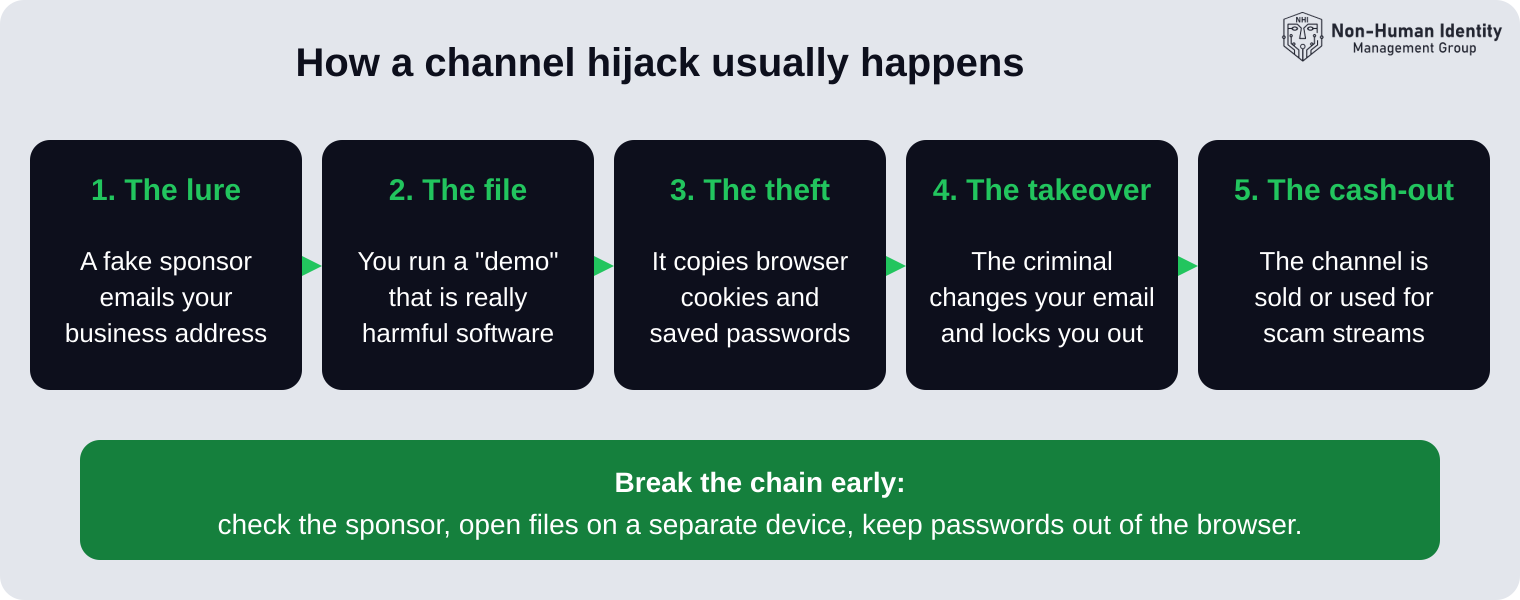
Most channel hijacks follow a short chain. Breaking any link in it helps.
- The lure. A "brand" sends a collaboration offer to the business email on your channel.[1]
- The file. You are asked to download a demo or contract viewer. Running it starts password-stealing software.[1]
- The theft. The software copies your browser's session cookies and saved passwords and sends them to the criminal.[1]
- The takeover. With a valid session cookie, the criminal may be able to act as you without typing your password. A second check happens at sign-in, so a stolen session that is already signed in can get around it. They change your recovery details and lock you out.
- The cash-out. The channel is sold, or renamed to stream scams to your audience.[1]
Not every takeover starts with a file. Some criminals trick a platform's recovery process instead, or reuse a password leaked from another site. That is why a strong, separate email for the channel matters. YouTube recommends using a separate email for your channel, because one email used across many platforms lets an attacker take over several accounts at once.[2]
Sharing is the other weak spot. YouTube's channel permissions let you invite people with roles such as Manager, Editor or Viewer. YouTube describes this as safer than sharing your password, and only the owner and managers can see who has access.[3]
A worked example
Juno Ueda makes cooking videos and has a growing channel. Hugo Castell edits her videos part time. Both names are fictional.
One Monday, Juno gets an email from a photo app brand offering 2,000 dollars for a short review. It asks her to install a demo before a call the next day. The file is a locked zip, with the password in the email.
Juno remembers the copied front door key. If the file steals her saved sign-in data, a criminal could walk straight into her channel. So she does not open it on her editing laptop.
First, she looks up the brand's real website and finds a contact email that is different from the one that wrote to her. She sends a short note there. The brand replies that it has no campaign with her and that others have reported fake offers.
Next, Juno looks at who can reach her channel. Hugo has been signing in with her password for a year. She changes the password and invites Hugo to the channel with an Editor role instead, using his own account.[3] Hugo turns on a second check for his own account.
Then she sets up a passkey on the account behind her channel. A passkey lets her sign in with her phone's screen lock, and Google says passkeys are more secure against phishing than passwords.[4]
Last, she writes a one-page recovery plan. It lists the official help page, her backup codes and who to call. It takes an afternoon, and nothing bad has happened yet. That is the point.
Myths and mistakes
| What people think | What is true |
|---|---|
| I have a second check on sign-in, so I am safe. | It helps a lot, but stolen session cookies can let someone act as you after you have signed in. Protect the device too. |
| Sharing my password with my editor is fine because I trust them. | Their computer or email can be the way in. Invite them with their own account and the lowest role that works.[3] |
| Big brands only email big channels. | Criminals target creators of many sizes, using the business email anyone can see on the channel.[1] |
| A locked zip file is safer. | Locked archives often get past antivirus scans, which is why criminals use them.[1] |
| If I am hacked, I can sort it out whenever I have time. | Act fast. YouTube asks you to undo unwanted changes straight away, and it supports hacked channel cases only from roughly the past nine months.[2] |
What can I do this week?
- Add a passkey or second check to your channel account and your email.
- Move your channel to a separate email that you never publish.
- Swap shared passwords for proper invites and roles. Remove people who have left.
- Decide on a separate device or browser profile for opening sponsor files.
- Write a short recovery plan with the official help links and your backup codes.
Checklist
- The channel uses a separate email that is not shown publicly.
- The owner account uses a passkey, security key or at least a second check.
- Nobody else knows the owner password. Helpers have their own invites.
- Each helper has the lowest role that lets them do their job.
- Access is reviewed every few months and after anyone leaves.
- Sponsor files are opened away from the device signed in to the channel.
- Passwords are kept in a password manager, not saved in the browser.
- Your computer installs updates automatically.
- A written recovery plan exists, with backup codes kept somewhere safe.
Common questions
How can someone take my channel without my password?
By stealing what your browser keeps after you sign in. Some harmful software copies session cookies. These tell a site you are already signed in. A criminal with a valid one may be able to act as you until that session ends or you sign out everywhere.
How do I tell if a sponsorship offer is real?
Check it in a way you choose. Find the brand's own website and contact them there, or ask an agency you know. Be wary of rush requests to install software, locked zip files and fees that seem too big for the work.
What should I do first if my YouTube channel is hijacked?
Get back into the Google Account behind the channel first. Then undo the changes and delete videos you did not upload. YouTube says the channel cannot be fully recovered until the Google Account is. It asks managers to secure their own accounts too.[2]
Should I give my editor my password?
No. Use the platform's permissions feature to invite them with their own account and a suitable role. On YouTube, an Editor can upload and publish but cannot manage who has access. That limits the damage if their account is ever taken over.[3]
Does this apply to other platforms, not just YouTube?
Yes. The same habits work on most platforms: a separate email, strong sign-in, no shared passwords and a recovery plan. For steps after any hacked account, the UK's National Cyber Security Centre has a clear guide.[5]
Where next?
Ready for the detail? Read the practitioner guide: Security for Content Creators and Influencer Accounts Guide. It goes further into team roles, sign-in methods, protecting revenue and a full recovery plan.
Also useful:
- Social Media Account Takeover Playbook
- Social Media Security for Beginners
- Account Takeover for Beginners
- Session Tokens and Cookies for Beginners
Related NHI Mgmt Group resources: Session Hijacking and Cookie Theft Guide · Account Takeover Prevention Guide · Social Media Account Security for Small Businesses Guide
Key terms
- Account takeover
- When someone else gets into an account and uses it as if they were the owner.
- A small file a browser keeps to show a site you are already signed in.
- Session hijacking
- Taking over a signed-in session, so the password is not needed.
- Infostealer
- Harmful software that collects saved passwords and session cookies and sends them to criminals.
- Two-step verification
- An extra check after your password, such as a code or a tap on your phone.
- Passkey
- A way to sign in with your device's screen lock instead of a password, which is harder to phish.
- Password manager
- An app that stores your passwords safely behind one strong unlock.
Sources and further reading
- Phishing campaign targets YouTube creators with cookie theft malware. Google Threat Analysis Group, 20 October 2021. https://blog.google/threat-analysis-group/phishing-campaign-targets-youtube-creators-cookie-theft-malware/, accessed 28 Nov 2026.
- Recover a hacked YouTube channel. YouTube Help, Google. https://support.google.com/youtube/answer/76187, accessed 28 Nov 2026.
- Add or remove access to your YouTube channel (channel permissions). YouTube Help, Google. https://support.google.com/youtube/answer/9481328, accessed 28 Nov 2026.
- Sign in with a passkey instead of a password. Google Account Help, Google. https://support.google.com/accounts/answer/13548313, accessed 28 Nov 2026.
- Recovering a hacked account. National Cyber Security Centre (UK). https://www.ncsc.gov.uk/guidance/recovering-a-hacked-account, accessed 28 Nov 2026.