Disaster recovery testing means practising getting your systems back, before a real disaster forces you to.
This guide is for small business owners, office managers, students and anyone new to IT who has a recovery plan but has never tried it. You do not need to be technical to take part: most tests start with people round a table, talking through what they would do.
In short
- A recovery plan you have never tried is a guess. Testing shows what really works.
- Tests range from a simple talk-through to restoring real systems in a safe, separate space.
- Start small: a one-hour tabletop chat and one test restore find many gaps.
- Write down what went wrong, fix it, and test again on a regular schedule.
What you will learn
- Explain what disaster recovery testing is and why it matters.
- Spot the main types of test, from talk-through to full restore.
- Check whether your own plan has been tried recently.
- Ask your team or supplier for a simple first test.
- Recovery plan (disaster recovery plan)
- written steps for getting your computer systems and data back after a serious problem.
- Talk-through (tabletop exercise)
- a meeting where people walk through a made-up disaster and say what they would do.
- Getting back to work (recovery)
- bringing systems and data back so people can work again.
What is disaster recovery testing?
Think of the spare tyre in your car. Having one is good. But if you have never changed a tyre, a dark motorway is a bad place to learn that the jack is missing.
A disaster recovery plan is your spare tyre for computer systems. It says how you will get systems and data back after a fire, flood, cyber attack or big mistake.[2] Disaster recovery testing is practising the change on your own drive, on a dry day.
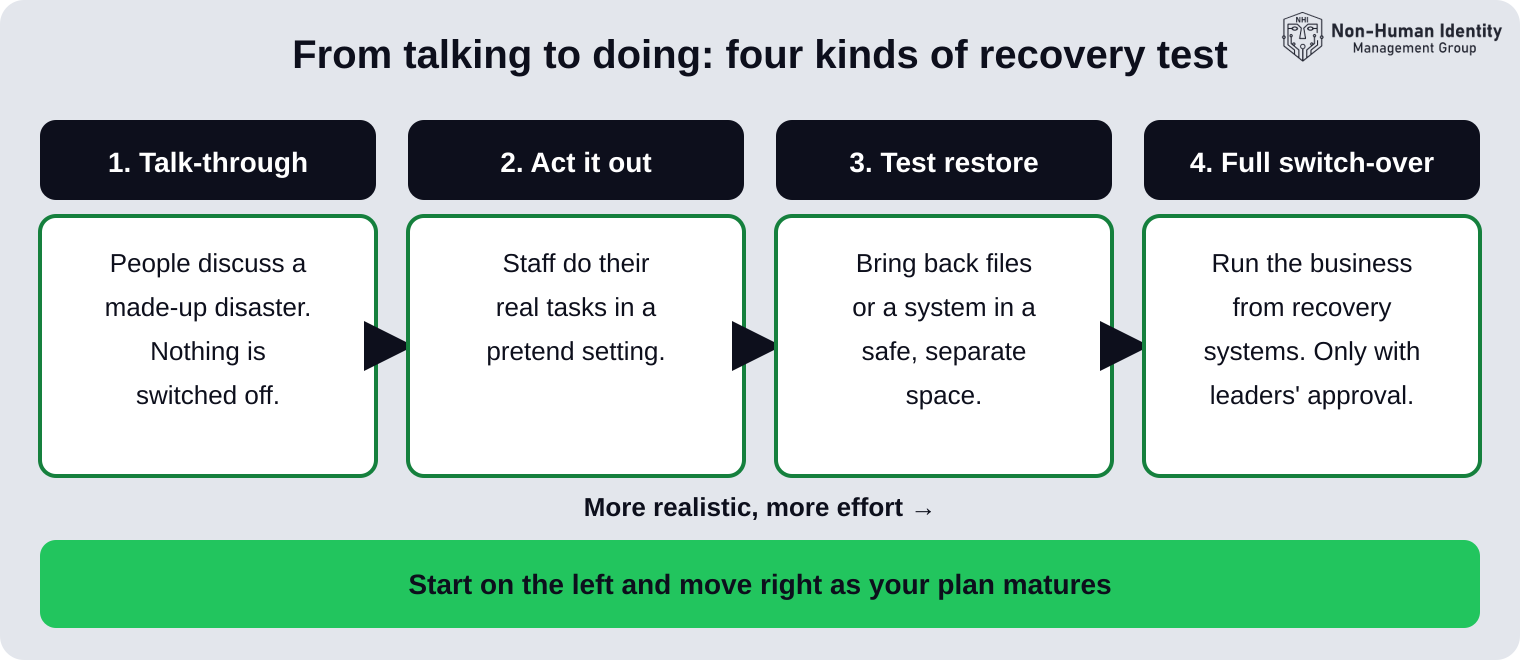
A test can be small or large. It can be a group of people talking through a made-up disaster. It can be getting one folder back from a backup. Or it can be starting a whole copy of your systems somewhere safe and checking they work.
Where the comparison stops working: a tyre stays the same size for years. Your systems, staff and suppliers change all the time, so a plan that worked last year may not work today. That is why testing is a habit, not a one-off.
Why does it matter?
Plans often look fine on paper. Testing is how you find the missing password, the out-of-date phone list or the backup that does not open. Amazon's cloud guidance puts it plainly: in its experience, the recovery that works is the path you test often.[5]
If you run a small business
What could happen: after a ransomware attack you find the plan names a supplier you stopped using last year.
Check this: ask when the plan was last tested, and what the test found.
Next: Business Continuity and Disaster Recovery for Beginners
If you are a manager
What could happen: getting the systems back takes three days, when the business can only cope with one.
Check this: compare how long the last test took with how long you can afford to be down.
If you are a student or new to IT work
What could happen: a test is run on the live systems by mistake and causes the outage it was meant to prepare for.
Check this: make sure technical tests run in a separate, safe space unless leaders have agreed otherwise.
What does it look like?
Here is a made-up scenario card, the kind used to start a tabletop exercise.
Example only. All values are made up.
SCENARIO CARD: EXAMPLE Ltd, tabletop test, 60 minutes
09:00  Staff cannot open shared files. A ransom note appears. (1)
09:15  The main server will not start.                       (2)
Questions for the group:
 - Who do we call first? Is the number in the plan?       (3)
 - Where is our newest clean backup, and who can restore it?
 - How long can we take orders by phone and paper?         (4)
Notes taker: FAKE-NAME-0000                                (5)
- The made-up trigger that starts the talk-through.
- A new twist, to see how the plan copes.
- This question often finds old contact details.
- How long can the business cope without its systems?
- Someone writes down every gap to fix later.
Why this is risky: if nobody writes down the gaps, they stay. The same problems may be there in a real disaster.
The safer way: end every test with a short report. Say what went well and what did not. Name who will fix each gap, and by when.[1]
How does it work?
Most organisations build up their testing in steps, from talking to doing.
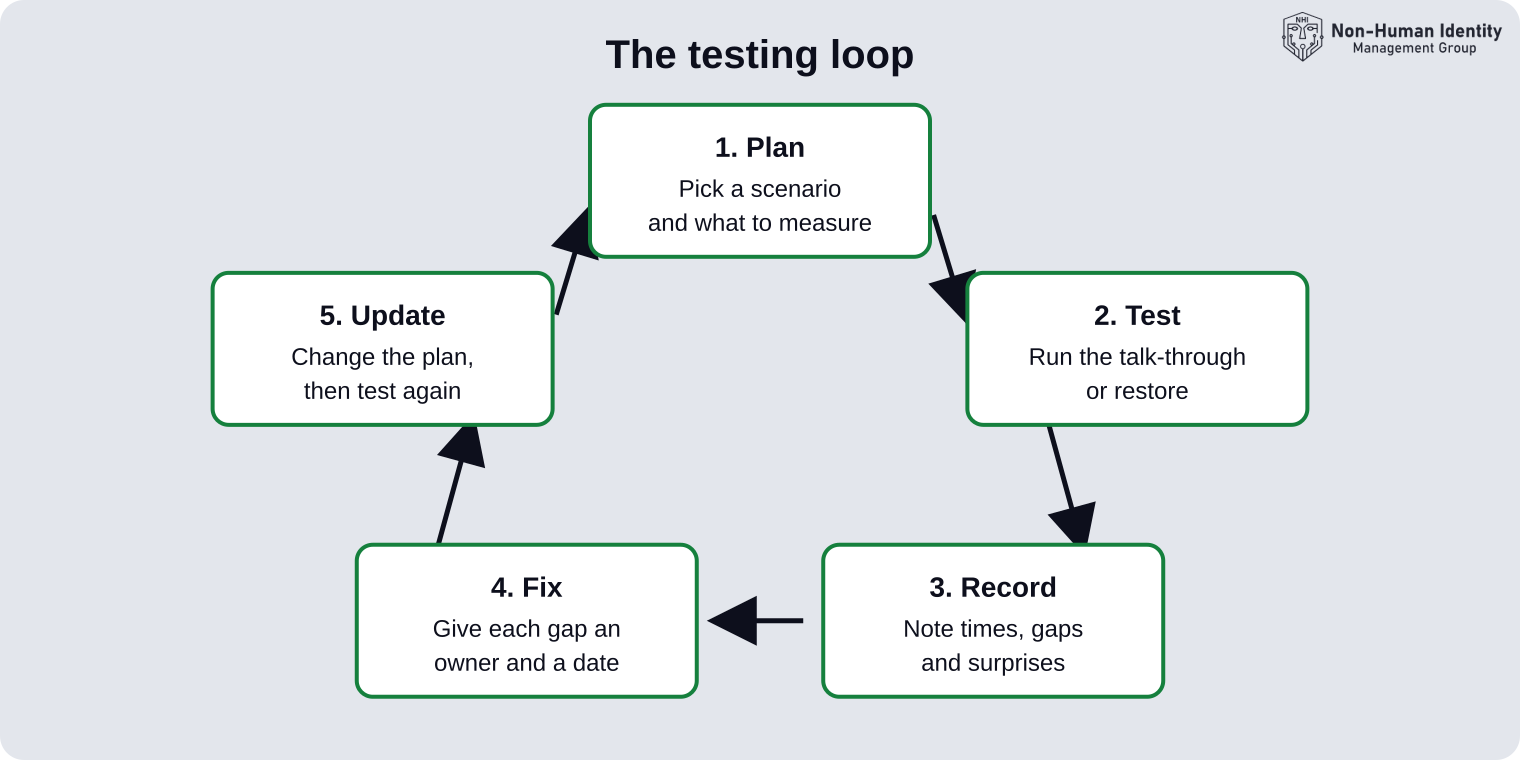
- Set your targets. Agree how long each system can be down, called the recovery time objective (RTO).[3] Agree how much recent data you could lose, called the recovery point objective (RPO).[4]
- Talk it through. In a tabletop exercise, people meet and talk through a made-up disaster. Nothing is switched off.[1]
- Act it out. In a functional exercise, staff carry out their real tasks in a pretend setting, from one task up to the whole plan.[1]
- Restore for real, somewhere safe. A technical test brings real systems back, often in a separate network, and measures how long it took.[1][6]
- Write it up and fix it. A short report lists what was found, with fixes and owners. Then the plan is updated.[1]
Cloud services often include a safe way to practise. Microsoft's recovery service is one example. It offers a test switch-over (also called a failover) that it says does not affect live systems or the copying of data. It recommends running the test in a network kept apart from the live one.[6]
A worked example
Bodhi Jensen manages a fictional accountancy firm with fifteen staff. They have a recovery plan, written three years ago, which nobody has opened since.
Bodhi asks Quinn Zeller, the firm's part-time IT support, to help run a first test. They choose a free tabletop pack from the UK's National Cyber Security Centre, which is built for small organisations and needs no expert to run.[7]
Six people meet for an hour. The scenario: ransomware has locked the file server on the first day of tax season.
Within twenty minutes, they find three gaps. The plan lists a former staff member as the person who can restore backups. Nobody knows the password for the backup service. And the phone list is on the server that has just been locked.
Quinn writes each gap down with an owner and a date. The new contact goes in the plan. The backup password moves into the firm's password manager, with two named people able to open it. The phone list is printed and kept in the office safe.
A month later they run a second test. This time Quinn restores the client folder to a spare laptop and times it. It takes four hours, which is inside the one working day the partners agreed they could cope with.
Bodhi books the next test for six months' time and puts it in the diary.
Myths and mistakes
| What people think | What is true |
|---|---|
| We have a plan, so we are ready. | An untested plan often hides gaps such as old contacts, lost passwords or slow restores.[5] |
| Testing means switching everything off. | Most tests are talk-throughs or restores in a separate space. Live systems are left alone.[1] |
| Backups succeeding means recovery will work. | Backups are one part. People, passwords, order of steps and time taken all need testing too. |
| A test that finds problems has failed. | Finding problems is the point. A test with no findings may not have been realistic enough. |
| Testing once is enough. | Systems and staff change, so test on a regular schedule and after big changes. |
What can I do this week?
- Find your recovery plan and check the date it was last tested.
- Check that the contact names and phone numbers in it are still right.
- Ask who can restore your backups, and whether they can do it without the main systems.
- Book a one-hour tabletop session with the people named in the plan.
- Restore one folder to a separate place and time how long it takes.
Checklist
- We have a written recovery plan, and we know where a copy is kept offline.
- We have agreed how long each key system can be down, and how much data we could lose.
- We run a tabletop exercise at least once a year.
- We test restoring real data in a safe, separate space on a regular schedule.
- Technical tests on live systems happen only with leaders' approval.
- Each test ends with a written report, with fixes, owners and dates.
- The plan is updated after each test and after big changes.
Common questions
How often should we test our recovery plan?
We suggest a talk-through at least once a year and test restores more often, for example every few months. Test again after big changes, such as a new system, a new supplier or staff leaving. Busy or regulated organisations often test more often than this.
Is disaster recovery testing the same as testing backups?
No, it is wider. Testing a backup checks that files come back. Disaster recovery testing also checks the people, the contact list, the passwords, the order of steps and how long it all takes. A backup test is one useful part of it.
Will a test disrupt our business?
Not if you plan it well. Talk-throughs touch no systems at all. Restore tests usually run in a separate space, away from live systems. Only a full switch-over affects live work, and that needs careful planning and leaders' approval first.
Do small organisations need to test?
Yes, and it can be cheap. A one-hour talk-through and one test restore cost little and often find the biggest gaps. The UK's National Cyber Security Centre offers free exercise packs made for small organisations.
What should a test report include?
Keep it short. Note the scenario, who took part, what went well and what did not, and how long key steps took. List each gap with a named owner and a date to fix it. Then update the plan.
Where next?
Ready for the detail? Read the practitioner guide: Disaster Recovery Testing Guide. It goes further into test types and schedules, how to measure recovery times, and what regulators and standards expect.
Also useful:
- Business Continuity and Disaster Recovery for Beginners
- Backup and Recovery Testing Checklist
- Types of Backup for Beginners
- Cyber Incident Exercises Beyond Tabletop Guide
Related NHI Mgmt Group resources: Business Continuity and Disaster Recovery Guide · Recovering From a Cyber Attack for Beginners · Cyber Resilience for Beginners
Key terms
- Disaster recovery plan
- Written steps for restoring systems and data after a serious disruption.
- Tabletop exercise
- A meeting where people talk through a made-up incident and agree what they would do.
- Recovery time objective (RTO)
- The longest a system can be down before the harm to the business is too great.
- Recovery point objective (RPO)
- How far back in time your data may go after a restore, which sets how much recent work could be lost.
- Failover
- Moving work to a standby system when the main one fails.
- Full recovery test
- A test that rebuilds a whole service, not just its data, to check it really works.
- Recovery runbook
- Step-by-step instructions for bringing back one system.
Sources and further reading
- NIST Special Publication 800-84, Guide to Test, Training, and Exercise Programs for IT Plans and Capabilities. National Institute of Standards and Technology, September 2006. https://nvlpubs.nist.gov/nistpubs/Legacy/SP/nistspecialpublication800-84.pdf, accessed 28 Nov 2026.
- NIST Special Publication 800-34 Rev. 1, Contingency Planning Guide for Federal Information Systems. National Institute of Standards and Technology, May 2010 (updated November 2010). https://csrc.nist.gov/pubs/sp/800/34/r1/upd1/final, accessed 28 Nov 2026.
- Glossary: recovery time objective (from SP 800-34 Rev. 1). NIST Computer Security Resource Center. https://csrc.nist.gov/glossary/term/recovery_time_objective, accessed 28 Nov 2026.
- Glossary: recovery point objective (from SP 800-34 Rev. 1). NIST Computer Security Resource Center. https://csrc.nist.gov/glossary/term/recovery_point_objective, accessed 28 Nov 2026.
- REL13-BP03 Test disaster recovery implementation to validate the implementation. AWS Well-Architected Framework, Reliability Pillar, Amazon Web Services. https://docs.aws.amazon.com/wellarchitected/latest/reliability-pillar/rel_planning_for_recovery_dr_tested.html, accessed 28 Nov 2026.
- Run a disaster recovery drill to Azure (test failover). Microsoft Learn, Microsoft. https://learn.microsoft.com/en-us/azure/site-recovery/site-recovery-test-failover-to-azure, accessed 28 Nov 2026.
- Exercise in a Box. National Cyber Security Centre (UK). https://www.ncsc.gov.uk/information/exercise-in-a-box, accessed 28 Nov 2026.