Recovering from a cyber attack means getting systems, data and accounts working again without letting the attacker back in.
This guide is for managers, small business owners and people new to IT work who want to know what happens after an attack is stopped. You do not need to be technical to help: recovery is full of business choices, such as what to switch back on first and when to tell customers.
In short
- Recovery starts only once you are confident the attacker has been removed, or the attack can start again.
- Rebuild affected computers from clean copies, then change passwords and keys, including those used by software.
- Restore data from backups you have checked, and switch services back on in a planned order.
- Expect it to take weeks or months, and use the time to fix the weak spots that let the attacker in.
What you will learn
- Explain the main steps of recovering from a cyber attack.
- Spot the common mistake of switching things back on too early.
- Check that passwords, keys and backups are trusted again.
- Ask your IT team or supplier the right questions during recovery.
- Starting again from a clean copy (rebuild)
- wiping a computer or server and setting it up again from a known good starting point.
- Spare copies of your data (backups)
- copies kept apart from your normal systems so you can bring data back after a loss.
- Hidden way back in (persistence)
- anything an attacker leaves behind so they can return later, such as a secret account.
What is recovering from a cyber attack?
Think of moving back into a house after a flood. You would not switch the power straight back on. First you check the wiring, dry the walls and throw out anything spoiled.
Recovery after a cyber attack works the same way. Once the attack has been stopped, the team brings systems back step by step. They rebuild what was touched, change the passwords and keys, and restore data they trust. Then they reconnect services in a planned order and watch closely for any sign of the attacker.
This is the last part of incident response, the planned way an organisation spots, stops and recovers from an attack.[6] Recovery is different from ordinary disaster recovery after a fire or power cut. After a cyber attack, someone may have left a hidden way back in, so you cannot simply trust what was there before.
Where the comparison stops working: flood damage is easy to see. An attacker's hidden account or tool may look exactly like normal files, so you need checks, not just a look around.
Why does it matter?
Recovery usually takes longer than leaders expect. UK guidance says a firm may have little or no IT for weeks. Full recovery can take months.[1] If you rush it, the attack can start again.
If you run a small business
What could happen: you restore an old copy that still holds the attacker's tool, and the trouble returns a week later.
Check this: ask your IT supplier how they know the attacker is gone before anything is switched back on.
If you are a manager
What could happen: staff build quick workarounds that quietly become permanent and are never checked.
Check this: agree what comes back first, and give every workaround a review date.
Next: Business Continuity and Disaster Recovery for Beginners
If you are new to IT work
What could happen: you reset staff passwords but miss the passwords and keys that software uses, so a door stays open.
Check this: list every account and key on the affected systems, for people and for software.
What does it look like?
Many teams keep a simple tracker during recovery. Here is a made-up one for a small firm, part way through.
Example only. All values are made up.
RECOVERY TRACKER  Example Ltd  Day 6
Attacker removed?   YES, confirmed by IR firm (EXAMPLE-IR)  (1)
File server         Rebuilt from clean image     DONE
Staff passwords     All reset, MFA on            DONE
Software accounts   backup-svc, sync-svc         NOT YET  (2)
Customer data       Restored from 0000 backup    CHECKED  (3)
Partner link        Off until partner agrees     WAITING  (4)
Email workaround    Personal accounts, review Day 10    (5)
- Recovery should only start after this answer is yes.
- In a real file, this line would list the accounts that programs use. They are easy to forget.
- The backup was checked for signs of the attacker before it was used.
- Partners may want proof that you are clean before they reconnect.
- A temporary workaround with a date to review it, so it does not become permanent.
Why this is risky: the software accounts in line 2 still use their old passwords. If the attacker copied them, the attacker may still be able to log in, even though every person has a new password.
The safer way: change every password and key on the affected systems, for people and for software, before reconnecting. Then switch services back on one at a time and watch them.
How does it work?
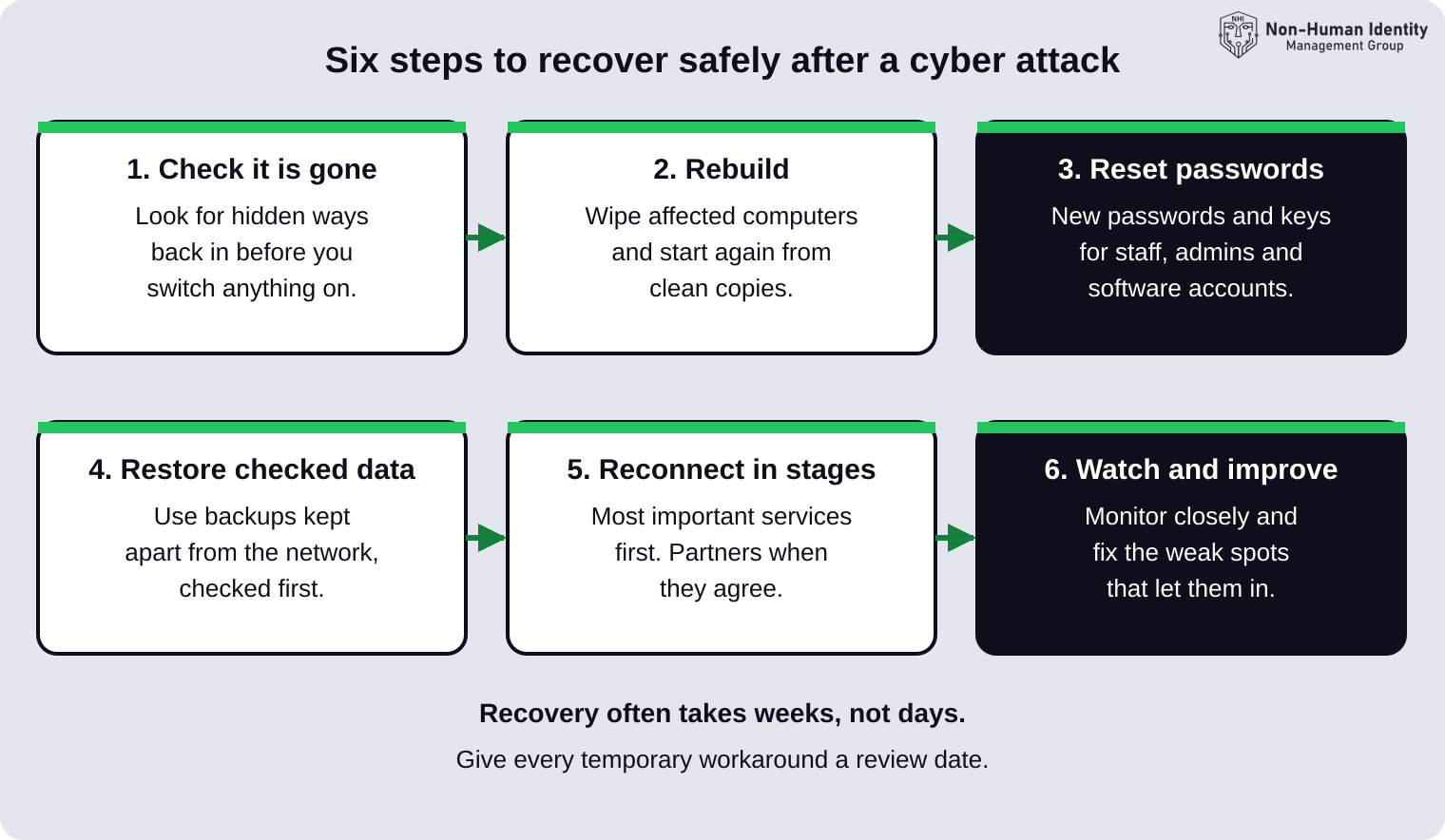
Every attack is different, but recovery usually follows these steps.
- Make sure the attacker is gone. Investigators check for hidden ways back in. If they are missed, the attack may start again.[1]
- Rebuild what was touched. Affected computers are wiped and set up again from clean, standard copies, starting with the most important services. For a small firm, this can mean replacing infected hardware or cleaning machines, depending on the attack.[3][4]
- Change passwords and keys. Reset passwords for the affected systems, including powerful admin accounts, once the cleaning is done.[1][3] This includes the accounts and keys that software uses, called non-human identities (NHIs).
- Restore data you trust. Bring data back from backups kept offline or apart from the network. Assume the attacker may have tried to reach the backups, so check them first.[1][3]
- Reconnect in stages. Switch services back on in a planned order, and keep clean systems apart from ones not yet checked, so they are not infected again.[3]
- Watch, learn and improve. Keep a close eye on the systems, write down what happened and fix the weak spots, rather than rebuilding the old set-up exactly.[2]
Partners and customers are part of recovery too. They may ask for proof that the problem is fixed before they let your systems connect to theirs again, and that can add time.[1] Real recoveries can be long. The British Library said it was still taking time to recover months after an attack in October 2023, partly because of its older, complex systems.[5]
A worked example
Hal Kowal runs a fictional accountancy firm with fifteen staff. On a Monday, files on the shared drive will not open, and a ransom note appears. His IT supplier, Fen Jovanovic, shuts the network down and calls in an incident response firm.
By Thursday the investigators say they have found how the attacker got in and removed the tools they left. Hal wants everything back by Friday. Fen reminds him of the flood: you check the wiring before you switch the power on.
They agree an order. Email and the accounts software come first, because clients have tax deadlines. Staff use a paper log for urgent work, with a review date the following week.
Fen wipes the file server and rebuilds it from a clean copy. She resets every staff password and turns on a second login check. Then she lists the accounts that programs use, such as the backup tool and the payroll link. She changes their passwords and keys too.
Before restoring files, she checks the backup. It was kept offline, and it shows no signs of the attacker's tools. She restores it and watches the server closely for a week.
The payroll provider asks for a short note on what was fixed before it reconnects. Hal sends it, and the link is back two days later.
At the end, they write down what went wrong. The attacker used an old remote login with no second check. That login is now switched off.
Myths and mistakes
| What people think | What is true |
|---|---|
| Once the ransom note is gone, we can switch everything back on. | First confirm the attacker is removed. Hidden ways back in can restart the attack.[1] |
| Restoring last night's backup puts us back to normal. | The backup may hold the attacker's tools, or may have been targeted. Check it before you use it.[1] |
| Resetting staff passwords is enough. | Software accounts, admin accounts and keys need changing too. |
| Recovery takes a few days. | It can take weeks of limited IT and months for full recovery.[1] |
| The aim is to get back exactly what we had. | UK guidance suggests building a better new set-up, not the old one with its weak spots.[2] |
What can I do this week?
- Write down which services you would need back first, and why.
- Ask your IT team or supplier where backups are kept and when a restore was last tested.
- List the accounts and keys that your software uses, with an owner for each.
- Note who you would need to tell, such as partners, customers and your insurer.
Checklist
- We know who decides that the attacker has been removed.
- We have a list of the most important services, in the order we would bring them back.
- Backups are kept offline or apart from the network, and restores are tested.
- We can rebuild key computers from clean, standard copies.
- We know how to change every password and key, for people and for software.
- Partners and suppliers we connect to are on a contact list.
- Workarounds used during recovery get a review date.
- After recovery, we hold a lessons-learned review and act on it.
Common questions
How long does recovery take?
Often longer than people expect. UK guidance says organisations may manage with little or no IT for weeks, and full recovery can take months. A small, simple set-up with good backups is usually quicker than a large one with older systems.
Should we rebuild or just clean the computers?
Rebuilding from a clean copy is usually safer for computers the attacker touched. Cleaning can miss a hidden tool. Your incident response team will advise, based on what they found. The practitioner guide on declaring systems clean explains how that choice is made.
Why change passwords that software uses?
Because attackers often copy them. Programs log in to other systems with their own passwords and keys, and these rarely change on their own. If they stay the same after an attack, the attacker may be able to keep using them to get back in.
When should we tell customers and partners?
Early, and with consistent updates, even when you do not have every answer. Some may have rules about when you must tell them. Partners may also want proof of the fix before reconnecting. See our guide to reporting cyber incidents for who you may need to tell.
Can we use our backups straight away?
Not without checking them. Attackers may target backups, and a copy taken after they got in may hold their tools. Use copies kept offline or apart from the network, and check them for signs of the attacker before restoring.
Where next?
Ready for the detail? Read the practitioner guide: Declaring Systems Clean. It goes further into choosing between rebuilding and cleaning, the checks a system must pass and how reconnection is signed off.
Also useful:
- Incident Response for Beginners
- Ransomware for Beginners
- Backup Security for Beginners
- Cyber Incident Reporting for Beginners
- Cyber Recovery vs Disaster Recovery
Related NHI Mgmt Group resources: Identity Recovery Guide · Business Continuity and Disaster Recovery for Beginners · Non-Human Identities for Beginners
Key terms
- Incident response
- The planned actions used to spot, contain, investigate and recover from a security event.
- Persistence
- Anything that keeps an attacker's access alive after reboots or password changes, such as a hidden account.
- Immutable backup
- A backup copy that cannot be changed or deleted for a set period, so it can be trusted for recovery.
- Password reset
- Replacing a forgotten or compromised password with a new one.
- Privileged account
- An account with powerful rights to run systems, data or security settings, often called an admin account.
- Disaster recovery
- The processes for restoring systems, data and services after a major outage.
Sources and further reading
- Disruptive cyber attacks: Recovery and ongoing investigations. National Cyber Security Centre (NCSC), 28 July 2026. https://www.ncsc.gov.uk/collection/what-to-do-when-cyber-attacks-disrupt-your-organisation/recovering/recovering-ongoing-investigations, accessed 28 Nov 2026.
- Disruptive cyber attacks: Rebuild. National Cyber Security Centre (NCSC), 28 July 2026. https://www.ncsc.gov.uk/collection/what-to-do-when-cyber-attacks-disrupt-your-organisation/recovering/rebuild, accessed 28 Nov 2026.
- #StopRansomware Guide. Cybersecurity and Infrastructure Security Agency (CISA). https://www.cisa.gov/stopransomware/ransomware-guide, accessed 28 Nov 2026.
- Small Business Guide: Response and Recovery, Step 3: Resolve the incident. National Cyber Security Centre (NCSC). https://www.ncsc.gov.uk/collection/small-business-guidance--response-and-recovery/step-3--resolve-the-incident, accessed 28 Nov 2026.
- Learning lessons from the cyber-attack. British Library, 8 March 2024. https://www.bl.uk/stories/blogs/posts/learning-lessons-from-the-cyber-attack, accessed 28 Nov 2026.
- SP 800-61 Rev. 3, Incident Response Recommendations and Considerations for Cybersecurity Risk Management: A CSF 2.0 Community Profile. NIST, April 2025. https://csrc.nist.gov/pubs/sp/800/61/r3/final, accessed 28 Nov 2026.