Backup types are the different ways of copying your files, from a whole copy to copying only what changed.
This guide is for small business owners, office managers, students and anyone who has been asked "full or incremental?" and nodded along. You do not need to run a server to be affected: the backup type your supplier picks decides how much work you could lose and how long a restore takes.
In short
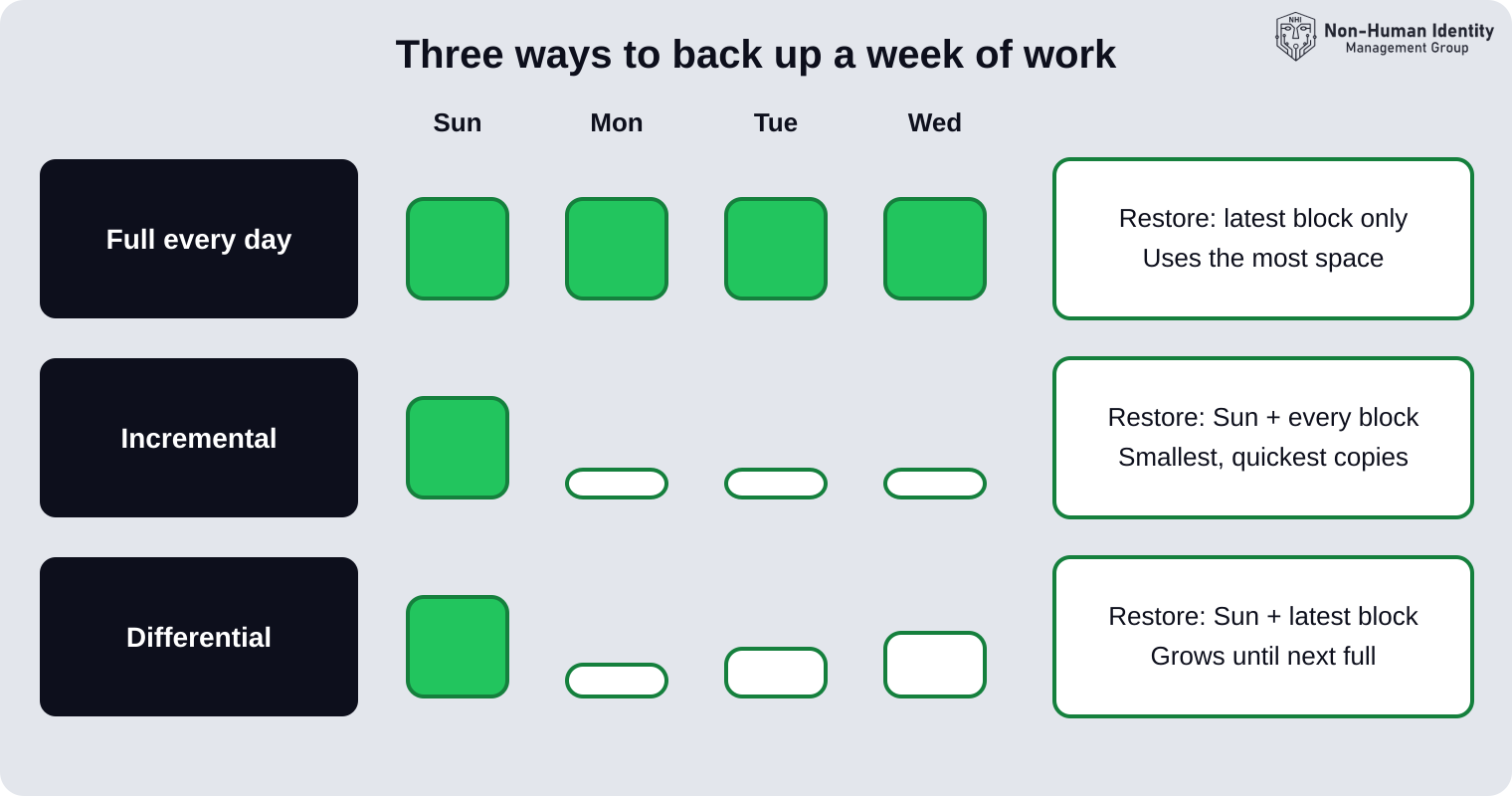
- A full backup copies everything. It is the simplest to restore but takes the most time and space.
- An incremental backup copies only what changed since the last backup of any kind. It is quick, but a restore needs the full copy plus every incremental since.
- A differential backup copies everything that changed since the last full backup. A restore needs just two pieces, but each differential grows over time.
- Most setups mix them, for example a weekly full and daily smaller backups, with at least one copy kept offline and restores tested.
What you will learn
- Explain full, incremental and differential backups in plain words.
- Spot which pieces you would need to get your files back.
- Check what a snapshot is, and where it falls short.
- Ask your IT supplier the right questions about your backup plan.
- Whole copy (full backup)
- a copy of every file you chose to protect, made in one go.
- Changes-only copy (incremental or differential backup)
- a copy of only the files that changed since an earlier backup.
- Getting files back (restore)
- copying files from a backup back to where you can use them.
What are backup types?
Think of keeping a safe copy of a busy notebook. On Monday you photocopy every page. On later days, you only photocopy the pages you wrote on.
A full backup is the Monday photocopy of every page. A incremental backup copies only the pages changed since the last copy of any kind. A differential backup copies every page changed since Monday's full copy.
The trade-off is simple. Copying less each day is faster and uses less space. But when you need the notebook back, you may have to put several piles of photocopies together in the right order.
Where the comparison stops working: software does this by itself, often at night, and keeps track of which pieces belong together. You rarely see the piles. You do need to know they exist, because a missing piece can stop a restore.
Why does it matter?
The backup type sets two things you care about when something goes wrong. How much recent work you could lose, and how long it takes to get the rest back.
If you run a small business
What could happen: a laptop dies and you learn the "backup" was one full copy from three months ago.
Check this: ask how often each type of backup runs, and when the last one finished.
If you are a student or new to IT work
What could happen: you delete an old full backup to save space and break the chain that newer backups rely on.
Check this: before deleting any backup, find out which later backups depend on it.
If you look after an office or a club
What could happen: ransomware (software that locks your files and demands payment) also locks the backup drive left plugged in.
Check this: keep at least one copy unplugged or otherwise cut off when it is not in use.[7]
Next: Ransomware for Beginners
What does it look like?
Here is a made-up backup report, the kind a backup tool might email each morning.
Example only. All values are made up.
Backup report: EXAMPLE Office (server FAKE-SRV-0000)
Sun  FULL          120 GB   OK         (1)
Mon  INCREMENTAL     2 GB   OK         (2)
Tue  INCREMENTAL     3 GB   FAILED     (3)
Wed  INCREMENTAL     2 GB   OK
Copy to offsite store: last run 0 days ago  (4)
Last test restore: never               (5)
- The weekly whole copy. Later backups this week build on it.
- A small changes-only copy holding Monday's changes.
- A failed link in the chain. Tuesday's changes may be missing from a restore until the backup is fixed.
- A copy kept somewhere else, which helps if the office or server is lost.
- Nobody has checked that the files come back. Fix this first.
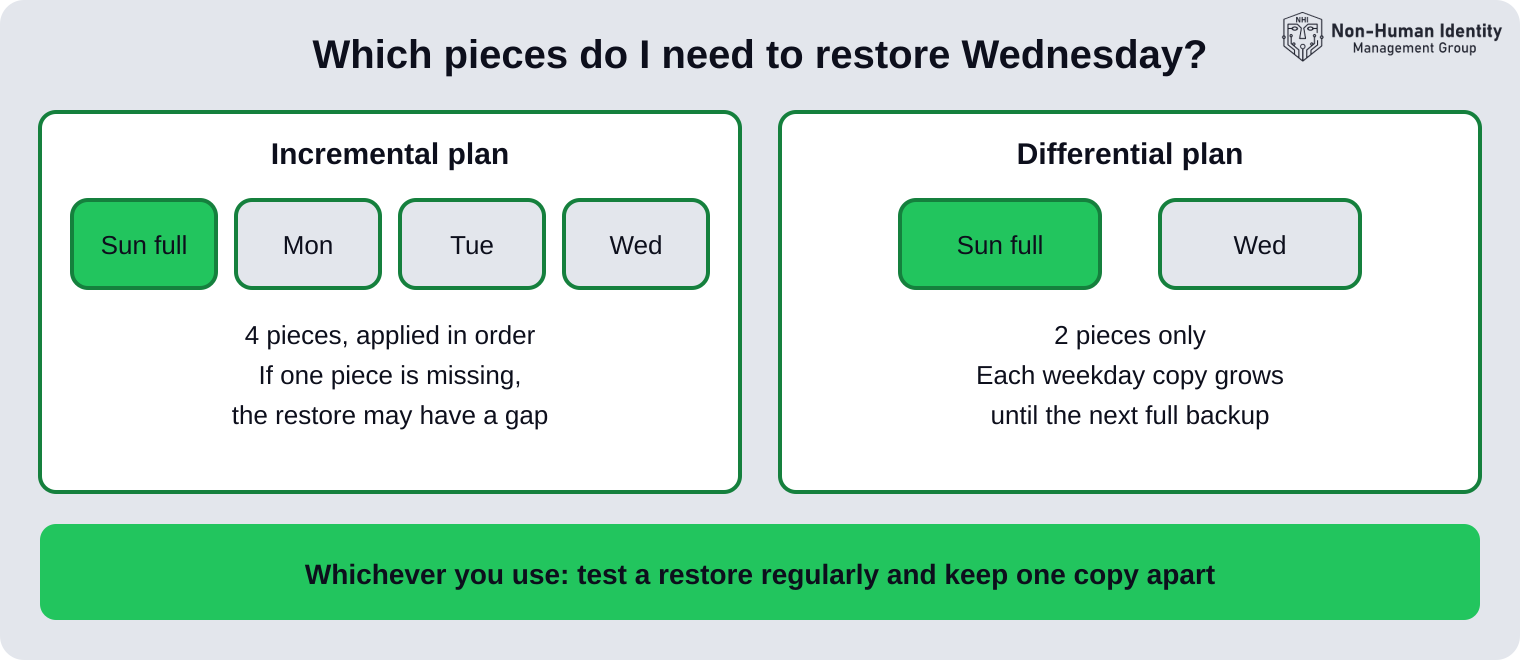
Why this is risky: with this plan, getting Wednesday back needs all four backups, in order.[2] One failed or missing piece can leave a gap.
The safer way: someone reads the report each day. Failed backups are run again. A test restore is done on a set schedule.[6]
How does it work?
Most backup plans follow the same pattern.
- Start with a whole copy. A full backup copies everything. Later backups use it as their starting point, often called the base.[1]
- Add changes-only copies. On the following days, the tool copies only what changed, either since the last backup (incremental) or since the last full (differential).[2]
- Watch the size. Differential backups grow each day, because they hold all changes since the base. Starting a new full backup at set times, for example weekly, keeps them small.[1]
- Restore in order. For a differential plan, restore the full, then only the latest differential.[1] For an incremental plan, restore the full, then each incremental in turn.[2]
- Keep a copy apart. Keep at least one copy disconnected from your everyday systems, so one problem cannot reach every copy.[7]
You may also hear about a snapshot. A snapshot is a copy of a whole disk or system at one moment. Big cloud providers store snapshots as changes since the last one. Even so, each snapshot can rebuild the whole disk as it was at that moment.[3][4] Snapshots are quick and handy. But if they sit in the same account as the original, one problem may affect both. So keep a separate copy too.[7]
Some databases go one step further. They keep a log of every change, so the data can be put back to a chosen moment, such as five minutes before a mistake. This is called point-in-time recovery.[5]
A worked example
Imani Delmar runs a small, fictional design studio with six staff. Her IT supplier, Wren Marlow, set up backups two years ago.
One Thursday a staff member opens a fake invoice and ransomware locks the shared drive. Imani's first question is simple. "How much have we lost?"
Wren checks the backup report. The studio runs a full backup every Sunday and an incremental every night. To bring the drive back to Wednesday night, she needs Sunday's full and the Monday, Tuesday and Wednesday incrementals.
Tuesday's backup had failed and nobody had noticed. So Wren can restore Sunday and Monday cleanly. Some files changed on Tuesday are missing, though many were changed again on Wednesday and came back with that backup.
The good news is that the backups sat on a cloud store that the office computers could not change. The ransomware did not reach them. Wren restores to clean computers, and the studio is working again by Friday lunchtime.
Afterwards, Imani and Wren change three things. Failed backups now send an alert to both of them. Wren switches the weekday backups to differentials, so a restore needs only two pieces. And they book a test restore of one folder every month.
Imani now reads the Monday report herself. It takes two minutes.
Myths and mistakes
| What people think | What is true |
|---|---|
| Incremental backups are always better because they are smaller. | They save time and space, but a restore needs the full plus every incremental since, in order.[2] |
| A differential backup stays small. | It grows each day until the next full backup, because it holds all changes since that full.[1] |
| Old full backups can be deleted once newer backups exist. | Newer changes-only backups may depend on that full. Check the chain before deleting anything. |
| A snapshot on the same system is all the backup I need. | Snapshots help, but a problem that reaches the system or account may reach them too. Keep a separate copy.[7] |
| If the report says OK, the backup works. | Only a test restore shows that files really come back.[6] |
What can I do this week?
- Ask your IT supplier which backup types you use and how often each runs.
- Read the latest backup report and look for any failed backups.
- Restore one test file to a different folder, and check that it opens.
- Check that at least one copy is offline or cut off from your everyday systems.
- Turn on two-step sign-in for any online backup account.[6]
Checklist
- We know which backup types we use and on which days.
- A full backup runs at set intervals, so changes-only backups stay manageable.
- Someone reads backup reports, and failed backups are re-run.
- We know which pieces a restore needs, in which order.
- Nobody deletes a backup without checking what depends on it.
- At least one copy is kept offline or in a separate account.
- Online backup accounts use two-step sign-in.
- We test a restore on a regular schedule and write down the result.
Common questions
Which backup type is best?
There is no single best type. Many small offices use a weekly full backup plus daily incremental or differential backups. Choose incrementals if space and time are tight, and differentials if quicker, simpler restores matter more. Your supplier can explain the trade-off for your data.
Is a snapshot a backup?
A snapshot is a useful copy of a disk at one moment, and it can rebuild that disk. It counts as a safe backup only if it is kept apart from the original system. Then a problem there cannot reach it as well.
Is syncing to the cloud the same as a backup?
Not quite. A sync tool copies changes straight away, so a deleted or locked file can be copied over too. A backup keeps older versions you can go back to. Some cloud services do both, so check whether yours keeps earlier versions and for how long.
How often should backups run?
Often enough that losing the work since the last backup would be bearable. For a busy office that may mean every night or more often. Ask yourself how much work you could redo by hand, then set the schedule to match.
What does a test restore involve?
A test restore means getting a few files, or a whole system, back from a backup and checking they open and are complete. Restore to a separate folder or machine so you do not overwrite anything. Write down how long it took and any problems.
Where next?
Ready for the detail? Read the practitioner guide: Full vs Incremental vs Differential Backups. It goes further into backup schedules, database and cloud snapshot options, and how to plan restore times.
Also useful:
- The 3-2-1 Backup Rule for Beginners
- Backup Security for Beginners
- Backing Up Microsoft 365 for Beginners
- Backup Retention Design
Related NHI Mgmt Group resources: Backup and Recovery Testing Checklist · Business Continuity and Disaster Recovery for Beginners · Ransomware for Beginners
Key terms
- Full backup
- A backup that copies every file chosen for protection.
- Incremental backup
- A backup that copies only what changed since the last backup of any kind.
- Differential backup
- A backup that copies everything changed since the last full backup.
- Snapshot
- A point-in-time copy of a disk or system, often stored as changes since the previous snapshot.
- Point-in-time recovery
- Restoring data to the state it was in at a chosen moment.
- Air-gapped backup
- A backup kept cut off from everyday systems, so a problem there does not reach it.
- Backup window
- The time set aside for backups to run, often overnight.
Sources and further reading
- Differential backups (SQL Server). Microsoft Learn, Microsoft. https://learn.microsoft.com/en-us/sql/relational-databases/backup-restore/differential-backups-sql-server, accessed 28 Nov 2026.
- Backup and Recovery User's Guide, RMAN Backup Concepts (Oracle Database 19c). Oracle. https://docs.oracle.com/en/database/oracle/oracle-database/19/bradv/rman-backup-concepts.html, accessed 28 Nov 2026.
- Amazon EBS snapshots. Amazon EBS User Guide, Amazon Web Services. https://docs.aws.amazon.com/ebs/latest/userguide/ebs-snapshots.html, accessed 28 Nov 2026.
- Create an incremental snapshot for managed disks. Microsoft Learn, Microsoft. https://learn.microsoft.com/en-us/azure/virtual-machines/disks-incremental-snapshots, accessed 28 Nov 2026.
- Continuous Archiving and Point-in-Time Recovery (PITR). PostgreSQL Documentation, PostgreSQL Global Development Group. https://www.postgresql.org/docs/current/continuous-archiving.html, accessed 28 Nov 2026.
- Small organisations guide to cyber security: Backing up your data. National Cyber Security Centre (UK). https://www.ncsc.gov.uk/collection/small-organisations-guide-to-cyber-security/backing-up-your-data, accessed 28 Nov 2026.
- Offline backups in an online world. National Cyber Security Centre (UK) blog. https://www.ncsc.gov.uk/blog-post/offline-backups-in-an-online-world, accessed 28 Nov 2026.