Fuzzing is a way of testing software by feeding it huge numbers of strange inputs to see what breaks.
This guide is for students, new developers and anyone curious about how bugs are found before attackers find them. You do not need to be a security expert: if your team builds software that reads files or messages from outside, fuzzing is one of the tools that can test it.
In short
- A fuzzer is a tool that makes lots of odd, broken or unexpected inputs and sends them to a program.
- It watches for crashes, freezes and warnings, which often point to bugs.
- Modern fuzzers learn which inputs reach new parts of the code, so they dig deeper over time.
- Each bug found becomes a saved test, so it is caught if it ever returns.
What you will learn
- Odd-input tester (fuzzer)
- a tool that sends a program many unexpected inputs and watches what happens.
- Starter samples (seed corpus)
- a small set of normal inputs the fuzzer changes to make new ones.
- Bug alarm (sanitizer)
- an extra checker built into a test copy of a program that raises a flag on hidden memory errors.
What is fuzzing?
Think of a toddler let loose on a TV remote. They press every button, in every order, again and again. Sooner or later they find the menu the grown-ups never knew about.
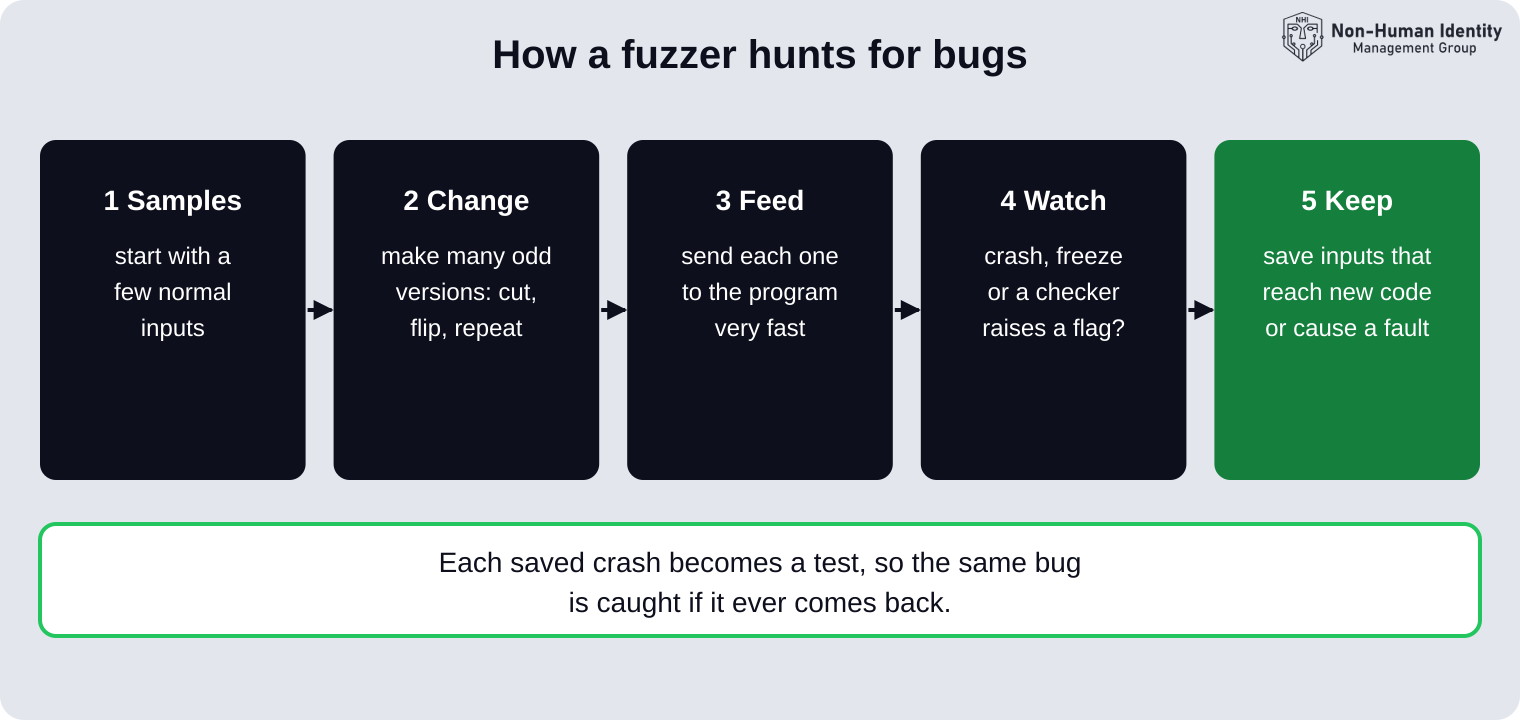
A fuzzer does the same to a program. An input is anything the program reads: a file, a form, a message from the internet. The fuzzer takes a few normal inputs and changes them in small random ways. It cuts bits off, flips letters and repeats parts. Then it sends each new version to the program, often thousands of times a second.
Most of the time nothing happens. But now and then the program crashes, freezes or trips an alarm. That moment is a clue that the code has a bug.
Where the comparison stops working: a toddler presses buttons at random and forgets what happened. A modern fuzzer keeps notes. It remembers which inputs reached new parts of the code and builds on those, so it gets smarter as it goes.
Why does it matter?
Attackers often break in by sending a program input it was never built to handle. Fuzzing tries those inputs first, so the bug can be fixed before anyone uses it. OSS-Fuzz is Google's free fuzzing service for open source software. It says it has helped find and fix over 10,000 security flaws and 36,000 bugs across 1,000 projects, as of August 2023.[1]
If you are a student or learning to code
What could happen: your program works on the inputs you tried, then falls over on the first strange one.
Check this: try your language's built-in fuzzing, if it has one, on a small function you wrote.
If you write code for a living
What could happen: code that reads uploaded files has a flaw that a crafted file can use.
Check this: list the places your code reads files or messages from outside, and ask which are fuzzed.
Next: Fuzzing Guide
If you buy or manage software
What could happen: a supplier ships a product that has only been tested with tidy, expected inputs.
Check this: ask suppliers how they test the parts that read data from outside, and whether that includes fuzzing.
What does it look like?
Here is a made-up starter sample for a program that reads parcel labels, and three changed versions a fuzzer might try.
Example only. All values are made up.
# starter sample (normal input)
NAME=EXAMPLE Person; POSTCODE=XX0 0XX; WEIGHT=2

# changed versions the fuzzer tries
NAME=EXAMPLE Person; POSTCODE=; WEIGHT=2          (1)
NAME=EXAMPLE PersonPersonPersonPerson...; WEIGHT=2  (2)
NAME=EXAMPLE Person; POSTCODE=XX0 0XX; WEIGHT=-99999999  (3)
- An empty field. Does the program expect something to be there?
- A name far longer than any real one. Does the program have room for it?
- A weight that makes no sense. Does the program check numbers before using them?
Why this is risky: a person testing by hand might never think to try these. If one of them makes the program crash, an attacker could try the same thing on purpose.
The safer way: let a fuzzer try millions of variations like these during testing. Fix each problem it finds, and keep the input that caused it as a test.
How does it work?
- Pick a target. A developer chooses one piece of code that reads input, such as a file reader. They write a small test that hands inputs to it, called a fuzz target.
- Give it samples. They add a few normal inputs, called the seed corpus. The fuzzer uses these as a starting point.[2]
- Change and feed. The fuzzer makes changed copies of the samples and runs the target with each one.[3]
- Follow the new paths. Many fuzzers track which parts of the code each input reached, which is called code coverage. Inputs that reach new code are kept and changed further.[3]
- Raise the alarm. A run fails on a crash, a freeze or an error. Extra checkers called sanitizers can catch hidden memory errors that would not crash on their own.[2][3]
- Save the evidence. Some tools shrink the failing input to the smallest version that still fails and save it, so it runs as a test from then on.[2]
Some languages now include fuzzing out of the box. The Go programming language, for example, has had it in its standard tools since version 1.18.[2]
A worked example
Umar Nakamura is a junior developer at Sorrel Couriers, a fictional delivery firm. He looks after a small program that reads parcel labels uploaded by business customers.
His tests all pass. Each one uses a neat, sensible label. A senior colleague suggests he try fuzzing the label reader before a big launch.
Umar writes a short fuzz target that hands any input to the label reader. He gives it five real-looking sample labels with made-up names. Then he lets the fuzzer run over lunch.
When he comes back, the fuzzer has saved two failing inputs. The first is a label with a weight field holding a huge negative number. The program crashes trying to work out the postage. The second is a name field thousands of characters long. It makes the program freeze.
Neither would have come from a normal customer. But either could come from someone trying to knock the service offline.
Umar adds checks on the weight and name length. He keeps both failing inputs as tests, so they run every time the code changes. He then sets the fuzzer to run for a few minutes on each change, as his team already does with other tests.
At the launch meeting, he explains what he found in plain words. His manager asks for the same approach on the invoice reader next.
Myths and mistakes
| What people think | What is true |
|---|---|
| Fuzzing is just throwing random junk at a program. | Modern fuzzers track which code each input reaches and build on the ones that find new paths.[3] |
| If the fuzzer finds nothing, the code is safe. | It only shows that no fault turned up in the inputs and time tried. Some bugs need longer runs or better samples. |
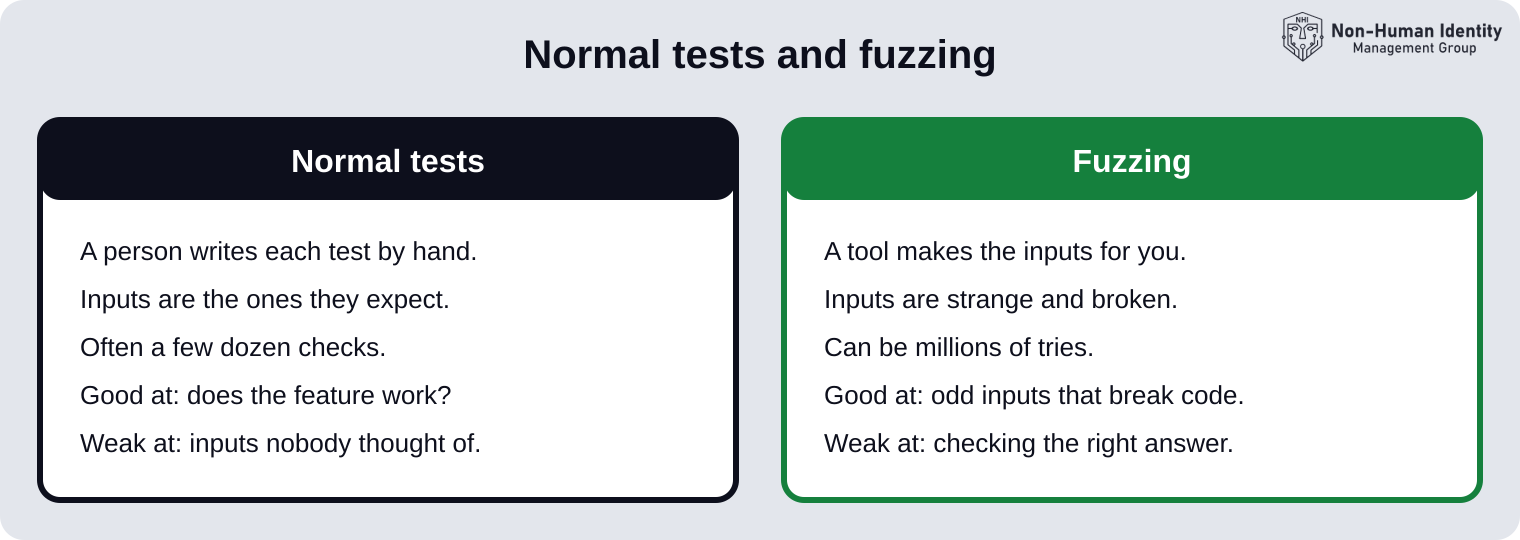
| Fuzzing replaces normal testing. | It adds to it. Fuzzing is good at finding crashes, but it does not check that the program gives the right answer unless you tell it how. |
| Fuzzing is only for security experts. | Some languages build it into their normal test tools, so any developer can start small.[2] |
| A crash is just a stability problem. | Some crashes point to memory bugs that an attacker could use. Treat them as possible security issues until checked. |
What can I do this week?
- List the places your code reads files, uploads or messages from outside.
- Pick one small reader function and write a fuzz target for it.
- Add a handful of normal sample inputs as the starting set.
- Run the fuzzer for an hour and look at anything it saves.
- Ask your team or supplier whether fuzzing runs as part of their tests.
Checklist
- We know which parts of our code read input from outside.
- The riskiest of those parts have at least one fuzz target.
- Each fuzz target has a set of normal starting samples.
- Test builds use sanitizers where the language supports them.
- Every crash found is fixed and kept as a test.
- Fuzzing runs for a short time on each change and longer in the background.
- Crashes are checked for security impact, not just closed as stability bugs.
Common questions
Is fuzzing the same as hacking?
No. Fuzzing is a testing method that developers use on their own code, with permission. Attackers can use similar tools, which is why it pays to fuzz your code first. Only fuzz software and systems you own or have written permission to test.
What kind of bugs does fuzzing find?
Mostly crashes, freezes and memory errors in code that reads input. With sanitizers turned on, it can also catch memory mistakes that would not crash on their own. It is less suited to finding logic mistakes, such as a wrong price, unless you add your own checks.
How long should a fuzzer run?
Longer runs tend to reach deeper code, so there is no single right answer. A common pattern is a few minutes on each code change and much longer runs in the background. Stop judging by time alone, and look at whether new code is still being reached.
Do I need special tools to start?
Not always. Some languages, such as Go, include fuzzing in their standard test tools. For C and C++, free engines such as libFuzzer are widely used. Start with the tool your language already offers, then move to dedicated tools if you need more.
Is fuzzing useful for websites and APIs?
Yes. Fuzzers can send odd requests to a web service and watch for errors and slow responses. This needs care, because test requests can change real data. Run it against a test copy, never against a live service without approval.
Where next?
Ready for the detail? Read the practitioner guide: Fuzzing Guide. It goes further into types of fuzzer, writing good fuzz targets and running fuzzing in build pipelines.
Also useful:
- Fuzzing vs Static Analysis
- SAST, DAST and IAST for Beginners
- Code Scanning Tools for Beginners
- Memory-Safe Languages for Beginners
- Penetration Testing for Beginners
Related NHI Mgmt Group resources: Fuzzing Guide · Memory-Safe Languages Guide · Web Application Attacks Guide
Key terms
- Fuzzing
- Testing software by sending it large numbers of unexpected inputs and watching for failures.
- Fuzz testing
- Another name for fuzzing, often used in testing and standards documents.
- Code coverage
- A measure of which parts of a program's code a test actually ran.
- Sanitizer
- A checker built into a test copy of a program that reports hidden memory and logic errors.
- Regression test
- A saved test that checks an old bug has not come back.
- Input validation
- Checking that data from outside is the right type, size and shape before using it.
Sources and further reading
- OSS-Fuzz documentation. Google. https://google.github.io/oss-fuzz/, accessed 28 Nov 2026.
- Go Fuzzing. The Go Programming Language documentation. https://go.dev/doc/security/fuzz/, accessed 28 Nov 2026.
- libFuzzer: a library for coverage-guided fuzz testing. LLVM Project documentation. https://llvm.org/docs/LibFuzzer.html, accessed 28 Nov 2026.